
1. Introduzzjoni
This manual provides comprehensive instructions for the Mycket portable DAB/DAB+/FM radio, Model D009. It covers setup, operation, maintenance, and troubleshooting to ensure optimal performance and longevity of your device. Please read this manual carefully before using the product.
The Mycket D009 radio features advanced signal reception technology for clear audio, Bluetooth 5.0 for wireless streaming, USB playback, AUX-in connectivity, a dual alarm clock, and a sleep timer. Its integrated rechargeable battery offers portability for use in various environments.
2. Istruzzjonijiet tas-Sigurtà
- Tesponix l-apparat għax-xita, umdità, jew temperaturi estremi.
- Evita li twaqqa’ jew tissuġġetta l-apparat għal impatti qawwija.
- Tiżżarmax jew tippruvax issewwi l-apparat int stess. Irreferi għal kull manutenzjoni f'idejn persunal kwalifikat.
- Żomm l-apparat 'il bogħod minn sorsi ta' sħana bħal radjaturi, reġistri tas-sħana, stufi, jew apparat ieħor (inkluż amplifiers) li jipproduċu sħana.
- Use only the specified charging cable and power adapter (5V via USB) to charge the device.
- Ensure proper ventilation around the device during operation and charging.
- Armi l-batteriji u l-komponenti elettroniċi b'mod responsabbli skont ir-regolamenti lokali.
3. Prodott Aktarview
3.1 Kontenut tal-Pakkett
- 1 x Mycket Portable DAB Radio (Model D009)
- 1 x USB Iċċarġjar Cable
- 1 x Manwal għall-Utent
3.2 It-Tqassim u l-Kontrolli tal-Apparat
Familiarize yourself with the main components and controls of your Mycket radio.

Stampa 1: Quddiem view of the Mycket D009 portable DAB radio, showing the speaker grille, LCD display, control buttons (MODE, OK, O/M, FAV, 1-4), and the telescopic antenna extended. The right side shows the DC 5V USB-C port, reset button, and headphone jack.
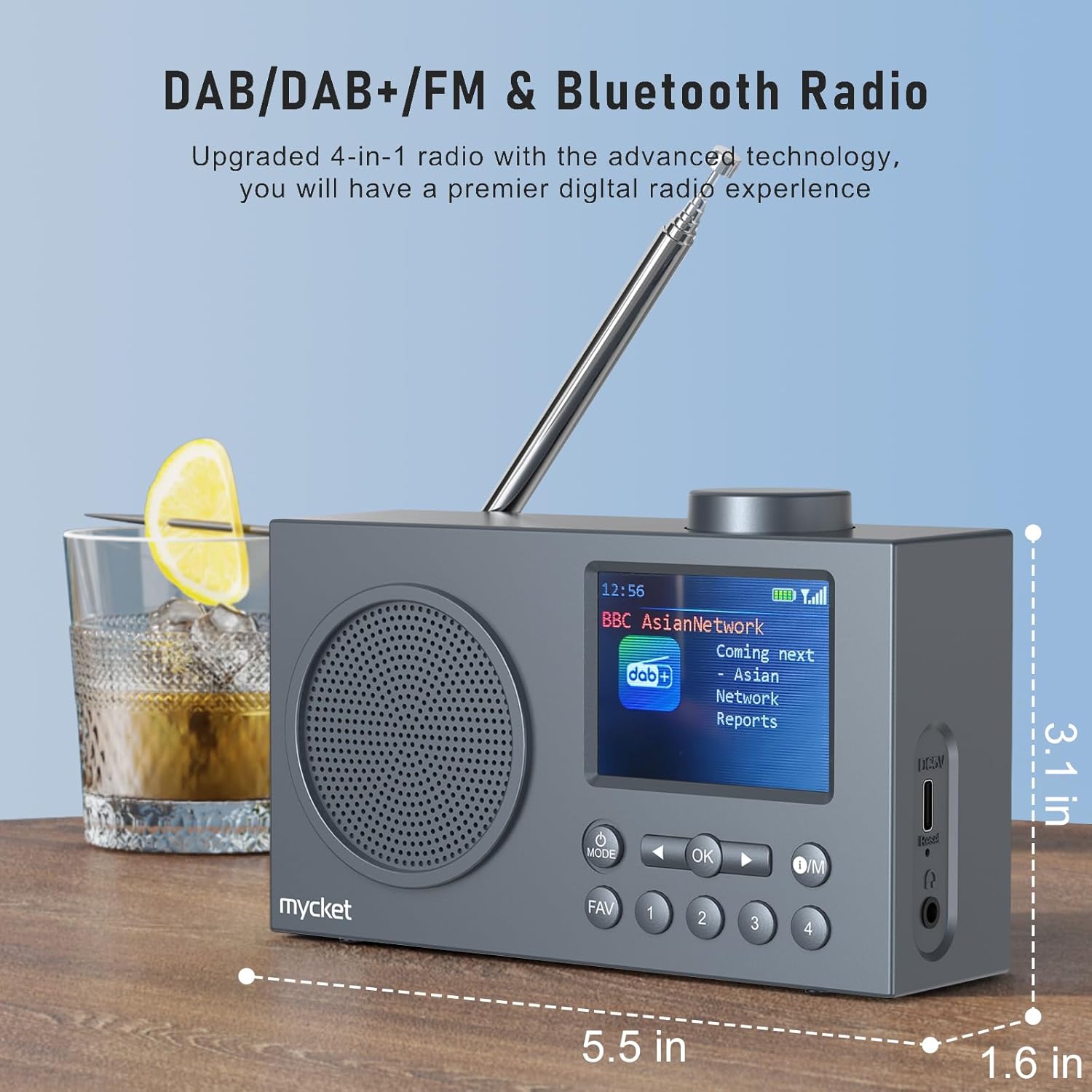
Stampa 2: Ġenb view of the Mycket D009 radio illustrating its compact dimensions: approximately 5.5 inches (length), 1.6 inches (width), and 3.1 inches (height). The image also highlights its DAB/DAB+/FM and Bluetooth capabilities.
- Wiri: 2.4-inch TFT color display for station information, time, and settings.
- Kelliem: Integrated Hi-Fi speaker for audio output.
- Antenna teleskopika: For optimal radio signal reception.
- Buttuna MODE: Switches between DAB, FM, Bluetooth, USB, and AUX modes.
- Buttuna OK: Jikkonferma l-għażliet jew jidħol fil-menus.
- O/M Button: Power On/Off and Menu access.
- Buttuna FAV: Accesses favorite presets.
- Buttuni tan-Numri (1-4): Direct access to stored presets.
- Buttuni tan-Navigazzjoni (Xellug/Lemin): Navigates menus or tunes stations.
- Buttuna tal-Volum: Jaġġusta l-volum tal-awdjo.
- DC 5V USB-C Port: Għall-iċċarġjar tal-batterija interna.
- Buttuna Irrisettja: Resets the device (use a thin object to press).
- Jack tal-headphones ta' 3.5mm: Għal smigħ privat.
4. Setup
4.1 Iċċarġjar tal-batterija
The radio is equipped with a built-in 2200mAh lithium battery. Before first use, fully charge the device.
- Connect the provided USB charging cable to the DC 5V USB-C port on the side of the radio.
- Qabbad it-tarf l-ieħor tal-kejbil USB ma' adapter tal-enerġija USB kompatibbli (mhux inkluż) jew port USB tal-kompjuter.
- The charging indicator on the display will show the charging status. A full charge typically takes approximately 2.5 hours and provides up to 12 hours of playback time at 70% volume.

Stampa 3: The Mycket D009 radio display showing a full battery indicator, emphasizing its long playback time on a single charge.
4.2 Aġġustament tal-Antenna
Għal riċeviment ottimali tar-radju, estendi l-antenna teleskopika kompletament. Aġġusta l-pożizzjoni tagħha għall-aħjar kwalità tas-sinjal.
4.3 Qawwa Inizjali
Agħfas u żomm il- O/M button to power on the radio. The display will light up, and the device will typically start in the last used mode or initiate a DAB scan if it's the first use.
5. Istruzzjonijiet Operattivi
5.1 Modi ta' Qlib
Agħfas il- MODALITÀ button repeatedly to cycle through available modes: DAB, FM, Bluetooth, USB, and AUX.
5.2 Tħaddim tar-Radju DAB/DAB+
- Aqleb għall-modalità DAB billi tuża l- MODALITÀ buttuna.
- The radio will automatically perform a full scan for available DAB/DAB+ stations upon first use or if no stations are found. To initiate a manual scan, press and hold the OK button, then select "Full Scan" from the menu.
- Once the scan is complete, use the navigation buttons (Left/Right) to browse through the list of available stations.
- Agħfas OK to select and listen to a station.

Stampa 4: The Mycket D009 radio display showing a DAB station and highlighting the auto-scan and 40 preset features (20 DAB & 20 FM).
5.2.1 Storing DAB Presets
The radio supports up to 20 DAB presets.
- Tune to the desired DAB station.
- Press and hold one of the number buttons (1-4) jew il- FAV button to save the current station to a preset slot. Follow the on-screen prompts to select a slot if using the FAV button.
- To recall a preset, briefly press the corresponding number button or the FAV button and select from the list.
5.3 Tħaddim tar-Radju FM
- Aqleb għall-modalità FM billi tuża l- MODALITÀ buttuna.
- Biex tiskennja awtomatikament għal stazzjonijiet FM, agħfas u żomm il-buttuna OK button. The radio will scan and store available stations.
- To manually tune, use the navigation buttons (Left/Right) to adjust the frequency.
- Agħfas OK to confirm the station.
5.3.1 Storing FM Presets
The radio supports up to 20 FM presets, similar to DAB presets.
- Intuna fuq l-istazzjon FM mixtieq.
- Press and hold one of the number buttons (1-4) jew il- FAV button to save the current station.
- To recall a preset, briefly press the corresponding number button or the FAV button and select from the list.
5.4 Bluetooth 5.0 Pairing
Connect your smartphone or tablet to the radio via Bluetooth for wireless audio streaming.
- Aqleb għall-modalità Bluetooth billi tuża l- MODALITÀ button. The radio display will show "Bluetooth Pairing" or similar.
- Fuq it-tagħmir mobbli tiegħek, ippermetti l-Bluetooth u fittex tagħmir disponibbli.
- Select "Mycket D009" from the list of devices.
- Once paired, the radio will confirm the connection, and you can play audio from your device through the radio.

Stampa 5: The Mycket D009 radio displaying "Playing" in Bluetooth mode, next to a smartphone showing "Mycket D009" as a connected Bluetooth device.
5.5 Daqq tal-USB
Play MP3 awdjo files direttament minn USB drive.
- Daħħal USB drive li jkun fih MP3 files fil-port USB.
- Switch to USB mode using the MODALITÀ buttuna.
- Ir-radju awtomatikament jinduna u jibda jdoqq l-MP3 files. Use the navigation buttons to skip tracks.
5.6 Konnessjoni AUX-in
Qabbad apparati awdjo esterni billi tuża kejbil awdjo ta' 3.5mm (mhux inkluż).
- Connect one end of a 3.5mm audio cable to the AUX-in port on the radio.
- Qabbad it-tarf l-ieħor mal-jack tal-headphones jew mal-output tal-awdjo tat-tagħmir estern tiegħek.
- Aqleb għall-modalità AUX billi tuża l- MODALITÀ buttuna.
- Ikkontrolla l-plejbek mit-tagħmir estern tiegħek.
5.7 Funzjoni tal-Arloġġ tal-Allarm
Issettja sa żewġ allarmi indipendenti.
- Agħfas u żomm il- O/M buttuna biex tidħol fil-menu.
- Navigate to "Alarm Settings" using the navigation buttons and press OK.
- Agħżel Allarm 1 jew Allarm 2.
- Set the alarm time, source (DAB, FM, or Buzzer), and volume.
- Ikkonferma s-settings billi tagħfas OK.
5.8 Funzjoni tat-Tajmer tal-Irqad
Issettja r-radju biex jintefa awtomatikament wara perjodu speċifikat.
- Agħfas u żomm il- O/M buttuna biex tidħol fil-menu.
- Navigate to "Sleep Timer" and press OK.
- Select the desired duration (e.g., 15, 30, 60 minutes).
- The radio will automatically power off after the set time.
5.9 Użu tal-Headphones
Connect 3.5mm headphones to the headphone jack for private listening. The internal speaker will be muted automatically.
6. Manutenzjoni
- Tindif: Uża drapp artab u niexef biex tnaddaf il-barra tar-radju. Tużax prodotti tat-tindif jew solventi li joborxu.
- Kura tal-batterija: Biex ittawwal il-ħajja tal-batterija, evita li tiċċarġja kompletament il-batterija ta' spiss. Iċċarġja l-apparat regolarment, anke jekk ma jkunx qed jintuża għal perjodi twal.
- Ħażna: Aħżen ir-radju f'post frisk u niexef 'il bogħod mix-xemx diretta u minn temperaturi estremi.
7 Issolvi l-problemi
| Problema | Kawża Possibbli | Soluzzjoni |
|---|---|---|
| Ebda enerġija / Ir-radju ma jixgħelx. | Il-batterija hija eżawrita. | Charge the radio using the provided USB cable. |
| Riċeviment tar-radju fqir (DAB/FM). | Antenna not fully extended or positioned correctly. Weak signal area. | Fully extend and adjust the telescopic antenna. Try moving the radio to a different location. Perform a full scan for stations. |
| Tqabbil Bluetooth ifalli. | Radio not in Bluetooth mode. Device too far. Bluetooth not enabled on external device. | Ensure the radio is in Bluetooth mode. Keep devices within range (approx. 10 meters). Enable Bluetooth on your external device and search for "Mycket D009". |
| L-ebda ħoss mill-ispiker. | Volum baxx wisq. Headphones imqabbdin. | Increase the volume. Disconnect headphones if not intended for private listening. |
| Il-plejbek tal-USB mhux qed jaħdem. | USB drive not inserted correctly. Incompatible file format. | Kun żgur li l-USB drive huwa mdaħħal kompletament. Iċċekkja li filehuma fil-format MP3. |
| L-apparat ma jirrispondix. | Problema temporanju tas-softwer. | Press the reset button on the side of the radio using a thin object (e.g., a paperclip). |
8. Speċifikazzjonijiet
| Brand | Mycket |
| Mudell | D009 |
| Modi tar-Radju | DAB, DAB+, FM |
| Verżjoni Bluetooth | 5.0 |
| Għażliet ta' Daqq | FM, DAB, DAB+, Bluetooth, USB MP3, AUX-in |
| Qawwa tal-Ħruġ tal-Ispeaker | 5 Watts |
| Unità tal-Ispeaker | 4 Ω10 W 78 mm x 1 |
| Wiri | LCD tal-Kulur TFT ta '2.4 pulzieri |
| Presets | 40 (20 DAB, 20 FM) |
| Tip ta 'batterija | Built-in Lithium-ion (18650) |
| Kapaċità tal-batterija | 2200 mAh (3.7V - 2.2 Ah) |
| Ħin tal-daqq | Approx. 8-9 hours at 70% volume (up to 12 hours) |
| Ħin tal-Iċċarġjar | Appross. 2.5 sigħat |
| Input tal-Enerġija | 5V permezz tal-USB |
| Dimensjonijiet (Prodott) | Madwar 14 ċm (T) x 4 ċm (W) x 7.8 ċm (Għoli) |
| Konnessjonijiet Output | 3.5mm Headphone Jack |
9. Garanzija u Appoġġ
Mycket products are designed for reliability and performance. This product comes with:
- Garanzija ta' 12-il Xahar: Enjoy a hassle-free 12-month warranty from the date of purchase.
- Appoġġ għall-Klijent: For any questions, issues, or support needs, please contact Mycket customer service.
Jekk jogħġbok żomm il-prova tax-xiri tiegħek għal pretensjonijiet ta' garanzija.