Prodott Overview
The Dosilkc 8-Channel POE Network Video Recorder (NVR) is designed for home security camera systems, supporting resolutions up to 4K. It features H.265+ video compression for efficient storage and remote access capabilities for convenient monitoring.

This image displays the front and rear panels of the Dosilkc 8-Channel POE NVR. The front panel shows indicator lights, while the rear panel features 8 PoE ports, audio input/output, VGA, HDMI, and USB ports for connectivity.
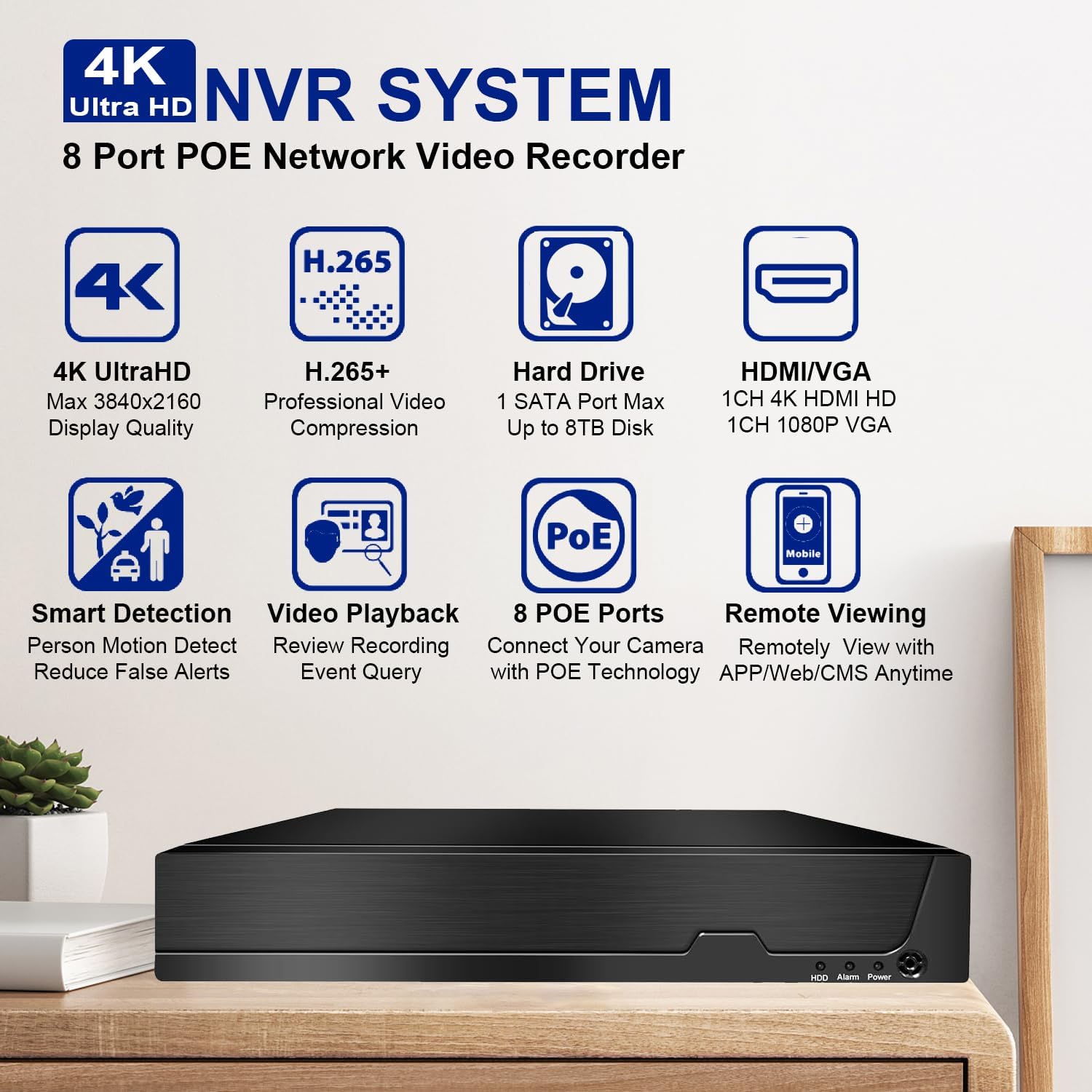
This image highlights the key features of the Dosilkc 4K Ultra HD NVR System, including 4K UltraHD display quality, H.265+ video compression, support for up to 8TB hard drive, HDMI/VGA output, smart detection, video playback, 8 PoE ports, and remote viewkapaċitajiet.
Kontenut tal-Pakkett
Qabel tibda l-installazzjoni, jekk jogħġbok ivverifika li l-oġġetti kollha elenkati hawn taħt huma preżenti fil-pakkett tiegħek:
- NVR Unit
- Ġurdien USB
- Adapter tal-Enerġija
- Manwal għall-Utent (dan id-dokument)
Gwida ta' Setup
1. Konnessjoni tal-Ħardwer
The Dosilkc NVR features Power over Ethernet (PoE) ports, simplifying camera installation by providing both power and data through a single Ethernet cable.
- Qabbad il-Kameras: Connect your PoE IP cameras to the NVR's PoE ports using Ethernet cables. The NVR will automatically power the cameras.
- Qabbad il-Monitor: Connect a monitor to the NVR using either the HDMI or VGA port. HDMI supports up to 4K resolution, while VGA supports 1080p.
- Qabbad il-ġurdien: Ipplaggja l-maws USB inkluż f'wieħed mill-portijiet USB tal-NVR.
- Konnessjoni tan-Netwerk: Connect the NVR to your local network router using an Ethernet cable for remote access capabilities.
- Qawwa Mixgħul: Qabbad l-adapter tal-enerġija mal-NVR u mbagħad ma' sokit tal-enerġija. L-NVR jixgħel awtomatikament.

This diagram illustrates the typical setup for the Dosilkc PoE NVR, showing connections for PoE IP cameras, a VGA/HDMI monitor, an internet router for remote viewing, audio input/output, a USB mouse, and the power supply.

This image emphasizes the "Plug & Play Easy Setup" feature, demonstrating how a single Ethernet cable provides both network access and power supply to the cameras, simplifying installation.
2. Konfigurazzjoni Inizjali
Upon first boot, the NVR may guide you through a setup wizard. Follow the on-screen prompts to set up basic parameters such as date/time, network settings, and administrator password.
Installazzjoni tal-Hard Drive (jekk mhux installat minn qabel): The NVR supports up to an 8TB SATA hard drive. Refer to the NVR's internal diagram for proper installation of the HDD. Ensure the NVR is powered off before installing or removing a hard drive.
Istruzzjonijiet Operattivi
1. Lokali Viewing u Daqq
Once connected to a monitor, you can view live feeds from your cameras and manage recordings directly from the NVR interface using the USB mouse.
- Live View: The main screen displays live video feeds from all connected cameras.
- Daqq: Access the playback menu to review irreġistrat footage. You can search by time, calendar, event, or channel.
- Modi ta' Reġistrazzjoni: The NVR supports various recording modes including manual, alarm, dynamic detection, and scheduled timing.

This image illustrates the 24/7 HDD Recording & Playback capability, showing a monitor displaying live camera feed and icons representing up to 8TB HDD storage and PC LMS Server Storage for video recording without monthly fees.
2. Aċċess mill-bogħod
The NVR allows remote viewing of your security system from mobile devices or computers.
- App mobbli: Download the free "Videolink" app from the App Store (iOS) or Google Play (Android). Follow the app's instructions to add your NVR using its unique ID or QR code.
- Klijent tal-PC: Use the LMS client software for Windows or Mac to access your NVR from a computer.
- Web Browser: Access the NVR interface directly via a web browser (Firefox, Google Chrome, Microsoft Edge) by entering the NVR's IP address.

This image details the various remote access methods for the NVR, including the "Videolink" mobile app for iOS and Android, AJDev Tools, LMS client for Windows and Mac, and web browser access via Firefox, Google Chrome, and Microsoft Edge, showing live view on different devices.

This image illustrates the compatibility of the Dosilkc NVR system with various viewing devices, including different types of cameras, laptops, tablets, and smartphones, allowing users to view their home from anywhere.
3. Karatteristiċi Avvanzati
- Kompressjoni tal-Vidjo H.265+: This advanced compression technology reduces file sizes by up to 50% without compromising video quality, allowing for longer recording times and saving hard drive space.
- Smart Detection & Alerts: Configure the NVR for intelligent motion detection, including human and vehicle detection, to reduce false alarms. Receive alerts via FTP, app notifications, email, or live alarms.
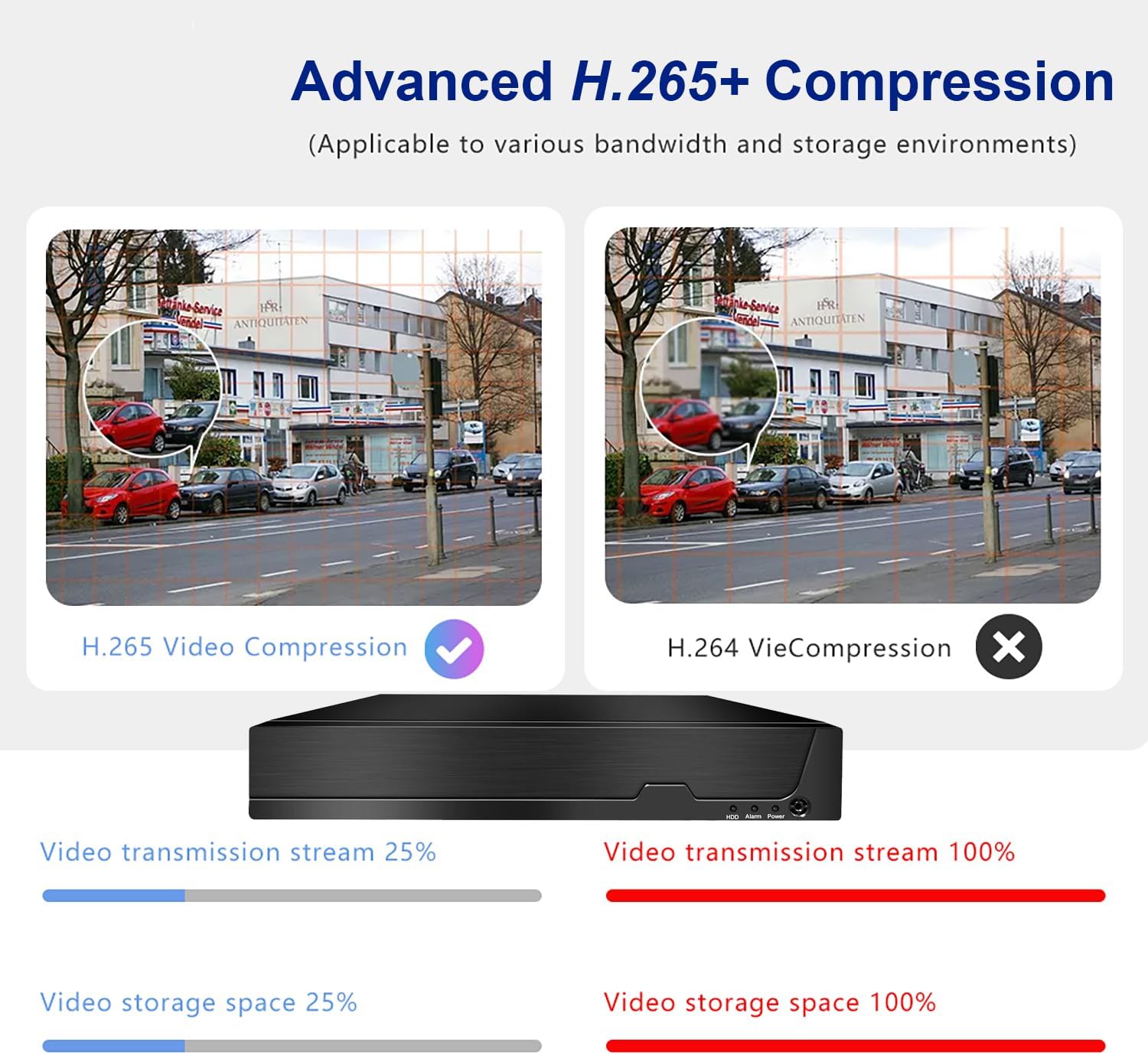
This image compares Advanced H.265+ Compression with H.264, showing that H.265+ significantly reduces video transmission stream and storage space requirements while maintaining quality.

This image demonstrates the AI Human and Vehicle Detection feature, showing how the system can differentiate between human/vehicle movement and other movements (like a dog running), sending alerts only for relevant events.

This image highlights the Smart Motion Detect & Alerts features, including options for FTP upload, app notifications, email alerts, and live alarms, ensuring users are promptly informed of detected events.
Manutenzjoni
- Tindif regolari: Keep the NVR unit free from dust. Use a soft, dry cloth for cleaning. Do not use liquid cleaners.
- Aġġornamenti tal-Firmware: Periodically check the Dosilkc official websit għal aġġornamenti tal-firmware biex tiġi żgurata prestazzjoni u sigurtà ottimali.
- Saħħa tal-Hard Drive: Monitor the health of your hard drive through the NVR's system settings. Replace the HDD if any issues are detected to prevent data loss.
- Ventilazzjoni: Kun żgur li l-NVR jitqiegħed f'żona ventilata sew biex tevita li jisħon iżżejjed. Timblokkax il-fetħiet tal-ventilazzjoni.
Issolvi l-problemi
L-ebda Ħruġ tal-Vidjo fuq il-Monitor
- Check if the NVR is powered on and the power adapter is securely connected.
- Verify the HDMI/VGA cable connection between the NVR and the monitor.
- Ensure the monitor is set to the correct input source (HDMI/VGA).
- Try a different HDMI/VGA cable or monitor.
Cameras Not Displaying
- Check the Ethernet cable connection for each camera to its respective PoE port on the NVR.
- Ensure the cameras are powered on (indicator lights on cameras should be active).
- If using non-Dosilkc PoE cameras, ensure they are ONVIF compatible and their IP addresses are configured to be on the same subnet as the NVR's PoE ports. Use the provided tool software to adjust IP addresses if necessary.
- Reboot the NVR and the cameras.
L-Aċċess Remot Mhux Jaħdem
- Verify the NVR is connected to your internet router and has a valid network connection.
- Ensure your mobile device or computer has an active internet connection.
- Double-check the NVR's ID or QR code entered in the mobile app/client software.
- Check your router's firewall settings; port forwarding may be required for direct IP access (though P2P/Cloud access via app usually bypasses this).
No Recording / HDD Issues
- Ensure a hard drive is installed and properly connected inside the NVR.
- Check the HDD status in the NVR's system settings. Format the HDD if it's new or unrecognized.
- Verify that recording schedules or motion detection settings are correctly configured.
Speċifikazzjonijiet
| Karatteristika | Dettall |
|---|---|
| Numru tal-Mudell | RM |
| Kanali | 8 Channel POE |
| Appoġġ għar-Riżoluzzjoni Massima | 12MP/8MP/5MP/4MP/3MP/1080P HD POE IP Cameras |
| Kompressjoni tal-vidjo | H.265 + |
| Hard Drive Interface | 1 interface SATA |
| Max HDD Kapaċità | Up to 8TB (HDD Not Included) |
| Output tal-vidjo | HDMI (max 4K@30fps), VGA (max 1080p@30fps) |
| Applikazzjoni ta' Aċċess Remot | Videolink (iOS/Android) |
| PC Client Software | LMS Client |
| Kwalità tad-Daqq | 1x12MP@30fps, 1x8MP@30fps, 2x5MP@25fps+2xD1, 4x4MP@25fps, 4x3MP@25fps, 4x1080p@30fps |
| Dimensjonijiet | 13.9 x 11 x 3 pulzieri |
| Piż tal-oġġett | 3.3 liri |
| Teknoloġija tal-Konnettività | VGA, Ethernet, HDMI |
Garanzija u Appoġġ
Dosilkc products come with a standard manufacturer's warranty. Please refer to the warranty card included in your package or visit the official Dosilkc websit għal termini u kundizzjonijiet dettaljati tal-garanzija.
For technical support, troubleshooting assistance, or any inquiries regarding your Dosilkc NVR, please contact our customer support team. Contact information can typically be found on our official webis-sit jew fuq l-imballaġġ tal-prodott.
Riżorsi onlajn:
- Dosilkc Official Websit: Visit Dosilkc Store on Amazon