
KESIEME YYK
KESIEME YYK Intelligent Touch Screen Open Ear Earbuds User Manual
Model: YYK
1. Introduzzjoni
Welcome to the KESIEME YYK Intelligent Touch Screen Open Ear Earbuds user manual. This guide provides detailed instructions on how to set up, operate, maintain, and troubleshoot your new open-ear headphones. Please read this manual thoroughly before using the product to ensure optimal performance and longevity.
Prodott Overview
The KESIEME YYK earbuds feature an innovative open-ear design for comfort and situational awareness, advanced Bluetooth 5.4 connectivity for stable audio, and a charging case with an intelligent touch screen for intuitive control and real-time information display.
X'hemm fil-Kaxxa
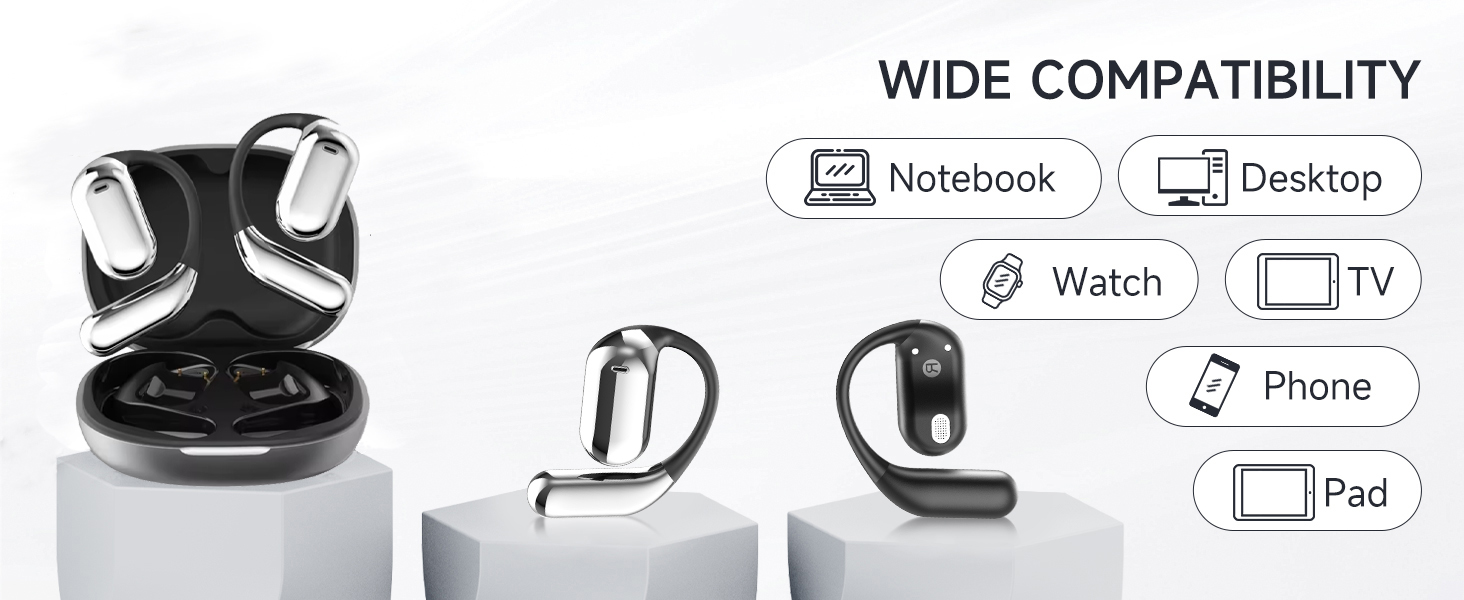
Image: Contents of the KESIEME YYK Earbuds box.
- Open Air Conduction Earphones (2)
- Każ tal-Iċċarġjar (1)
- Manwal għall-Utent (1)
- Kejbil għall-Iċċarġjar tat-Tip Ċ (1)
2. Karatteristiċi tal-prodott
Disinn tal-Widna Miftuħa

Image: Comparison of open-ear design versus traditional in-ear headphones.
The KESIEME YYK earbuds feature a true open-ear design, resting gently and securely on the top of your ear. This design avoids insertion into the ear canal, reducing pressure and allowing for greater comfort during extended wear. It also enhances situational awareness, allowing you to hear your surroundings while enjoying audio.
Konnettività Bluetooth 5.4

Immaġni: Benefiċċji tat-teknoloġija Bluetooth 5.4.
Equipped with the latest Bluetooth 5.4 technology, these earbuds offer a stable and fast wireless connection. This ensures uninterrupted music playback and calls, with a connection range of up to 33 feet (10 meters). The dual-channel transmission improves stability and reduces power consumption.
Kwalità tal-Ħoss Premium

Image: 14.2mm dynamic speaker driver for sound quality.
Experience clear and powerful audio with dual 14.2mm air conduction dynamic drivers. These drivers deliver high-fidelity sound with crisp highs and impactful lows, providing an immersive listening experience while minimizing sound leakage.
Extended Playtime & Digital Display
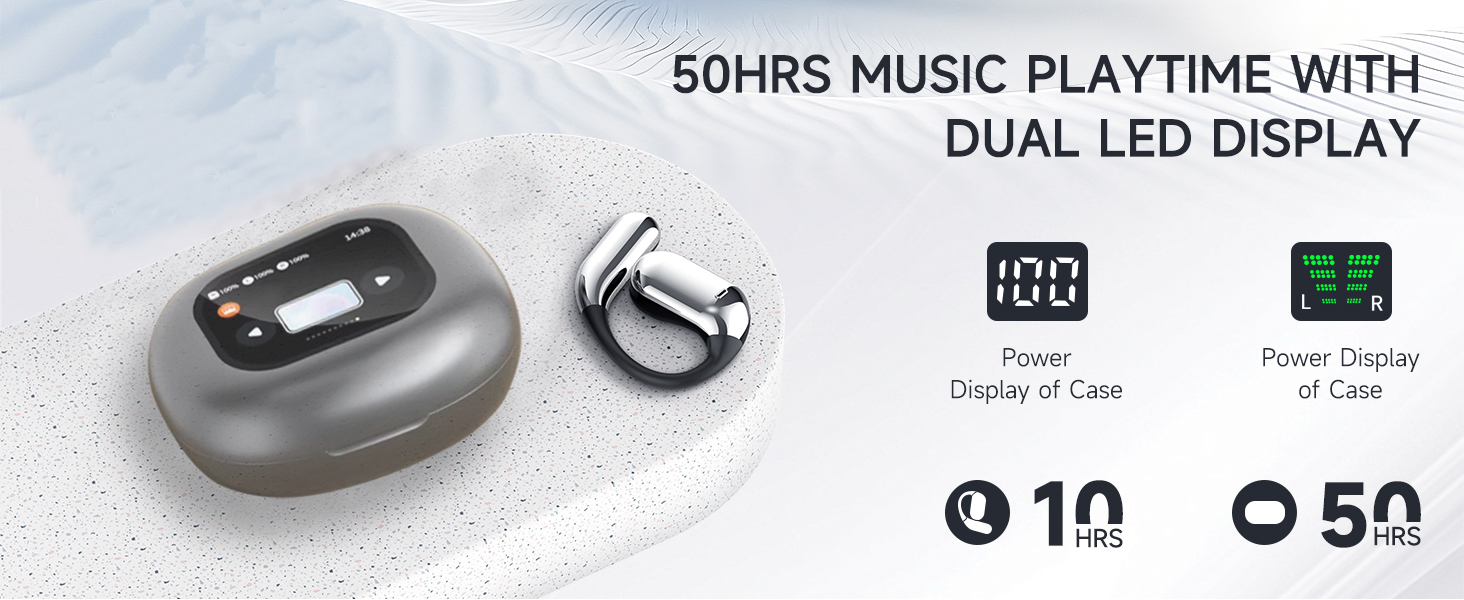
Image: Battery life and LED display features.
The earbuds provide up to 20 hours of playtime on a single charge. The charging case extends the total listening time to approximately 50 hours. The smart LED power display on the case shows the remaining battery level for both the case and individual earbuds in real-time.
Comfortable and Lightweight Fit

Image: Ergonomic design for comfort and fit.
Designed for ultimate comfort, the earbuds feature ergonomic ear hooks made from skin-friendly, ultra-lightweight materials. This ensures a secure fit without discomfort, even during active use like running or fitness activities.
Intelligent Touch Screen Case
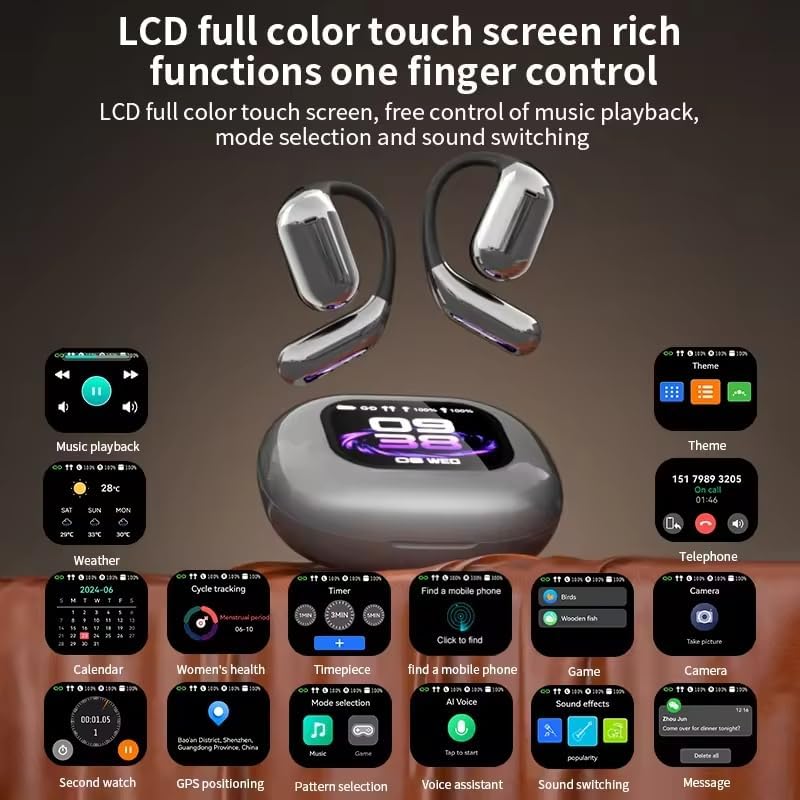
Image: Touch screen case displaying various functions.
The charging case features an LCD full-color touch screen, providing convenient access to various functions. This includes music playback control, mode selection, sound switching, weather information, calendar, timer, and more, all controlled with a single finger.
3. Setup
Iċċarġjar tal-Apparat
Before first use, fully charge the earbuds and the charging case. Connect the provided Type-C charging cable to the charging port on the case and a compatible USB power source. The LED display on the case will indicate the charging status and battery levels.
Istruzzjonijiet ta' Tqabbil
- Iftaħ il-kaxxa tal-iċċarġjar. Il-earbuds jinxtegħlu awtomatikament u jidħlu fil-modalità ta' tqabbil.
- Fuq l-apparat tiegħek (smartphone, tablet, kompjuter), attiva l-Bluetooth u fittex apparati disponibbli.
- Select 'KESIEME YYK' from the list of found devices to connect.
- Once connected, a voice prompt will confirm successful pairing. The earbuds will automatically reconnect to the last paired device when taken out of the case.
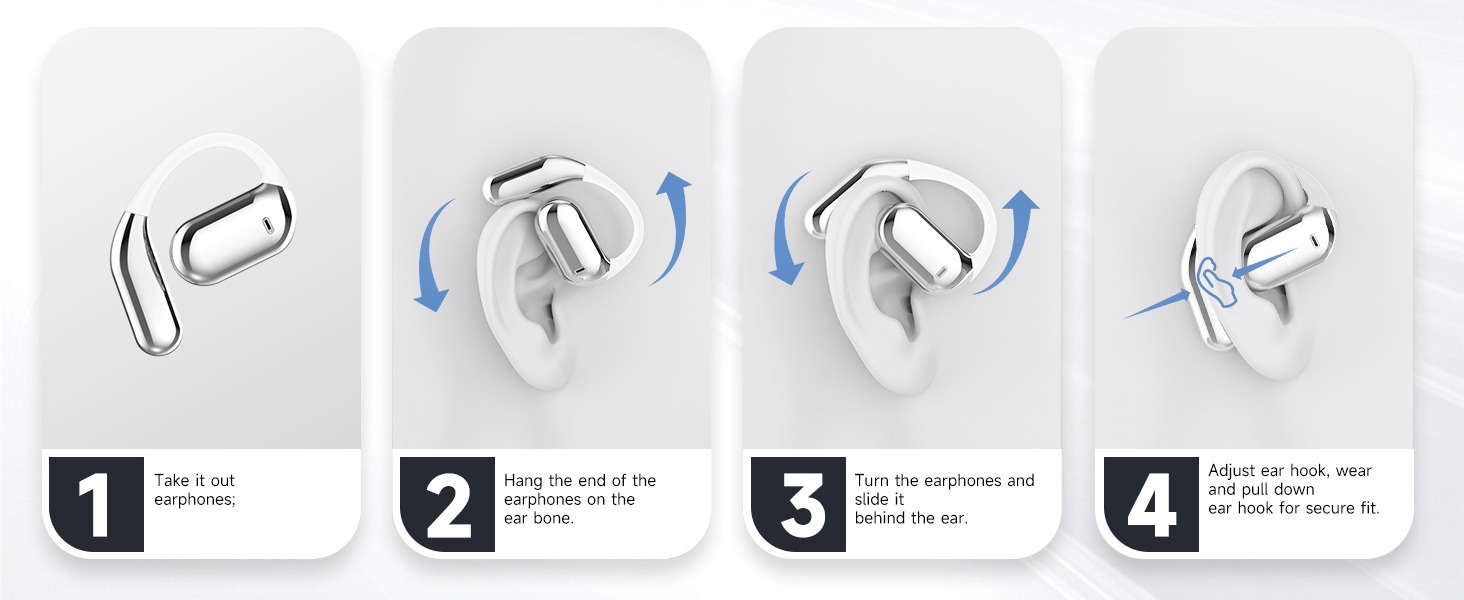
Istruzzjonijiet għall-ilbies
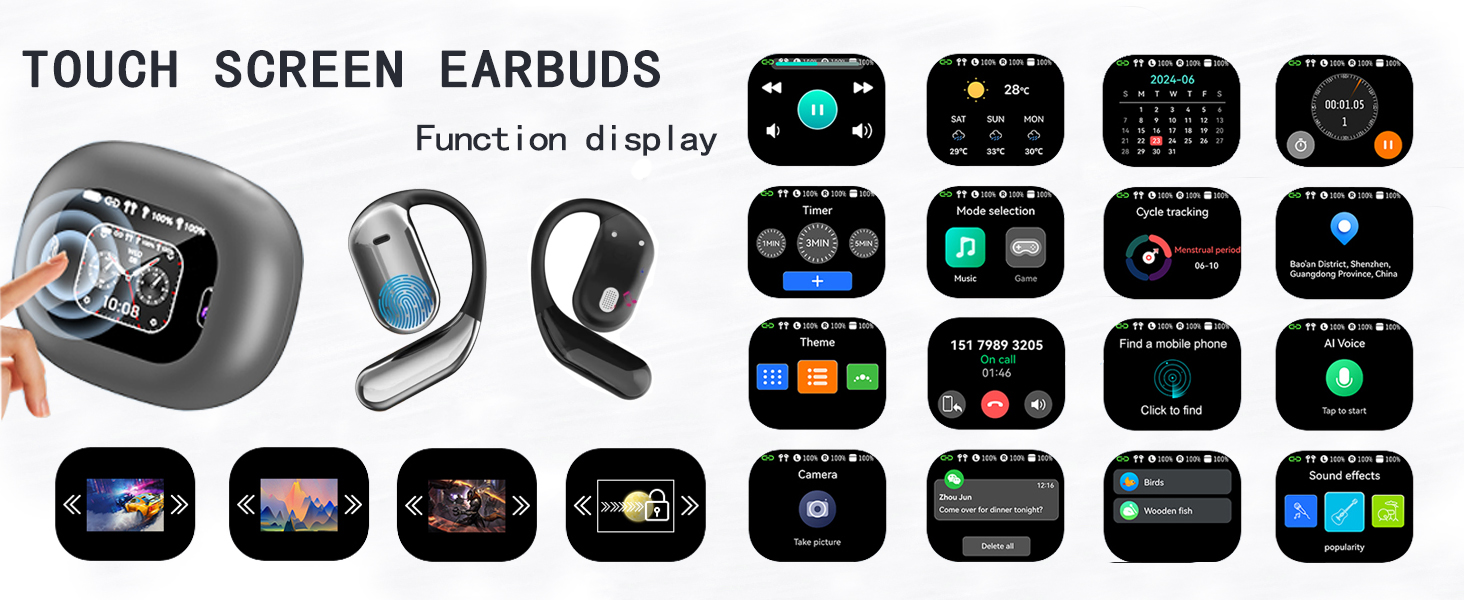
Image: Step-by-step guide for wearing the earbuds.
- Oħroġ iż-żewġ earphones mill-każ tal-iċċarġjar.
- Gently hang the end of each earphone onto your ear bone.
- Turn the earphone and slide it behind your ear.
- Adjust the ear hook and pull it down for a secure and comfortable fit.
4. Istruzzjonijiet Operattivi
Kontrolli Bażiċi tal-Messaġġ
Immaġni: Funzjonijiet ta' kontroll tat-touch tal-earbuds.
| Azzjoni | Kontroll | Earbud (L/R) |
|---|---|---|
| Volum Up | Tektek Doppju | Xellug jew Lemin |
| Volum 'l isfel | Tektek Doppju | Xellug jew Lemin |
| Play/Pawsa | Tektek Uniku | Xellug jew Lemin |
| Wieġeb Sejħa | Tektek Uniku | Xellug jew Lemin |
| Kanzunetta Preċedenti | Pressa twila (1s) | Xellug |
| Kanzunetta li jmiss | Pressa twila (1s) | Dritt |
| Reject Call/Hang Up | Pressa twila (1s) | Xellug jew Lemin |
| Attiva l-Assistent tal-Vuċi (Siri) | Tektek triplu | Xellug jew Lemin |
| Irrisettja l-Earbuds | Double Tap + Long Press (2s) | Left & Right Simultaneously |
Għajnuniet għat-tisħin: To reset earbuds, disconnect from the phone and quickly press the left button 5 times at the same time to reset.
Touch Screen Case Operation
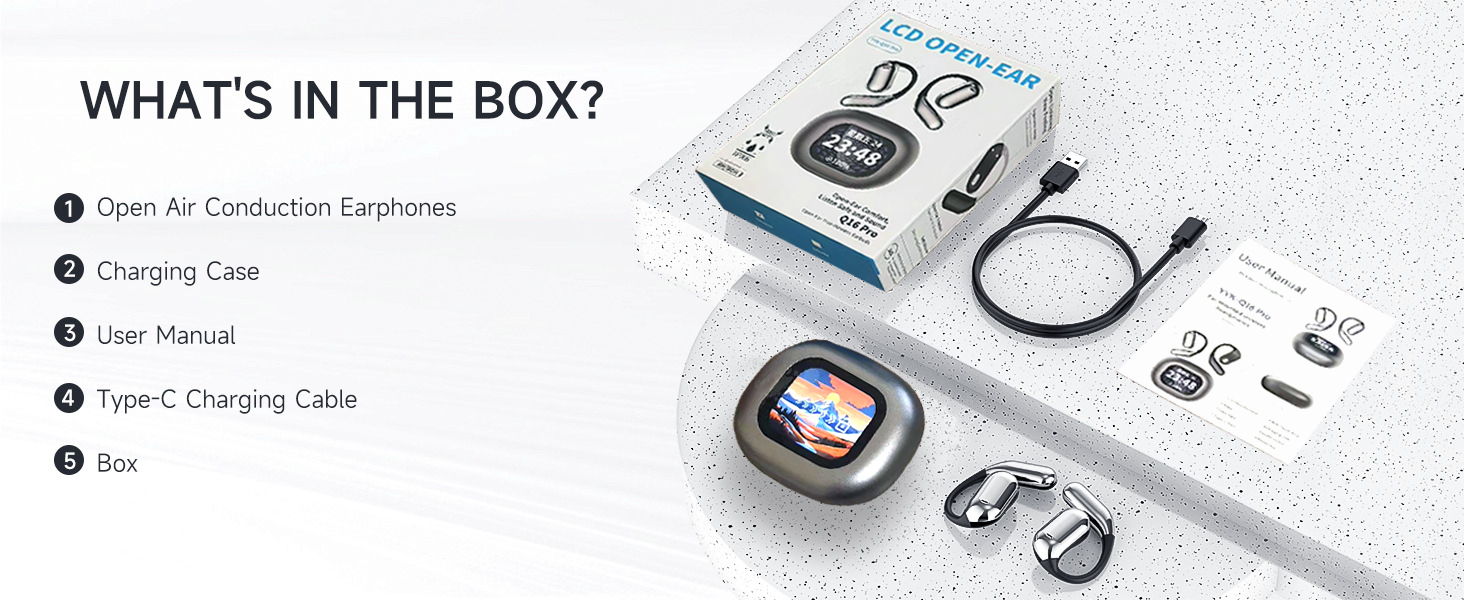
Image: Touch screen case displaying various functions.
The charging case features a responsive touch screen interface. Swipe left or right to navigate through different functions and tap to select. Functions include:
- Daqq tal-mużika: Control tracks and volume.
- Temp: View kundizzjonijiet tat-temp attwali.
- Kalendarju: Access date and time information.
- Traċċar taċ-ċiklu: Monitor fitness data.
- Timer: Set countdowns or use as a stopwatch.
- Għażla tal-Modalità: Switch between different audio modes.
- Tema: Customize the screen display.
- Telefon: View call history or dial.
- Find a Mobile Phone: Locate your paired phone.
- Voice AI: Attiva l-assistent tal-vuċi.
- Logħba: Access simple games.
- Kamera: Remote control for your phone's camera.
- Effetti tal-Ħsejjes: Aġġusta awdjo profiles.
- Messaġġ: View notifiki.
Kompatibilità Wiesgħa
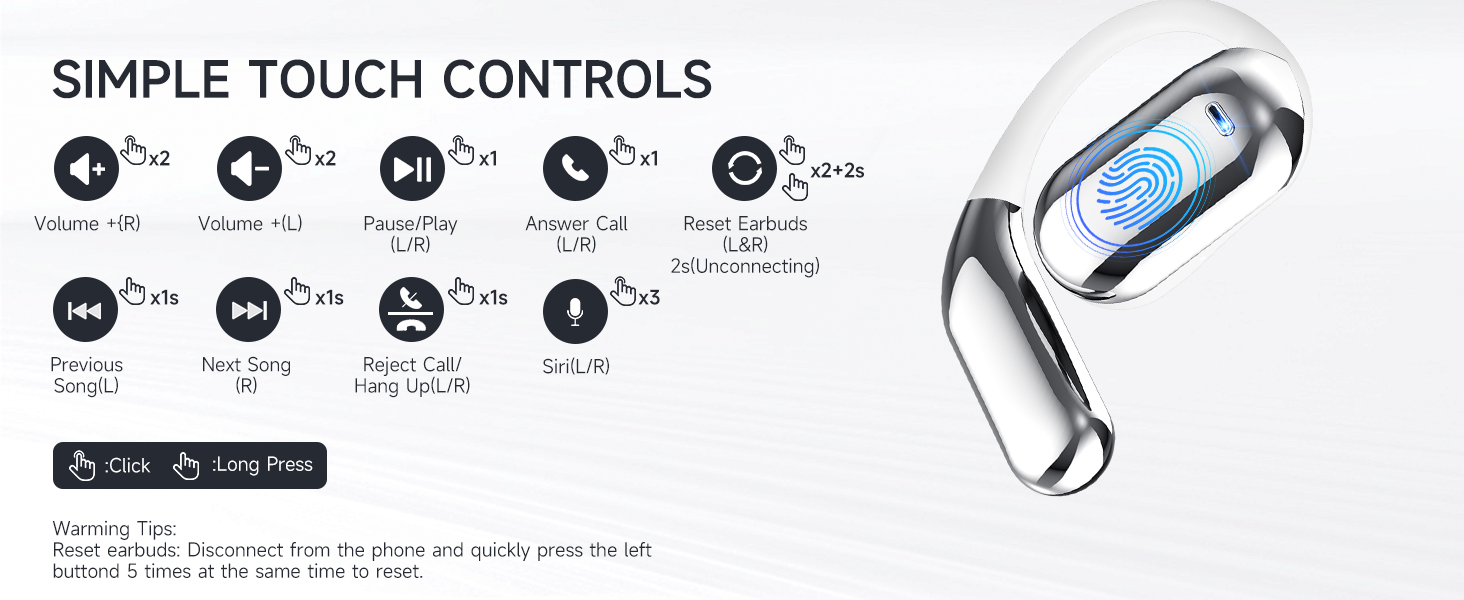
Image: Device compatibility.
The KESIEME YYK earbuds are compatible with a wide range of Bluetooth-enabled devices, including:
- Smartphones
- Pilloli
- Laptops
- Desktops
- Smartwatches
- Smart TVs (with Bluetooth audio support)
5. Manutenzjoni
Tindif
- Imsaħ il-earbuds u l-kaxxa tal-iċċarġjar regolarment b'ċarruta ratba, niexfa u mingħajr suf.
- Tużax prodotti tat-tindif li joborxu, alkoħol, jew solventi kimiċi.
- Kun żgur li l-kuntatti tal-iċċarġjar kemm fuq il-earbuds kif ukoll fuq il-kaxxa huma nodfa u niexfa.
Ħażna
- Aħżen il-earbuds fil-każ tal-iċċarġjar tagħhom meta ma tkunx qed tuża biex tipproteġihom u żżommhom iċċarġjati.
- Evita li taħżen f'temperaturi estremi (sħan jew kiesaħ) jew umdità għolja.
- Żomm fejn ma jintlaħaqx mit-tfal u l-annimali domestiċi.
6 Issolvi l-problemi
Kwistjonijiet Komuni u Soluzzjonijiet
| Problema | Kawża Possibbli | Soluzzjoni |
|---|---|---|
| Earbuds ma jingħaqdux | Il-earbuds mhumiex fil-modalità ta' tqabbil, il-Bluetooth mitfi fuq l-apparat, barra mill-firxa. | Ensure earbuds are out of the case and charged. Turn Bluetooth on your device. Move closer to the device. Try resetting the earbuds. |
| Earbud wieħed biss jaħdem | One earbud not charged, not paired correctly, or connection issue. | Place both earbuds back in the case, close it, then reopen. Ensure both are charged. Try resetting the earbuds. |
| Kwalità tal-ħoss fqira | Low battery, interference, earbud placement. | Charge earbuds. Move away from sources of interference. Adjust earbud position for optimal sound. |
| Każ tal-iċċarġjar mhux iċċarġjar | Cable issue, power source issue, dirty charging port. | Try a different Type-C cable or power adapter. Clean the charging port. |
| Il-kontrolli tal-mess ma jirrispondux | Problema temporanju tas-softwer, sensur maħmuġ. | Clean the touch sensor area. Place earbuds back in case and take them out again. Restart your connected device. |
Irrisettjar tal-Earbuds
If you experience persistent connection issues or other malfunctions, you can reset the earbuds:
- Disconnect the earbuds from all paired devices in your device's Bluetooth settings.
- Oħroġ iż-żewġ earbuds mill-kaxxa tal-iċċarġjar.
- Quickly tap the touch sensor on the left earbud 5 times simultaneously.
- Place the earbuds back into the charging case and close the lid for a few seconds.
- Open the case and attempt to pair them again with your device.
7. Speċifikazzjonijiet
| Karatteristika | Speċifikazzjoni |
|---|---|
| Isem tal-Mudell | Open Ear Earbuds (YYK) |
| Brand | KESIEME |
| Teknoloġija tal-Konnettività | Wireless (Bluetooth) |
| Verżjoni Bluetooth | 5.4 |
| Medda Bluetooth | 33 pied (10 metru) |
| Daqs tas-Sewwieq tal-Awdjo | 14.2 Millimetru |
| Tip ta' Sewwieq Awdjo | Sewwieq Dinamika |
| Medda ta' Frekwenzi | 20 Hz - 20,000 Hz |
| Impedenza | 32 Ohm |
| Ħajja tal-Batterija (Earbuds) | Sa 20-il Siegħa |
| Ħin Totali tal-Logħob (bil-Kaxxa) | Sa 50-il Siegħa |
| Metodu ta' Kontroll | Mess |
| Livell ta 'Reżistenza għall-Ilma | Reżistenti għall-Ilma |
| Piż tal-oġġett | 0.19 Kilogrammi (6.7 uqija) |
| Dimensjonijiet tal-Prodott | 6 x 4.2 x 1.5 pulzieri |
| Tqegħid tal-widnejn | Widna Miftuħa |
| Fattur tal-Formola | Widna Miftuħa |
8. Informazzjoni dwar is-Sigurtà
- Żarmax jew timmodifikax il-prodott.
- Evita li tesponi l-prodott għal temperaturi estremi, dawl tax-xemx dirett, jew nar.
- Do not immerse the earbuds or charging case in water. While water-resistant, they are not waterproof.
- Uża biss il-kejbil tal-iċċarġjar provdut jew wieħed ekwivalenti ċċertifikat.
- Evita li tisma' f'livelli ta' volum għoljin għal perjodi estiżi biex tevita ħsara fis-smigħ.
- Be aware of your surroundings when using open-ear headphones, especially in traffic or hazardous environments.
9. Garanzija u Appoġġ
KESIEME products are designed for reliability and performance. For warranty information, technical support, or customer service inquiries, please refer to the contact details provided on the product packaging or visit the official KESIEME websit. Jekk jogħġbok żomm il-prova tax-xiri tiegħek għal talbiet ta' garanzija.
Ask a question about this manual
Ask about setup, troubleshooting, compatibility, parts, safety, or missing instructions. Manuals+ will review the question and use this page’s manual context to help answer it.