
1. Introduzzjoni
This manual provides detailed instructions for the installation, operation, and maintenance of your INQMEGA 36X Optical Zoom 4G LTE Cellular Solar Camera. This advanced surveillance camera is designed for outdoor use, featuring 4G LTE connectivity, solar power with a high-capacity battery, 36X optical zoom dual lenses, PIR motion detection, and superior night vision capabilities. Please read this manual thoroughly before using the product to ensure proper setup and functionality.
2. Kontenut tal-Pakkett
Iftaħ il-kaxxa bir-reqqa u kun żgur li l-oġġetti kollha elenkati hawn taħt huma preżenti u f'kundizzjoni tajba. Jekk xi oġġetti huma neqsin jew bil-ħsara, jekk jogħġbok ikkuntattja l-appoġġ għall-klijenti.

Figura 2.1: Detailed list of included products.
- INQMEGA 4G LTE Cellular Solar Camera (1 unit)
- Pannell Solari (unità 1)
- Battery Partner (1 unit)
- Bracket tal-Immuntar (unità 1)
- Extension Cord (1 unit)
- Manwal għall-Utent (unità waħda)
- Kejbil tal-Enerġija (unità 1)
- Screw Kit (1 set)
3. Prodott Aktarview
The INQMEGA 4G LTE Cellular Solar Camera is a robust outdoor surveillance solution. It features a dual-lens system, including a wide-angle lens and a 36X optical zoom lens, providing comprehensive coverage. The integrated 10W solar panel and 20000mAh battery ensure continuous operation without external power. Its metal casing offers durability and efficient heat dissipation.

Figura 3.1: Product components and dimensions.
Komponenti Ewlenin:
- Lenti ta' angolu wiesa': Jipprovdi qasam wiesa' ta' view.
- Zoom Lens: Offers 36X optical zoom for detailed viewing.
- Sensuri PIR: Detect human movement to trigger alerts.
- Dawl tal-Allarm Aħmar-Blu: Visual deterrent and alert indicator.
- LEDs bojod u IR: Ipprovdi dawl għall-viżjoni bil-lejl.
- Mikrofonu: For audio capture.
- Antenna: For 4G LTE cellular connectivity.
- Panel Solari: Recharges the internal battery.
- Metall Casing: Durable and weather-resistant housing.
4. Karatteristiċi ewlenin
The INQMEGA camera is equipped with several advanced features to enhance your surveillance experience:

Figura 4.1: Fuqview tal-karatteristiċi tal-prodott.
- 4G LTE Cellular Connectivity: Operates independently without Wi-Fi, ideal for remote or off-grid locations. Requires a 4G LTE SIM card (not included).
- 36X Optical Zoom Dual Lens: Allows for clear capture of distant details, such as license plate numbers. The UBOX app provides a split-screen view for both lenses.
- High-Capacity Solar Power: Equipped with a 10W solar panel and a 20000mAh battery, providing extended operating times and up to 3 months of continuous function without direct sunlight.
- Sejbien tal-Moviment PIR: Advanced sensors detect human movement, sending immediate alert notifications to your smartphone. Note: This camera does not support auto-tracking.
- Ċ tal-metall durabbliasing: Offers superior structural strength, resistance to breaches, excellent heat dissipation, and reduces maintenance costs.
- Viżjoni bil-lejl Superjuri: Features a night vision range up to 328 feet (100 meters) and daylight visibility up to 650 feet (200 meters). Dual spotlights provide bright illumination up to 20 meters for enhanced security.
- Klassifikazzjoni IP67 li ma jgħaddix ilma minnha: Designed to withstand various weather conditions, including rain, snow, and extreme temperatures.
5. Gwida ta' Setup
5.1. Installazzjoni ta' SIM Card
- Locate the SIM card slot on the camera body. This is typically protected by a waterproof cover secured with screws.
- Neħħi l-viti bir-reqqa u iftaħ l-għatu.
- Insert a activated 4G LTE Nano SIM card into the designated slot. Ensure the SIM card is inserted correctly according to the diagram near the slot.
- Securely close the waterproof cover and tighten the screws to maintain the IP67 rating.
5.2. Immuntar tal-Kamera
The camera is designed for wall mounting. Choose a location with good cellular signal and direct sunlight exposure for the solar panel.
- Immarka l-punti tat-tħaffir fuq il-ħajt billi tuża l-bracket tal-immuntar bħala mudell.
- Drill holes at the marked positions. Insert wall anchors if necessary.
- Waħħal il-bracket tal-immuntar mal-ħajt billi tuża l-viti pprovduti.
- Secure the camera to the mounting bracket. Adjust the camera angle for optimal viewing.
5.3. Connecting the Solar Panel
Ensure the solar panel is positioned to receive maximum direct sunlight throughout the day.
- Connect the solar panel cable to the charging port on the camera.
- If needed, use the extension cord to bridge the distance between the solar panel and the camera.
- Kun żgur li l-konnessjonijiet kollha huma siguri u reżistenti għall-ilma.
5.4. App Download u Pairing
The camera is controlled via the UBOX app.
- Download the UBOX app from your smartphone's app store (iOS or Android).
- Irreġistra għal kont ġdid jew idħol jekk diġà għandek wieħed.
- Follow the in-app instructions to add your new camera. This typically involves scanning a QR code on the camera or manually entering its device ID.
- Once paired, you can access live view, settings, and recorded footage.
6. Istruzzjonijiet Operattivi
6.1. Tixgħil / Mitfi
The camera automatically powers on when the battery is charged and the SIM card is inserted. To power off, you may need to access the power switch located near the SIM card slot or remove the battery.
6.2. Using the UBOX App
The UBOX app is your primary interface for controlling the camera. From the app, you can:
- View live video streams from both lenses (split-screen view).
- Access recorded video footage.
- Aġġusta s-settings tal-kamera, inkluża s-sensittività għad-detezzjoni tal-moviment u l-modi tal-viżjoni bil-lejl.
- Receive real-time alerts and notifications.
- Control the camera's pan and tilt functions (if applicable to your model).
6.3. Funzjonalità taż-Zoom
The camera features a powerful 36X optical zoom lens. In the UBOX app, you can digitally zoom in or out on the live feed to view distant objects with clarity. The optical zoom allows for clear identification of details such as license plates.

Figura 6.1: 36X Optical Zoom demonstration.
6.4. Sejbien ta 'Moviment
The integrated PIR sensors detect human movement. When motion is detected, the camera will:
- Irreġistra video footage.
- Send an alert notification to your smartphone via the UBOX app.
- Activate the red-blue alarm lights and siren (if enabled in settings).
You can adjust the sensitivity of the PIR sensors within the UBOX app settings to minimize false alarms.
6.5. Viżjoni bil-lejl
The camera automatically switches to night vision mode in low-light conditions. It utilizes infrared (IR) LEDs and powerful dual spotlights to provide clear visibility up to 328 feet (100 meters) in complete darkness.
6.6. Għażliet ta 'Ħażna
The camera supports multiple methods for storing recorded video and audio:

Figura 6.2: Multiple storage methods.
- TF Card (MicroSD Card): Insert a TF card (up to 128GB, not included) into the camera's designated slot for local storage.
- Ħażna Cloud: The UBOX app offers optional cloud storage services for secure backup of your recordings. Refer to the app for subscription details.
7. Manutenzjoni
7.1. Kura tal-Batterija u l-Panel Solari
The camera's 20000mAh battery is designed for long-term use, recharged by the 10W solar panel. To ensure optimal performance:
- Periodically clean the surface of the solar panel to remove dust, dirt, or debris that may obstruct sunlight.
- Ensure the solar panel is always positioned to receive maximum direct sunlight.
- Avoid placing the camera in shaded areas that would prevent the solar panel from charging effectively.
7.2. Cleaning and Weather Resistance
The camera features an IP67 waterproof metal casing, making it highly resistant to environmental elements.
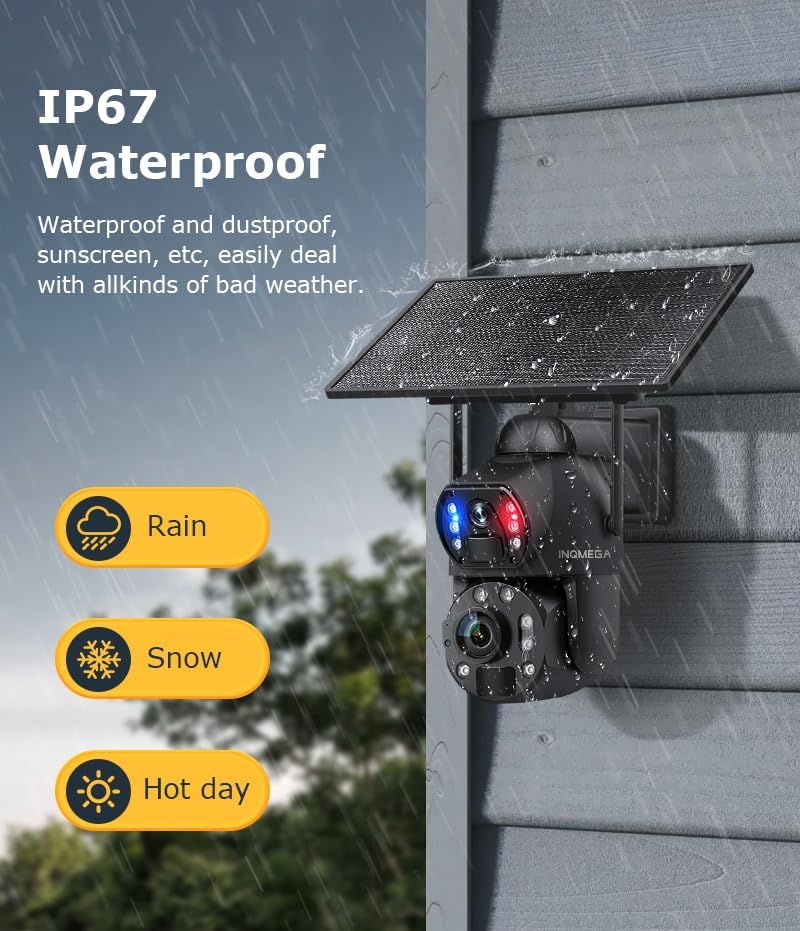
Figura 7.1: Klassifikazzjoni tal-ilma IP67.
- Imsaħ il-lenti u l-korp tal-kamera b'ċarruta ratba u damp cloth to remove any accumulated dirt. Do not use harsh chemicals or abrasive materials.
- Regularly check all cable connections to ensure they remain secure and waterproof.
- Ensure the SIM card slot cover is always tightly sealed.
8 Issolvi l-problemi
If you encounter issues with your INQMEGA camera, please refer to the following common troubleshooting steps:
| Problema | Kawża Possibbli | Soluzzjoni |
|---|---|---|
| Il-kamera ma tixgħelx | Low battery; Solar panel not charging; Power switch off. | Ensure solar panel is clean and receiving direct sunlight. Check battery connection. Verify power switch is in the 'ON' position. Charge the camera via USB if needed. |
| No 4G LTE signal | SIM card not activated or incorrectly inserted; Poor cellular coverage. | Ensure SIM card is activated and correctly inserted. Relocate the camera to an area with better cellular reception. Contact your cellular provider. |
| Is-sejbien tal-moviment mhux qed jaħdem | PIR sensitivity too low; Obstructions in detection zone; Incorrect app settings. | Adjust PIR sensitivity in the UBOX app. Clear any obstructions in front of the camera. Verify motion detection is enabled in app settings. |
| Kwalità fqira tal-vidjo | Dirty lens; Low light conditions; Network issues. | Clean the camera lenses with a soft cloth. Ensure sufficient lighting for optimal image quality. Check cellular signal strength. |
| Cannot connect to UBOX app | Incorrect pairing process; App version outdated; Network issues. | Ensure camera is powered on and has cellular signal. Re-attempt pairing process. Update UBOX app to the latest version. Check your smartphone's network connection. |
9. Speċifikazzjonijiet
Detailed technical specifications for the INQMEGA 36X Optical Zoom 4G LTE Cellular Solar Camera:
- Numru tal-Mudell: ST-699-6M-36X-10W-4G-US-12.23
- Użu fuq ġewwa/barra: Barra
- Apparati Kompatibbli: Smartphone
- Sors tal-Enerġija: Mħaddma Solari
- Protokoll tal-Konnettività: Ċellulari (4G LTE)
- Tip ta 'Kontrollur: UBOX App
- Tip ta 'Immuntar: Mount Wall
- Riżoluzzjoni tal-Qbid tal-Vidjo: 6MP
- Komponenti Inklużi: SOLAR CAMERA (main unit)
- Teknoloġija tal-Komunikazzjoni mingħajr Fili: Ċellulari
- Fattur tal-Formola: Bullet
- Firxa tal-Viżjoni Lejla: 300 Pied (madwar 91 metru)
- Materjal: Metall
- Livell ta' Reżistenza għall-Ilma: Li ma jgħaddix ilma minnu (IP67)
- Zoom ottiku: 36x
- Tip ta' Fokus: Auto Focus
- Teknoloġija tad-Dawl Baxx: Kulur bil-lejl
- Format tal-Qbid tal-Vidjo: MP4
- Użi Speċifiċi Għall-Prodott: 360 Degree Coverage, Surveillance, Optical Zoom
- Riżoluzzjoni Still effettiva: 6 MP
- Metodu ta' Kontroll: App
- Piż tal-oġġett: 5.5 liri (madwar 2.5 kg)
- Manifattur: INQMEGA
- Użi Rakkomandati Għall-Prodott: Game & Trail, Outdoor Security
- Karatteristika Speċjali: 10W Solar Panels, 20000mA Battery, 36X Optical ZOOM, 6MP, Metal case
10. Garanzija u Appoġġ
For warranty information and technical support, please refer to the documentation included with your purchase or visit the official INQMEGA website. If you encounter any issues not covered in this manual, please contact INQMEGA customer service for assistance.
Manifattur: INQMEGA
Data L-Ewwel Disponibbli: 23 ta’ Diċembru 2024