1. Introduzzjoni
This manual provides essential information for the safe and effective use of your H9 Pro Max Smartwatch. Please read it thoroughly before operating the device and retain it for future reference. The H9 Pro Max Smartwatch is designed to integrate into your daily life, offering fitness tracking, communication features, and health monitoring.
2. X'hemm fil-Kaxxa
Upon opening your H9 Pro Max Smartwatch package, you should find the following items:
- H9 Pro Max Smartwatch
- Manwal għall-Utent
- Iċċarġjar Cable
- Banda tal-Għassa
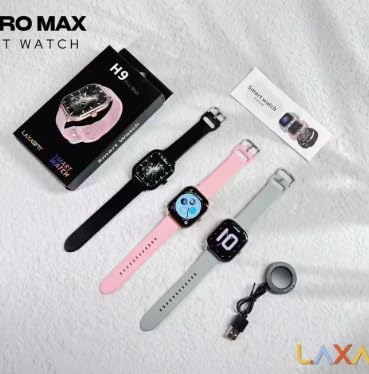
Image: The H9 Pro Max Smartwatch packaging, showing the smartwatch in various colors, the charging cable, and the user manual.
3. Prodott Aktarview
The H9 Pro Max Smartwatch features a 2.01-inch HD Retina Display, providing clear visuals and an intuitive touch interface. Its design is suitable for various daily activities and fitness routines.
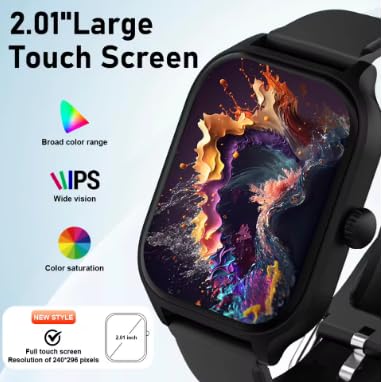
Immaġni: Dettaljata view of the smartwatch's 2.01-inch large touch screen, highlighting its IPS display with broad color range and saturation.
Komponenti Ewlenin:
- Wiri: 2.01-inch HD Retina IPS Touch Screen (240x240 resolution)
- Sensers: Heart rate sensor, Blood oxygen sensor, Accelerometer
- Konnettività: Bluetooth
- Batterija: Lithium Ion (180 Amp Hours capacity)
4. Setup
4.1 Iċċarġjar inizjali
Before first use, fully charge your H9 Pro Max Smartwatch. Connect the charging cable to the watch's charging port and a compatible USB power source. The watch will display a charging indicator.
4.2 Installazzjoni u Tqabbil tal-App
Biex tiftaħ il-funzjonalità sħiħa tal-ismartwatch tiegħek, niżżel u installa LaxasFit app on your smartphone. You can find the app by scanning the QR code provided in the user manual or searching in your device's app store.
- Kun żgur li l-Bluetooth huwa attivat fuq l-ismartphone tiegħek.
- Open the LaxasFit app and follow the on-screen instructions to create an account or log in.
- Agħżel 'Żid Apparat' jew għażla simili fl-app.
- The app will search for your H9 Pro Max Smartwatch. Select it from the list of available devices.
- Ikkonferma t-talba ta' tqabbil kemm fuq l-ismartwatch kif ukoll fuq l-ismartphone tiegħek.
5. Istruzzjonijiet Operattivi
5.1 Navigazzjoni Bażika
The smartwatch is operated primarily via its touchscreen. Swipe left, right, up, or down to navigate through menus and features. Press the side button to return to the home screen or access the app list.
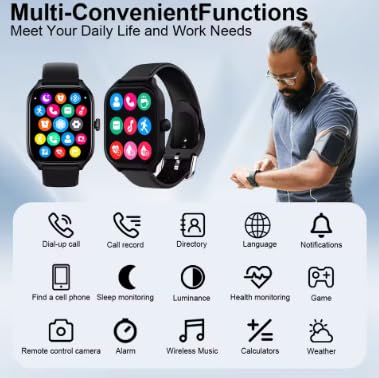
Image: The smartwatch interface showing multiple functions and app icons, demonstrating its versatile capabilities.
5.2 Sejħa Bluetooth
Ladarba tkun imqabbad mal-ismartphone tiegħek, tista' tagħmel u tirċievi telefonati direttament mill-ismartwatch tiegħek.
- Tagħmel Sejħiet: Access the dial pad or contact list on your watch to initiate a call.
- Jirċievu Sejħiet: An incoming call notification will appear on your watch. Tap to answer or decline.
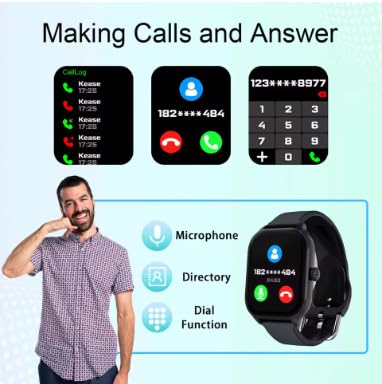
Image: The smartwatch demonstrating its Bluetooth calling features, including call logs, answering calls, and using the dial function.
5.3 Notifiki Intelliġenti
Receive notifications from various apps (WeChat, WhatsApp, Instagram, etc.) directly on your wrist. Ensure notification permissions are granted in the LaxasFit app and your phone's settings.
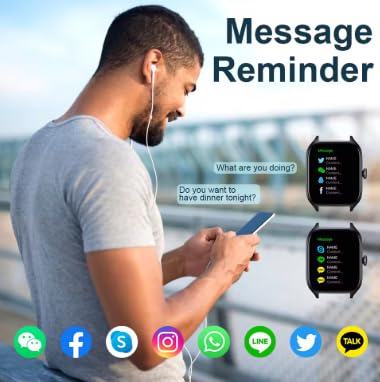
Image: The smartwatch showing message reminders from popular social media applications.
5.4 Monitoraġġ tas-Saħħa
L-ismartwatch isegwi diversi metriċi tas-saħħa:
- Rata tal-qalb: Monitoraġġ kontinwu jew on-demand tar-rata tal-qalb.
- Ossiġenu tad-Demm: Ikejjel il-livelli ta' saturazzjoni tal-ossiġnu fid-demm.
- Monitoraġġ tal-irqad: Isegwi x-xejriet u l-kwalità tal-irqad.
- Pressjoni tad-demm: Jipprovdi qari tal-pressjoni tad-demm.
Ċaħda ta' responsabbiltà: The health monitoring features are for general wellness and fitness purposes only and are not intended for medical diagnosis, treatment, or prevention of any disease. Consult a medical professional for any health concerns.
5.5 Modi Multi-Sport
Select from various sport modes to track your workouts accurately. Modes include outdoor running, walking, indoor cycling, indoor running, and free exercise.

Image: The smartwatch interface showing available sports modes, with examples of people performing different exercises.
5.6 Music Playback and Remote Camera Control
- Kontroll tal-Mużika: Ikkontrolla d-daqq tal-mużika fuq l-ismartphone konness tiegħek (daqq, pawża, aqbeż it-traċċi).
- Kamera mill-bogħod: Use your smartwatch as a remote shutter button for your smartphone's camera.
6. Karatteristiċi Speċjali
- TWS Bluetooth Headset Pairing: Connect your True Wireless Stereo (TWS) Bluetooth headsets directly to the smartwatch for an enhanced audio experience.
- Uċuħ ta' l-arloġġi personalizzabbli: Personalize your smartwatch with a variety of watch faces available through the LaxasFit app.
- Aġġornamenti tal-Firmware tal-OTA: Receive over-the-air (OTA) updates to keep your smartwatch software current with the latest features and improvements.
- Global Weather Forecast: Stay informed with accurate, up-to-date weather information displayed on your watch.
7. Manutenzjoni
7.1 Tindif
Wipe the smartwatch and band regularly with a soft, dry cloth. Avoid using harsh chemicals or abrasive materials.
7.2 Iċċarġjar
Charge the device using the provided charging cable. Avoid using damaged cables or chargers. The average battery life is 3 years, with a charging time of approximately 90 hours for a full charge.
7.3 Reżistenza għall-Ilma
Importanti: This smartwatch is mhux reżistenti għall-ilma. Avoid exposure to water, including showering, swimming, or heavy rain, to prevent damage.
8 Issolvi l-problemi
- Apparat mhux qed jixgħel: Kun żgur li l-apparat huwa kompletament iċċarġjat.
- Ma tistax tqabbad ma' smartphone: Check if Bluetooth is enabled on both devices and the LaxasFit app is open. Try restarting both the watch and phone.
- Notifiki li ma jidhrux: Verify notification permissions in the LaxasFit app and your phone's settings.
- Dejta dwar is-saħħa mhux preċiża: Ensure the watch is worn snugly on your wrist. Environmental factors and movement can affect readings.
9. Speċifikazzjonijiet
| Karatteristika | Dettall |
|---|---|
| Mudell | LAXASFIT H9 Pro Max |
| Daqs tal-Wiri | 2.01 Pulzier |
| Tip ta 'Wiri | IPS 240x240 resolution |
| Kapaċità tal-Ħżin tal-Memorja | 512 MB |
| Sistema Operattiva | Android Wear 1.4, Android Wear 2.8 |
| Teknoloġija tal-Konnettività | Bluetooth |
| Kapaċità tal-batterija | 180 Amp Sigħat |
| Ħajja Medja tal-Batterija | 3 Snin |
| Ħin tal-Iċċarġjar | 90 Sigħat |
| Piż tal-oġġett | 180 g |
| Apparati Kompatibbli | Smartphone, iPhone |
| Karatteristiċi Speċjali | Accelerometer, Activity Tracker, Custom Activity Tracking, Lightweight, Music Player |
10. Garanzija u Appoġġ
10.1 Informazzjoni dwar Garanzija
Your H9 Pro Max Smartwatch comes with a 1-il Xahar Garanzija mid-data tax-xiri. Din il-garanzija tkopri difetti fil-manifattura. Jekk jogħġbok żomm il-prova tax-xiri tiegħek għal talbiet ta' garanzija.
10.2 Appoġġ għall-Klijent
For further assistance, troubleshooting, or warranty claims, please contact your retailer or the manufacturer's customer support. Refer to the packaging or product websit għad-dettalji tal-kuntatt.


