
1. Prodott Aktarview
The Moondrop Edge is a Hi-Fi portable wireless headphone featuring Active Noise Cancellation (ANC). It is designed for high-resolution audio transmission and comfortable wear, suitable for various listening environments.

Image 1.1: Moondrop Edge Hi-Fi Portable Wireless ANC Headphone (Grey).
Kontenut tal-Pakkett
Kun żgur li l-oġġetti kollha huma preżenti fil-pakkett:
- Moondrop Edge Headphones
- Borża tal-Ħażna
- Kejbil tal-Iċċarġjar (USB-C)
- Manwal għall-Utent (dan id-dokument)
- Ċertifikat
- Karta ta' wara l-bejgħ
- APP QR Code Card

Image 1.2: Product Information and Packaging List.
2. Setup
2.1 Iċċarġjar tal-Headphones
Before first use, fully charge the headphones. Use the provided USB-C charging cable.
- Connect the USB-C end of the cable to the charging port on the headphone.
- Connect the USB-A end to a compatible USB power source (e.g., computer, wall adapter).
- Ċarġ sħiħ jieħu madwar 1.5 sigħat.
- Ċarġ ta' 5 minuti jista' jipprovdi sa 4 sigħat ta' daqq ta' mużika.
- The headphones offer up to 48 hours of continuous music playback on a full charge.

Image 2.1: Battery life and fast charging capabilities.
2.2 Tqabbil tal-Bluetooth
To connect your Moondrop Edge headphones to a device:
- Kun żgur li l-headphones huma mitfija.
- Agħfas u żomm il-buttuna tal-qawwa sakemm id-dawl indikatur jteptep, u dan jindika l-modalità ta' tqabbil.
- Fuq l-apparat tiegħek (smartphone, tablet, laptop), attiva l-Bluetooth u fittex apparati disponibbli.
- Select "Moondrop Edge" from the list of found devices.
- Ladarba jkun imqabbad, id-dawl indikatur jinbidel għal blu fiss jew jintefa, skont il-mudell.
The Moondrop Edge supports Bluetooth 5.4 and high-resolution audio codecs like LDAC and AAC for optimal sound quality with compatible devices.

Image 2.2: LDAC high-resolution audio support.
2.3 Konnessjoni ta' Apparat Doppju
The headphones support simultaneous connection to two devices:
- Qabbad il-headphones mal-ewwel apparat kif deskritt hawn fuq.
- Disconnect Bluetooth on the first device temporarily.
- Erġa’ poġġi l-headphones fil-modalità ta’ tqabbil u qabbadhom mat-tieni apparat.
- Reconnect Bluetooth on the first device. The headphones should now be connected to both devices, allowing seamless switching between audio sources.

Image 2.3: Dual device connection capability.
3. Istruzzjonijiet Operattivi
3.1 Kontrolli Fuqview
The Moondrop Edge headphones feature touch controls and physical buttons for various functions. Refer to the diagram below for button locations.
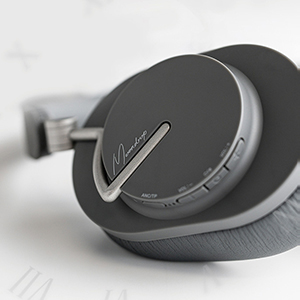
Image 3.1: Headphone control buttons.
3.2 Power On/Off
- Qawwa Mixgħul: Agħfas u żomm il-buttuna tal-qawwa sakemm id-dawl indikatur jixgħel.
- Itfi: Agħfas u żomm il-buttuna tal-qawwa sakemm id-dawl indikatur jintefa.
3.3 Kanċellazzjoni Attiva tal-Istorbju (ANC) u Modalità ta' Trasparenza
The headphones feature Hybrid ANC with four noise-canceling microphones for effective noise reduction. They also offer a transparent transmission mode.
- Aqleb il-Modi: Press the dedicated ANC button to cycle between ANC On, Transparency Mode, and ANC Off.
- Modalità ta' Trasparenza: Allows you to hear your surroundings without removing the headphones, useful for conversations or environmental awareness.
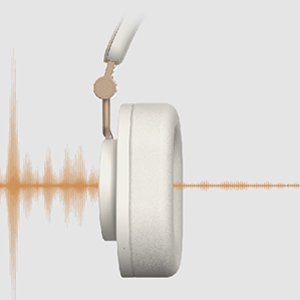
Image 3.2: Transparency transmission mode.
3.4 Daqq tal-Mużika u Ġestjoni tas-Sejħiet
Use the touch controls and buttons for audio and call functions:
- Play/Pawsa: Single tap the touch panel.
- Volum 'il fuq/Niżżel: Use the volume buttons.
- Track li jmiss: Double tap the touch panel.
- Track preċedenti: Triple tap the touch panel.
- Tweġiba/Tmiem Sejħa: Single tap the touch panel during an incoming call.
- Irrifjuta Sejħa: Press and hold the touch panel during an incoming call.
The integrated beamforming ENC microphones enhance call clarity by reducing background noise.

Image 3.3: Beamforming ENC for crystal-clear calls.
3.5 Moondrop Link App
Download the Moondrop Link app for additional features and customization, including sound tuning presets and firmware updates. Refer to the APP QR Code Card in your package for download instructions.
4. Manutenzjoni
4.1 Tindif
- Imsaħ il-headphones b'ċarruta ratba, niexfa u mingħajr suf.
- Tużax prodotti tat-tindif li joborxu, alkoħol, jew solventi kimiċi.
- Żomm l-umdità 'l barra mill-fetħiet.
4.2 Ħażna
When not in use, store the headphones in the provided storage bag to protect them from dust and scratches. The foldable design allows for compact storage.
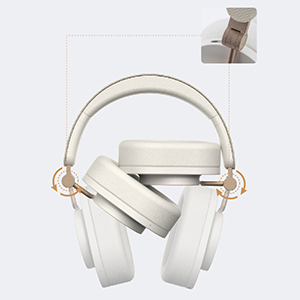
Image 4.1: Foldable design for portability and storage.
4.3 Kura tal-Batterija
- Evita li tiċċarġja l-batterija kompletament ta' spiss.
- Store the headphones with a partial charge if not used for extended periods.
- Evita temperaturi estremi, li jistgħu jaffettwaw il-ħajja tal-batterija.
Kuxxinetti tal-widnejn 4.4
The ear pads are designed for comfort. Please note that they are not easily replaceable. Handle with care to ensure longevity.
5 Issolvi l-problemi
If you encounter issues with your Moondrop Edge headphones, refer to the following common solutions:
- Ebda Qawwa: Kun żgur li l-headphones huma ċċarġjati kompletament.
- Ma tistax tqabbad: Ensure Bluetooth is enabled on your device and the headphones are in pairing mode. Try turning Bluetooth off and on again on your device.
- Ebda Ħsejjes: Check the volume level on both the headphones and your connected device. Ensure the headphones are correctly paired.
- Kwalità tal-Ħoss Fqira: Ensure your device supports LDAC for high-resolution audio. Move closer to your device to avoid interference. Check for firmware updates via the Moondrop Link app.
- ANC Mhux Effettiv: Ensure the ear pads form a good seal around your ears. Cycle through ANC modes to ensure it is active.
- Kwistjonijiet ta' Kwalità tas-Sejħiet: Ensure the microphones are not obstructed. Check for firmware updates.
- Buttuni ma jirrispondux: Ibda mill-ġdid il-headphones.
For further assistance, consult the Moondrop Link app or the official Moondrop support channels.
6. Speċifikazzjonijiet
| Karatteristika | Speċifikazzjoni |
|---|---|
| Isem tal-Prodott | MOONDROP Edge High-Fidelity Portable Wireless ANC Headphone |
| Isem tal-Mudell | XIFER |
| Verżjoni Bluetooth | 5.4 |
| Teknoloġija tal-Konnettività | Wireless (Bluetooth) |
| Teknoloġija tal-Komunikazzjoni mingħajr Fili | Bluetooth, LDAC, AAC |
| Tip ta' Sewwieq Awdjo | Dynamic Driver (40mm low-distortion with beryllium-plated dome) |
| Medda ta' Frekwenzi | 20 Hz - 20,000 Hz |
| Kontroll tal-Ħoss | Kanċellazzjoni tal-Istorbju Ibrida |
| Mikrofoni | Four highly sensitive noise-canceling microphones, Beamforming ENC |
| Ħajja tal-batterija | Up to 48 Hours (continuous music playback) |
| Ħin tal-Iċċarġjar | Appross. 1.5 Sigħat |
| Port tal-Iċċarġjar | USB-C |
| Ħlas Mgħaġġel | 5 minuti ta' ħlas għal sagħtejn ta' daqq |
| Distanza tax-Xogħol | Over 10m (unobstructed open environment) |
| Metodu ta' Kontroll | Mess |
| Tqegħid tal-widnejn | Fuq il-widnejn |
| Fattur tal-Formola | Fuq Widnejn |
| Piż tal-oġġett | 0.82 Kilogrammi (1.8 libbra) |
| Livell ta 'Reżistenza għall-Ilma | Mhux Reżistenti għall-Ilma |
| Apparati Kompatibbli | Smartphones, Tablets, Laptops, Apparati li jaħdmu bil-Bluetooth |
7. Garanzija u Appoġġ
Moondrop products are covered by a limited warranty. For specific warranty terms, duration, and claim procedures, please refer to the After-sales Card included in your package or visit the official Moondrop website. Keep your proof of purchase for warranty service.
Appoġġ għall-Klijent
For technical support, product inquiries, or service requests, please contact Moondrop customer support through their official website or the contact information provided on the After-sales Card.