1. Introduzzjoni
Thank you for choosing the Generic G1200 Digital Microscope. This device is designed for detailed observation, inspection, and analysis of various objects, offering a 12-megapixel camera and a 7-inch LCD display with 1-1200X continuous magnification. This manual provides essential information for the safe and effective use of your microscope.
2. Informazzjoni dwar is-Sigurtà
- Keep the microscope away from water and other liquids to prevent electric shock or damage.
- Tiżżarmax jew timmodifikax l-apparat. It-tiswijiet għandhom isiru biss minn persunal kwalifikat.
- Evita li tesponi l-apparat għax-xemx diretta jew għal temperaturi għoljin.
- Handle the lens and screen with care to prevent scratches.
- This product is not a toy; keep it out of reach of children without adult supervision.
3. Kontenut tal-Pakkett
Jekk jogħġbok iċċekkja l-kontenut tal-pakkett meta tiftaħ il-kaxxa:
- G1200 Digital Microscope Unit (with 7-inch LCD)
- Adjustable Stand and Base
- Kejbil tal-Enerġija USB
- Manwal għall-Utent (dan id-dokument)
- Calibration Ruler (may vary by package)
4. Prodott Aktarview
The G1200 Digital Microscope features a robust design for stable observation and a clear display for detailed viewing.

Figura 4.1: Quddiem view of the G1200 Digital Microscope displaying a circuit board.
The microscope consists of a main unit with an integrated 7-inch LCD screen, a high-resolution lens, and an adjustable stand. The stand allows for precise positioning and stable observation of specimens.

Figure 4.2: The adjustable stand allows for flexible viewangoli.
The 7-inch LCD provides a large, clear viewing area, enhancing the user experience for prolonged observation and group viewing.
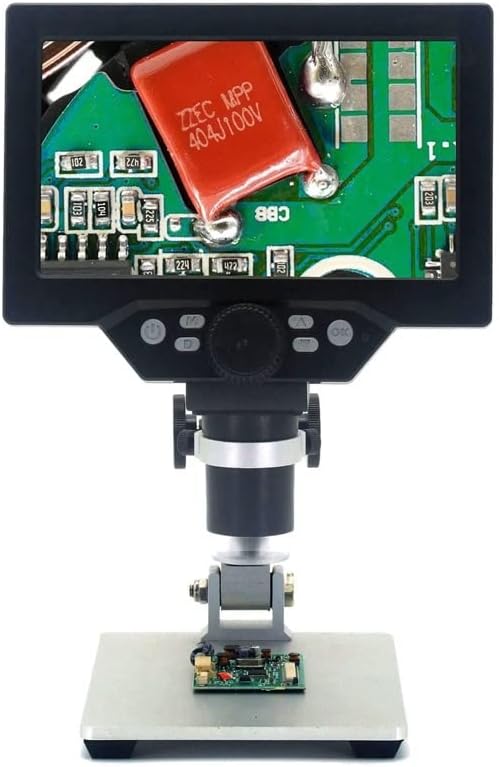
Figure 4.3: The G1200 features a 7-inch display for enhanced viewċarezza.
5. Setup
- Ippakkja: Neħħi bir-reqqa l-komponenti kollha mill-imballaġġ.
- Arma l-Istand: Attach the microscope unit to the adjustable stand. Ensure all screws are tightened securely to prevent wobbling.
- Konnessjoni tal-Enerġija: Connect the USB power cable to the microscope's power input port and then to a suitable USB power adapter (not included) or a powered USB port. For the Bluit Battery Model, ensure the internal battery is charged before first use.
- Qawwa Inizjali Mixgħula: Press and hold the power button located on the microscope unit until the LCD screen illuminates.
6. Istruzzjonijiet Operattivi
6.1 Tixgħel/Jitfi
- Qawwa Mixgħul: Agħfas u żomm il-buttuna tal-qawwa għal madwar 3 sekondi.
- Itfi: Press and hold the power button again for approximately 3 seconds until the screen turns off.
6.2 Placing a Specimen
Place the object you wish to observe directly on the base plate beneath the microscope lens. Ensure it is centered for optimal viewing.
6.3 Adjusting Focus and Magnification
- Aġġustament Għoli: Use the knob on the stand to raise or lower the microscope unit, bringing the lens closer or further from the specimen.
- Fine Focus: Rotate the focus wheel on the microscope unit to achieve a clear image.
- Tkabbir: The G1200 offers 1-1200X continuous amplification. Adjust the distance between the lens and the object, and then fine-tune the focus to change the magnification level.
6.4 Using the LCD Display and Controls
The 7-inch LCD displays the live view from the microscope camera. Buttons on the unit typically include:
- Buttuna tal-menu: Accesses settings for image resolution, video resolution, date/time, language, etc.
- Buttuna tal-Modalità: Switches between photo, video, and playback modes.
- Buttuna Qbid/Record: Takes a photo or starts/stops video recording.
- Buttuni 'l fuq /' l isfel: Navigate menus or adjust digital zoom (if available).
Refer to the on-screen menu for specific functions and settings.
7. Manutenzjoni
- Tindif tal-Lenti: Uża drapp artab u mingħajr suf iddisinjat speċifikament għal lentijiet ottiċi. Tużax materjali li joborxu jew kimiċi ħarxa.
- Tindif tal-Iskrin: Wipe the LCD screen gently with a soft, dry microfiber cloth.
- Ħażna: Store the microscope in a clean, dry, and dust-free environment when not in use.
- Battery Care (Bluit Battery Model): Għal ħajja ottimali tal-batterija, evita li tiċċarġja kompletament il-batterija ta' spiss. Iċċarġja l-apparat regolarment, anke jekk ma jkunx qed jintuża għal perjodi twal.
8 Issolvi l-problemi
- Ebda Qawwa: Ensure the USB power cable is securely connected and the power source is active. For battery models, check if the battery is charged.
- Immaġni mċajpra: Adjust the height of the microscope unit and rotate the focus wheel until the image is clear. Ensure the specimen is flat and well-lit.
- L-Iskrin Mhux Qed Jintwera: Check power connection. If the device is on but no image appears, try restarting the microscope.
- Buttuni ma jirrispondux: Power off the device and restart it. If the issue persists, ensure no debris is obstructing the buttons.
9. Speċifikazzjonijiet
| Karatteristika | Speċifikazzjoni |
|---|---|
| Isem tal-Mudell | G1200 (EENKNDXQA-BLUITBATTERYMODEL-1-1200X) |
| Wiri | LCD ta '7 pulzieri |
| Proporzjon ta' Tkabbir | 1-1200X Continuous Amplifikazzjoni |
| Riżoluzzjoni tal-Kamera | 12 Megapixels |
| Materjal | Plastik |
| Piż tal-oġġett | 2.2 libbra (1000 Gramm) |
| Dimensjonijiet tal-Pakkett | 1.18 x 0.79 x 0.39 pulzieri |
| Sors tal-Enerġija | USB Powered / Built-in Battery (Bluit Battery Model) |
10. Garanzija u Appoġġ
For warranty information and customer support, please refer to the documentation provided at the time of purchase or contact your retailer. The manufacturer is committed to providing high-quality after-sales service.


