
1. Introduzzjoni
Grazzi tax-xiriasing the Kaiser MSA-2073M Professional One Body Speaker. This powerful and versatile audio system is designed to deliver clear, robust sound for various events, both indoors and outdoors. Featuring dual 8-inch woofers, 70W RMS power, Bluetooth connectivity, a wireless microphone, and dynamic Infinity Light effects, the MSA-2073M is built to enhance your audio experience. Please read this manual carefully to ensure proper setup, operation, and maintenance of your speaker.
2. Istruzzjonijiet tas-Sigurtà
- Tesponix l-ispiker għax-xita jew għall-umdità biex tevita nar jew xokk elettriku.
- Tiftaħx l-ispiker casing. Irreferi s-servizz kollu lil persunal kwalifikat.
- Żomm l-ispiker 'il bogħod minn sorsi ta' sħana bħal radjaturi, reġistri tas-sħana, stufi, jew apparat ieħor li jipproduċi sħana.
- Uża biss aċċessorji/aċċessorji speċifikati mill-manifattur.
- Skonnettja l-ispiker waqt maltempati bis-sajjetti jew meta ma jintużax għal perjodi twal.
- Aċċerta ruħek li jkun hemm ventilazzjoni xierqa. Timblokkax xi fetħiet tal-ventilazzjoni.
- Tpoġġix oġġetti tqal fuq l-ispiker.
- Avoid placing the speaker in unstable positions where it might fall.
3. Kontenut tal-Pakkett
Jekk jogħġbok iċċekkja l-kontenut tal-pakkett tiegħek. Jekk xi oġġetti huma nieqsa jew bil-ħsara, ikkuntattja lill-bejjiegħ tiegħek.
- Kaiser MSA-2073M Professional One Body Speaker
- Mikrofonu bla fili
- Cable tal-Iċċarġjar tal-USB
- Kejbil tal-Awdjo (3.5mm AUX)
- Manwal għall-Utent
4. Prodott Aktarview
Familiarize yourself with the different parts and controls of your Kaiser MSA-2073M speaker.

Figura 4.1: Quddiem View. Shows the speaker's front panel with dual 8-inch woofers and the dynamic Infinity Light display.

Figura 4.2: Wara View. Displays the speaker's rear, including the integrated handle and transport wheels for easy mobility.
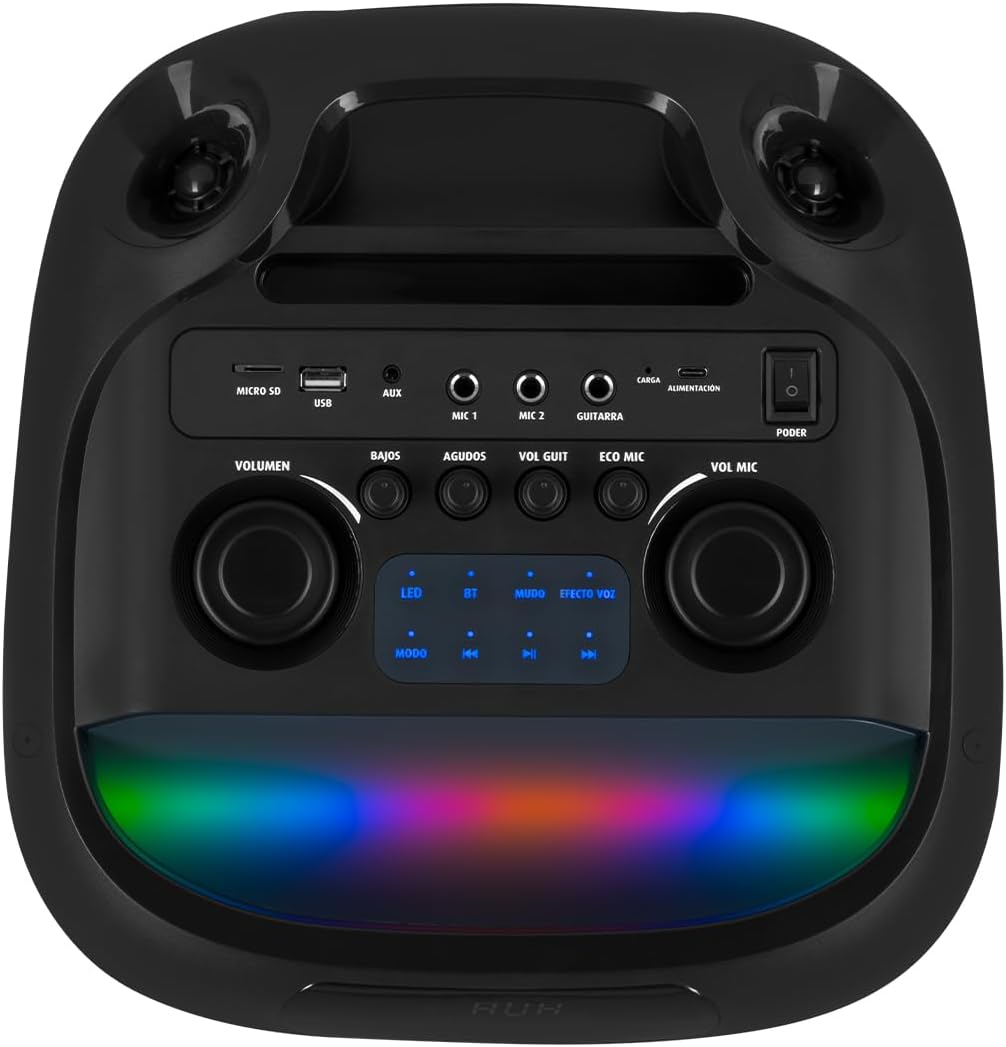
Figura 4.3: Pannell tal-Kontroll. Details the top-mounted control panel with inputs for USB, Micro SD, AUX, two microphones, and a guitar, along with volume, bass, treble, and effect controls.

Figure 4.4: Wireless Microphone. The included wireless microphone for vocal performances and announcements.
5. Setup
5.1 Disimballaġġ
- Neħħi l-ispiker u l-aċċessorji kollha mill-imballaġġ bir-reqqa.
- Żomm l-imballaġġ għal trasport jew ħażna fil-futur.
5.2 Iċċarġjar inizjali
Before first use, it is recommended to fully charge the speaker's internal battery.
- Connect the provided USB charging cable to the speaker's charging port (labeled 'CARGA' or 'ALIMENTACIÓN' on the control panel).
- Qabbad it-tarf l-ieħor tal-kejbil USB ma' adapter tal-enerġija USB kompatibbli (mhux inkluż) jew port USB li jaħdem bl-enerġija.
- The charging indicator light will illuminate. Allow several hours for a full charge.
- Ladarba jkun iċċarġjat kompletament, id-dawl indikatur jista' jinbidel jew jintefa. Skonnettja l-kejbil tal-iċċarġjar.
5.3 Power On/Off
To power on the speaker, locate the 'PODER' (Power) switch on the control panel and slide it to the 'ON' position. To power off, slide it to 'OFF'.
6. Istruzzjonijiet Operattivi
6.1 Konnessjoni Bluetooth
Connect your mobile device wirelessly to the speaker.
- Turn on the speaker. The 'BT' indicator on the control panel should blink, indicating it's in pairing mode.
- Fuq it-tagħmir mobbli tiegħek, ippermetti l-Bluetooth u fittex tagħmir disponibbli.
- Select "Kaiser MSA-2073M" from the list of devices.
- Once paired, the 'BT' indicator will stop blinking and remain solid. You can now play audio from your device through the speaker.
- Il-firxa Bluetooth hija sa 10 metri.
6.2 Input AUX
Qabbad apparati awdjo esterni billi tuża l-kejbil AUX ta' 3.5mm.
- Connect one end of the 3.5mm audio cable to the 'AUX' port on the speaker.
- Qabbad it-tarf l-ieħor mal-jack tal-headphones jew mal-output tal-awdjo tat-tagħmir estern tiegħek.
- Press the 'MODE' button on the speaker until 'AUX' mode is selected.
- Daqq l-awdjo mit-tagħmir estern tiegħek.
Daqq ta' 6.3 USB/Micro SD
Daqq il-mużika direttament minn USB flash drive jew Micro SD card.
- Insert a USB flash drive into the 'USB' port or a Micro SD card into the 'MICRO SD' slot.
- The speaker will automatically switch to USB/Micro SD mode and begin playing compatible audio files. If not, press the 'MODE' button to select the correct input.
- Use the playback controls (play/pause, next/previous track) on the speaker to manage your music.
6.4 Użu tal-Mikrofonu
Use the included wireless microphone for karaoke or announcements.
- Kun żgur li l-mikrofonu mingħajr fili huwa mixgħul.
- The microphone will automatically connect to the speaker.
- Adjust the microphone volume using the 'VOL MIC' knob on the control panel.
- Use the 'ECO MIC' knob to adjust the echo effect for the microphone.
- The speaker also features five voice effects for the microphone, accessible via the 'EFECTOS VOZ' button.
6.5 Input tal-Kitarra
Connect an electric guitar to the speaker.
- Connect your guitar to the 'GUITARRA' input jack on the control panel.
- Adjust the guitar volume using the 'VOL GUIT' knob.
6.6 Aġġustamenti tal-Ħoss
Customize your audio output.
- VOLUM: Adjusts the overall master volume of the speaker.
- BAJOS (Bass): Jaġġusta l-ħruġ ta' frekwenza baxxa.
- AGUDOS (Treble): Jaġġusta l-ħruġ ta' frekwenza għolja.
6.7 Infinity Light Effects
Enhance your listening experience with dynamic LED lighting.
- Press the 'LED' button on the control panel to cycle through different light modes or turn the lights off.
- The lights synchronize with the music for an immersive effect.
6.8 KSR-LINK (True Wireless Stereo)
Connect two MSA-2073M speakers for a true wireless stereo experience.
- Kun żgur li ż-żewġ kelliema huma mixgħula u fil-modalità Bluetooth, iżda mhux konnessi ma' xi apparat.
- On one speaker, press and hold the 'MUDO' (Mute) button (which also functions as the KSR-LINK pairing button). You will hear a confirmation tone.
- The two speakers will automatically pair with each other.
- Once paired, connect your mobile device to one of the speakers via Bluetooth as described in section 6.1. Audio will now play in stereo through both speakers.
7. Iċċarġjar
The speaker features a rechargeable battery for portable use. A full charge allows for prolonged use.
- Connect the USB charging cable to the speaker's charging port and a power source.
- L-indikatur tal-iċċarġjar se juri l-istatus tal-iċċarġjar.
- Avoid overcharging the battery. Disconnect the charger once the battery is full.
8. Manutenzjoni
8.1 Tindif
- Imsaħ l-ispiker b'ċarruta ratba u niexfa.
- Tużax prodotti tat-tindif li joborxu, xama', jew solventi.
8.2 Ħażna
- Aħżen l-ispiker f'post frisk u niexef 'il bogħod mix-xemx diretta u minn temperaturi estremi.
- Jekk taħżinha għal perjodu estiż, iċċarġja l-batterija perjodikament biex iżżomm il-ħajja tagħha.
9 Issolvi l-problemi
| Problema | Kawża Possibbli | Soluzzjoni |
|---|---|---|
| Ebda qawwa | Il-batterija hija eżawrita; Is-swiċċ tal-enerġija huwa mitfi. | Charge the speaker; Turn the power switch to 'ON'. |
| L-ebda ħoss | Volume is too low; Incorrect input mode selected; Device not connected properly. | Increase volume; Press 'MODE' to select correct input; Reconnect device/Bluetooth. |
| Il-Bluetooth mhux qed jgħaqqad | Speaker not in pairing mode; Device too far; Already connected to another device. | Ensure 'BT' indicator is blinking; Move device closer; Disconnect from other devices and try again. |
| Mikrofonu mhux qed jaħdem | Microphone is off; Microphone volume is low; Microphone battery is low. | Turn on microphone; Increase 'VOL MIC' knob; Charge/replace microphone battery. |
10. Speċifikazzjonijiet
| Karatteristika | Speċifikazzjoni |
|---|---|
| Brand | Kaiser |
| Mudell | MSA-2073M |
| Daqs tal-Kelliem | 2 x 8 pulzier |
| Ħruġ ta 'Qawwa RMS | 70 Watts |
| PMPO Power Output | 28000 Watts |
| Teknoloġija tal-Konnettività | Wireless (Bluetooth) |
| Medda Bluetooth | Sa 10 metri |
| Modalità tal-Ħruġ tal-Awdjo | Stereo |
| Impedenza | 3 Ohm |
| Rispons ta' Frekwenza | 60 Hz |
| Metodu ta' Kontroll | Push Button, Rotary Knobs |
| Sors tal-Enerġija | Batterija |
| Dimensjonijiet (DxWxH) | 37.4 x 36.2 x 80 ċm |
| Piż tal-oġġett | 10.8 Kilogrammi |
| Aċċessorji Inklużi | Mikrofonu bla fili |
11. Vidjo tal-Prodott Aktar minnview
Video 11.1: Product Features and Unboxing. Dan il-filmat jipprovdi ħarsa ġenerali fil-qosorview of the Kaiser MSA-2073M speaker, showcasing its unboxing, key features like 70W RMS power, 10m Bluetooth range, included cables, and detailed views of the control panel with independent volume, bass, treble, microphone, guitar, and echo controls. It also highlights the five voice effects for the microphone, 3 Ohm impedance, and convenient transport wheels. The video also mentions the KSR-LINK technology for connecting two speakers.
12. Garanzija u Appoġġ
Your Kaiser MSA-2073M speaker comes with a 90-day factory warrantyJekk jogħġbok żomm il-prova tax-xiri tiegħek għal talbiet ta' garanzija.
For technical support, troubleshooting assistance, or warranty inquiries, please contact Kaiser customer service through their official website or the retailer where you purchased the product. Do not attempt to repair the device yourself, as this may void your warranty.