
Conambo K10C-CBOX
Conambo K10C Bluetooth Headset User Manual
Model: K10C-CBOX
Introduzzjoni
Thank you for choosing the Conambo K10C Bluetooth Headset. This manual provides detailed instructions on how to set up, operate, and maintain your new headset, ensuring you get the best experience from its advanced features, including dual-mic noise canceling and extended battery life with the charging case.
X'hemm fil-Kaxxa
- Conambo K10C Bluetooth Headset
- Kawża tal-Iċċarġjar bla Fili
- Cable tal-Iċċarġjar tal-USB
- Ponot tal-widnejn (daqsijiet varji)
- Manwal għall-Utent
Prodott Overview
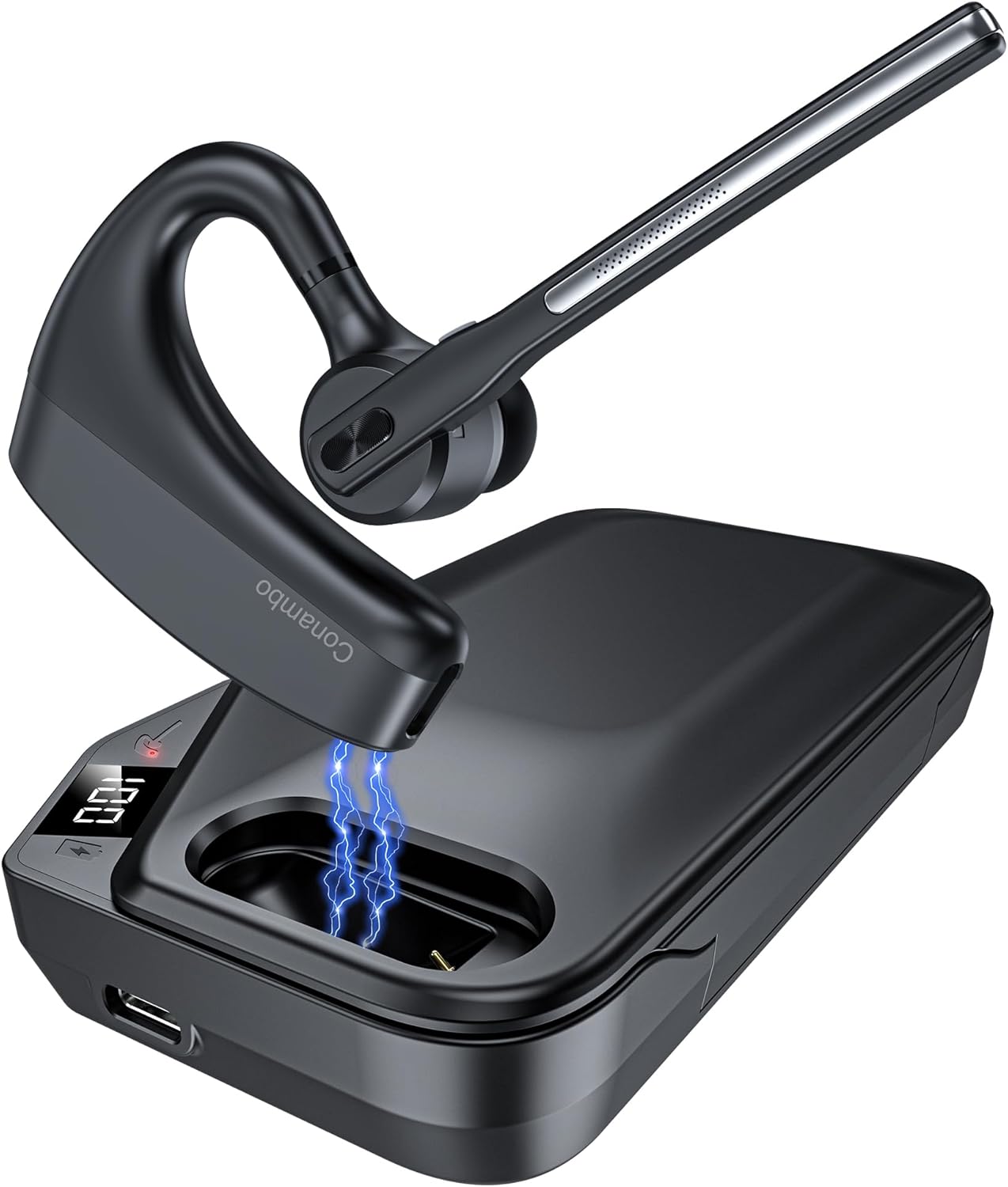
The Conambo K10C Bluetooth Headset with its dedicated charging case. The headset features an ergonomic design for comfortable wear, and the charging case provides extended battery life.
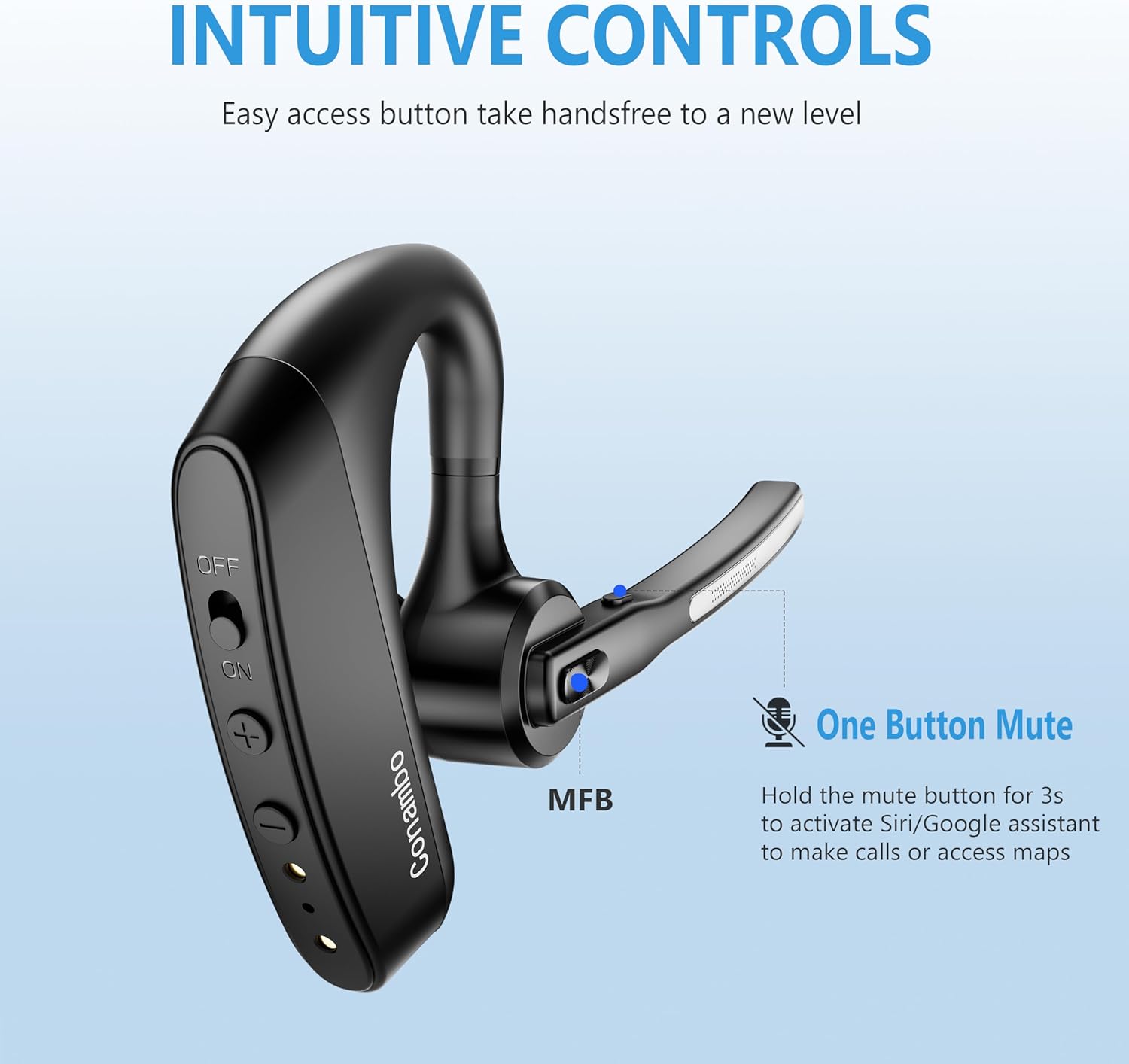
Dettaljati view of the headset's intuitive controls, including the power switch, volume buttons, and the Multi-Function Button (MFB). The microphone boom also features a dedicated mute button.
Komponenti Ewlenin:
- Headset: Earpiece, Microphone Boom, Power Switch, Volume Up/Down Buttons, Multi-Function Button (MFB), Mute Button.
- Każ tal-Iċċarġjar: Headset charging slot, USB-C Charging Port, LED Digital Display for battery life.
Setup
1. Charging the Headset and Charging Case
Before first use, fully charge both the headset and the charging case.
- Iċċarġjar tal-widna: Place the headset into the charging slot of the charging case. Ensure the charging contacts align. The headset's indicator light will show charging status.
- Iċċarġjar tal-Każ: Connect the USB charging cable to the USB-C port on the charging case and to a power source (e.g., computer USB port, wall adapter). The LED digital display on the case will show the battery percentage waqt l-iċċarġjar.

The 750mAh charging case provides up to 64 hours of talk time. The LED display indicates the remaining battery life of the case.
2. Tixgħil / Mitfi
- Qawwa Mixgħul: Slide the power switch on the headset to the "ON" position. You will hear a voice prompt indicating power on.
- Itfi: Slide the power switch on the headset to the "OFF" position. You will hear a voice prompt indicating power off.
3. Tqabbil tal-Bluetooth
The first time you power on the headset, it will automatically enter pairing mode.
- Ensure the headset is powered on and in pairing mode (indicator light will flash).
- Fuq l-apparat tiegħek (smartphone, laptop, eċċ.), attiva l-Bluetooth.
- Fittex għal available Bluetooth devices and select "K10C-CBOX" from the list.
- Once connected, the headset's indicator light will stop flashing, and you will hear a voice prompt confirming the connection.

The K10C supports fast pairing and multi-point technology, allowing connection to two devices simultaneously within a 59-foot (18-meter) range.
4. Konnessjoni b'ħafna Punti
The K10C headset supports connecting to two Bluetooth devices simultaneously.
- Connect the headset to the first device as described in the "Bluetooth Pairing" section.
- Iddiżattiva l-Bluetooth fuq l-ewwel apparat. Il-headset jerġa' jidħol fil-modalità ta' tqabbil.
- Connect the headset to the second device.
- Re-enable Bluetooth on the first device. The headset should automatically connect to both devices. You can then switch between audio sources as needed.
Istruzzjonijiet Operattivi
1. Ġestjoni tas-Sejħiet
- Tweġiba/Tmiem Sejħa: Press the Multi-Function Button (MFB) once.
- Irrifjuta Sejħa: Agħfas u żomm l-MFB għal 2 sekondi.
- Ixekkel/Istinka l-mikrofonu: Press the dedicated mute button on the microphone boom once during a call.

The Conambo K10C headset provides crystal clear audio quality for calls, supported by dual mic noise-canceling technology.

Equipped with CVC8.0 and ENC noise canceling technology, the K10C effectively blocks 96% of background noise, ensuring clear voice transmission.
2. Attivazzjoni tal-Assistent tal-Vuċi
To activate your device's voice assistant (Siri, Google Assistant), press and hold the mute button on the microphone boom for 2 seconds.
3. Kontroll tal-Volum
Use the Volume Up (+) and Volume Down (-) buttons on the headset to adjust the audio volume.
Manutenzjoni
- Tindif: Use a soft, dry cloth to clean the headset and charging case. Do not use abrasive cleaners or solvents.
- Ħażna: When not in use, store the headset in its charging case to protect it and keep it charged. Store in a cool, dry place away from extreme temperatures.
- Kura tal-batterija: Biex ittawwal il-ħajja tal-batterija, evita li tiċċarġja kompletament il-batterija ta' spiss. Iċċarġja l-apparat regolarment, anke jekk ma tkunx qed tużah kontinwament.
Issolvi l-problemi
| Problema | Kawża Possibbli | Soluzzjoni |
|---|---|---|
| Il-headset mhux se jixgħel | Batterija baxxa; Swiċċ tal-enerġija mitfi | Charge the headset; Slide power switch to ON. |
| Ma tistax tqabbad mat-tagħmir | Il-headset mhux fil-modalità ta' tqabbil; Bluetooth mitfi fuq l-apparat; Apparat 'il bogħod wisq | Ensure headset is in pairing mode; Enable Bluetooth on device; Move device closer (within 18m). |
| No audio during calls/music | Volume too low; Not connected; Wrong audio output selected | Increase volume on headset/device; Reconnect headset; Select K10C as audio output on device. |
| Poor call quality/noise | Interference; Headset too far from device; Microphone blocked | Move away from interference sources; Move closer to device; Ensure microphone is clear. |
| Każ tal-iċċarġjar mhux iċċarġjar | Cable issue; Power source issue | Try a different USB cable or power adapter; Ensure connection is secure. |
Speċifikazzjonijiet
| Karatteristika | Dettall |
|---|---|
| Isem tal-Mudell | K10C-CBOX |
| Teknoloġija tal-Konnettività | Bluetooth V5.2 |
| Medda Bluetooth | Sa 59 pied (18 metri) |
| Ħajja tal-batterija tal-headset | Up to 16 hours talk time (single charge) |
| Ħajja tal-Batterija tal-Każ tal-Iċċarġjar | Up to 64 hours total talk time (with 750mAh case) |
| Kontroll tal-Ħoss | Dual Mic CVC8.0 & ENC Noise Canceling |
| Forma tal-widna | Fuq il-widna |
| Piż | Approx. 18g (headset only) |
| Apparati Kompatibbli | Cellphones, Laptops, Tablets (IOS, Android, PC) |
| Livell ta 'Reżistenza għall-Ilma | Reżistenti għall-Ilma |
Garanzija u Appoġġ
Conambo products are designed for reliability and performance. For warranty information or technical support, please refer to the contact details provided on the product packaging or visit the official Conambo websit. Jekk jogħġbok żomm il-prova tax-xiri tiegħek għal talbiet ta' garanzija.
Ask a question about this manual
Ask about setup, troubleshooting, compatibility, parts, safety, or missing instructions. Manuals+ will review the question and use this page’s manual context to help answer it.