
1. Introduzzjoni
This manual provides essential instructions for the safe and efficient operation of your BOSYTRO SJK-24V-480W-WX 24V 20A 480W DC Switching Power Supply. This unit is designed to convert AC mains power to a stable DC 24V output, suitable for a wide range of applications including LED strips, 3D printers, and CCTV camera security systems. Please read this manual thoroughly before installation and use, and retain it for future reference.

Stampa 1.1: The BOSYTRO 24V switching power supply is suitable for various applications such as LED advertising displays, security monitoring systems, automation equipment, car audio, LED light strips, and medical equipment.
2. Istruzzjonijiet tas-Sigurtà
Biex tiżgura tħaddim sikur u tevita ħsara, osserva l-prekawzjonijiet ta' sigurtà li ġejjin:
- Input Voltage Għażla: Before connecting the power supply, verify that the input voltage switch (115V/230V) is set to match your local mains voltage. Vol mhux korretttagL-għażla tista' tagħmel ħsara lill-unità.
- Wiring kif suppost: Ensure all wiring connections are secure and correct. Pay close attention to positive (V+) and negative (V-) DC output terminals and AC input connections (Live, Neutral, Ground).
- L-ertjar: Always connect the ground terminal to a proper earth ground to prevent electrical shock.
- Protezzjoni ta' tagħbija żejda: Do not exceed the maximum output current of 20A or power of 480W. Overloading can trigger protection mechanisms or damage the unit. For equipment with high peak variations (e.g., motors), select a power supply with at least 2 times the rated power.
- Ventilazzjoni: Ensure adequate ventilation around the power supply. Do not block the cooling fan or ventilation holes. Maintain the operating temperature range of 14℉-140℉ (-10℃-60℃).
- Kundizzjonijiet Ambjentali: Avoid exposing the unit to moisture, dust, or extreme temperatures.
- Installazzjoni professjonali: Installation and wiring should be performed by qualified personnel to prevent electrical hazards.
- L-ebda Partijiet li jistgħu jservu mill-utent: Tiftaħx il-provvista tal-enerġija casing. There are no user-serviceable parts inside, and opening it voids the warranty.
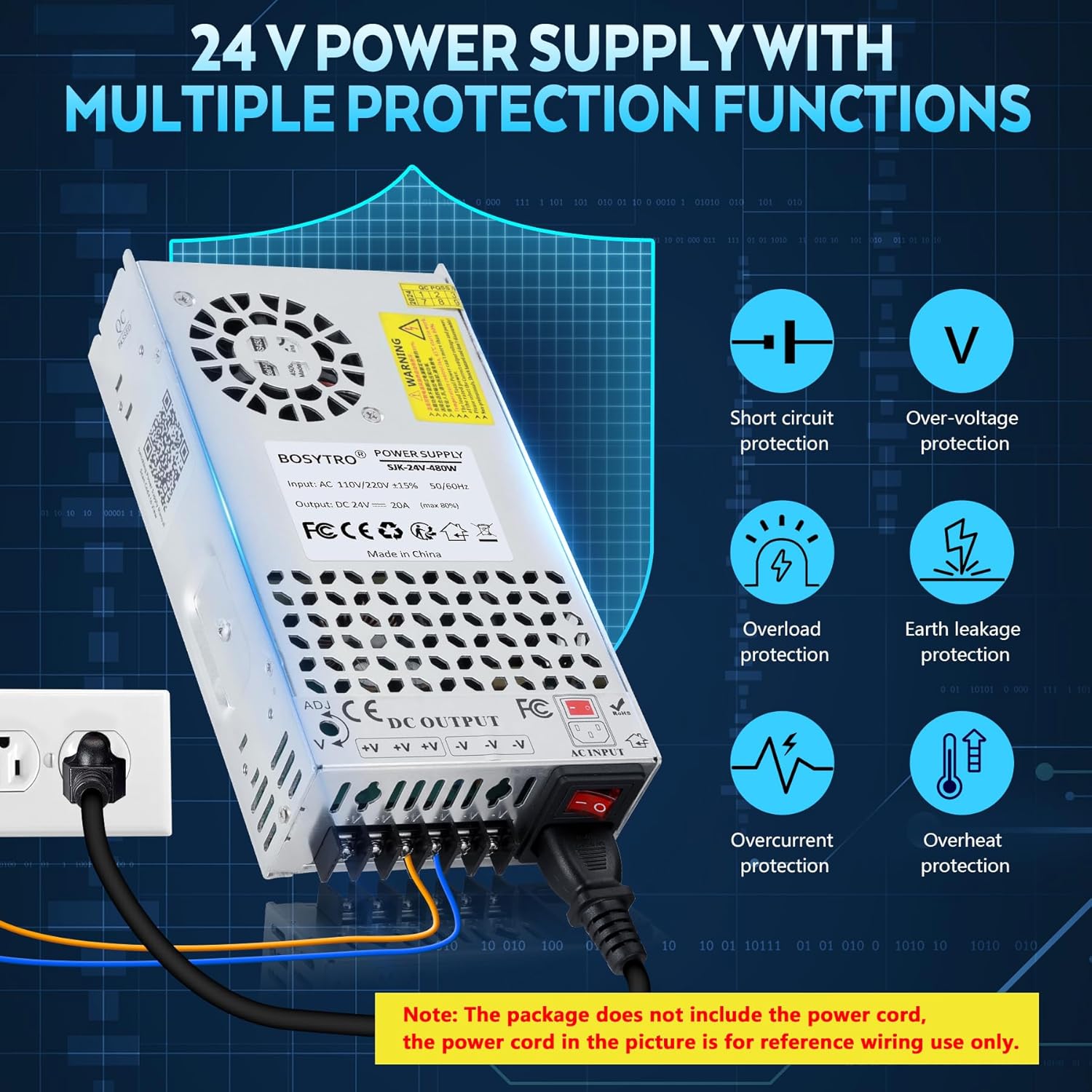
Stampa 2.1: The power supply features multiple protections including short circuit, over-voltage, overload, earth leakage, overcurrent, and overheat protection. Note: The power cord is for reference wiring use only and is not included.
3. Prodott Aktarview
3.1 Karatteristiċi ewlenin
- AC/DC 24V Power Supply: Provides a default DC 24V output with an adjustable range of ±10% (21.6V-26.4V).
- Ħruġ ta' Enerġija Għolja: Delivers up to 20A and 480W of maximum power with an efficiency of up to 80%.
- Upgraded Output Ports: Features three output channels and an added power port for easier and faster connections, eliminating the need for separate Fire, Ground, and Zero cables.
- Dissipazzjoni effiċjenti tas-sħana: Constructed with a porous metal aluminum shell and equipped with a built-in cooling fan for stable and low-noise heat management.
- Protezzjonijiet Multipli: Incorporates smart chip technology for overload, over-voltage, overheat, and short circuit protection. Certified with RoHS/CE/LVD/EMC standards.
- Input VoltagSwiċċ e: Input li jista' jintgħażel voltage between 115V and 230V to accommodate different regional power standards.
3.2 Komponenti
The BOSYTRO SJK-24V-480W-WX power supply is composed of high-quality electronic components housed within a durable aluminum casing.
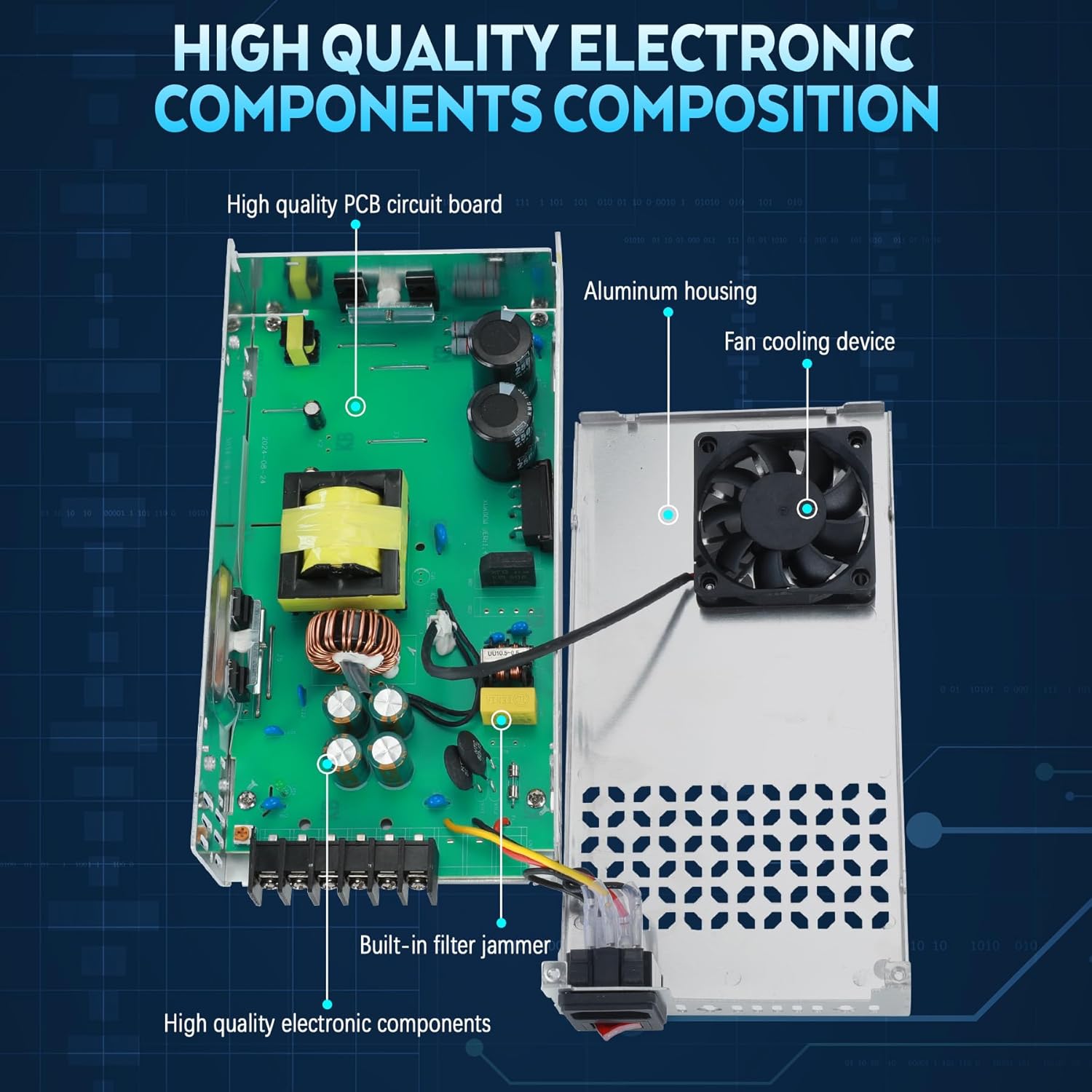
Stampa 3.1: A dettaljata view of the power supply's internal structure, showing the high-quality PCB circuit board, aluminum housing, fan cooling device, built-in filter jammer, and other electronic components.

Stampa 3.2: An overhead view of the BOSYTRO SJK-24V-480W-WX power supply, highlighting its physical dimensions (21.5cm x 11.5cm x 5cm) and a table of key specifications.
4. Istruzzjonijiet ta' Setup
4.1 Select Input Voltage
Before connecting the power supply to an AC source, it is critical to set the input voltage switch to match your local power grid. The switch is located on the side of the unit. For American and Canadian customers, set it to 115V. For European customers, set it to 230V. Failure to select the correct voltage can result in damage to the power supply and connected equipment.
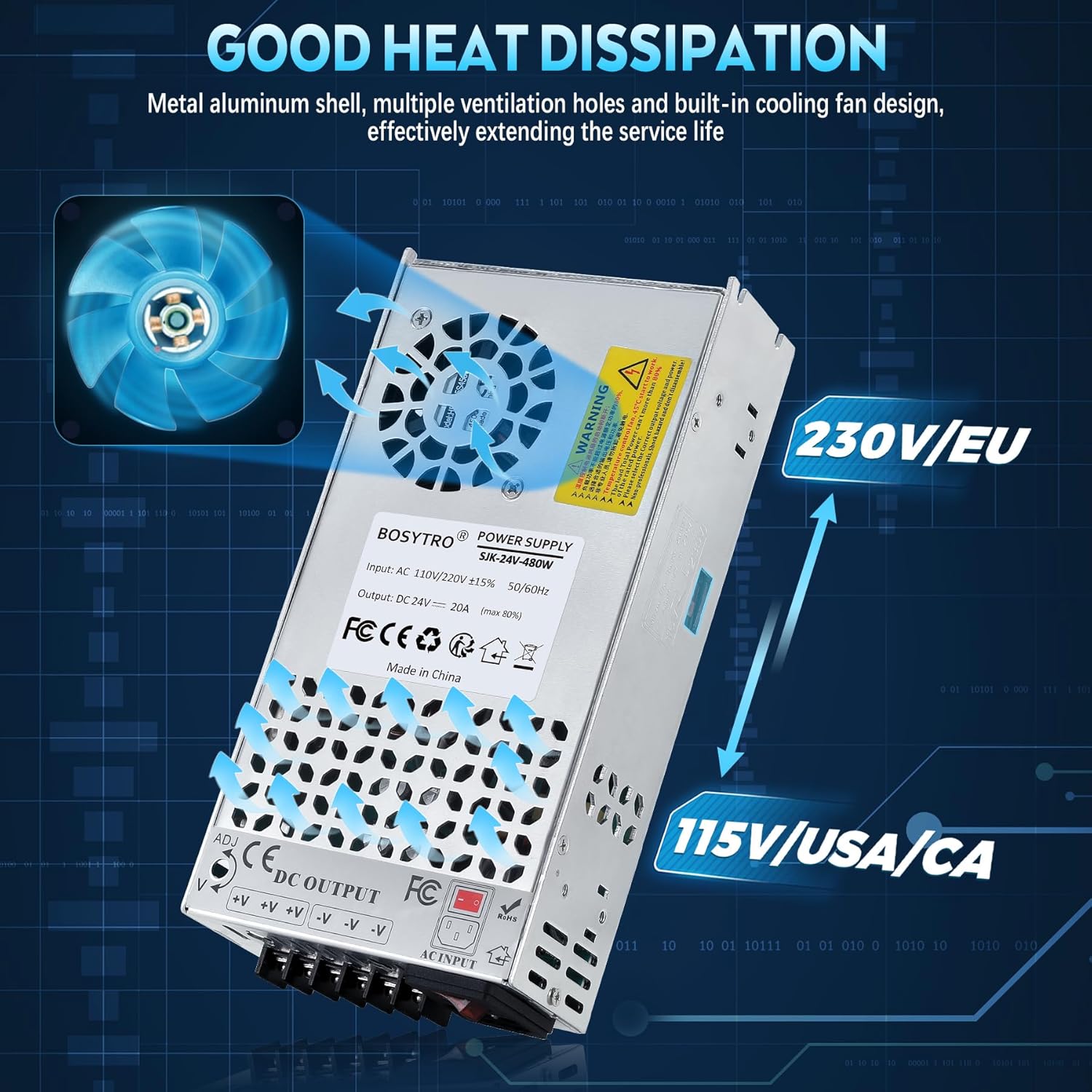
Stampa 4.1: L-input voltage selector switch, showing options for 115V (USA/CA) and 230V (EU). Ensure this is correctly set before powering on.
4.2 Power Supply Check (Initial Test)
After setting the input voltage, perform a quick check:
- Ensure the power supply is not connected to any load devices.
- Plug a power cord (not included) into the AC input port of the power supply.
- Turn on the power switch. Observe the indicator lights. If both the red and green lights are on, the power supply is functioning normally.
- Turn off the switch and unplug the power cord before proceeding to connect your devices.
4.3 Il-Konnessjoni tat-Tagħmir Tiegħek
Connect your load device(s) to the DC output terminals. The power supply features three positive (V+) terminals and three negative (V-) terminals for connecting multiple devices. Ensure correct polarity to prevent damage to your devices.
- Connect the positive wire from your device to any V+ terminal.
- Connect the negative wire from your device to any V- terminal.
- Kun żgur li l-konnessjonijiet kollha huma stretti u sikuri.
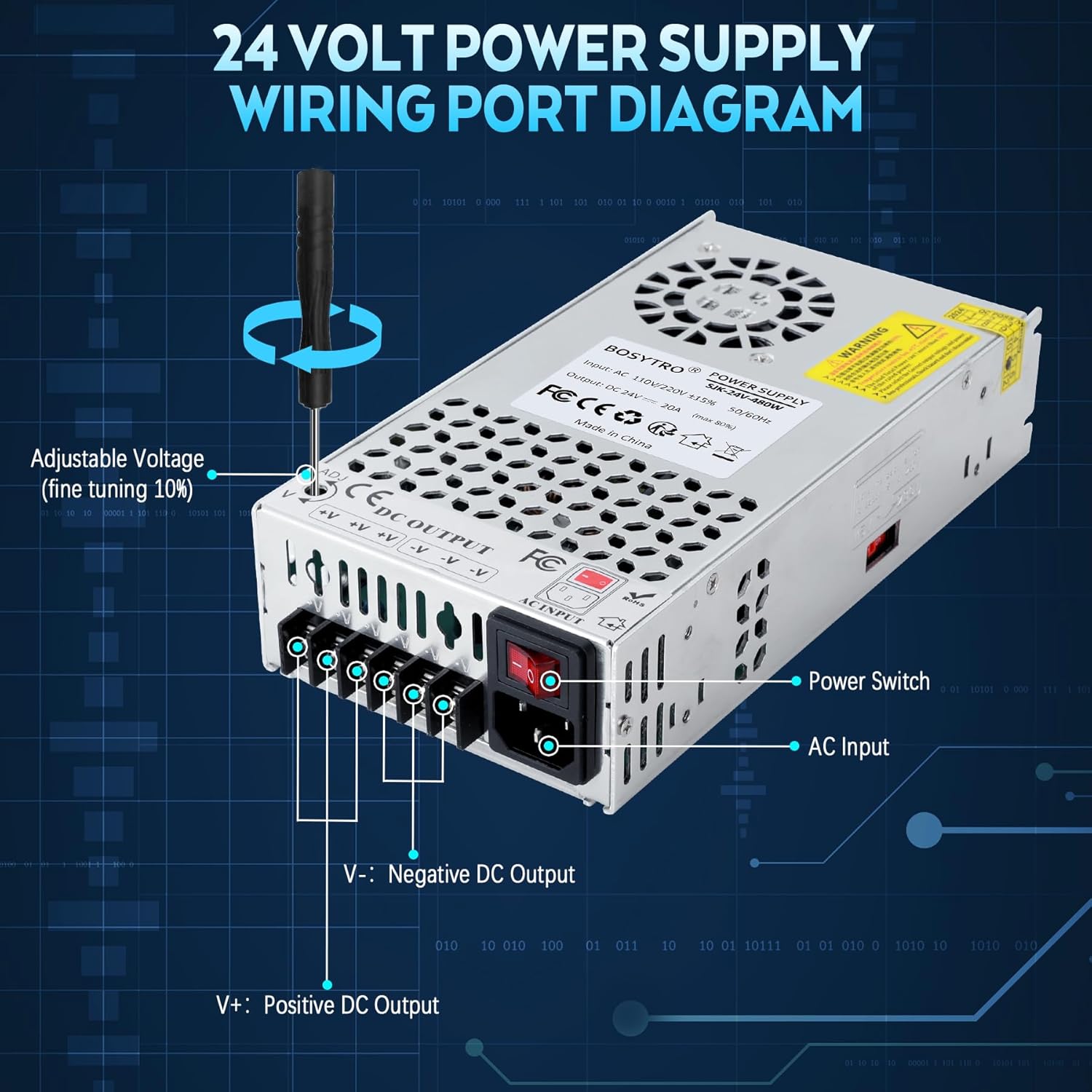
Stampa 4.2: A diagram illustrating the wiring terminals of the 24V power supply, including the AC input, power switch, and DC output terminals (V+ for positive, V- for negative). It also shows the adjustable voltage screw (ADJ) for fine-tuning the output voltage.
5. Istruzzjonijiet Operattivi
5.1 Tixgħel
Once all connections are secure and the input voltage is correctly set, plug the power cord into the AC input and turn on the power switch. The power supply will begin providing 24V DC power to your connected devices.
5.2 Aġġustament tal-Volum tal-Outputtage
L-output voltage can be fine-tuned within a ±10% range (21.6V-26.4V) using the adjustable voltage screw (labeled 'ADJ') located near the DC output terminals. Use a small screwdriver to carefully turn the screw clockwise to increase voltage jew kontra l-arloġġ biex tnaqqas il-voltage. Immonitorja l-volum tal-ħruġtage with a multimeter during adjustment to ensure it meets your device's requirements.
6. Manutenzjoni
Regular maintenance helps ensure the longevity and reliable operation of your power supply:
- Tindif: Keep the unit clean and free from dust. Use a soft, dry cloth to wipe the exterior. Do not use liquid cleaners or solvents.
- Ventilazzjoni: Periodically check that the ventilation holes and cooling fan are not obstructed. Ensure proper airflow to prevent overheating.
- Konnessjonijiet: Regularly inspect all wiring connections for tightness and signs of wear or corrosion. Loose connections can lead to poor performance or safety hazards.
- Ħażna: If storing the unit for an extended period, disconnect it from power, clean it, and store it in a cool, dry place away from direct sunlight and moisture.
7 Issolvi l-problemi
Jekk tiltaqa' ma' problemi bil-provvista tal-enerġija tiegħek, irreferi għall-passi komuni li ġejjin għas-soluzzjoni tal-problemi:
| Problema | Kawża Possibbli | Soluzzjoni |
|---|---|---|
| L-ebda output voltage / L-unità mhux qed tixgħel |
|
|
| Vol. Tal-ħruġtage instabbli jew mhux korrett |
|
|
| Unità sħana żejda |
|
|
| Connectors breaking or loose |
|
|
If the problem persists after attempting these solutions, please contact BOSYTRO customer support.
8. Speċifikazzjonijiet
| Karatteristika | Dettall |
|---|---|
| Brand | BOSYTRO |
| Numru tal-Mudell | SJK-24V-480W-WX |
| Input Voltage | AC 110V/220V (Switchable) |
| Ħruġ Voltage | DC 24V (Adjustable range: 21.6V-26.4V) |
| Kurrent tal-Ħruġ | 20A (Mass) |
| Output Wattage | 480W (Mass) |
| Frekwenza | 50/60 Hz |
| Materjal | Aluminju |
| Dimensjonijiet tal-oġġett (L x W x H) | 8.46 x 4.52 x 1.97 pulzieri (21.5 x 11.5 x 5 ċm) |
| Temperatura operattiva | 14 ℉ -140 ℉ (-10 ℃ -60 ℃) |
| Effiċjenza tax-Xogħol | ≥80% |
| Ċertifikazzjonijiet tas-Sigurtà | CE, RoHS, LVD, EMC |
9. Garanzija u Appoġġ
9.1 Informazzjoni dwar Garanzija
BOSYTRO provides a warranty for this product. Quality issues can be returned or exchanged. Please retain your proof of purchase for warranty claims.
9.2 Appoġġ għall-Klijent
For technical assistance, troubleshooting beyond this manual, or warranty inquiries, please contact BOSYTRO customer support through the retailer where the product was purchased or visit the official BOSYTRO websit għal informazzjoni ta' kuntatt.