
1. Introduzzjoni
Grazzi tax-xiriasing the Dolphin Audio DR30 Diver Sport Portable Speaker. This manual provides essential information for the safe and efficient operation of your device. Please read it thoroughly before use and retain it for future reference. The DR30 Diver Sport is a robust, waterproof portable speaker designed for various environments, featuring Bluetooth 5.3 connectivity, True Wireless Stereo (TWS) pairing, and integrated LED lights.
2. X'hemm fil-Kaxxa
- Dolphin Audio DR30 Diver Sport Portable Speaker
- USB-C Charge Cable
- Kejbil Awżiljarju (AUX).
- Manwal għall-Utent (dan id-dokument)
- Karta ta' Garanzija
3. Prodott Aktarview
Iffamiljarizza ruħek mal-komponenti u l-kontrolli tal-ispiker.

Figura 3.1: Quddiem view of the Dolphin DR30 Diver Sport speaker, demonstrating its waterproof design.

Figura 3.2: Aktarview of key features and specifications including connectivity options and battery performance.
Kontrolli u Portijiet
The DR30 speaker features intuitive controls, typically located on the top or side panel, and various input ports for versatile playback.
- Buttuna tal-Qawwa: Agħfas u żomm biex tixgħel jew titfi l-ispiker.
- Buttuna Play/Pause: Agħfas biex tilgħab jew twaqqaf l-awdjo.
- Buttuni tal-Volum (+/-): Press to adjust volume. Hold to skip tracks.
- Buttuna tal-Modalità: Press to switch between Bluetooth, USB, MicroSD, FM Radio, and AUX input modes.
- Buttuna tad-Dawl: Press to cycle through or turn off the flashing LED light modes.
- Port USB: For USB drive playback and charging.
- Slott tal-Karta MicroSD: Għall-plejbek ta' kard MicroSD.
- Input AUX (3.5mm): For connecting external audio devices via the included AUX cable.
- Port tal-Iċċarġjar USB-C: Għall-iċċarġjar tal-batterija interna tal-ispiker.
4. Setup
4.1 Iċċarġjar tal-Ispeaker
Before first use, fully charge the speaker. Use the provided USB-C cable to connect the speaker to a compatible USB power adapter (not included) or a computer's USB port.
- Id-dawl indikatur tal-iċċarġjar se jixgħel waqt l-iċċarġjar.
- The light will turn off or change color once charging is complete.
- Operating time is up to 7 hours at medium volume; standby time is up to 40 hours.

Figure 4.1: Charging the speaker and connecting an auxiliary device.
4.2 Power On/Off
Press and hold the Power button for approximately 3 seconds to turn the speaker on or off. A sound indicator will confirm the action.
4.3 Tqabbil tal-Bluetooth
- Turn on the DR30 speaker. It will automatically enter Bluetooth pairing mode, indicated by a flashing LED light.
- Fuq it-tagħmir mobbli tiegħek, ippermetti l-Bluetooth u fittex tagħmir disponibbli.
- Select "Dolphin DR30" from the list of devices.
- Once paired, the speaker will emit a confirmation tone, and the LED light will stop flashing.
- The Bluetooth range is approximately 32 ft. to 49 ft. (10-15 meters).
4.4 Tqabbil ta' Stereo Veru Wireless (TWS)
The WaveSync TWS technology allows you to pair two DR30 speakers (sold separately) for a stereo audio experience.
- Ensure both DR30 speakers are powered on and not connected to any Bluetooth device.
- On one speaker (this will be the primary speaker), press and hold the TWS button (if available, or a combination of buttons as per specific model instructions) until you hear a pairing tone.
- Iż-żewġ kelliema jikkonnettjaw ma' xulxin awtomatikament. Jinstema' ħoss ta' konferma ladarba jkunu konnessi.
- Issa, qabbad l-apparat mobbli tiegħek mal-ispiker primarju permezz tal-Bluetooth kif deskritt fit-Taqsima 4.3. L-awdjo se jindaqq stereo permezz taż-żewġ kelliema.
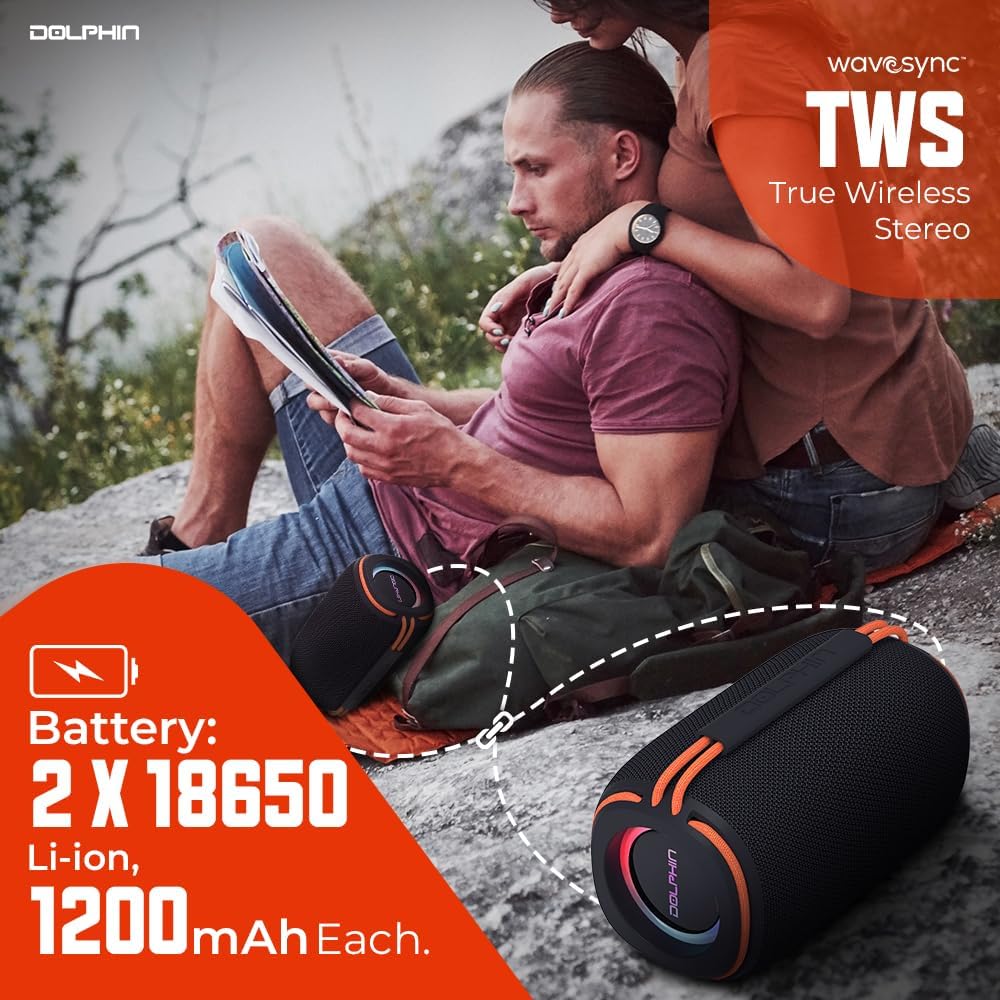
Figure 4.2: Two DR30 speakers connected via TWS for stereo sound.
4.5 Modi Oħra ta' Daqq
Press the Mode button to cycle through available input sources:
- Daqq USB: Insert a USB drive into the USB port. The speaker will automatically switch to USB mode and begin playing supported audio files (WAV, MP3) up to 64 GB.
- Daqq tal-Karta MicroSD: Insert a MicroSD card into the MicroSD card slot. The speaker will automatically switch to MicroSD mode and play supported audio files (WAV, MP3) up to 64 GB.
- Radju FM: In FM mode, the speaker will automatically scan and save available radio stations. Use the volume buttons to navigate between stations.
- Input AUX: Connect an external audio device (e.g., MP3 player, smartphone) to the 3.5mm AUX input using the provided AUX cable. The speaker will switch to AUX mode.
5. Istruzzjonijiet Operattivi
5.1 Basic Audio Controls
- Volum 'il fuq/Niżżel: Agħfas il-buttuni '+' jew '-'.
- Track Li jmiss / Preċedenti: Hold the '+' button for the next track, and the '-' button for the previous track.
- Play/Pawsa: Agħfas il-buttuna Play/Pause.
5.2 Modalità tad-Dawl LED
The DR30 features flashing side LED lights. Press the dedicated Light button to cycle through different light patterns or to turn the lights off.
5.3 Waterproof Guidelines (IPX6)
The DR30 Diver Sport speaker is rated IPX6 waterproof. This means it is protected against powerful water jets from any direction. It is suitable for use by the pool, at the beach, or in rainy conditions. However, it is le designed for submersion in water. Ensure all port covers are securely closed before exposing the speaker to water.
6. Manutenzjoni
- Tindif: Imsaħ il-kelliem b 'soft, damp drapp. Tużax tindif jew solventi li joborxu.
- Ħażna: Aħżen l-ispiker f'post frisk u niexef 'il bogħod mix-xemx diretta u minn temperaturi estremi.
- Kura tal-batterija: Biex ittawwal il-ħajja tal-batterija, evita li tiċċarġja kompletament il-batterija ta’ spiss. Iċċarġja l-ispiker regolarment, anke jekk ma jkunx qed jintuża għal perjodi twal.
- Kisi tal-Portijiet: Always ensure the rubber port covers are firmly sealed to maintain the speaker's waterproof rating.
7 Issolvi l-problemi
| Problema | Kawża Possibbli | Soluzzjoni |
|---|---|---|
| L-ispiker ma jixgħelx | Batterija baxxa; Il-buttuna tal-qawwa ma nżammitx għal żmien twil biżżejjed | Charge the speaker; Press and hold the Power button for 3 seconds |
| L-ebda ħoss | Volum baxx wisq; Modalità ta' input mhux korretta; Apparat mhux imqabbad | Increase volume; Press Mode button to select correct input; Re-pair Bluetooth or check cable connection |
| Il-Bluetooth mhux qed jgħaqqad | L-ispiker mhux fil-modalità ta' tqabbil; L-apparat wisq 'il bogħod; Interferenza | Ensure speaker is in pairing mode; Move device closer; Turn off other Bluetooth devices |
| TWS pairing ifalli | Speakers already connected to another device; Too far apart | Disconnect speakers from other devices; Ensure speakers are close to each other during pairing |
8. Speċifikazzjonijiet

Figure 8.1: Physical dimensions and weight of the DR30 speaker.
| Karatteristika | Dettall |
|---|---|
| Numru tal-Mudell | DR-30 |
| Output ta 'Qawwa | 15 Watts RMS (30 Watts Max) |
| Rispons ta' Frekwenza | 40 Hz sa 18 kHz |
| Verżjoni Bluetooth | v5.3 |
| Medda Bluetooth | 32 ft. to 49 ft. (10-15 meters) |
| Daqs tas-Sewwieq | Single 3-inch full-range driver |
| Klassifikazzjoni li ma jgħaddix ilma minnha | IPX6 |
| Għażliet ta' Daqq | Bluetooth, USB, MicroSD (up to 64 GB, WAV/MP3), FM Radio, 3.5mm AUX |
| Tip ta 'batterija | Built-in Li-Ion (2 x 18650, 1200mAh each) |
| Ħin Operattiv | Sa 7-il siegħa (f'volum medju) |
| Ħin ta' Standby | Sa 40 sigħat |
| Port tal-Iċċarġjar | USB-C |
| Dimensjonijiet tal-Prodott (P x W x H) | 3.5" x 3.5" x 6.5" (8.9 ċm x 8.9 ċm x 16.5 ċm) |
| Piż tal-oġġett | 1.2 lbs (0.54 kg) |
| Materjal | Plastik |
| Metodu ta' Kontroll | Touch buttuni |
9. Informazzjoni dwar Garanzija
The Dolphin Audio DR30 Diver Sport Portable Speaker comes with a limited warranty. Please refer to the included warranty card for detailed terms, conditions, and registration information. Retain your proof of purchase for any warranty claims.
10. Appoġġ
For technical assistance, troubleshooting beyond this manual, or general inquiries, please contact Dolphin Audio customer support. Refer to the warranty card or the official Dolphin Audio websit għad-dettalji tal-kuntatt.