
Introduzzjoni
This manual provides detailed instructions for the safe and efficient operation of your Phomemo M836-B Portable Thermal Printer. The M836-B is an inkless, wireless thermal printer designed for portability and convenience, supporting various paper sizes including US Letter and A4. Please read this manual thoroughly before using the printer to ensure optimal performance and longevity.
Prodott Overview
Karatteristiċi Ewlenin
- Stampar Termali mingħajr Linka: Utilizes thermal technology, eliminating the need for ink cartridges or ribbons.
- Konnettività Wireless: Supports Bluetooth for seamless connection with iOS and Android devices.
- Konnettività USB: Compatible with Windows, macOS, ChromeOS, and Linux via USB Type-C.
- Riżoluzzjoni Għolja: Offers a print resolution of 300 DPI for clear text and graphics.
- Disinn portabbli: Compact and lightweight, ideal for travel and on-the-go printing.
- Appoġġ għal Karta b'Diversi Daqsijiet: Accommodates various thermal paper sizes, including US Letter (8.5'' x 11'') and A4.
- Output Monokromu: Prints in black and white.

Image: The Phomemo M836-B printer demonstrating its inkless thermal printing capability, highlighting no mess from ink.

Immaġni: Aktar minnview of the Phomemo M836-B's key features, including wireless connectivity, inkless operation, 2600mAh battery capacity, and 300 DPI resolution.
Kontenut tal-Pakkett
Ivverifika li l-oġġetti kollha huma preżenti fil-pakkett:
- Phomemo M836-B Portable Thermal Printer
- Thermal Paper (as specified in the box)
- Kejbil USB Type-C
- Manwal għall-Utent (dan id-dokument)
Gwida ta' Setup
1. Iċċarġja l-Istampatur
- Connect the provided USB Type-C cable to the printer's charging port.
- Qabbad it-tarf l-ieħor tal-kejbil USB ma' adapter tal-enerġija USB kompatibbli (mhux inkluż) jew mal-port USB tal-kompjuter.
- The indicator light will show charging status. Charge the printer fully before first use.
2. Tagħbija tal-Karta
The Phomemo M836-B supports both thermal paper rolls and sheet-fed thermal paper.
- Iftaħ il-qoxra tal-kompartiment tal-karta.
- For roll paper: Insert the thermal paper roll into the designated slot, ensuring the printing side faces upwards. Gently pull a small length of paper out.
- For sheet-fed paper: Insert the thermal paper sheet into the input slot, ensuring it is straight and aligned.
- Agħlaq l-għatu tal-kompartiment tal-karta sew.

Image: Illustration of how to load different types of thermal paper (roll and sheet) into the Phomemo M836-B printer, showing the paper selection mechanism.
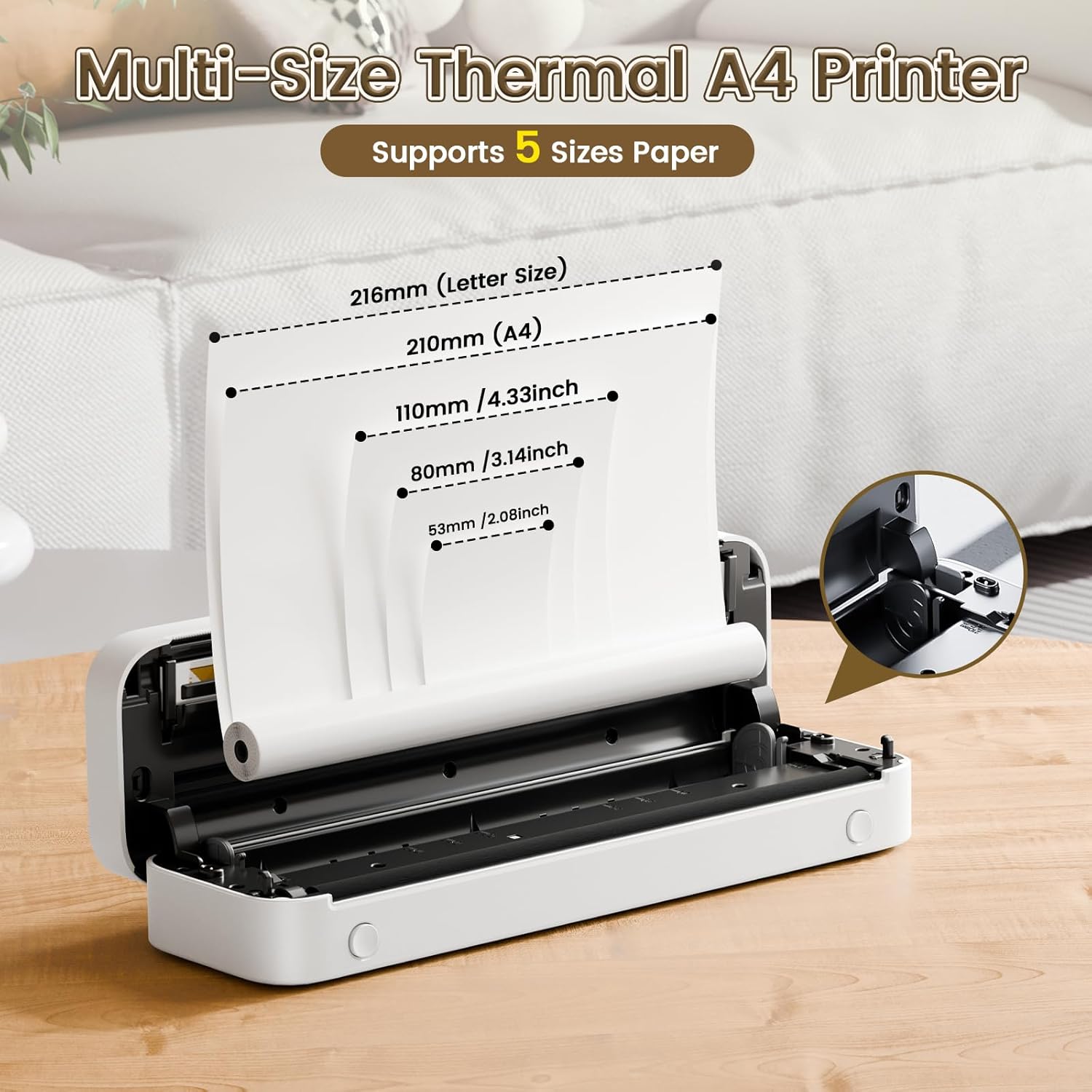
Image: The Phomemo M836-B printer demonstrating support for multiple paper sizes, including US Letter (216mm) and A4 (210mm).
3. Konnessjoni ma' Apparati
Il-printer jappoġġja kemm konnessjonijiet Bluetooth kif ukoll USB.
Bluetooth Connection (for iOS/Android)
- Download the official Phomemo app from your device's app store.
- Turn on the printer by pressing and holding the power button.
- Ippermetti Bluetooth fuq it-tagħmir mobbli tiegħek.
- Open the Phomemo app, search for the printer (M836-B), and pair with it.
- Segwi kwalunkwe prompts fuq l-iskrin biex tlesti l-proċess ta 'tqabbil.
USB Connection (for Windows/macOS/ChromeOS/Linux)
- Kun żgur li l-istampatur huwa mixgħul.
- Qabbad il-printer mal-kompjuter tiegħek billi tuża l-kejbil USB Type-C provdut.
- Żur il-Phomemo uffiċjali websit (www.phomemo.com) to download and install the appropriate drivers for your operating system.
- Once drivers are installed, the printer should be recognized by your computer.

Image: Diagram illustrating the two types of connections supported by the Phomemo M836-B: Bluetooth for Android, iOS, and iPad, and USB for Windows, macOS, ChromeOS, and Linux.
Istruzzjonijiet Operattivi
Printing from Mobile Devices
- Ensure your printer is charged, loaded with paper, and connected via Bluetooth to your mobile device.
- Iftaħ l-app Phomemo.
- Select the document or image you wish to print from within the app.
- Aġġusta s-settings tal-istampar (eż., id-daqs tal-karta, id-densità) kif meħtieġ.
- Tap the print button to initiate printing.
Printing from Computers
- Ensure your printer is charged, loaded with paper, and connected via USB to your computer with drivers installed.
- Iftaħ id-dokument jew file tixtieq tipprintja fuq il-kompjuter tiegħek.
- Mur fuq "File" > "Ipprintja" (jew uża s-shortcut Ctrl+P/Cmd+P).
- Select the Phomemo M836-B from the list of available printers.
- Adjust print preferences (e.g., paper size, orientation) as required.
- Ikklikkja "Ipprintja".
Paper Handling Tips
- Always use high-quality thermal paper for best results.
- Ensure the paper is loaded correctly with the printable side facing the print head.
- Avoid exposing thermal paper to direct sunlight or high temperatures, as this can degrade print quality over time.
- Manually tear off printed documents carefully after printing, as the printer does not have an automatic cutter.
Manutenzjoni
Tindif tal-Istampatur
- Itfi l-istampatur u skonnettja mis-sors tal-enerġija.
- Uża drapp ratba u mingħajr ħelu ftit dampImxarrab bl-alkoħol isopropiliku biex timsaħ bil-mod ir-ras tal-istampar. Ħalliha tinxef kompletament qabel l-użu.
- Clean the exterior of the printer with a soft, dry cloth. Do not use abrasive cleaners or solvents.
Ħażna
- Aħżen il-printer f'post frisk u niexef 'il bogħod mix-xemx diretta u minn temperaturi estremi.
- If storing for an extended period, ensure the printer is fully charged to maintain battery health.
- Keep thermal paper in its original packaging in a dark, cool place to prevent premature fading.
Issolvi l-problemi
If you encounter issues with your Phomemo M836-B printer, refer to the following common problems and solutions:
Printer Not Turning On
- Iċċekkja l-batterija: Ensure the printer is sufficiently charged. Connect it to a power source and try again.
- Buttuna tal-Qawwa: Press and hold the power button for a few seconds to ensure it's properly activated.
Connectivity Issues (Bluetooth/USB)
- Bluetooth:
- Ensure Bluetooth is enabled on your device and the printer is within range.
- Unpair and re-pair the printer in your device's Bluetooth settings.
- Erġa' ibda kemm il-printer kif ukoll l-apparat mobbli tiegħek.
- USB:
- Verify the USB cable is securely connected to both the printer and the computer.
- Ensure the correct printer drivers are installed on your computer. Reinstall if necessary.
- Ipprova port jew kejbil USB differenti.
Poor Print Quality (Blurry, Faded, Streaks)
- Naddaf ir-Ras tal-Istampar: Follow the cleaning instructions in the Maintenance section.
- Paper Quality/Type: Ensure you are using high-quality thermal paper and that it is loaded correctly.
- Densità tal-Istampar: Adjust print density settings in the Phomemo app or printer driver.
- Ħażna tal-Karta: Thermal paper exposed to heat or light can degrade. Try a fresh roll of paper.
Ġammijiet tal-karti
- Turn Off Printer: Immediately turn off the printer.
- Neħħi l-Karta: Gently pull out any jammed paper. Do not force it, as this can damage the printer.
- Reload: Ensure paper is loaded correctly and not wrinkled or bent before restarting.
Speċifikazzjonijiet Tekniċi
| Karatteristika | Speċifikazzjoni |
|---|---|
| Brand | Phomemo |
| Isem tal-Mudell | M836-B |
| Teknoloġija tal-Konnettività | Bluetooth, USB Tip Ċ |
| Teknoloġija tal-Istampar | Termali |
| Output Printer | Monokromu |
| Riżoluzzjoni Massima tal-Istampar | 300 DPI |
| Veloċità Massima tal-Istampar (Monokromu) | 1.5 paġna fil-minuta |
| Apparati Kompatibbli | Android Devices, Mac, Windows, iPhone, iPad |
| Daqs Massimu tal-Midja | 8.5 x 11-il pulzier (Ittra tal-Istati Uniti) |
| Appoġġ għad-Daqs tal-Karta | US Letter, A4 |
| Tip ta' Midja tal-Istampar | Karta Termali |
| Piż tal-oġġett | 1.53 Liri (madwar 694g) |
| Dimensjonijiet tal-Prodott (P x W x H) | 7.8D x 26.4W x 4.5H Ċentimetri |
| Metodu ta' Kontroll | App |
| Pajjiż ta' Oriġini | Iċ-Ċina |
Garanzija u Appoġġ
Specific warranty details for the Phomemo M836-B Portable Thermal Printer are not provided within this document. For information regarding warranty coverage, technical support, or service, please refer to the warranty card included with your product or contact Phomemo customer service directly through their official webis-sit jew l-informazzjoni ta' kuntatt ipprovduta fl-imballaġġ tal-prodott tiegħek.
Official Phomemo Websit: www.phomemo.com


