
Introduzzjoni
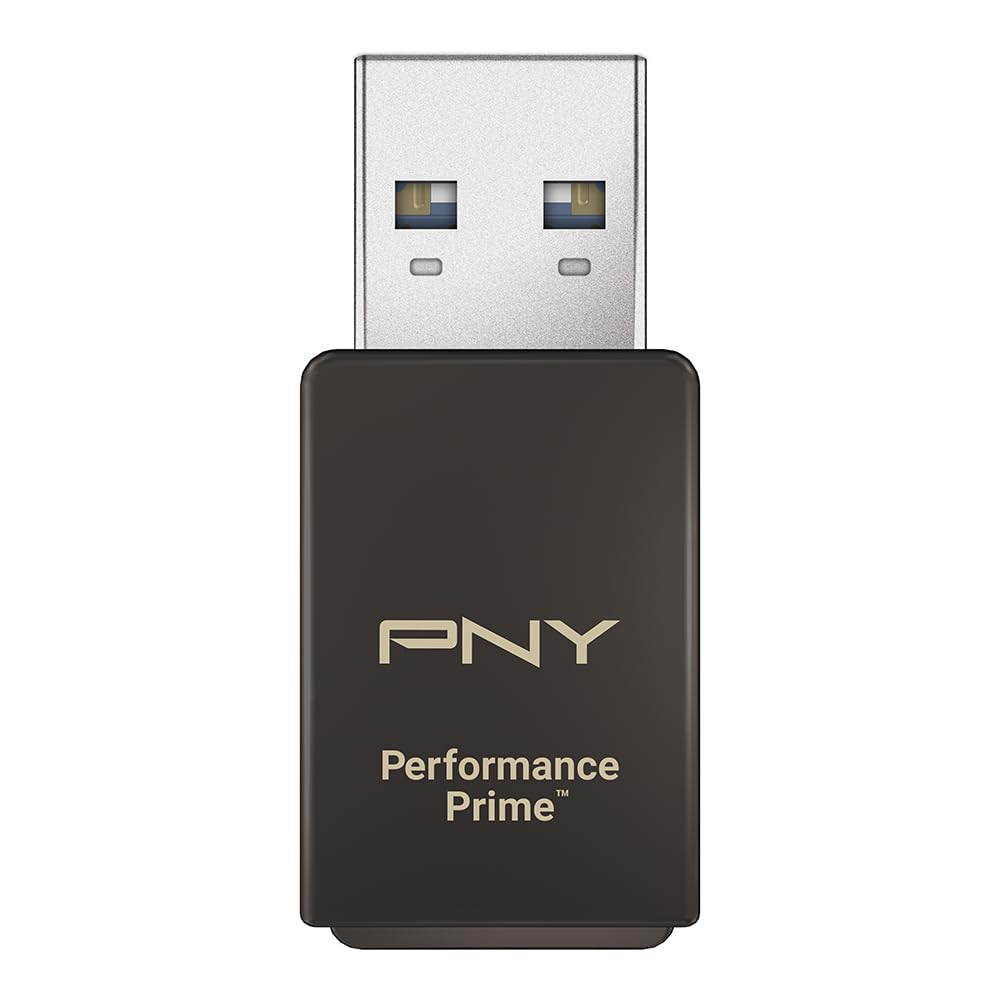
This manual provides instructions for the PNY Performance Prime USB 3.2 Gen 1 microSD Flash Memory Card Reader. It covers product features, setup, operation, maintenance, troubleshooting, and technical specifications to ensure optimal performance and longevity of your device. The PNY Performance Prime card reader is designed for convenient and high-speed data transfer from microSD media to compatible host devices.
Setup
- Spakkjar: Verify that the package contains the PNY Performance Prime USB 3.2 Gen 1 microSD Flash Memory Card Reader.
- Kontroll tal-Kompatibbiltà: Ensure your host device (computer, laptop) has an available USB 3.2 Gen 1 or USB 3.0 Type-A port. The card reader is backwards compatible with USB 2.0 ports, but data transfer speeds will be limited to USB 2.0 performance.
- Daħħal il-Kard microSD: Gently insert your microSD card into the card reader slot. Ensure the card is oriented correctly with the gold contacts facing down and push until it clicks securely into place.
- Qabbad mat-Tagħmir Ospitanti: Plug the USB-A connector of the card reader into an available USB 3.2 Gen 1/USB 3.0 port on your computer. The device is plug-and-play and typically requires no additional driver installation.

Video 1: PNY PRO Elite Prime microSD OverviewDan il-filmat jipprovdi ħarsa ġenerali lejnview of the PNY PRO Elite Prime microSD card and its capabilities, demonstrating its use with the card reader.
Istruzzjonijiet Operattivi
- Aċċess għad-Data: Once connected, your operating system (Windows, macOS) will typically recognize the microSD card as a removable drive. You can access its contents by navigating to 'This PC' or 'My Computer' (Windows) or 'Finder' (macOS) and selecting the corresponding drive letter or name.
- Trasferiment Files: Biex tittrasferixxi files, drag and drop them between your computer's folders and the microSD card's drive. For optimal transfer speeds, ensure both your microSD card and the host device support USB 3.2 Gen 1/USB 3.0.
- Tkeċċija Sikura: Before physically removing the card reader from your computer, always safely eject the drive through your operating system. This prevents data corruption. On Windows, right-click the drive icon in 'This PC' and select 'Eject'. On macOS, drag the drive icon to the Trash or click the Eject button next to the drive in Finder.
- Removing microSD Card: After safe ejection, gently push the microSD card further into the slot until it springs out slightly, then carefully pull it out.

Video 2: Take Content to New Heights with PRO Elite Prime microSD. This video demonstrates the practical application of the PNY PRO Elite Prime microSD card, highlighting its performance in various scenarios, which is facilitated by the card reader.
Manutenzjoni
- Tindif: Use a soft, dry, lint-free cloth to clean the exterior of the card reader. Do not use liquid cleaners, abrasive materials, or solvents, as these can damage the device.
- Ħażna: Store the card reader in a cool, dry environment away from direct sunlight and extreme temperatures when not in use.
- Immaniġġjar: Avoid dropping the device or subjecting it to physical shock. Protect the USB connector and microSD card slot from dust and debris.
- Kura tal-Kard MicroSD: Always handle microSD cards by their edges. Avoid touching the gold contacts to prevent damage or data loss.
Issolvi l-problemi
- Apparat Mhux Rikonoxxut:
- Ensure the card reader is fully and securely inserted into the USB port.
- Try connecting the card reader to a different USB port on your computer.
- Test the card reader on another computer to determine if the issue is with the device or the host computer.
- Verify that the microSD card is correctly inserted into the card reader.
- Iċċekkja l-Maniġer tal-Apparat (Windows) jew l-Informazzjoni tas-Sistema (macOS) tal-kompjuter tiegħek biex tara jekk l-apparat USB huwiex elenkat.
- Veloċitajiet ta' Trasferiment Baxxi:
- Confirm that your computer's USB port is a USB 3.2 Gen 1 or USB 3.0 port. Connecting to a USB 2.0 port will limit speeds to USB 2.0 performance.
- Ensure your microSD card is a high-speed card (e.g., UHS-I U3 or V30 rated) to achieve maximum transfer rates.
- Close any other applications that might be consuming significant system resources or performing background data transfers.
- Il-Karta MicroSD Mhux Qed Taqra:
- Inspect the microSD card for any visible damage or bent contacts.
- Try the microSD card in another compatible device to confirm its functionality.
- Ensure the card is inserted correctly and fully into the reader's slot.
Speċifikazzjonijiet
| Karatteristika | Dettall |
|---|---|
| Brand | PNY |
| Isem tal-Mudell | PNY Performance Prime USB 3.2 Gen 1 |
| Tip ta' Memorja Flash | Mikro SD |
| Apparati Kompatibbli | USB 3.2 Gen 1/USB 3.0 equipped devices, backwards compatible with USB 2.0. |
| Kulur | Griż |
| Karatteristiċi Addizzjonali | High Speed, Portable |
| Aqra Veloċità | Sa 200 Megabytes Kull Sekonda |
| Ikteb Veloċità | Sa 150 Megabytes Kull Sekonda |
| Konnettività tal-Hardware | USB, USB 3.0, USB 3.2 Gen 1 |
| Klassi tal-Veloċità tal-Assoċjazzjoni Diġitali Sikura | Klassi 10 |
| Piż tal-oġġett | 0.02 Kilogrammi |
| Numru tal-Mudell | P-CRUAUSDDG3CPPR-GE |
| UPC | 751492792811 |
Informazzjoni dwar Garanzija
The PNY Performance Prime USB 3.2 Gen 1 microSD Flash Memory Card Reader comes with an 18-month limited warranty. For detailed terms and conditions, please refer to the official PNY websit jew ikkuntattja l-appoġġ tal-klijent.
Appoġġ
For further assistance, technical support, or warranty claims, please visit the official PNY websit fuq www.pny.com or contact PNY customer service through the contact information provided on their websit.