
1. Prodott Aktarview
This manual provides essential information for the Lenovo 15.6" FHD IdeaPad Business Laptop. It covers initial setup, operation, maintenance, troubleshooting, and technical specifications to help you maximize your laptop's performance and longevity.
The Lenovo IdeaPad Business Laptop is designed for productivity, featuring an Intel Core i5 processor, 12GB RAM, and a 512GB SSD. It includes a 15.6-inch Full HD display, an integrated camera with a privacy shutter, and a numeric keypad for enhanced usability. The laptop operates on Windows 11 Pro and comes with a Microsoft Office Lifetime Suite. It also includes PLUSERA Earphones as an accessory.

Image: The Lenovo 15.6-inch IdeaPad Business Laptop in a closed position, showcasing id-disinn eleganti tiegħu.
2. Setup Inizjali
2.1 Il-Ftuħ tal-Kaxxa u l-Ewwel Xgħel
- Oħroġ il-laptop u l-aċċessorji kollha mill-imballaġġ bir-reqqa.
- Connect the power adapter to the laptop's power port and then to an electrical outlet.
- Open the laptop lid. The laptop may power on automatically (Flip to Start feature). If not, press the power button located on the top right of the keyboard.
- Segwi l-istruzzjonijiet fuq l-iskrin biex tlesti s-setup inizjali tal-Windows 11 Pro, inkluż il-lingwa, ir-reġjun, il-konnessjoni tan-netwerk, u l-ħolqien tal-kont tal-utent.
2.2 Konnessjoni tal-Periferali
Il-laptop tiegħek huwa mgħammar b'diversi portijiet għall-konnessjoni ta' apparati esterni:
- Port USB-C: Għat-trasferiment tad-dejta u l-kunsinna tal-enerġija.
- Portijiet USB-A: Għall-konnessjoni ta' apparati USB bħal ġurdien, tastieri, jew drives esterni.
- Port HDMI: Għall-konnessjoni ma' displays jew projetturi esterni.
- Jack tal-Headphone/Mikrofonu Combo: Għad-dħul u l-ħruġ tal-awdjo.
- SD Card Reader: Għall-aċċess tad-dejta minn karti SD.
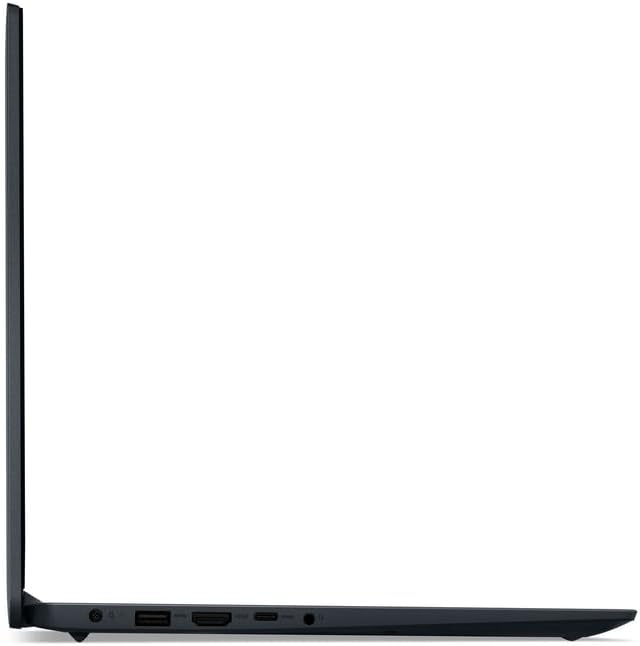
Image: Left side of the laptop showing the power input, HDMI port, USB-C port, and headphone/microphone combo jack.
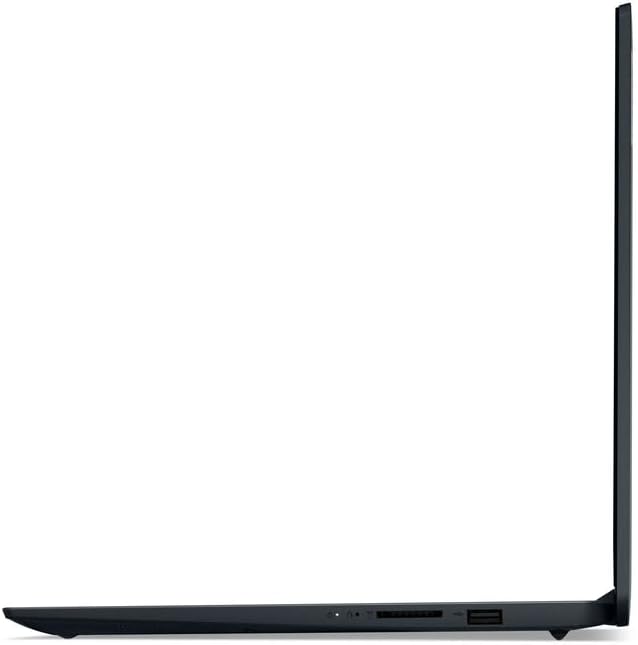
Image: Right side of the laptop showing two USB-A ports and an SD card reader.
2.3 PLUSERA Earphones Setup
The included PLUSERA Earphones can be paired via Bluetooth for wireless audio. Follow these steps:
- Ensure the earphones are charged and in pairing mode.
- On your laptop, go to Settings > Bluetooth u apparati.
- Ixgħel il-Bluetooth u kklikkja Żid apparat.
- Select the PLUSERA Earphones from the list of available devices to pair.

Image: Visual guide for one-step pairing of PLUSERA Earphones, showing the earphones in their case and a smartphone's Bluetooth settings screen.
3. It-Tħaddim tal-Laptop Tiegħek
3.1 Ġestjoni tal-Enerġija
- Qawwa Mixgħul: Iftaħ l-għatu jew agħfas il-buttuna tal-qawwa.
- Modalità Sleep: Agħlaq l-għatu jew agħżel 'Sleep' mill-menù Start.
- Itfi: Mur fuq Start > Power > Shut down.
- Ħajja tal-batterija: The laptop offers up to 10 hours of battery life and supports rapid charging.
3.2 Tastiera u Touchpad
The laptop features a full-size keyboard with a dedicated numeric keypad for efficient data entry. The precision touchpad supports multi-touch gestures for navigation.

Immaġni: Minn fuq għal isfel view of the laptop, highlighting the full keyboard with numeric keypad and touchpad.
3.3 Kamera u Awdjo
- Kamera Integrata: Located above the display, suitable for video calls.
- Xater tal-Privatezza tal-Kamera: Slide the physical shutter to cover the camera lens for privacy.
- Dolby Audio: Ittejjeb il-kwalità tal-ħoss għal esperjenza awdjo immersiva.
- Mikrofoni b'Arranġament Doppju: For clear voice input during calls.
3.4 Operating System and Software
- Windows 11 Pro: Provides enhanced security, performance, and features for business and personal use.
- Microsoft Office Lifetime Suite: Pre-installed for productivity tasks.
4. Manutenzjoni u Kura
4.1 Tindif tal-Laptop Tiegħek
- Dejjem itfi l-laptop u skonnettja l-adapter tal-enerġija qabel ma tnaddaf.
- Uża drapp ratba u mingħajr ħelu ftit dampNaddaf bl-ilma jew b'tindif tal-iskrin għall-wiri.
- Għat-tastiera u x-chassis, uża drapp artab. Evita kimiċi ħarxa jew materjali li joborxu.
4.2 Kura tal-Batterija
- Biex ittawwal il-ħajja tal-batterija, evita li tiċċarġja kompletament il-batterija ta' spiss.
- Aħżen il-laptop f'post frisk u niexef jekk ma tużahx għal perjodi twal.
- Periodically update your laptop's drivers and firmware to ensure optimal battery performance.
4.3 Aġġornamenti tas-Software
Regularly check for and install updates for Windows 11 Pro and Microsoft Office to ensure system stability, security, and access to the latest features.
5 Issolvi l-problemi
Din it-taqsima tindirizza kwistjonijiet komuni li tista’ tiltaqa’ magħhom bil-laptop tiegħek.
5.1 Kwistjonijiet tal-Enerġija
- Il-laptop ma jixgħelx: Ensure the power adapter is securely connected to both the laptop and a working electrical outlet. Check if the power indicator light is on. Try pressing and holding the power button for 10-15 seconds.
- Il-batterija mhix qed tiċċarġja: Verify the power adapter is functioning correctly. Try a different outlet. Ensure the charging port on the laptop is clean and free of debris.
5.2 Problemi tal-Wiri
- Skrin vojt: Connect an external monitor via HDMI to check if the display issue is with the laptop screen or the graphics output. Restart the laptop.
- Skrin li jteptep: Update your graphics drivers. Adjust the display refresh rate in Windows settings.
5.3 Kwistjonijiet ta' Konnettività
- Il-Wi-Fi mhux qed jikkonnettja: Kun żgur li l-Wi-Fi huwa attivat fis-settings tal-Windows. Erġa' ibda r-router u l-laptop tiegħek. Iċċekkja għal sewwieqa tal-Wi-Fi aġġornati.
- Apparat Bluetooth mhux qed jitqabbad: Ensure Bluetooth is enabled on both the laptop and the device. Make sure the device is in pairing mode and within range.
Għal kwistjonijiet aktar kumplessi, irreferi għall-appoġġ ta' Lenovo websit jew ikkuntattja lis-servizz tal-konsumatur.
6. Speċifikazzjonijiet Tekniċi
| Karatteristika | Speċifikazzjoni |
|---|---|
| Brand | Lenovo |
| Isem tal-Mudell | Lenovo 15 |
| Daqs tal-Iskrin | 15.6 Pulzier |
| Riżoluzzjoni tal-Wiri | 1920 x 1080 pixel (FHD) |
| Proċessur | Intel Core i5 (10 Cores, up to 4.4 GHz) |
| Koproċessur tal-Grafika | Grafika Intel Iris Xe |
| Memorja RAM | 12 GB DDR4 (Espansibbli sa 64 GB) |
| Ħażna | 512 GB SSD |
| Sistema Operattiva | Windows 11 Pro |
| Konnettività | Wi-Fi 6 (802.11ax), Bluetooth 5 |
| Portijiet | 1x USB-C, 2x USB-A, 1x HDMI, 1x Headphone/Microphone Combo Jack, 1x SD Card Reader |
| Ħajja tal-batterija | Up to 10 Hours (42 Watt Hours) |
| Karatteristiċi Speċjali | Anti-Glare Coating, Camera Privacy Shutter, HD Audio, Numeric Keypad |
| Dimensjonijiet (T x W x Ħ) | 14.14" x 9.31" x 0.78" |
| Piż | 4.6 Liri |
7. Garanzija u Appoġġ
7.1 Garanzija tal-Prodott
This Lenovo IdeaPad Business Laptop comes with a Garanzija Limitata ta' 1 Snin mingħand il-manifattur. Din il-garanzija tkopri difetti fil-materjali u l-abbilità taħt użu normali. Jekk jogħġbok żomm il-prova tax-xiri tiegħek għal talbiet ta' garanzija.
7.2 Appoġġ għall-Klijent
For technical assistance, warranty service, or further inquiries, please visit the official Lenovo support website or contact their customer service. You can typically find support contact information and resources on the Lenovo website by searching for your specific model number (Lenovo 15).
Before contacting support, it is recommended to have your laptop's serial number and proof of purchase readily available.