
1. Introduzzjoni
This manual provides detailed instructions for the installation, operation, and maintenance of your QttyElok V7024BM6 7-inch WiFi IP Video Intercom System. This system includes a 7-inch AHD 1080P touchscreen indoor monitor and an outdoor doorbell camera, designed to enhance your home security and communication. Please read this manual thoroughly before installation and use to ensure proper function and safety.
2. Informazzjoni dwar is-Sigurtà
- Ensure all power is disconnected before performing any installation or wiring.
- L-installazzjoni għandha titwettaq minn persunal kwalifikat jekk m'intix ċert dwar il-wajers elettriċi.
- Do not expose the outdoor camera to extreme temperatures outside its operating range (-30℃ to 60℃).
- Keep the indoor monitor away from water and high humidity.
- Uża biss l-adapter tal-enerġija pprovdut.
3. Kontenut tal-Pakkett
Ivverifika li l-komponenti kollha huma preżenti fil-pakkett tiegħek:
- Monitor ta' ġewwa ta' 7 pulzieri
- Kamera ta' Qanpiena ta' Barra
- Power Adapter (for Indoor Monitor)
- Viti u Ankri tal-Immuntar
- Wiring Cables (4-wire cable)
- Manwal għall-Utent
4. Setup u Installazzjoni
4.1 Dijagramma tal-Wiring
The system uses a 4-wire connection between the indoor monitor and the outdoor camera. Ensure correct polarity and secure connections.

Immaġni: Wiring diagram illustrating the connection points for the indoor monitor, outdoor camera, and power supply. The diagram shows color-coded wires (GND, Audio, Video, Power) for the outdoor unit and corresponding terminals on the indoor monitor, along with the power adapter connection.
The maximum distance between the monitor and doorbell can be extended up to 100 meters using RVV4 (4-wire), Cat5, or Cat6 cable.
4.2 Installazzjoni ta' Monitor ta' Ġewwa
The indoor monitor is designed for wall-mount installation. Choose a suitable location indoors, away from direct sunlight and heat sources. Secure the mounting bracket to the wall and then attach the monitor.
4.3 Installazzjoni ta' Kamera ta' Barra
The outdoor camera is designed for surface-mount installation. Install it at a height that allows for optimal viewing of visitors. The camera has a 120° wide-angle lens. Ensure it is protected from direct heavy rain, although it is designed to be waterproof and dustproof.

Immaġni: Dettaljati views of the indoor monitor (front and back) and the outdoor camera (front, side, and back). The images highlight the physical design, connection points, and mounting features of both units.
4.4 App Connection (Tuya Smart)
The indoor monitor supports 2.4G Wi-Fi connectivity. Download the "Tuya Smart" application on your smartphone. Follow the on-screen instructions on the monitor to pair it with the app. This enables remote access features.
Immaġni: A visual comparison showing an easy method of connecting the indoor monitor to a smartphone app via a QR code, contrasted with a more complicated, less intuitive method.
5. Istruzzjonijiet Operattivi
5.1 Indoor Monitor Functions
The 7-inch IPS touchscreen monitor provides intuitive control. Key functions include:
- Intercom: Two-way audio communication with visitors.
- Monitoraġġ: View live feed from the outdoor camera.
- Il-ftuħ: Remotely unlock connected doors.
- Reġistrazzjoni: Capture photos and videos of visitors.
- Daqq: Review recorded media.
The monitor supports 10 languages, including English, Chinese, Russian, French, German, Arabic, Portuguese, Spanish, Italian, and Polish. You can change the language setting through the monitor's configuration menu.

Immaġni: A screenshot of the 7-inch indoor monitor's display, showing the main interface with time and weather, and an overlay of the configuration menu highlighting language selection options.
5.2 Two-way Intercom and Remote Unlocking
When a visitor presses the doorbell, the indoor monitor will ring, and you can see and speak with the visitor. You can also remotely unlock the door directly from the monitor.

Immaġni: A visual representation of the two-way intercom functionality, showing a person at the outdoor doorbell speaking to someone inside via the indoor monitor, and also demonstrating remote unlocking via a smartphone app.
5.3 Photo/Video Recording and Playback
The system has a built-in 6MB memory and supports up to a 128GB TF card (not included) for expanded storage. It can automatically record photos or videos when motion is detected or when the doorbell is pressed. You can review these recordings at any time through the monitor's media menu.

Immaġni: The indoor monitor screen displaying a gallery of recorded photos and videos, indicating the system's ability to store and play back media. A decorative filmstrip graphic is shown below the monitor.
5.4 Sejbien tal-Moviment
The outdoor camera features motion detection. When motion is detected, the system can automatically trigger recording and send notifications to your linked Tuya Smart app. You can adjust the detection range in the settings.
5.5 Viżjoni bil-lejl
The outdoor camera is equipped with IR night vision, providing clear visibility up to 3 meters in low-light conditions. The 2MP camera ensures 1080P AHD resolution for both day and night viewing.
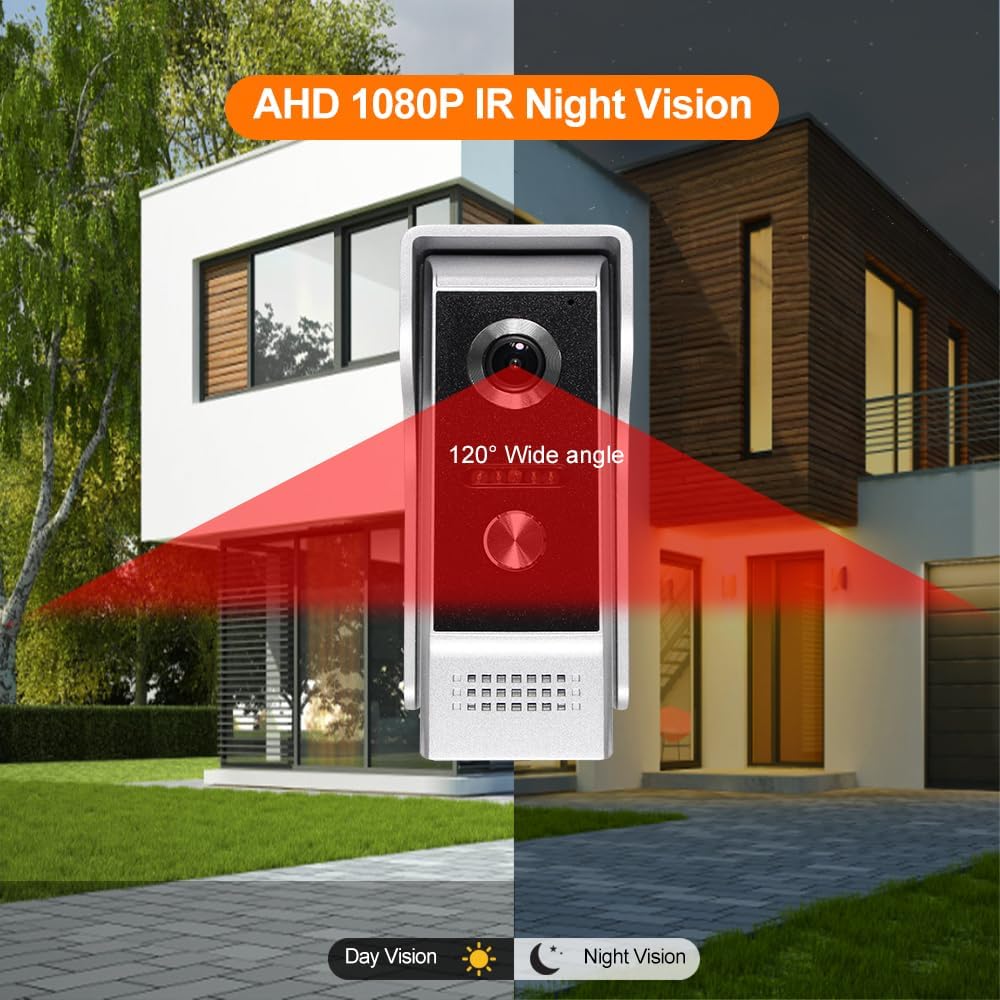
Immaġni: A split image demonstrating the outdoor camera's capabilities, showing a clear daytime view on one side and an equally clear infrared night vision view on the other, highlighting the 1080P AHD IR Night Vision feature.
5.6 Tuya Smart App Integration
Bl-app Tuya Smart, tista':
- Receive real-time notifications when the doorbell is pressed or motion is detected.
- View live video feed from the outdoor camera.
- Engage in two-way audio communication with visitors from anywhere.
- Remotely unlock your door.
- Review recorded photos and videos.
6. Manutenzjoni
- Tindif: Use a soft, dry cloth to clean the monitor screen and camera lens. Avoid abrasive cleaners.
- Aġġornamenti tas-Software: Periodically check for firmware updates through the Tuya Smart app or the monitor's settings to ensure optimal performance and security.
- Spezzjoni tal-Cable: Regularly inspect all wiring for any signs of damage or wear.
7 Issolvi l-problemi
7.1 No Power to Indoor Monitor
- Check if the power adapter is securely plugged into both the monitor and a working power outlet.
- Kun żgur li l-iżbokk tad-dawl huwa funzjonali.
7.2 No Video from Outdoor Camera
- Verify that the 4-wire cable connecting the outdoor camera to the indoor monitor is correctly and securely connected at both ends.
- Check for any damage to the cable.
7.3 Cannot Connect to Tuya Smart App
- Ensure your home Wi-Fi network is 2.4GHz. The system does not support 5GHz Wi-Fi.
- Check that your Wi-Fi signal strength is adequate at the monitor's location.
- Restart your Wi-Fi router and the indoor monitor.
- Follow the app pairing instructions carefully, ensuring the monitor is in pairing mode.
7.4 Kwalità tal-Awdjo Fqira
- Ensure there are no obstructions near the microphone or speaker on either unit.
- Check for strong electromagnetic interference nearby.
8. Speċifikazzjonijiet Tekniċi

Immaġni: A comprehensive diagram illustrating the dimensions of both the indoor monitor and the outdoor camera, along with a visual summary of key features such as Tuya Smart compatibility, AHD 1080p, motion detection, monitoring, unlocking, CCTV support, TF card support, rain-proof design, 120° view angle, night vision, and alarm functions.
| Karatteristika | Speċifikazzjoni |
|---|---|
| Brand | QttyElok |
| Numru tal-Mudell | V7024BM6 |
| Protokoll tal-Konnettività | Wi-Fi (2.4G biss) |
| Karatteristiċi Speċjali | Motion Sensor, Two-way Audio, Local Recording, Night Vision, HD Resolution |
| Indoor Monitor Display | Skrin tattili IPS ta' 7 pulzieri |
| Indoor Monitor Resolution | 1024 * 600 |
| Indoor Monitor Power | DC 15V/1.2A (Standby: ≤3W; Operating: ≤10W) |
| Indoor Monitor Dimensions | 195 x 132 x 18 mm (7.67 x 5.19 x 0.71 pulzieri) |
| Outdoor Camera Material | Liga tal-Aluminju |
| Outdoor Camera Angle of View | 120° |
| Riżoluzzjoni tal-Kamera ta' Barra | 2.0MP (1080P AHD) |
| Distanza tal-Viżjoni bil-lejl | 0.2 - 3 metru |
| Outdoor Camera Power | Powered by monitor (Standby: <2W; Operating: <5W) |
| Dimensjonijiet tal-Kamera ta' Barra | 125 x 52 x 45 mm (4.92 x 2.05 x 1.77 pulzieri) |
| Temperatura operattiva | -30℃ sa 60℃ (-22°F sa 140°F) |
| Ħażna | Built-in 6MB, supports up to 128GB TF card (not included) |
| Espansjoni tas-Sistema | Max. 4 indoor units + 2 outdoor units + 2 CCTV cameras (2MP 1080P AHD only) |
| Lingwi Appoġġjati | Chinese, English, German, French, Italian, Spanish, Portuguese, Arabic, Russian, Polish |
9. Garanzija u Appoġġ
Għal informazzjoni dwar il-garanzija u appoġġ tekniku, jekk jogħġbok irreferi għad-dokumentazzjoni pprovduta fil-ħin tax-xiri jew ikkuntattja lill-bejjiegħ tiegħek. Żomm l-irċevuta tax-xiri tiegħek bħala prova tax-xiri.