
Prodott Overview
The XO BE18 is a stereo audio wireless Bluetooth headset featuring RGB lighting. It is designed for immersive listening experiences and convenient communication, offering multiple playback modes including Bluetooth, AUX, TF card, and FM radio.
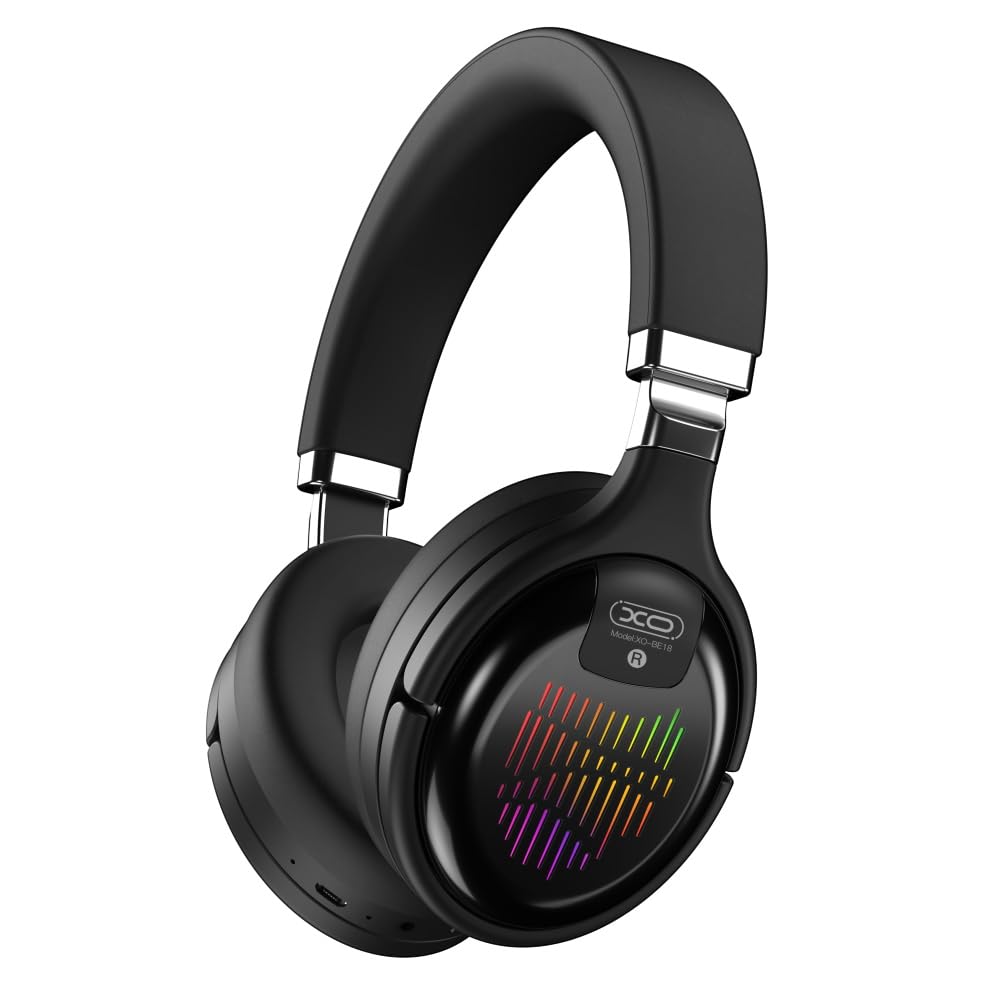
Image: The XO BE18 Wireless Bluetooth Headset, showcasing its over-ear design and integrated RGB lighting on the earcups.
Kontenut tal-Pakkett
Jekk jogħġbok kun żgur li l-oġġetti kollha huma preżenti fil-pakkett:
- XO BE18 Wireless Bluetooth Headset
- Iċċarġjar Cable
- Manwal għall-Utent (dan id-dokument)

Image: The XO BE18 headset shown within its retail packaging, indicating the included accessories.
Setup
Iċċarġjar tal-Headset
- Sib il-port tal-iċċarġjar fuq il-headset.
- Connect the provided charging cable to the headset and a compatible USB power source (e.g., computer USB port, USB wall adapter).
- The LED indicator on the headset will typically show a specific color (e.g., red) during charging and change (e.g., turn off or blue) when fully charged.
- Ċarġ sħiħ jieħu madwar 2.5 sigħat.
Tixgħel/Jitfi
- Biex Tixgħel: Press and hold the Power button for approximately 3-5 seconds until the LED indicator lights up and you hear an audible prompt.
- Biex Tifi: Press and hold the Power button for approximately 3-5 seconds until the LED indicator turns off and you hear an audible prompt.
Istruzzjonijiet Operattivi
Tqabbil tal-Bluetooth
- Kun żgur li l-widna hija mitfija.
- Press and hold the Power button for approximately 5-7 seconds until the LED indicator flashes rapidly (e.g., alternating blue and red), indicating pairing mode.
- Fuq l-apparat tiegħek (smartphone, tablet, kompjuter), attiva l-Bluetooth u fittex apparati disponibbli.
- Select "XO BE18" from the list of found devices.
- Once paired, the LED indicator will typically flash slowly or turn solid blue, and you will hear a confirmation tone.
Kontrolli Bażiċi
The headset features various buttons for controlling audio playback and calls. Refer to the image below for button locations.

Immaġni: Close-up view of the XO BE18 headset earcup, highlighting the control buttons and ports.
- Buttuna tal-Qawwa: Agħfas u żomm biex tixgħel/titfi. Agħfas qasir biex tilgħab/twaqqaf il-mużika jew twieġeb/temm telefonati.
- Volum 'il fuq (+): Agħfas qasir biex iżżid il-volum. Agħfas fit-tul għat-trakka li jmiss.
- Volum 'l isfel (-): Agħfas qasir biex tnaqqas il-volum. Agħfas fit-tul għat-trakka ta' qabel.
- Buttuna tal-Modalità (M): Short press to switch between Bluetooth, AUX, TF card, and Radio modes.
Dawl RGB
The headset features integrated RGB lighting on the earcups. This lighting typically activates automatically when the headset is powered on. Specific controls for the RGB lighting (if any) may be integrated with the mode button or a dedicated button not explicitly detailed.

Image: The XO BE18 headset displaying its colorful RGB lighting on the earcups.
Uża l-Mikrofonu
The built-in microphone allows for hands-free calls. When a call comes in, press the Power button once to answer. Press again to end the call.
Modalità AUX
Connect an audio cable (not included) from your device's 3.5mm audio jack to the headset's AUX port to use it in wired mode. The headset does not require power in AUX mode.
Modalità TF Card
Daħħal kard TF (microSD) bl-awdjo files into the designated slot. Use the Mode button to switch to TF card mode.
Modalità tar-Radju
Use the Mode button to switch to Radio mode. The headset will automatically scan for available FM radio stations.
Manutenzjoni
- Tindif: Uża drapp artab u niexef biex tnaddaf il-headset. Tużax prodotti tat-tindif jew solventi li joborxu.
- Ħażna: When not in use, store the headset in a cool, dry place. The headset features a portable folding design for compact storage.
- Kura tal-batterija: Biex ittawwal il-ħajja tal-batterija, evita li tiċċarġja kompletament il-batterija ta' spiss. Iċċarġja l-headset regolarment, anke jekk ma tkunx qed tużaha kontinwament.
- Espożizzjoni għall-Ilma: This headset is not waterproof. Avoid exposure to water or excessive moisture.

Image: The XO BE18 headset shown in its folded configuration, demonstrating its portable design.
Issolvi l-problemi
| Problema | Soluzzjoni Possibbli |
|---|---|
| Il-headset ma jixgħelx. | Kun żgur li l-headset huwa ċċarġjat kompletament. Qabbad ma' sors ta' enerġija u erġa' pprova. |
| Ma tistax tqabbad mat-tagħmir. |
|
| L-ebda ħoss jew volum baxx. |
|
| Il-mikrofonu mhux qed jaħdem. |
|
| Id-dawl RGB mhux qed jaħdem. | Ensure the headset is powered on. If the issue persists, contact customer support. |
Speċifikazzjonijiet
| Karatteristika | Dettall |
|---|---|
| Isem tal-Mudell | BE18 |
| Konnettività | Wireless (Bluetooth V5.0) |
| Firxa Wireless | Madwar 10-il metru |
| Teknoloġija Awdjo | Hi-Fis Audio, Intelligent Noise Reduction |
| Tqegħid tal-widnejn | Fuq Widnejn |
| Kontroll tal-Ħoss | Iżolament tal-Ħoss |
| Mikrofonu | Mibnija fil- |
| Kapaċità tal-batterija | 250mAh |
| Ħin ta 'Daqq tal-Mużika | Madwar 4 sigħat |
| Ħin tas-Sejħa | Madwar 4 sigħat |
| Ħin tal-Iċċarġjar | Madwar 2.5 sigħat |
| Ħin ta' Standby | Long Standby Capability |
| Qawwa tal-Kelliem | 3 mW |
| Sensittività | 94 ± 3dBm |
| Proporzjon S/N | >=75dB |
| Frekwenza tax-Xogħol | 20Hz-20KHz |
| Modi tal-logħob | Bluetooth, AUX, TF Card, Radio |
| Protokolli Bluetooth | A2DP, HSP, HFP |
| Dimensjonijiet (Pakkett) | 195 x 195 x 80 mm |
| Kulur | Iswed |

Image: A detailed table outlining the technical specifications and product information for the XO BE18 headset.
Garanzija u Appoġġ
This product comes with a standard manufacturer's warranty. For specific warranty terms and conditions, please refer to the warranty card included in your product packaging or contact the retailer where you purchased the product.
For technical support or further assistance, please contact your retailer or visit the official XO websit (jekk disponibbli).