
Introduzzjoni
Thank you for choosing the TECKNET TK-MS017 Ergonomic Wireless Vertical Mouse. This manual provides detailed instructions for setting up, operating, maintaining, and troubleshooting your new mouse. Designed for comfort and efficiency, this vertical mouse helps reduce wrist strain during prolonged use.

The TECKNET Ergonomic Vertical Mouse, designed for comfortable use.
Karatteristiċi tal-Prodott
- Disinn Vertikali Ergonomiku: Mimics a natural handshake posture to reduce wrist and arm pressure, preventing discomfort from prolonged use.
- DPI aġġustabbli: 5 levels of DPI (800/1600/2400/3200/4800) for precise tracking and adaptable sensitivity.
- Klikks Siekta: 99% noise reduction for a quiet working environment. (Forward/Backward buttons are not silent).
- 6 Buttuni: Includes standard left/right click, scroll wheel, DPI switch, and convenient forward/backward buttons for web navigazzjoni.
- Stable 2.4G Wireless Connection: Provides a reliable connection up to 10 meters with a plug-and-play USB receiver.
- Ħajja twila tal-batterija: Features an independent power switch and automatic sleep function to conserve battery, offering up to 24 months of use.
- Kompatibilità Wiesgħa: Supports Windows 11/10/8/7/XP, Mac OS X10.4, Chrome OS, and Linux.

Comparison of vertical ergonomic grip and traditional mouse grip, highlighting reduced wrist tension with the vertical design.
Setup Istruzzjonijiet
- Installa Batteriji:
Locate the battery compartment on the underside of the mouse. Open the cover and insert two AA batteries (not included), ensuring correct polarity. Close the battery cover securely.

The underside of the mouse, illustrating the battery compartment and the storage slot for the USB receiver.
- Qabbad ir-Riċevitur USB:
Remove the USB receiver from its storage slot next to the battery compartment. Plug the receiver into an available USB port on your computer (PC, laptop, Mac, Chromebook, or tablet).
- Qawwa Mixgħul:
Flip the ON/OFF switch on the bottom of the mouse to the "ON" position. The mouse should automatically connect to your device. No additional drivers are typically required for most operating systems.
Istruzzjonijiet Operattivi
Funzjonijiet tal-buttuna
- Ikklikkja Xellug: Għażla u attivazzjoni standard.
- Ikklikkja bil-lemin: Jiftaħ menus tal-kuntest.
- Scroll Wheel: Skrollja dokumenti u web pages vertically. Can also be pressed for middle-click functionality.
- Buttuna tas-Swiċċ tad-DPI: Located near the scroll wheel. Press to cycle through DPI settings (800/1600/2400/3200/4800). The red indicator light will flash to confirm the change.
- Buttuna 'l quddiem: Jinnaviga 'l quddiem ġewwa web browsers jew file explorers. (Not supported on Mac OS).
- Buttuna b'lura: Jinnaviga lura ġewwa web browsers jew file explorers. (Not supported on Mac OS).
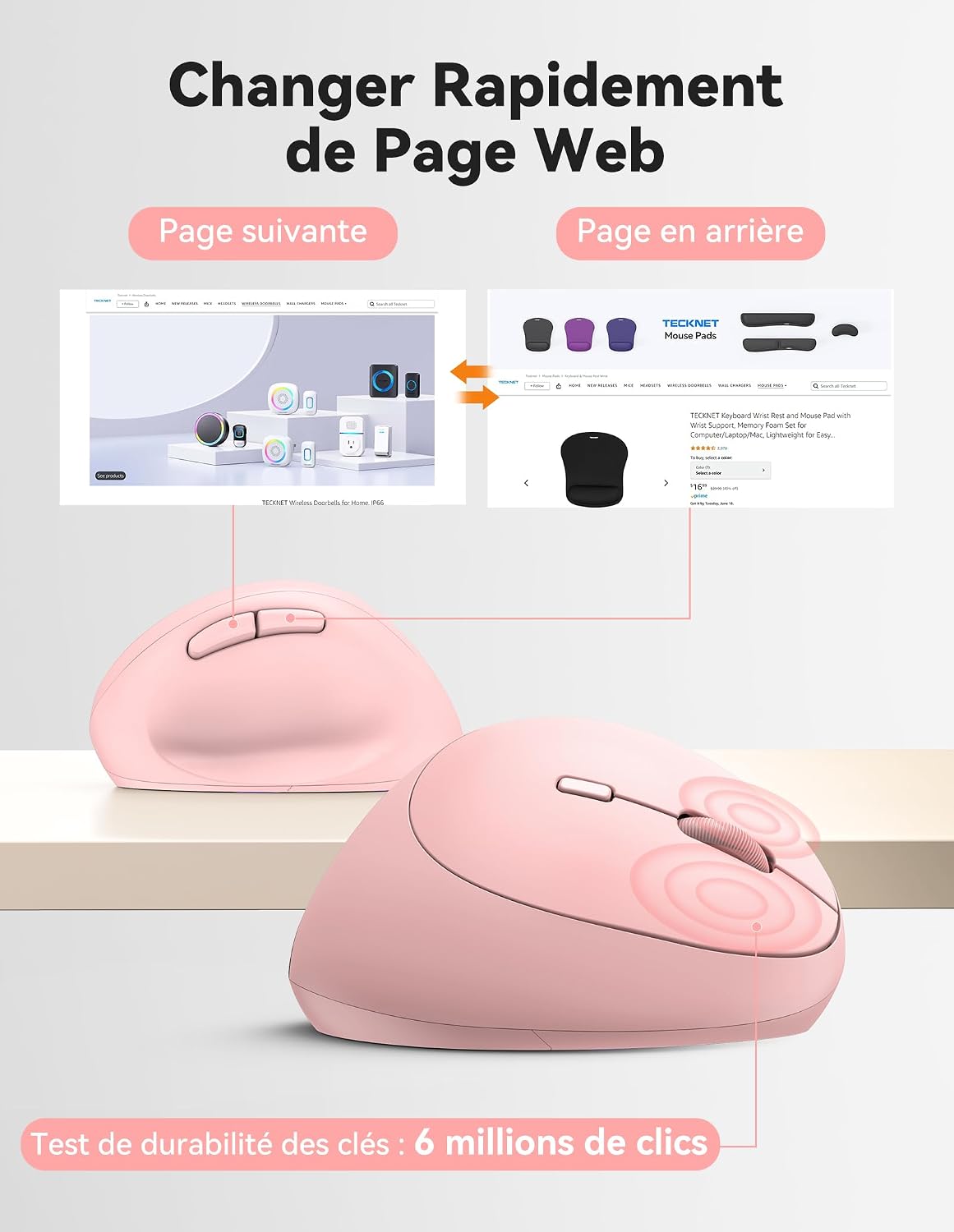
Diagram illustrating the location and function of each button on the TECKNET vertical mouse.
Aġġustament DPI
The mouse offers 5 adjustable DPI levels to suit various tasks and preferences. Press the DPI switch button to change the cursor speed. The red indicator light will flash a corresponding number of times to indicate the current DPI setting:
- Flash X1: 800 DPI (Web Navigation)
- Flash X2: 1600 DPI (Excel Editing)
- Flash X3: 2400 DPI (Video Editing)
- Flash X4: 3200 DPI (Photoshop)
- Flash X5: 4800 DPI (Gaming Track)

Visual representation of the 5 adjustable DPI levels for different usage scenarios.
Modalità Iffrankar tal-Enerġija
To conserve battery life, the mouse will automatically enter sleep mode after 8 minutes of inactivity. To wake it up, simply move the mouse or click any button.
Manutenzjoni
- Tindif: Uża drapp artab u niexef biex tnaddaf il-maws. Evita li tuża kimiċi ħarxa jew materjali li joborxu.
- Sostituzzjoni tal-batterija: When the mouse performance degrades or the cursor becomes erratic, it's time to replace the batteries. Ensure you use fresh AA batteries and dispose of old batteries responsibly.
- Ħażna: When not in use for extended periods, turn off the mouse using the ON/OFF switch to further conserve battery life. Store the USB receiver inside the mouse's battery compartment to prevent loss.
Issolvi l-problemi
- Il-maws ma jirrispondix:
- Kun żgur li l-maws huwa mixgħul.
- Iċċekkja jekk il-batteriji humiex installati sew u għandhomx biżżejjed ċarġ. Ibdelhom jekk meħtieġ.
- Kun żgur li r-riċevitur tal-USB huwa mdaħħal sew f'port USB li jaħdem. Ipprova port USB ieħor.
- Mexxi l-maws eqreb lejn ir-riċevitur tal-USB biex teskludi problemi ta' firxa.
- Ibda mill-ġdid il-kompjuter tiegħek.
- Moviment erratiku tal-cursor:
- Naddaf is-senser ottiku fil-qiegħ tal-maws.
- Ensure you are using the mouse on a suitable surface. The mouse is designed to track on various surfaces like resin, wood, fabric, paper, and metal. Avoid highly reflective or transparent surfaces.
- Aġġusta s-setting tad-DPI għal livell aktar baxx jekk il-cursor ikun sensittiv wisq.
- Forward/Backward buttons not working on Mac:
These side buttons are not supported by Mac OS. This is a system limitation, not a mouse malfunction.
Speċifikazzjonijiet
| Brand | TECNET |
| Numru tal-Mudell | TK-MS017 |
| Teknoloġija tal-Konnettività | 2.4G Wireless (Radio-frequency) |
| Teknoloġija ta 'Sejbien tal-Moviment | Ottiċi |
| Livelli DPI | 800, 1600, 2400, 3200, 4800 |
| Numru ta' Buttuni | 6 |
| Orjentazzjoni tal-Idejn | Dritt |
| Dimensjonijiet tal-Prodott | 10.5L x 6.5W ċentimetri |
| Firxa Wireless | Sa 10 metri |
| Sors tal-Enerġija | 2 x Batteriji AA (mhux inklużi) |
| Ħajja Medja tal-Batterija | Sa 24 xhur |
| Sistemi Operattivi Kompatibbli | Windows 11/10/8/7/XP, macOS X10.4+, Chrome OS, Linux |
Garanzija u Appoġġ
TECKNET provides a 36-month support period for registered products. If you encounter any issues during the use of this product, please contact the professional TECKNET customer service team for assistance.
For more information and support, please visit the official TECKNET webis-sit jew ikkuntattja lis-servizz tal-klijenti tagħhom direttament.
Websit: Ħanut TECKNET fuq Amazon