
1. Introduzzjoni
Thank you for choosing the Provirtec MistFree Smart Evaporative Humidifier. This manual provides essential information for the safe and efficient operation, maintenance, and troubleshooting of your device. Please read it thoroughly before use and retain it for future reference.
Informazzjoni dwar is-Sigurtà
- Always place the humidifier on a firm, flat, and waterproof surface.
- Tgħaddix l-unità prinċipali fl-ilma jew likwidi oħra.
- Kun żgur li l-korda tal-enerġija mhix bil-ħsara u li hija konnessa sew ma' sokit tal-enerġija adattat.
- Żomm fejn ma jintlaħaqx mit-tfal u l-annimali domestiċi.
- Unplug the humidifier before cleaning, refilling, or when not in use.
- Iżżidx żjut essenzjali jew addittivi oħra direttament fit-tank tal-ilma, għax dan jista' jagħmel ħsara lill-unità.
2. Kontenut tal-Pakkett
Iċċekkja li l-oġġetti kollha huma preżenti fl-imballaġġ:
- Unità Prinċipali tal-Umidifikatur
- Tank tal-Ilma
- Filter & Bracket
- Adapter tal-Enerġija
- Manwal għall-Utent (dan id-dokument)
- Provirtec Smart Thermo-hygrometer (with 2 AA batteries included)
3. Prodott Aktarview
The Provirtec MistFree Smart Evaporative Humidifier is designed to provide clean, mist-free humidification for spaces up to 300 square feet. It features smart controls, an efficient filter, and a UV light for water treatment.

Image: Provirtec MistFree Smart Evaporative Humidifier, showing the main unit, the accompanying smart thermo-hygrometer, and a smartphone displaying the control app interface.

Image: An internal diagram illustrating the humidifier's water treatment process, highlighting the UV light and Ag+ (silver ion) technology for cleaner humidity.

Image: The humidifier placed on a wooden table, emphasizing its 'No Mist, No Dust' feature, with an inset showing a clean surface compared to a dusty one from other humidifiers.
4. Setup
4.1 Spakkjar u Tqegħid
- Neħħi bir-reqqa l-komponenti kollha mill-imballaġġ.
- Place the humidifier on a stable, level surface in the desired room. For optimal performance, ensure the room is up to 300 square feet and keep windows and doors closed during operation.
4.2 Mili tal-Ilma
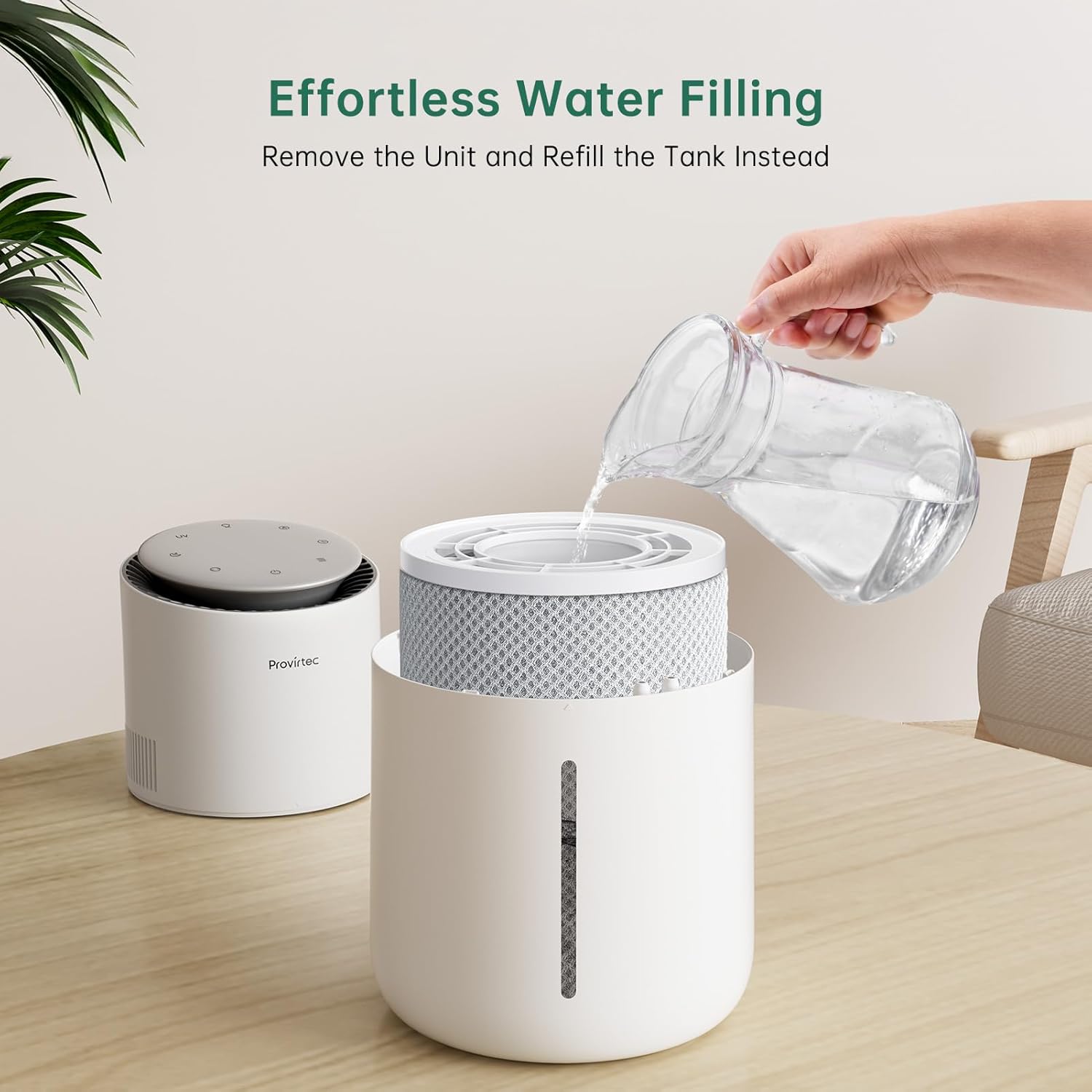
Image: A person demonstrating how to refill the humidifier by lifting off the top main unit and pouring water directly into the tank, emphasizing ease of use.
- Remove the main unit (top section) from the water tank.
- Fill the water tank with tap water. There is no need for purified water. Do not add water directly from the top of the assembled unit to avoid damage.
- Place the main unit back onto the water tank, ensuring the triangle marks on both parts align.
4.3 Konnessjoni tal-Enerġija
- Connect the power adapter to the humidifier and then plug it into a standard electrical outlet.
4.4 App and Smart Thermo-hygrometer Pairing

Image: A smartphone displaying the Prodigytec app interface for smart control of the humidifier, showing options for humidity levels and device status.
- Download the 'Prodigytec' app from your smartphone's app store.
- Ensure your humidifier is connected to a 2.4GHz Wi-Fi network.
- Follow the in-app instructions to add your humidifier.
- After connecting the humidifier via Wi-Fi, pair the included smart thermo-hygrometer with the humidifier via Bluetooth within the app. The humidifier will then display humidity readings from the thermo-hygrometer.
- The humidifier is compatible with Alexa and Google Assistant for voice control once connected via 2.4GHz Wi-Fi.
5. Operazzjoni
5.1 Funzjonijiet tal-Panew tal-Kontroll
The top panel of the humidifier features touch controls for various functions:
- Buttuna tal-Qawwa: Ixgħel jew jitfi l-unità.
- Buttuna tal-Modalità: Cycles through operating modes (e.g., Auto, Manual, Sleep).
- Atmosphere Light Button: Controls the ambient light. Press and hold to set to '000' to turn off.
- Buttuna tat-Tajmer: Sets an operating timer.
- UV Light Button: Activates or deactivates the internal UV water treatment.
5.2 Karatteristiċi Intelliġenti u Kontroll tal-App

Image: A collage of app screenshots demonstrating various smart features including Auto Mode, Auto Shut-off settings, Date Setting, UV Light control, and Preset Scenes like Nighttime, Plants, Aroma, and Baby.
- Modalità Awtomatika: With the paired thermo-hygrometer, the humidifier automatically adjusts output to maintain your set humidity level.
- Modalità Sleep: Reduces operating noise to approximately 28 dB and dims the display for undisturbed rest.
- Skedar: Use the Prodigytec app to set custom operating schedules and humidity levels.
- Kontroll tal-Vuċi: Integrate with Alexa or Google Assistant for hands-free operation.

Image: A child sleeping peacefully in a bedroom with the humidifier operating quietly on a bedside table, illustrating the 28dB noise level for sleep-friendly operation.
6. Manutenzjoni
6.1 Tindif tal-Umidifikatur

Image: A person cleaning the humidifier's water tank and filter in a sink, demonstrating the ease of cleaning due to the smooth interior and machine-washable filter.
The humidifier is designed for easy cleaning with a smooth interior and no hard-to-reach corners in the tank. Regular cleaning helps prevent buildup and maintains efficiency.
- Skonnettja l-umidifikatur mill-iżbokk tal-enerġija.
- Remove the main unit and empty any remaining water from the tank.
- Wipe the interior of the water tank with a soft cloth. For stubborn deposits, use a mild descaling solution or white vinegar. Rinse thoroughly.
- Clean the exterior of the humidifier with a damp drapp.
6.2 Manutenzjoni tal-Filtru
The humidifier filter is machine washable. Clean it when prompted by the humidifier (indicated by a red light on the control panel) or approximately every 1,500 hours of use (about 6 months if used 8 hours a day). Replace the filter after approximately 1,500 hours of use.
- Remove the filter from its bracket.
- Wash the filter in a washing machine or by hand with mild detergent.
- Ħalli l-filtru jinxef kompletament bl-arja qabel ma terġa' ddaħħalha.
- Replace the filter with a new one after approximately 1,500 hours of use to ensure optimal performance.
7 Issolvi l-problemi
Irreferi għall-kwistjonijiet u s-soluzzjonijiet komuni li ġejjin:

Image: A visual guide addressing common questions such as slow humidity rise and automatic shut-off, providing concise solutions.

Image: A visual guide addressing questions about differences in humidity readings between the humidifier and thermo-hygrometer, and how to control the atmosphere light.

Image: A visual guide addressing questions about filter replacement frequency and issues with connecting the app to the humidifier or smart thermo-hygrometer.
- Q: Why is the humidity in my room rising slowly?
A: The humidification effect is related to the environment. Ensure all windows and doors are closed before use, and turn on the humidifier in advance. It works best in rooms up to 300 square feet. - Q: Why does the humidity shown on the humidifier differ significantly from the reading on the included Provirtec smart thermo-hygrometer?
A: Differences may occur if the humidifier and thermo-hygrometer are placed in different locations. Connect the humidifier to a 2.4GHz Wi-Fi network, then follow app instructions to bind the thermo-hygrometer. Once paired, the humidifier will display the thermo-hygrometer's reading. - Q: Why does my humidifier automatically shut off after running for a while?
A: Incorrect installation or insufficient water in the tank can cause the humidifier to shut down after 1 hour for energy saving. Align the triangle marks on both the main unit and the water tank, and ensure there is enough water. - Q: Why can't I turn off or dim the light on my humidifier?
A: To turn off the light, press and hold the Atmosphere Light button, set the Atmosphere Light mode to '000', or turn it off via the app. Dimmer functionality is under development. - Q: How often should the humidifier filter be replaced?
A: It is recommended to replace the filter after approximately 1,500 hours of use (about 6 months if used 8 hours a day). The filter icon on the control panel will light up red to remind you. - Q: Why can't I use the app to connect the humidifier or smart thermo-hygrometer?
A: To use the thermo-hygrometer with the humidifier, first connect the humidifier to a 2.4GHz Wi-Fi network. Then, pair the thermo-hygrometer via Bluetooth. If you use Bluetooth to connect the humidifier, you won't be able to pair the thermo-hygrometer.
8. Speċifikazzjonijiet
| Karatteristika | Dettall |
|---|---|
| Brand | Provirtec |
| Isem tal-Mudell | HC-03 |
| Mod ta' Operazzjoni | Evaporativa |
| Kulur | Abjad |
| Dimensjonijiet tal-Prodott | 7.04"D x 7.04"W x 13.11"H |
| Piż tal-oġġett | 4.66 liri |
| Kopertura taż-Żona tal-Art | Sa 300 pied kwadru |
| Voltage | 12 Volts (DC) |
| Wattage | 12 watt |
| Karatteristiċi Speċjali | 2.4GHz Wi-Fi connection, Adjustable Humidity Control, Auto Shut Off, Quiet Operation, Smart Precise Auto-Control |
| Komponenti Inklużi | Filter & Bracket, Humidifier Main Unit, Power Adapter, User Manual, Water Tank, Smart Thermo-hygrometer |
| Tip ta' Kamra | Kamra tas-sodda, Kamra tat-tfal, Kamra tal-għixien, Nursery, Uffiċċju |
9. Garanzija u Appoġġ
For warranty information or technical support, please refer to the documentation included with your purchase or contact Provirtec customer service through the official website or your retailer. Please have your model number (HC-03) and purchase details available when contacting support.