
Prodott Overview
The Douk Audio MX5 is a compact 4-channel line-mixing audio mixer designed for integrating multiple audio sources. It features independent stereo/mono switching for each channel, a 16-bit stereo dual-color LED level meter, and individual volume controls for precise audio management. This manual provides detailed instructions for setting up and operating your MX5 mixer.

Image: The Douk Audio MX5 mixer, showcasing its compact design and durable aluminum knobs. This unit is built to maximize isolation from external interference signals.
Setup Istruzzjonijiet
1. Konnessjoni tal-Enerġija
Connect the provided USB cable (Type-C) to the DC 5V/1A power input on the MX5 mixer. Connect the other end to a suitable DC5V power adapter (not included). Ensure the power adapter provides at least 0.5A.
2. Konnessjonijiet ta' Input Awdjo
The MX5 features four groups of 6.35mm/3.5mm input jacks. Connect your audio sources (e.g., CD players, computers, phones, preamps, amplifiers) to these input jacks. Each input can accept either a 6.35mm or 3.5mm plug.
- Nota ta' Kompatibbiltà: The MX5 supports standard audio signals. It cannot directly connect phono turntables or microphones without an appropriate preampaktar ħaj.
3. Konnessjonijiet Output Awdjo
The mixer has one group of 6.35mm/3.5mm output jacks. Connect your headphones or main audio system to these outputs.
- Headphone Priority: If both the 3.5mm headphone jack and the 6.35mm OUT interface are connected, the 3.5mm headphone jack output will take priority, and the 6.35mm OUT interface will automatically disconnect.

Image: A detailed diagram illustrating the input and output connections of the Douk Audio MX5 mixer, including power input, 6.35mm/3.5mm audio inputs, and 6.35mm/3.5mm audio outputs.
Istruzzjonijiet Operattivi
1. Power On/Off
Agħfas il- QAWWA button to turn the mixer on or off. The power indicator light will illuminate when the unit is on.
2. Aġġustament tal-Livelli tal-Input
Each of the four input channels has an independent volume knob. Rotate these knobs (-1-, -2-, -3-, -4-) to adjust the input level for each respective channel. These adjustments do not interfere with other channels.
3. Kontroll tal-Volum Prinċipali
Il- -VOL- knob controls the overall output volume of the mixed audio signal.
4. Stereo/Mono Mode Selection
Each channel features an independent stereo/mono switch (S/M). Use these switches to select between stereo (S) and mono (M) modes for each input, allowing for flexible mixing configurations.
5. LED Level Meter Operation
The built-in 16-bit stereo dual-color LED level meter visually displays the output level. You can customize its appearance:
- Agħfas il- KULUR button to cycle through different display colors.
- Agħfas il- MODALITÀ button to switch between various display modes and adjust the gain (Level 1-6).
The mixer supports power-off memory, retaining your last settings for display color, mode, and gain.
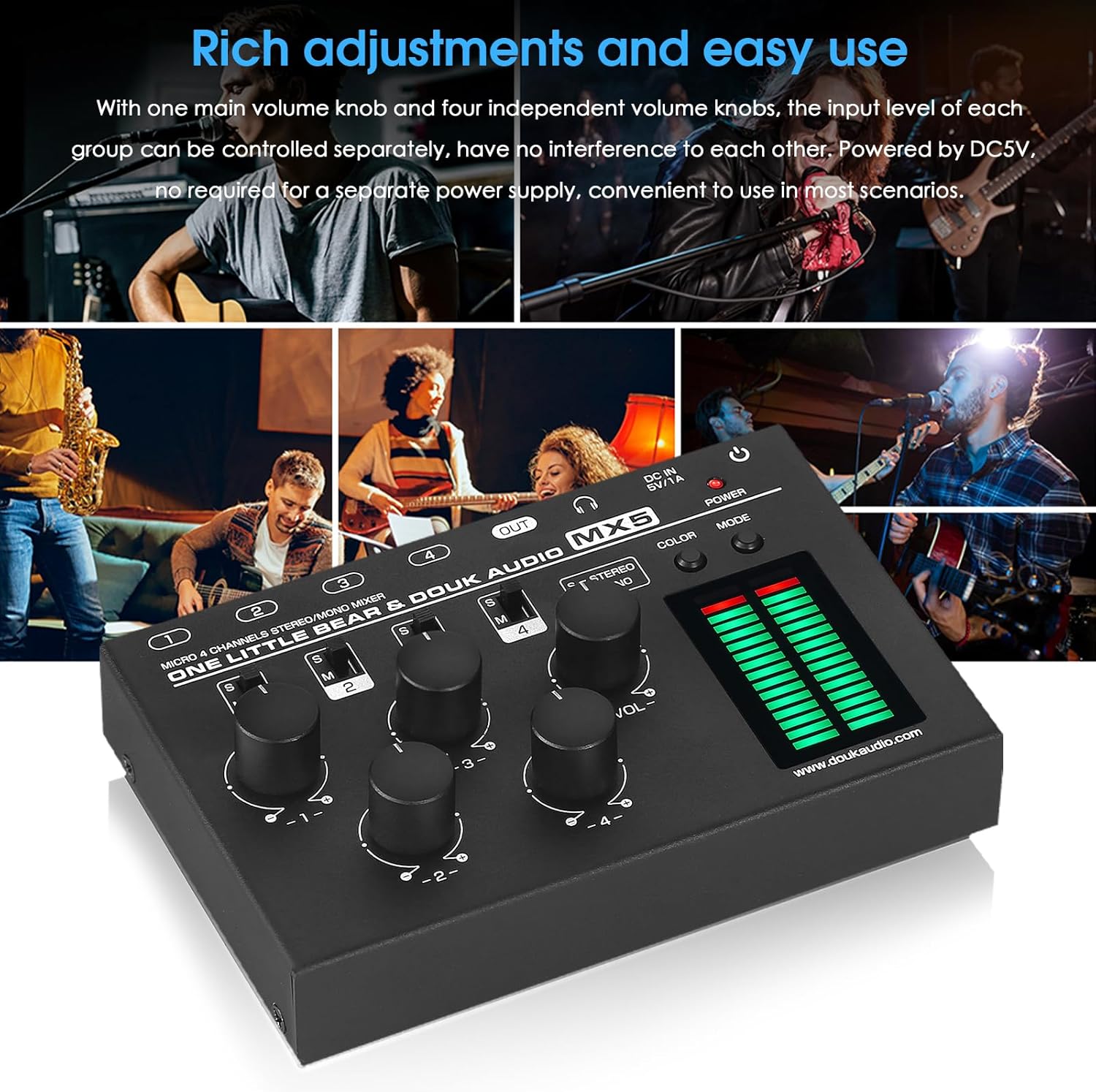
Image: The Douk Audio MX5 mixer in use, demonstrating its multiple input channels and individual volume controls for easy adjustment of audio levels from various sources.

Image: The Douk Audio MX5 mixer showcasing its 16-bit stereo dual-color LED level meter with different display modes and color options, providing visual feedback on audio levels.
Manutenzjoni
To ensure the longevity and optimal performance of your Douk Audio MX5 mixer, follow these maintenance guidelines:
- Tindif: Use a soft, dry cloth to clean the exterior of the unit. Avoid using liquid cleaners, aerosols, or solvents, as these may damage the finish or internal components.
- Ħażna: When not in use for extended periods, store the mixer in a cool, dry place away from direct sunlight and extreme temperatures.
- Immaniġġjar: Immaniġġja l-unità b'attenzjoni biex tevita ħsara fiżika. Evita li twaqqagħha jew li tissottomettiha għal impatti qawwija.
- Ventilazzjoni: Kun żgur li jkun hemm ventilazzjoni xierqa madwar l-unità biex tevita li s-sħana tisħon iżżejjed. Timblokkax il-fetħiet tal-ventilazzjoni.
Issolvi l-problemi
If you encounter issues with your Douk Audio MX5 mixer, please refer to the following common solutions:
- Ebda Ħsejjes tal-Ħsejjes:
- Ensure the mixer is powered on and the power indicator is lit.
- Check all audio cable connections to ensure they are secure and correctly inserted into the input and output jacks.
- Verify that the main volume knob (-VOL-) and individual channel volume knobs are turned up.
- If using headphones, remember that the 3.5mm headphone jack output takes priority over the 6.35mm OUT interface. If both are connected, the 6.35mm output will be muted.
- Confirm that your audio sources are active and producing sound.
- Ħoss Distort jew ta' Kwalità Baxxa:
- Ensure input levels are not too high, causing clipping. Adjust individual channel volume knobs to prevent distortion.
- Check the quality of your audio cables. Faulty cables can introduce noise or distortion.
- Verify that your audio sources are compatible. The MX5 is designed for standard audio signals and does not directly support phono turntables or microphones without a dedicated preampaktar ħaj.
- LED Meter Not Displaying Correctly:
- Agħfas il- KULUR u MODALITÀ buttons to cycle through different display options and gain settings.
- Ensure there is an active audio signal being processed by the mixer.
- L-Unità Ma Tixgħel:
- Verify that the DC5V power adapter is correctly connected and supplying power.
- Ensure the power adapter meets the minimum current requirement of 0.5A.
- Try a different Type-C USB cable and power adapter to rule out faulty accessories.
Speċifikazzjonijiet
| Brand | Douk Awdjo |
| Mudell | MX5 |
| Numru ta 'Kanali | 4 |
| Input Awdjo | 4 groups of 6.35mm/3.5mm jacks |
| Output Awdjo | 1 group of 6.35mm/3.5mm jack |
| Impedenza tal-headphone | 16-200Ω |
| Impedenza tad-dħul | 50kΩ |
| Modalità Channel | Stereo/Mono (switchable) |
| Display Color & Mode | Switchable, 16-bit stereo dual-color LED |
| Wiri Gwadan | Livell 1-6 |
| Power Off Memorja | Appoġġjati |
| Ħidma Voltage | DC5V (≥0.5A) |
| Interface tal-Enerġija | USB tat-tip C |
| Dimensjonijiet (W*D*H) | 132*86*24mm / 5.20*3.39*0.94in |
| Piż Nett | 350g / 0.77lb |

Image: The Douk Audio MX5 mixer shown with its physical dimensions and a visual representation of the included USB Type-C cable, along with net and package weights.
Informazzjoni dwar Garanzija
The Douk Audio MX5 mixer comes with an Garanzija limitata ta '18-il xahar. This warranty covers manufacturing defects and ensures the product functions as intended under normal use. Please retain your proof of purchase for warranty claims. For specific terms and conditions, refer to the warranty documentation provided with your product or contact customer support.
Appoġġ għall-Klijent
For technical assistance, troubleshooting not covered in this manual, or warranty inquiries, please contact Douk Audio customer support. You can often find support contact information on the official Douk Audio websit jew permezz tal-bejjiegħ bl-imnut tiegħek.
Żur l-uffiċjal Douk Audio Store għal aktar informazzjoni u aġġornamenti tal-prodott.