
1. Introduzzjoni
Thank you for choosing the Inwa MZ-622 Outdoor Bluetooth Speakers. This active and passive speaker system delivers 400W peak power for a loud stereo sound experience, suitable for both indoor and outdoor environments. Featuring Bluetooth 5.2 connectivity and an auxiliary input, these speakers offer versatile audio streaming options. Their weatherproof design ensures durability against splashes and light rain, making them ideal for patios, porches, gazebos, and garages. This manual provides detailed instructions for setup, operation, and maintenance to ensure optimal performance and longevity of your speaker system.

Immaġni: Fuqview of Inwa 400W Outdoor Bluetooth Speakers highlighting key features like Bluetooth 5.2, AUX input, weatherproofing, stereo system, and remote control.
2. X'hemm fil-Kaxxa
Jekk jogħġbok iċċekkja l-kontenut tal-pakkett biex tiżgura li l-oġġetti kollha huma preżenti:
- 1 x Speaker Attiv
- 1 x Passive Speaker
- 1 x 12V DC Power Adapter
- 1 x Kontroll mill-bogħod
- 1 x RCA Cable (5m)
- 1 x 3.5mm Auxiliary Input Cable
- Mounting Accessories (4 x Expansion screws, 4 x Fastener screws)
- 1 x Manwal għall-Utent
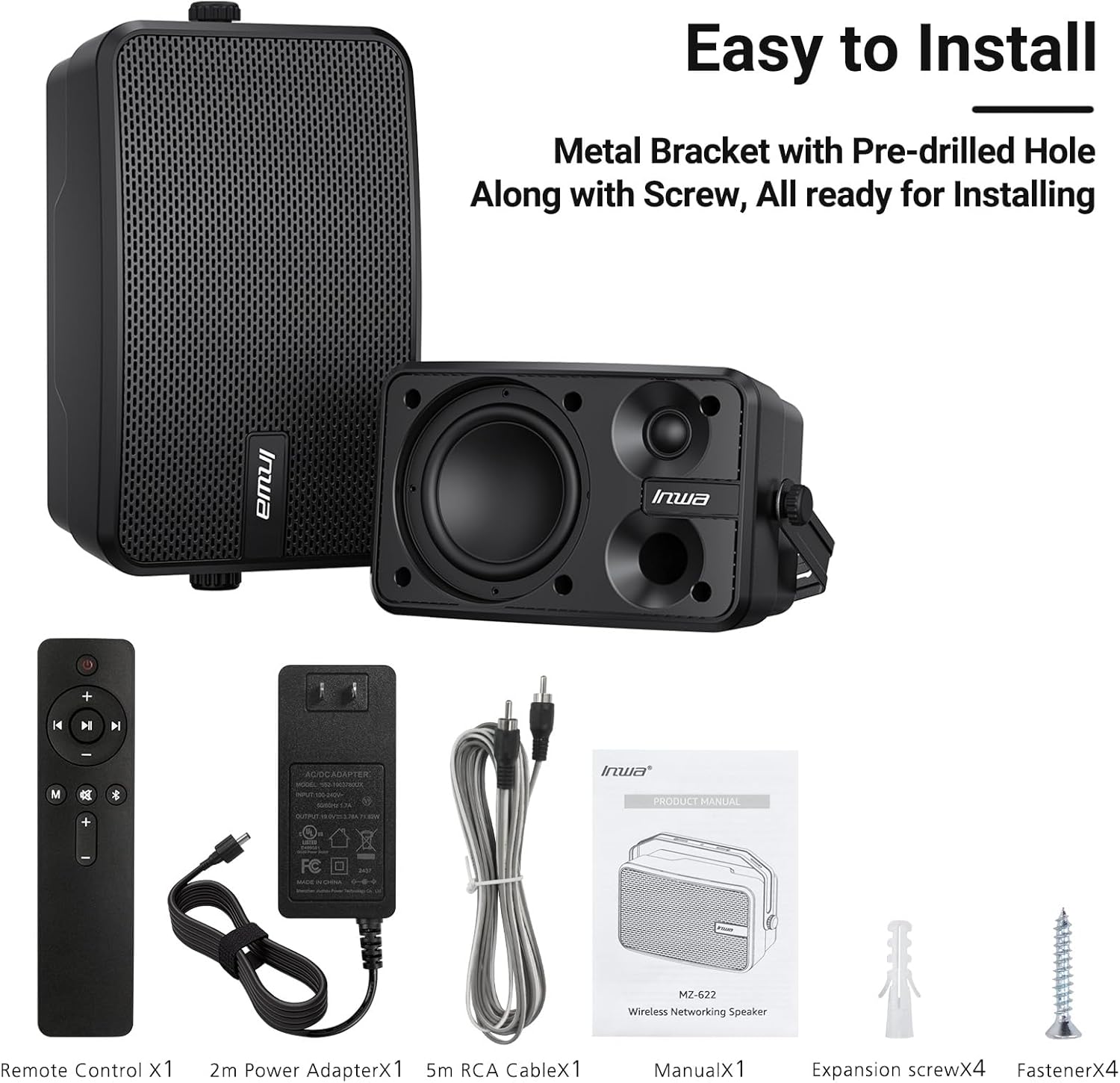
Image: All included components of the Inwa MZ-622 speaker system.
3. Istruzzjonijiet ta' Setup
3.1 Konnessjoni tal-Ispeakers
The Inwa MZ-622 system consists of one active speaker and one passive speaker. The active speaker contains the amplifier and controls, while the passive speaker connects to the active speaker.
- Connect the Passive Speaker: Use the provided RCA cable to connect the passive speaker to the active speaker. Ensure a secure connection.
- Qabbad l-Enerġija: Plug the 12V DC power adapter into the active speaker's power input, then plug the adapter into a power outlet.
- Qawwa Mixgħul: After connecting the power, the active speaker will automatically power on and enter Bluetooth mode, indicated by a flashing blue light.

Immaġni: Dettaljata view of the rear connections for the active and passive speakers.
3.2 Konnessjoni tas-Sors tal-Awdjo
The speakers support both Bluetooth wireless streaming and wired auxiliary input.
3.2.1 Konnessjoni Bluetooth
- Ensure the active speaker is powered on and the blue indicator light is flashing, indicating Bluetooth pairing mode.
- Fuq l-ismartphone, it-tablet, jew il-PC tiegħek, attiva l-Bluetooth u fittex apparati disponibbli.
- Select "Inwa MZ-622" (or similar name) from the list to pair. Once paired, the blue light will become solid.

Image: Illustration of Bluetooth 5.2 connectivity with a mobile device.
3.2.2 Konnessjoni tad-Dħul Awżiljarju (AUX)
- Connect one end of the provided 3.5mm auxiliary input cable to your external device (e.g., mobile phone, laptop, TV).
- Connect the other end of the 3.5mm auxiliary input cable to the AUX IN port on the active speaker.
- Press the 'M' button on the remote control to switch to AUX input mode. The indicator light on the active speaker will turn red.

Image: Connection diagram for AUX input with various devices.
3.3 Video Guide: Connection Method for MZ-622 Active + Passive Speakers
Video: A step-by-step guide demonstrating how to connect the active and passive Inwa MZ-622 speakers, including power and audio cables.
4. Istruzzjonijiet Operattivi
The Inwa MZ-622 speakers can be easily operated using the included remote control. The remote control primarily functions with the active speaker.
4.1 Funzjonijiet ta' Kontroll mill-bogħod
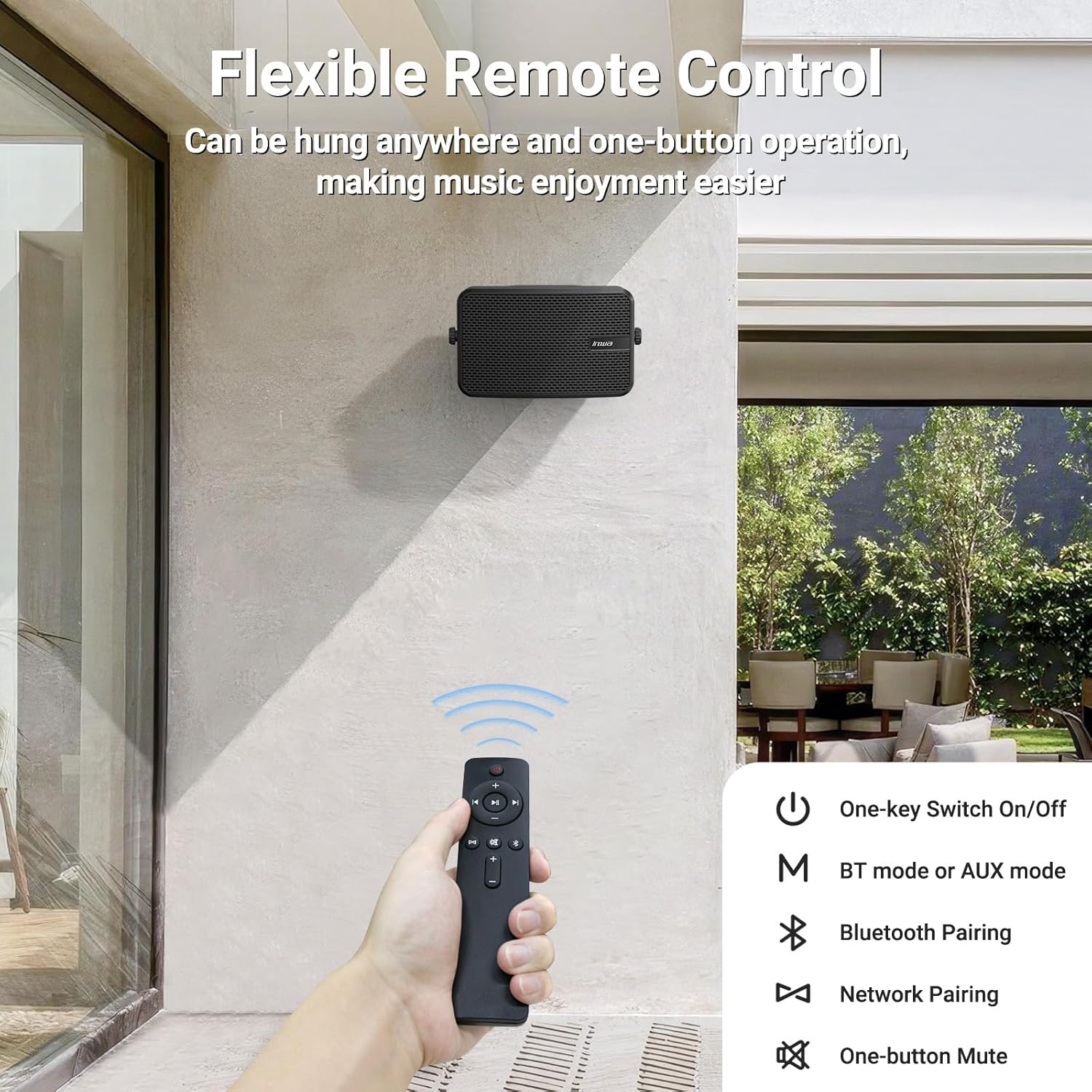
Image: The remote control for the Inwa MZ-622 speakers.
- Buttuna tal-Enerġija (⏻): Jixgħel jew jitfi s-sistema tal-ispikers.
- Buttuna tal-Modalità (M): Switches between Bluetooth mode (blue indicator light) and AUX input mode (red indicator light).
- Bluetooth Pairing Button (Ⓘ): Jibda l-modalità ta' tqabbil Bluetooth.
- Volum 'il fuq (+): Iżżid il-volum.
- Volum 'l isfel (-): Tnaqqas il-volum.
- Buttuna tal-Mute (🔇): Issikket jew jitneħħa l-awdjo.
- Buttuna tal-Logħob/Pawża (⏸): Idoqq jew iwaqqaf l-awdjo fil-modalità Bluetooth.
- Trakka Preċedenti (⏮): Skips to the previous track in Bluetooth mode.
- It-Trakka li Jmiss (⏭): Skips to the next track in Bluetooth mode.
Nota: In AUX input mode, track control buttons (Play/Pause, Previous, Next) on the remote are disabled as audio control is managed by the connected external device.
5. Tqegħid u Immuntar
The Inwa MZ-622 speakers are designed for versatile placement, both indoors and outdoors. Their compact size (9.41"W x 6.54"D x 4.61"H) and included mounting accessories make installation straightforward.
5.1 Outdoor Placement Considerations
While the speakers are weatherproof and can withstand splashes and light rain, it is recommended to install them in locations that offer some protection from direct, heavy downpours or prolonged exposure to harsh elements. Ideal locations include:
- Under a patio cover
- On the underside of a porch roof
- Within a gazebo or outdoor bar area
- Inside a garage or small workshop

Image: The weatherproof construction of the Inwa speaker.
5.2 Istruzzjonijiet tal-Immuntar
The speakers come with metal brackets and pre-drilled holes for easy wall mounting. Use the provided expansion and fastener screws for secure installation.
- Agħżel Post: Select a suitable mounting location, considering sound dispersion and protection from extreme weather.
- Immarka toqob: Hold the speaker bracket against the wall and mark the positions for drilling.
- Drill toqob: Drill pilot holes at the marked positions. Insert expansion screws if necessary for added stability.
- Bracket Sikur: Attach the speaker bracket to the wall using the fastener screws.
- Waħħal l-Ispeaker: Mount the speaker onto the secured bracket. Adjust the angle as desired for optimal sound direction.

Immaġni: Eżample of outdoor wall mounting.
6. Speċifikazzjonijiet
| Karatteristika | Dettall |
|---|---|
| Isem tal-Mudell | MZ-622 |
| Tip ta' Kelliem | Barra |
| Qawwa tal-Ħruġ Massimu tal-Ispeaker | 400 Watts |
| Teknoloġija tal-Konnettività | Awżiljarju, Bluetooth |
| Teknoloġija tal-Komunikazzjoni mingħajr Fili | Bluetooth |
| Verżjoni Bluetooth | 5.2 |
| Modalità tal-Ħruġ tal-Awdjo | Stereo |
| Surround Sound Channel Konfigurazzjoni | 2.0 |
| Dijametru tal-Woofer | 4 Pulzier |
| Daqs tat-Tweeter | 1 Pulzier |
| Materjal | Acrylonitrile Butadiene Styrene (ABS) |
| Huwa Waterproof | Veru |
| Dimensjonijiet tal-Prodott | 6.54"D x 9.41"W x 4.61"H |
| Piż tal-oġġett | 7.78 liri |
| Sors tal-Enerġija | Corded Elettriku |
| Metodu ta' Kontroll | Remote |
7. Manutenzjoni
To ensure the longevity and optimal performance of your Inwa MZ-622 speakers, follow these maintenance guidelines:
- Tindif: Wipe the speaker enclosures with a soft, damp cloth. Avoid using harsh chemicals or abrasive cleaners, as these can damage the ABS material and mesh grille.
- Protezzjoni tat-Temp: Although weatherproof, it is advisable to protect the speakers from extreme weather conditions such as heavy storms, prolonged direct sunlight, or freezing temperatures when not in use for extended periods.
- Ġestjoni tal-Kejbil: Ensure all cables are securely connected and not under strain. Periodically check cables for any signs of wear or damage.
- Ħażna: If storing the speakers for a long time, disconnect them from power, clean them, and store them in a cool, dry place.
8 Issolvi l-problemi
If you encounter issues with your Inwa MZ-622 speakers, refer to the following common problems and solutions:
| Problema | Kawża Possibbli | Soluzzjoni |
|---|---|---|
| No power/Speaker not turning on | L-adapter tal-enerġija mhux imqabbad jew difettuż. | Ensure the 12V DC power adapter is securely connected to the active speaker and a working power outlet. Test the outlet with another device. |
| L-ebda ħoss mill-kelliema | Volume too low; incorrect input mode; cables loose; device not playing audio. | Increase volume on both the speaker and the connected device. Press the 'M' button on the remote to cycle through modes (Bluetooth/AUX) until the correct mode is selected. Check all audio cables (RCA, AUX) for secure connections. Ensure your audio source is playing. |
| Bluetooth mhux pairing | Speaker not in pairing mode; device Bluetooth off; interference. | Ensure the active speaker's blue indicator light is flashing. Turn Bluetooth off and on again on your device. Move closer to the speaker. Disconnect other Bluetooth devices from your source. |
| Il-kontroll mill-bogħod ma jaħdimx | Battery low/dead; remote out of range; line of sight blocked. | Replace the remote control battery. Ensure you are within range and have a clear line of sight to the active speaker. |
| Awdjo mgħawweġ | Volume too high; poor audio source quality; damaged cables. | Reduce the volume on both the speaker and the audio source. Test with a different audio source or cable. |
9. Garanzija u Appoġġ
The Inwa MZ-622 speakers come with a limited warranty. For specific warranty terms and conditions, please refer to the warranty information provided with your purchase or contact Inwa customer support.
For technical assistance, troubleshooting, or any other inquiries, please visit the official Inwa webis-sit jew ikkuntattja lid-dipartiment tas-servizz tal-konsumatur tagħhom. Id-dettalji ta' kuntatt tipikament jistgħu jinstabu fl-imballaġġ tal-prodott jew fuq il-manuskritt tal-manifattur. websit.