
1. Introduzzjoni
Thank you for choosing the FEELWORLD P215-9HSD 21.5 Inch Broadcast Production Monitor. This monitor is designed for professional video production environments, offering a 1920x1080 Full HD display, multiple input/output options including 4K HDMI and 3G-SDI, and advanced monitoring features. This manual provides essential information for the safe and efficient operation of your device. Please read it thoroughly before use and retain it for future reference.

Figura 1.1: Quddiem view of the FEELWORLD P215-9HSD monitor, highlighting its 21.5-inch screen, Full HD 1920x1080 resolution, 3000:1 contrast, and 250 nits brightness.
2. Informazzjoni dwar is-Sigurtà
- Sors tal-Enerġija: Use only the provided 3A DC power adapter. Ensure the power supply voltage hija fil-medda speċifikata.
- Ventilazzjoni: Do not block ventilation openings. Ensure adequate airflow around the monitor to prevent overheating.
- Ilma u Umdità: Do not expose the monitor to rain, moisture, or immerse it in water. If liquid enters the unit, disconnect power immediately and contact service personnel.
- Tindif: Skonnettja l-provvista tal-enerġija qabel it-tindif. Uża drapp artab u niexef. Tużax prodotti tat-tindif likwidi jew aerosol.
- Pjazzament: Place the monitor on a stable surface. Avoid placing it in direct sunlight, near heat sources, or in environments with excessive dust or vibration.
- Servizzi: Tippruvax isservi dan il-prodott int stess. Irreferi l-manutenzjoni kollha lil persunal tas-servizz kwalifikat.
3. Kontenut tal-Pakkett
Iċċekkja li l-oġġetti kollha elenkati hawn taħt huma inklużi fil-pakkett tiegħek. Jekk xi oġġetti huma neqsin jew bil-ħsara, jekk jogħġbok ikkuntattja lill-bejjiegħ tiegħek.
- FEELWORLD P215-9HSD 21.5 Inch Broadcast Production Monitor
- 3A DC Power Adapter
- V Battery Plate
- Mini HDMI Cable
- Tally Kit
- Sunshade
- U Bracket
- Manwal tat-Tħaddim
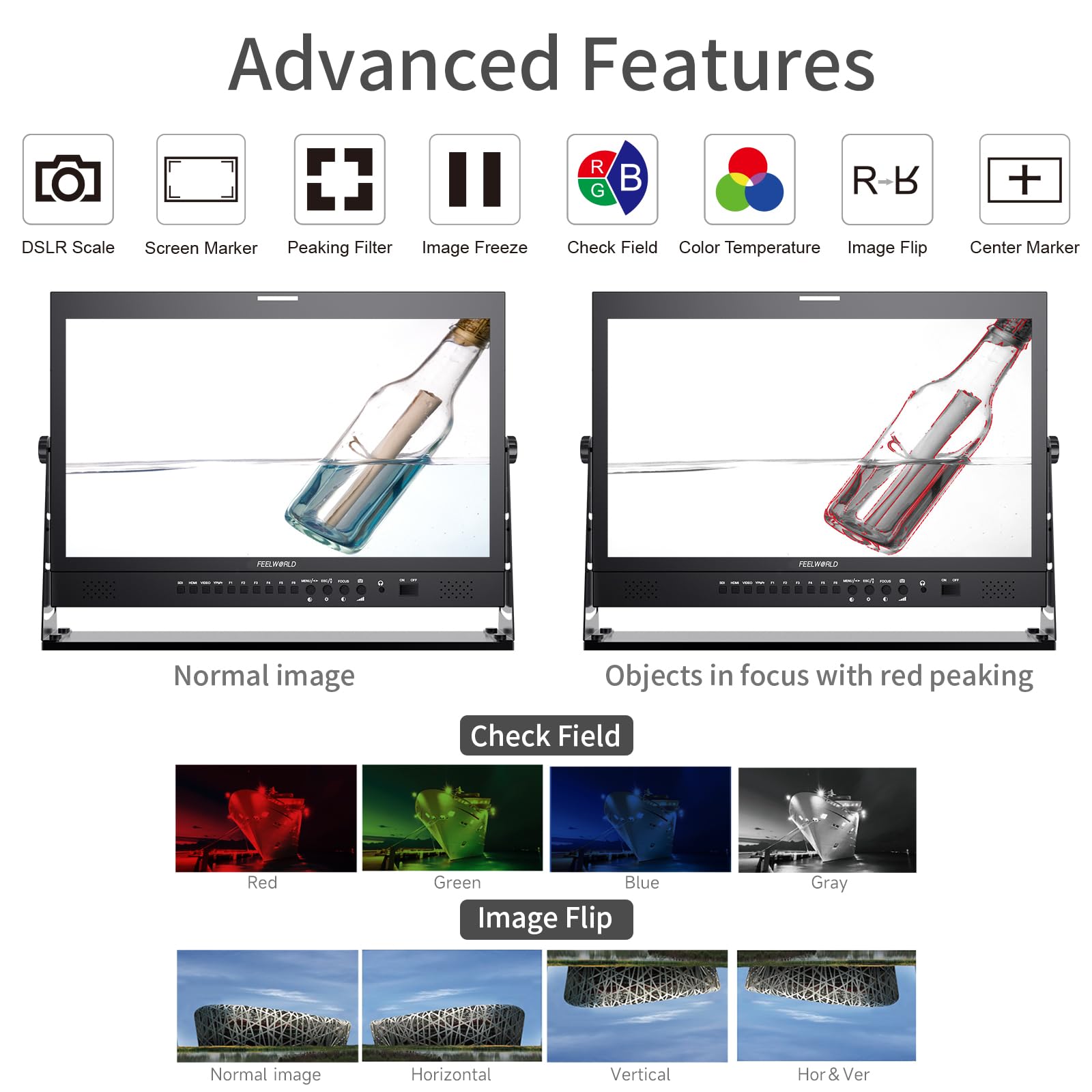
Figure 3.1: Included accessories with the FEELWORLD P215-9HSD monitor, showing the monitor, Mini HDMI cable, V battery plate, 3A power adapter, Tally Kit, Jib Crane Bracket (U bracket), and Operation Manual.
4. Prodott Aktarview
4.1 Kontrolli ta' Front Panel
The front panel features various buttons and indicators for controlling the monitor's functions and navigating the On-Screen Display (OSD) menu.
- Buttuni tal-Għażla tal-Input: SDI, HDMI, VIDEO, YPbPr for selecting video sources.
- Buttuni tal-Funzjoni (F1-F6): Customizable shortcut buttons for quick access to frequently used features.
- MENU/ESC/◄/► Buttons: Used for OSD menu navigation, entering sub-menus, and adjusting settings.
- FOCUS Button: Activates peaking focus assist.
- Buttuna ON/OFF: Jixgħel jew jitfi l-monitor.
- Kelliema Mibnija: Għall-monitoraġġ tal-awdjo.
- 3.5mm Stereo Earphone Jack: For private audio monitoring.
4.2 Konnessjonijiet tal-Panew ta' wara
The rear panel provides all necessary input and output ports for connecting video and audio sources, as well as power.
- Input DVI: Digital Visual Interface input.
- Input/Output HDMI: High-Definition Multimedia Interface for both input and loop-through output.
- YPbPr Input: Input tal-vidjo komponenti.
- Input/Output tal-Vidjo: Composite video input and loop-through output.
- Input/Output Awdjo: RCA connectors for analog audio.
- 3G-SDI Input/Output: Serial Digital Interface for professional video input and loop-through output.
- Konnettur XLR: For professional audio input.
- DC Barrel (5.5, 2.1): Power input for the 3A DC adapter.
- USB Upgrade Port: Għal aġġornamenti tal-firmware.
- DAĦLA TAL-LAN: Port Ethernet.
- TALLY Port: DP-9 connector for Tally light control.

Figure 4.1: Top section shows the front panel OSD operation buttons. Bottom section details the rear panel connections including DVI, HDMI, YPbPr, Video, Audio, 3G-SDI, XLR, DC power, USB, LAN, and Tally.
Figura 4.2: Close-up view of the rear panel, emphasizing the 3G-SDI, HDMI, Video, and Audio input/output connections, along with the USB upgrade port and DC power input.
5. Setup
5.1 Immuntar tal-Monitor
The monitor comes with an adjustable U bracket for desktop placement. Ensure the bracket is securely attached to the monitor and placed on a stable, flat surface. The monitor also supports VESA mounting for alternative setups (mounting hardware not included).
5.2 Qawwa tal-Konnessjoni
- Connect the provided 3A DC power adapter to the DC barrel input on the rear of the monitor.
- Ipplaggja l-adapter ta 'l-enerġija fi żbokk ta' l-elettriku adattat.
- Alternatively, attach a compatible V-mount battery to the V Battery Plate on the rear of the monitor for portable power.
5.3 Konnessjoni ta' Sorsi tal-Vidjo
Connect your video source (camera, video switcher, etc.) to the appropriate input port on the monitor's rear panel.
- HDMI: Use an HDMI cable (Mini HDMI cable included) to connect to the HDMI IN port.
- 3G-SDI: Use an SDI cable to connect to the 3G-SDI IN port.
- YPbPr: Use component video cables to connect to the YPbPr IN ports.
- Vidjow: Use a composite video cable to connect to the VIDEO IN port.
If you need to loop out the signal to another device, connect an appropriate cable from the corresponding OUT port (HDMI OUT, 3G-SDI OUT, VIDEO OUT) to your next device.
6. Istruzzjonijiet Operattivi
6.1 Tixgħel/Jitfi
Agħfas il- ON/OFF button on the front panel to power the monitor on or off.
6.2 Għażla tal-Input
Press the corresponding input button (SDI, HDMI, VIDEO, YPbPr) on the front panel to switch between video sources.
6.3 Navigazzjoni tal-Menù tal-OSD
Agħfas il- MENU button to open the On-Screen Display menu. Use the ◄ u ► buttons to navigate through menu options and adjust values. Press MENU again to confirm a selection or ESC biex toħroġ mill-menu.
6.4 Funzjonijiet Avvanzati
The monitor includes several advanced features to assist with professional monitoring:
- Assistenza għall-Fokus Peaking: Highlights sharp edges in the image to aid in achieving precise focus. Activate with the FOCUS button or assign to a function button.
- Marker taċ-Ċentru: Displays a crosshair in the center of the screen.
- Screen Marker: Provides various aspect ratio markers (e.g., 16:9, 4:3, 2.35:1) and safety area markers.
- Iffriżar tal-Immaġni: Jwaqqaf il-frejm tal-vidjow kurrenti.
- Flip tal-Immaġni: Flips the image horizontally, vertically, or both. Useful for specific mounting orientations.
- Camera 5D II Mode: Optimizes display for Canon 5D Mark II camera output.
- Iċċekkja l-Qasam: Displays only Red, Green, Blue, or Mono channels for color calibration.
- Pixel għal Pixel: Displays the image at its native resolution without scaling.
- Żomm Kollha: Magnifies the entire image.
- U/D & L/R Zoom: Allows independent vertical and horizontal zooming.
- Proporzjon tal-aspett: Adjusts the display aspect ratio.
- Aġġustament tat-Temperatura tal-Kulur: Allows fine-tuning of the display's color temperature.
Figure 6.1: Visual demonstration of advanced features including Peaking Filter (red peaking), Check Field (Red, Green, Blue, Gray channels), and Image Flip (Normal, Horizontal, Vertical, Horizontal & Vertical).
6.5 Tally Light System
The monitor features a 3-color Tally light system (Red, Green, Yellow) on both the front and rear panels, controlled via the DP-9 Tally port. This allows for clear indication of live, preview, and standby states in a multi-camera setup.
- Aħmar: Indicates the camera is live (On Live).
- Aħdar: Indicates the camera is on preview (On Preview).
- Isfar: Indicates the camera is on standby (Standby).

Figure 6.2: Illustration of the Red, Green, and Yellow Tally lights and their corresponding states (On Live, Standby, On Preview), controlled via the DP-9 Barrel on the rear.
7. Manutenzjoni
- Tindif tal-Iskrin: Imsaħ l-iskrin bil-mod b'ċarruta ratba u mingħajr suf. Għal marki persistenti, nixxef ftit.ampLaħlaħ id-drapp bl-ilma jew b'soluzzjoni tat-tindif speċifika għall-iskrin. Tisprejjax likwidu direttament fuq l-iskrin.
- Tindif tas-Casing: Uża drapp artab u niexef biex timsaħ il-parti ta' fuq tal-monitor.asing. Evita prodotti tat-tindif jew solventi li joborxu.
- Ħażna: Meta ma tkunx qed tużah għal perjodi twal, aħżen il-monitor f'post frisk u niexef, 'il bogħod mix-xemx diretta u minn temperaturi estremi.
- Aġġornamenti tal-Firmware: Periodically check the FEELWORLD official website for any available firmware updates to ensure optimal performance and access to new features. Use the USB Upgrade Port for this purpose.
8 Issolvi l-problemi
Jekk tiltaqa' ma' problemi bil-monitor tiegħek, jekk jogħġbok irreferi għall-problemi u s-soluzzjonijiet komuni li ġejjin:
| Problema | Kawża Possibbli | Soluzzjoni |
|---|---|---|
| Ebda qawwa | L-adapter tal-enerġija mhux imqabbad jew difettuż; problema bis-sokit tal-enerġija. | Ensure power adapter is securely connected to monitor and outlet. Test outlet with another device. Check if V-mount battery is charged and properly installed. |
| L-ebda sinjal tal-vidjo | Incorrect input selected; cable not connected or faulty; source device not outputting signal. | Select the correct input source (HDMI, SDI, etc.). Check all video cables for secure connection. Verify the source device is powered on and outputting video. Try a different cable. |
| Image is distorted or incorrect colors | Incorrect display settings; faulty cable; source issue. | Reset monitor settings to default via OSD menu. Check cable connections. Verify source device output. Adjust color temperature settings. |
| L-ebda awdjo | Audio cable not connected; volume too low; source device not outputting audio. | Ensure audio cables are connected (if applicable). Increase monitor volume. Check audio settings on the source device. |
| Tally light not working | Tally cable not connected or faulty; switcher not sending Tally signal. | Ensure the Tally Kit is correctly wired and connected to the DP-9 port. Verify your video switcher is configured to send Tally signals. |
9. Speċifikazzjonijiet
Detailed technical specifications for the FEELWORLD P215-9HSD Broadcast Production Monitor:
- Daqs tal-iskrin: 21.5 Pulzier
- Riżoluzzjoni Nattiva: 1920 x 1080 (Full HD)
- Tip ta' wiri: LED IPS Panel
- Proporzjon tal-aspett: 16:9
- Luminożità: 400 cd/m²
- ViewIng Angolu: 160 Degrees (H/V)
- Proporzjon ta' Kuntrast: 3000:1
- Fond tal-Kulur: 8-bit, 16.7 Miljun Kulur
- Inputs tal-Vidjo: 1x HDMI, 1x 3G-SDI, 1x YPbPr, 1x Video, 1x DVI
- Outputs tal-Vidjo: 1x HDMI, 1x 3G-SDI, 1x Video
- Inputs tal-Awdjo: Analog Audio (RCA), XLR
- Outputs tal-Awdjo: 3.5mm Stereo Earphone Jack, Built-in Speakers
- Input ta' Enerġija: DC 12V (3A)
- Teknoloġija tal-Konnettività: HDMI, 3G-SDI
- Karatteristiċi Speċjali: Peaking Focus Assist, Center Marker, Screen Marker, Image Freeze, Image Flip, Camera 5D II Mode, Check Field, Pixel to Pixel, Zoom All, U/D & L/R Zoom, Aspect Ratio, Color Temperature Adjustment, 3-Color Tally Light
Figura 9.1: Aktarview of key specifications and features including 8-bit color, HDMI input/output, 3G-SDI input/output, 1920x1080 resolution, 3000:1 contrast, and 250 nits brightness.
10. Garanzija u Appoġġ
The FEELWORLD P215-9HSD Broadcast Production Monitor comes with a Garanzija ta' 1 snin mill-manifattur mid-data tax-xiri. Din il-garanzija tkopri difetti fil-materjali u l-abbilità taħt użu normali.
For warranty claims, technical support, or service inquiries, please contact your authorized FEELWORLD dealer or visit the official FEELWORLD website for customer service contact information. Please retain your proof of purchase for warranty validation.
For more information about FEELWORLD products, visit the FEELWORLD Store on Amazon.