
1. Matulview
The Denon DCD-3000NE is a high-performance CD/SACD player engineered to deliver exceptional sound quality for audiophiles. It features advanced digital processing and robust construction to ensure precise and detailed audio reproduction from various disc and file formati.

Figura 1.1: Quddiem view of the Denon DCD-3000NE CD/SACD Player in silver.
Karatteristiċi ewlenin:
- Hi-Fi CD/SACD Playback: Supports SACD/CD and DSD playback with a 384kHz/32-bit quad DAC for high-resolution audio.
- Ultra AL32 Processing: Denon's proprietary processing technology for smooth, high-resolution output and enhanced audio fidelity.
- Versatile Media Support: Plays SACD/CD, DVD-R/RW, DVD+R/RW (up to 192kHz/24-bit), CD-R/RW (at 48kHz), and digital formats including MP3, WMA, AAC, WAV, FLAC, Apple Lossless, and AIFF.
- High-Precision SVH Disc Drive: Minimizes vibrations and ensures accurate disc loading and precise spinning for superior reading accuracy.
- Pure Direct Mode: Bypasses digital signal processing and disables digital outputs and display for an unaltered, high-quality analog sound.
- Kostruzzjoni robusta: Features separate analog and digital power supplies to isolate noise, Direct Mechanical Ground Construction to channel away vibrations, and premium components for pristine sound.
2. X'hemm fil-Kaxxa
Ivverifika li l-oġġetti kollha huma preżenti fl-imballaġġ qabel ma tipproċedi bis-setup.
- Denon DCD-3000NE CD/SACD Player
- Korda tal-Enerġija
- Gwida Quick Start
- Kontroll mill-Bogħod (b'2 Batteriji AAA)
- Kejbil RCA Stereo
3. Setup
3.1 Tqegħid
Place the DCD-3000NE on a stable, level surface away from direct sunlight, heat sources, and excessive vibration. Ensure adequate ventilation around the unit.
3.2 Konnessjonijiet
Connect the DCD-3000NE to your amplifier or receiver using the appropriate audio cables. The player offers analog RCA, optical, and coaxial digital outputs.
- Konnessjoni Analoġika: Use the supplied stereo RCA cable to connect the DCD-3000NE's ANALOG OUT jacks to the corresponding analog input jacks on your ampaktar ħaj.
- Konnessjoni Diġitali (Mhux obbligatorja): For digital audio transmission, connect either the OPTICAL OUT or COAXIAL OUT jack on the DCD-3000NE to a digital input on your amplifier or external DAC. Use a high-quality optical or coaxial digital cable (not supplied).
- Konnessjoni tal-Enerġija: After all audio connections are made, connect the supplied power cord to the AC IN terminal on the rear of the DCD-3000NE and then to a wall outlet.

Figure 3.1: Rear panel connections, including analog RCA, optical, and coaxial digital outputs.
4. Istruzzjonijiet Operattivi
4.1 Daqq Bażiku tad-Diska
- Agħfas il- QAWWA buttuna biex tixgħel l-unità.
- Agħfas il- FTUĦ/MAGĦLUQ buttuna biex tiftaħ it-trej tad-diska.
- Place a disc (CD, SACD, DVD-R/RW, DVD+R/RW, CD-R/RW) gently onto the disc tray with the label side facing up.
- Agħfas il- FTUĦ/MAGĦLUQ button again to close the disc tray. The player will read the disc.
- Agħfas il- PLAY buttuna biex tibda d-daqq.
- Uża l- SKIP buttons (◀◀ / ▶▶) to navigate between tracks and the STOP (■) or PAWŻA (██) buttons to control playback.

Figure 4.1: Inserting a disc into the DCD-3000NE.
4.2 Diski Appoġġjati u File Formati
The DCD-3000NE supports a wide range of audio formats:
- Diski: SACD, CD, CD-R/RW, DVD-R/RW, DVD+R/RW
- Diġitali Files: DSD (2.8MHz/5.6MHz), MP3, WMA, AAC, WAV, FLAC, Apple Lossless (ALAC), AIFF
4.3 Modalità Diretta Pura
Activate Pure Direct Mode for the purest audio signal. This mode disables the digital audio outputs and the display to minimize potential interference and noise, providing an uncolored analog output.
- Agħfas il- PUR DIRETT buttuna fuq il-pannell ta 'quddiem jew kontroll mill-bogħod.
- The display will turn off, and digital outputs will be deactivated.
- Agħfas il- PUR DIRETT buttuna għal darb'oħra biex toħroġ minn din il-modalità.

Figure 4.2: The DCD-3000NE as part of a complete audio system.
5. Manutenzjoni
5.1 Tindif tal-Unità
To maintain the appearance and performance of your DCD-3000NE:
- Imsaħ l-uċuħ ta’ barra b’ċarruta ratba u niexfa.
- Għal ħmieġ iebes, neħħi ftitampmt id-drapp bl-ilma jew cleaner ħafif u li ma jobrox.
- Avoid using harsh chemicals, solvents, or abrasive materials, as these can damage the finish.
- Do not spray cleaners directly onto the unit.
5.2 Immaniġġjar tad-Diski
Proper disc handling ensures optimal playback and longevity of your discs:
- Always hold discs by their edges to avoid fingerprints on the playing surface.
- Keep discs clean and free from dust, dirt, and scratches.
- Aħżen id-diski fil-każijiet tagħhom meta ma tkunx qed tintuża.
- Do not expose discs to direct sunlight or high temperatures.
6 Issolvi l-problemi
If you encounter issues with your DCD-3000NE, refer to the table below for common problems and solutions.
| Problema | Kawża Possibbli | Soluzzjoni |
|---|---|---|
| Ebda qawwa | Il-korda tal-enerġija mhux imqabbda sew. | Kun żgur li l-korda tal-enerġija hija pplaggjata sew fl-unità u fis-sokit tal-ħajt. |
| L-ebda ħoss | Incorrect audio cable connection or input selection on ampaktar ħaj. | Check audio cable connections. Select the correct input source on your ampaktar ħaj. |
| Id-diska ma tilgħabx | Id-diska hija maħmuġa, mibruxa, jew imdaħħla ħażin. | Clean the disc. Check for scratches. Ensure the disc is inserted label-side up. |
| Il-kontroll mill-bogħod ma jaħdimx | Il-batteriji huma eżawriti jew imdaħħla ħażin. Ostruzzjoni bejn ir-remote u l-unità. | Ibdel il-batteriji. Kun żgur li l-polarità hija korretta. Neħħi kwalunkwe ostaklu. |
| Skipping or distorted audio | Disc is dirty or damaged. Unit is subject to excessive vibration. | Clean or replace the disc. Ensure the unit is on a stable surface. |
7. Speċifikazzjonijiet
Detailed technical specifications for the Denon DCD-3000NE.
| Karatteristika | Dettall |
|---|---|
| Brand | Denon |
| Isem tal-Mudell | DCD-3000NE |
| Kulur | Silver (variant shown) |
| Teknoloġija tal-Konnettività | Analog Output, Coaxial Output, Optical Output |
| Numru ta' Diski | 1 |
| Formati Awdjo Appoġġjati | AAC, FLAC, MP3, WAV, WMA, DSD, Apple Lossless, AIFF |
| Tipi ta' Konnettur | Optical, Coaxial, RCA |
| Numru ta 'Kanali | 2 |
| Tip ta' Format tal-Midja | Audio CD, SACD, DVD-R/RW, DVD+R/RW, CD-R/RW |
| Apparati Kompatibbli | Speaker, Headphone (via ampaktar ħaj) |
| Headphones Jack | 3.5mm Jack (on compatible ampliifikaturi) |
| Dimensjonijiet tal-oġġett (L x W x H) | 15.94"T x 17.09"W x 5.43"Għ |
| Numru tal-Mudell | 301005-02-00-101 |
| UPC | 747192143459 |
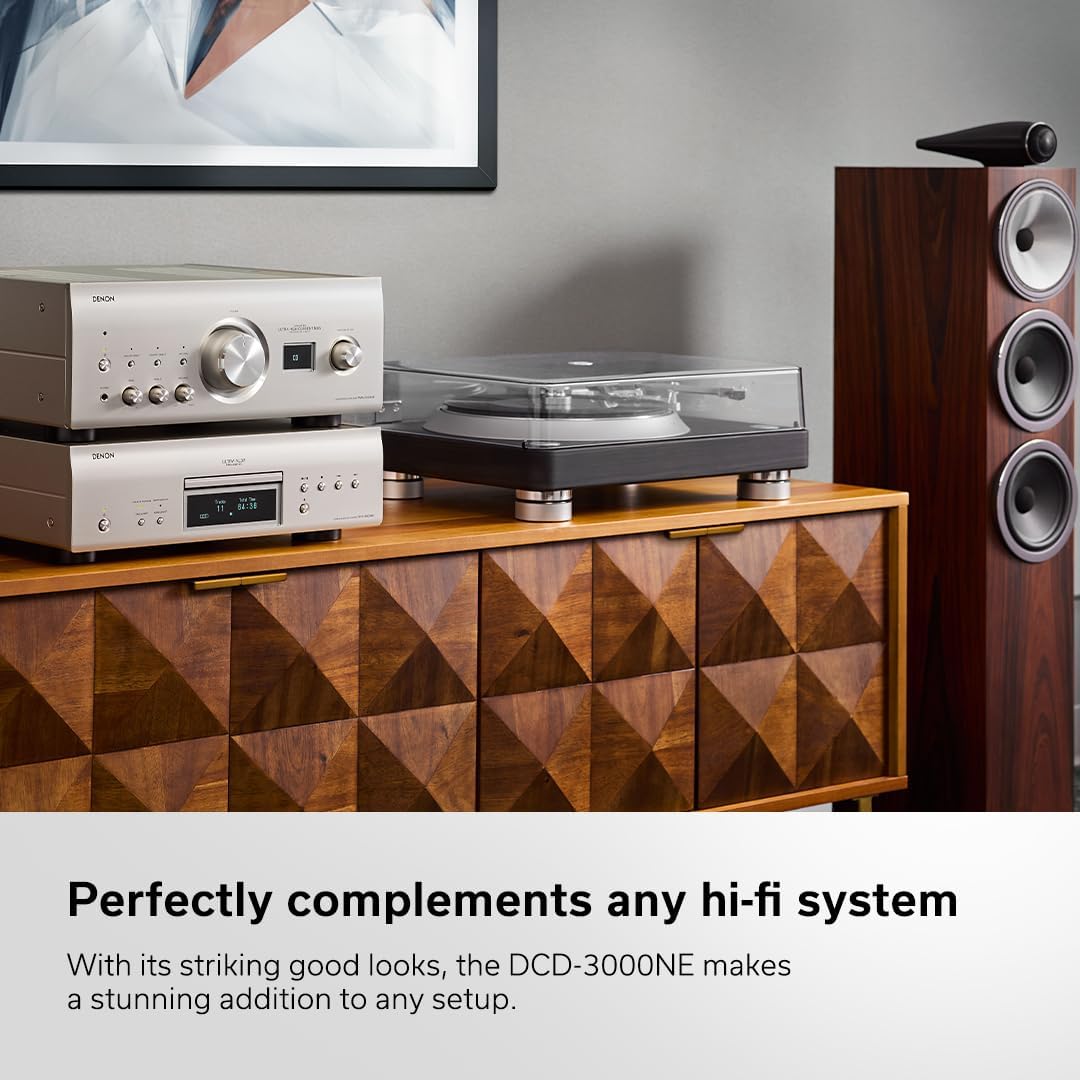
Figure 7.1: Internal circuitry highlighting the Ultra AL32 Processing.

Figura 7.2: Intern view of the DCD-3000NE's power supply section.
8. Garanzija u Appoġġ
8.1 Informazzjoni dwar Garanzija
The Denon DCD-3000NE comes with a Garanzija tal-Manifattur ta' SenaDin il-garanzija tkopri difetti fil-materjali u fix-xogħol taħt użu normali. Jekk jogħġbok żomm il-prova tax-xiri tiegħek għal talbiet ta' garanzija.
8.2 Appoġġ għall-Klijent
For technical assistance, troubleshooting beyond this manual, or warranty service, please contact Denon customer support. Refer to the official Denon webis-sit għall-aktar informazzjoni ta' kuntatt u riżorsi ta' appoġġ aġġornati.