
1. Introduzzjoni
Grazzi tax-xiriasing the Audizio Genua DAB Radio. This manual provides essential information for the safe and efficient operation of your device. Please read it thoroughly before use and retain it for future reference. The Audizio Genua is a versatile DAB+/FM stereo radio featuring Bluetooth connectivity, USB playback, and an alarm function, designed for both home and portable use.
2. Informazzjoni dwar is-Sigurtà
- Sors tal-Enerġija: Uża biss l-adapter tal-enerġija pprovdut. Kun żgur li l-volumtage jaqbel mar-rekwiżiti tar-reġjun tiegħek.
- Ilma u Umdità: Tesponix l-unità għax-xita, umdità, jew likwidi li jqattru/jitilqu. Tpoġġix oġġetti mimlija b'likwidi, bħal vażuni, fuq l-apparat.
- Ventilazzjoni: Aċċerta ruħek li jkun hemm ventilazzjoni adegwata. Timblokkax il-fetħiet tal-ventilazzjoni.
- Sħana: Żomm l-unità 'l bogħod minn sorsi ta' sħana bħal radjaturi, reġistri tas-sħana, stufi, jew apparat ieħor (inkluż amplifiers) li jipproduċu sħana.
- Tindif: Naddaf biss b'ċarruta niexfa.
- Servizzi: Tippruvax isservi dan il-prodott int stess. Irreferi l-manutenzjoni kollha lil persunal tas-servizz kwalifikat.
- Antenna: Do not bend or force the antenna.
3. Kontenut tal-Pakkett
Jekk jogħġbok iċċekkja li l-oġġetti kollha huma preżenti u f'kundizzjoni tajba meta tiftaħ il-pakkett:
- Audizio Genua DAB Radio
- Kontroll mill-bogħod
- Adapter tal-Enerġija
- Quick Start Guide (language not guaranteed)
4. Prodott Aktarview
4.1 Kontrolli u Wiri tal-Panew ta' Quddiem

Figura 4.1: Quddiem view of the Audizio Genua DAB Radio.
The front panel features a clear color TFT display, two speaker grilles, and an array of control buttons and a central rotary knob. The display shows station information, track details, time, and menu options. Buttons include Menu, Preset, Scan, Dimmer, Alarm, and playback controls (Play/Pause, Skip). The central knob is used for volume adjustment, tuning, and selection.
4.2 Konnessjonijiet tal-Panew ta' wara
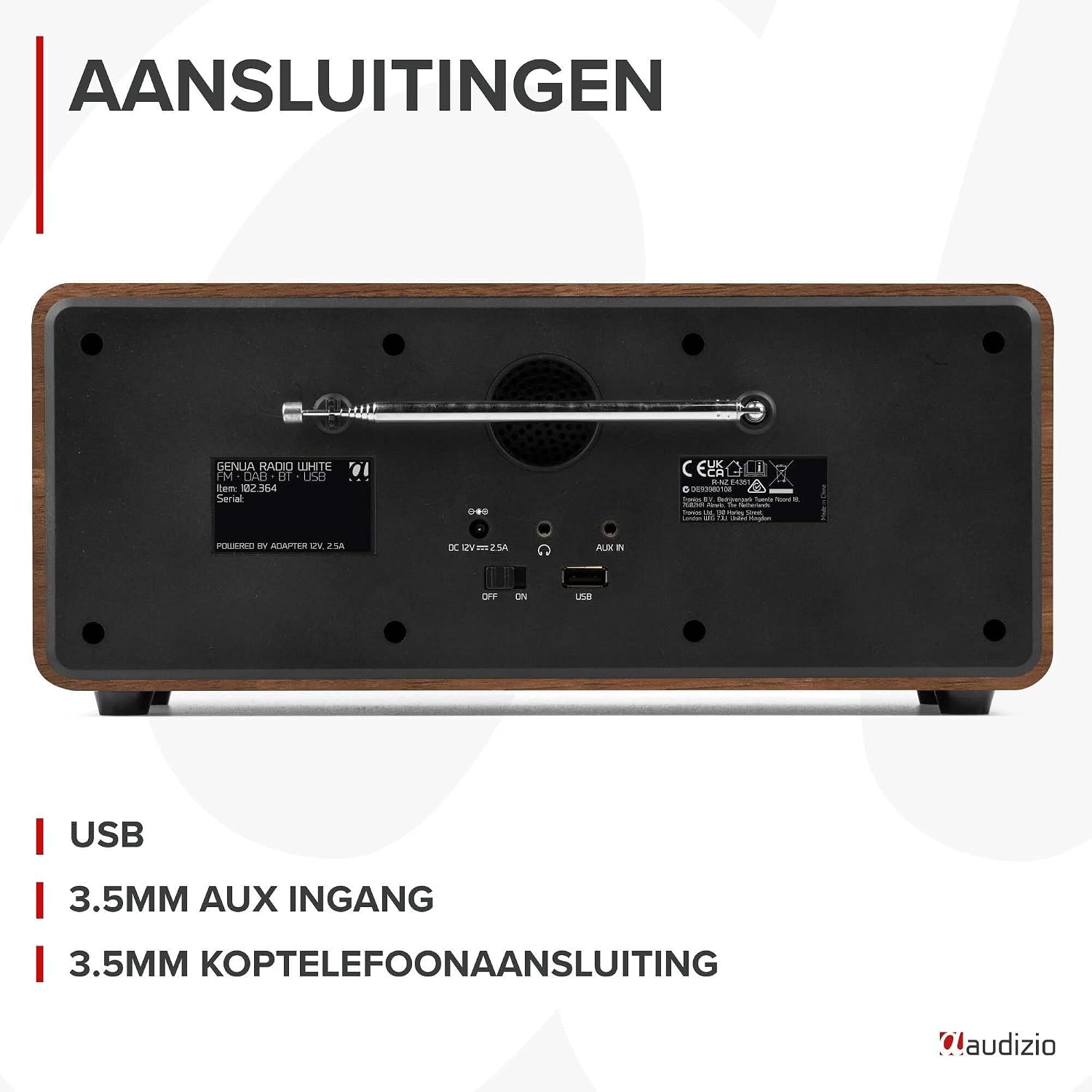
Figura 4.2: Wara view of the Audizio Genua DAB Radio with connections.
The rear panel includes the telescopic antenna for radio reception, a USB port for media playback, a 3.5mm AUX input for external audio devices, a 3.5mm headphone output, a DC 12V power input, and a main power ON/OFF switch.
4.3 Kontroll mill-Bogħod

Figure 4.3: Remote control for the Audizio Genua DAB Radio.
The included remote control provides full functionality, allowing you to power on/off, adjust volume, change modes, navigate menus, set alarms, and control playback from a distance.
5. Setup
5.1 Konnessjoni tal-Enerġija
- Connect the power adapter to the DC 12V input on the rear of the radio.
- Ipplaggja l-adapter tal-enerġija f'sokit tal-ħajt adattat.
- Flip the main power switch on the rear panel to the 'ON' position.
5.2 Aġġustament tal-Antenna
Estendi l-antenna teleskopika kompletament għal riċeviment ottimali tad-DAB+ u tar-radju FM. Aġġusta l-pożizzjoni tagħha għall-aħjar kwalità tas-sinjal.
5.3 Setup Inizjali u Skennjar Awtomatiku
- Upon first power-on, the radio may prompt you to perform an auto-scan for DAB+ stations. Select 'Yes' or press the 'Scan' button.
- Ir-radju se jiskennja għall-istazzjonijiet DAB+ disponibbli u jaħżinhom. Dan il-proċess jista' jieħu ftit minuti.
- Ladarba l-iskennjar ikun lest, ir-radju se jissettja fuq l-ewwel stazzjon disponibbli.
6. Istruzzjonijiet Operattivi
6.1 Għażla tal-Modalità
Press the 'Mode' button on the remote control or the 'Menu' button on the unit to cycle through available modes: DAB+, FM, Bluetooth, USB, and AUX In.
6.2 Tħaddim tar-Radju DAB+
- Select DAB+ mode.
- If no stations are found or you wish to rescan, press the 'Scan' button to perform a full scan.
- Use the 'Tune/Select' knob or the navigation buttons on the remote to browse through the list of available stations.
- Press the 'OK' button (on remote) or push the 'Tune/Select' knob to select a station.
- Ħażna ta 'Presets: To store a favorite station, press and hold the 'Preset' button until the preset menu appears. Use the knob/navigation to select a preset number (1-30) and press 'OK' to confirm.
- Filwaqt li jfakkru l-Presets: Briefly press the 'Preset' button, then use the knob/navigation to select the desired preset and press 'OK'.
6.3 Tħaddim tar-Radju FM
- Agħżel modalità FM.
- Skanjar Awtomatiku: Press the 'Scan' button to automatically scan for and store available FM stations.
- Irfinar Manwali: Use the 'Tune/Select' knob to manually tune to a specific frequency.
- Ħażna ta 'Presets: Similar to DAB+ mode, press and hold 'Preset', select a number, and confirm.
- Filwaqt li jfakkru l-Presets: Briefly press 'Preset', select the desired preset, and confirm.
6.4 Konnettività Bluetooth
- Select Bluetooth mode. The display will show "Pairing" or "Waiting for connection".
- On your smartphone or other Bluetooth-enabled device, enable Bluetooth and search for available devices.
- Select "Audizio Genua" from the list of devices.
- Once paired, the radio will confirm the connection, and you can start playing audio from your device.
6.5 Daqq tal-USB
- Daħħal USB flash drive li jkun fih MP3 files fil-port USB fuq il-pannell ta' wara.
- Select USB mode. The radio will automatically detect the USB drive and begin playing the first compatible audio file.
- Use the playback control buttons (Play/Pause, Skip Forward/Backward) on the unit or remote to manage your music.
6.6 Input AUX
- Connect an external audio device (e.g., MP3 player, smartphone) to the 3.5mm AUX IN port on the rear panel using an audio cable (not included).
- Agħżel il-mod AUX.
- Ikkontrolla d-daqq u l-volum mit-tagħmir estern tiegħek.
6.7 Allarm u Sleep Timer
- Issettjar ta' Allarm: Press the 'Alarm' button on the unit or remote. Follow the on-screen prompts to set Alarm 1 and Alarm 2, including time, source (DAB/FM/Buzzer), and volume.
- Funzjoni Snooze: When the alarm sounds, press any button (except Power) to activate snooze. The alarm will sound again after a set interval.
- Timer ta 'l-Irqad: Press the 'Sleep' button on the remote to set a sleep timer (e.g., 15, 30, 60 minutes). The radio will automatically turn off after the selected time.
6.8 Dimmer tal-Wiri
Press the 'Dimmer' button on the unit or remote to adjust the brightness of the display. This is useful for different lighting conditions or for use in a bedroom.
7. Manutenzjoni
- Tindif: Uża drapp artab u niexef biex tnaddaf il-barra tar-radju. Tużax prodotti tat-tindif li joborxu, xama', jew solventi.
- Antenna: Immaniġġja l-antenna teleskopika b'attenzjoni biex tevita l-ħsara.
- Ħażna: If storing the radio for an extended period, disconnect it from the power supply.
8 Issolvi l-problemi
| Problema | Kawża Possibbli | Soluzzjoni |
|---|---|---|
| Ebda qawwa | Power adapter not connected; Main power switch off | Ensure power adapter is securely connected and plugged in; Turn main power switch to 'ON' |
| Riċeviment tar-radju fqir (DAB+/FM) | Antenna mhux estiża; Żona b'sinjal dgħajjef; Interferenza | Fully extend and adjust the telescopic antenna; Try repositioning the radio; Move away from other electronic devices |
| Bluetooth mhux pairing | Radio not in Bluetooth mode; Device not discoverable; Already paired with another device | Select Bluetooth mode on the radio; Ensure Bluetooth is enabled on your device and it's in pairing mode; Disconnect from other Bluetooth devices |
| Daqq USB mhux qed jaħdem | Id-drajv tal-USB mhux imdaħħal sew; Inkompatibbli file format; USB drive corrupted | Ensure USB drive is fully inserted; Check if files are in MP3 format; Try a different USB drive |
| L-ebda ħoss | Volum baxx wisq; Mute attivat; Sors mhux korrett magħżul | Increase volume; Check if mute is active; Ensure correct input source (DAB/FM/BT/USB/AUX) is selected |
9. Speċifikazzjonijiet

Figure 9.1: Audizio Genua DAB Radio dimensions.
- Ditta: Audizio
- Numru tal-Mudell: Genua
- Kulur: Abjad
- Karatteristika Speċjali: Bluetooth Connectivity, DAB+ Radio
- Teknoloġija tal-Konnettività: Aux, Bluetooth, USB
- Dimensjonijiet tal-Prodott (L x W x H): 13.5 x 31 x 13.3 ċm
- Teknoloġija tuner: DAB+
- Stil: Moderna
- Sors tal-Enerġija: Corded Elettriku
- Baned tar-Radju Appoġġjati: FM, DAB+
- Apparati Kompatibbli: Smartphone, Tablet, Laptop, MP3 Player, Headphones, Speaker
- Voltage: 220 Volts
- Qawwa Massima tal-Ħruġ tal-Ispeaker: 50 Watts
- Numru ta' Batteriji: 1 Non-standard battery (Type of battery required)
- Tip ta' Skrin: TFT
- Piż tal-oġġett: 2.25 Kilogrammi
10. Garanzija u Appoġġ
This product is covered by a standard manufacturer's warranty. For detailed warranty terms and conditions, please refer to the documentation provided at the time of purchase or contact your retailer. For technical support or service inquiries, please contact the Audizio customer support team through their official webis-sit jew il-punt tax-xiri tiegħek.


