
1. Introduzzjoni
This manual provides essential instructions for the proper setup, operation, and maintenance of your RayNeo HDMI-C to AR Glasses Charging Adapter (Model HC 2.0). This adapter allows for simultaneous video transmission to your AR glasses and charging of your source device, ensuring an uninterrupted experience.
2. Kontenut tal-Pakkett
Jekk jogħġbok ivverifika li l-oġġetti kollha elenkati hawn taħt huma inklużi fil-pakkett tiegħek:
- 1 x RayNeo HDMI-C to AR Glasses Charging Adapter
- 1 x USB-A għal USB-C Iċċarġjar Cable
- 1 x Cable HDMI
- 1 x Gwida Quick Start

Immaġni: Il-komponenti kollha huma inklużi fil-pakkett tal-prodott.
3. Karatteristiċi ewlenin
- Operazzjoni Simultanja: Connect your AR glasses and charge your source device concurrently.
- Iċċarġjar b'Veloċità Għolja: Delivers up to 50W of power to your AR glasses. Actual charging speed depends on the connected device's specifications.
- Kompatibilità Wiesgħa tal-Apparat: Compatible with devices adhering to the USB-C standard protocol, including Steam Deck, ROG Ally, and Legion Go.
- Appoġġ għal Riżoluzzjoni Għolja: Supports resolutions up to 8K for crisp, lossless image quality. Features are dependent on source device and display capabilities.
- Kostruzzjoni Durabbli: Made from aluminum alloy for enhanced durability.
- Smart Hardware Protection: Safeguards against overvoltage ħsara.
- Faċli għall-utent: Supports hot-swapping, plug-and-play functionality, and requires no software installation.
4. Istruzzjonijiet ta' Setup
Follow these steps to connect your RayNeo HDMI-C to AR Glasses Charging Adapter:
- Connect AR Glasses: Plug your AR glasses into the USB-C output port on the adapter.
- Qabbad Apparat Sors: Use the provided HDMI cable to connect your source device (e.g., gaming console, PC, laptop) to the HDMI-IN port on the adapter.
- Qabbad l-Enerġija: Connect the USB-A to USB-C charging cable to a power adapter (not included) and then to the DC 5V or Type-C charging input port on the adapter. This will provide power to both your AR glasses and charge your source device.

Image: Connection diagram for the adapter with AR glasses, a gaming console, and a power source.
5. Istruzzjonijiet Operattivi
Once connected, the adapter operates on a plug-and-play basis. Your AR glasses should automatically display content from your source device, and your source device will begin charging.
- Gaming/Streaming: Enjoy uninterrupted gaming or streaming sessions as the adapter ensures continuous power supply to your AR glasses while simultaneously charging your connected device.
- Riżoluzzjoni: The adapter will automatically adapt to the highest supported resolution up to 8K, based on the capabilities of your source device and AR glasses.

Image: Adapter connected to a laptop, AR glasses, and power for simultaneous use and charging.
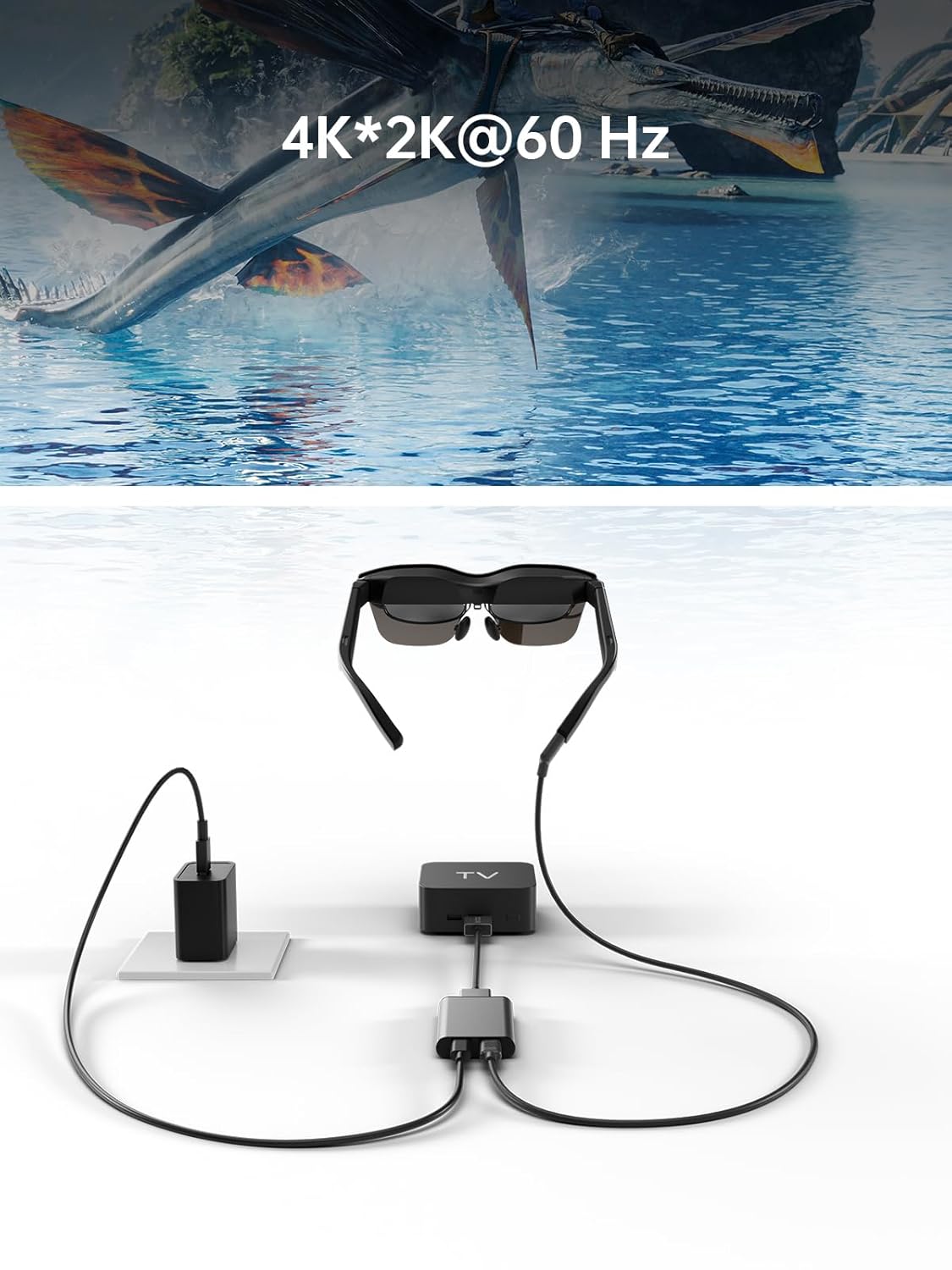
Image: Adapter facilitating 4K*2K@60Hz video output from a TV box to AR glasses.
6. Kompatibilità
The RayNeo HDMI-C to AR Glasses Charging Adapter is designed for broad compatibility. Ensure your devices meet the following criteria:
6.1. Source Devices (HDMI-IN)
Compatible with any device that outputs video via HDMI, including but not limited to:
- Gaming Consoles (e.g., PlayStation 5/4, Xbox Series X/S, Nintendo Switch, Steam Deck, ROG Ally, Legion Go)
- Personal Computers (PC)
- Laptops
- Streaming Devices (e.g., Apple TV)
6.2. AR Glasses (USB-C OUT)
Compatible with AR glasses that accept video input via USB-C, such as:
- RayNeo Air 2s
- RayNeo Air 2
- TCL NXTWEAR S
Nota: Your source device must adhere to the USB-C standard protocol for charging and data transmission to function correctly with this adapter.

Image: Visual representation of the adapter's wide compatibility with various input devices and AR glasses.
7 Issolvi l-problemi
Jekk tiltaqa' ma' xi problemi, jekk jogħġbok irreferi għas-soluzzjonijiet komuni li ġejjin:
- No Display on AR Glasses:
- Ensure all cables (HDMI, USB-C to AR glasses) are securely connected.
- Verify that your source device is powered on and outputting video.
- Check if your AR glasses are powered on and functioning correctly.
- Test with different HDMI or USB-C cables if available.
- Source Device Not Charging:
- Confirm the power adapter is connected to the adapter's charging port and to a working power outlet.
- Ensure the power adapter provides sufficient wattage (up to 50W supported).
- Verify that your source device supports charging via its USB-C port when connected to an external adapter.
- Low Resolution or Poor Image Quality:
- Check the resolution settings on your source device.
- Ensure your HDMI and USB-C cables are high-quality and support the desired resolution.
- The maximum resolution is dependent on both the source device and the AR glasses.
- Adapter Mhux Rikonoxxut:
- Disconnect and reconnect all cables.
- Ibda mill-ġdid it-tagħmir tas-sors tiegħek.
8. Manutenzjoni
Biex tiżgura l-lonġevità u l-prestazzjoni ottimali tal-adapter tiegħek, segwi dawn il-linji gwida ta' manutenzjoni:
- Tindif: Uża drapp artab u niexef biex tnaddaf l-adapter. Evita prodotti tat-tindif likwidi jew materjali li joborxu.
- Ħażna: Aħżen l-adapter f'post frisk u niexef 'il bogħod mix-xemx diretta u minn temperaturi estremi.
- Immaniġġjar: Evita li twaqqa' l-adapter jew li tissottomettih għal impatti qawwija. Tippruvax tiżżarma l-apparat.
- Kura tal-Cable: Do not bend cables excessively or pull them forcefully from the ports.
9. Speċifikazzjonijiet
| Karatteristika | Speċifikazzjoni |
|---|---|
| Numru tal-Mudell | HC2.0 |
| Brand | RayNeo |
| Tip ta' Konnettur | USB Type C (Output), HDMI (Input) |
| Input tal-Iċċarġjar | DC 5V / USB Type C |
| Kunsinna Massima tal-Qawwa | Sa 50W |
| Appoġġ għar-Riżoluzzjoni Massima | 8K |
| Materjal | Liga tal-Aluminju |
| Kulur | Fidda |
| Piż tal-oġġett | 2.89 uqija |
| Dimensjonijiet tal-Pakkett | 5.39 x 2.64 x 0.94 pulzieri |

Image: Dimensional drawing of the adapter.
10. Garanzija u Appoġġ
For warranty information and customer support, please refer to the documentation included with your product or visit the official RayNeo websit. Żomm l-irċevuta tax-xiri tiegħek għal pretensjonijiet ta' garanzija.