
1. Introduzzjoni
Grazzi tax-xiriasing the CHOYONG A8W Portable Smart Internet Radio Receiver. This device is a versatile audio companion, offering access to over 40,000 internet radio stations worldwide via Wi-Fi or 4G connectivity, along with FM radio and Micro-SD card playback. Its compact design, clear sound, and intuitive controls make it ideal for home use or on-the-go listening.
This manual provides detailed instructions for setting up, operating, maintaining, and troubleshooting your A8W radio. Please read it thoroughly before use to ensure optimal performance and longevity of your device.
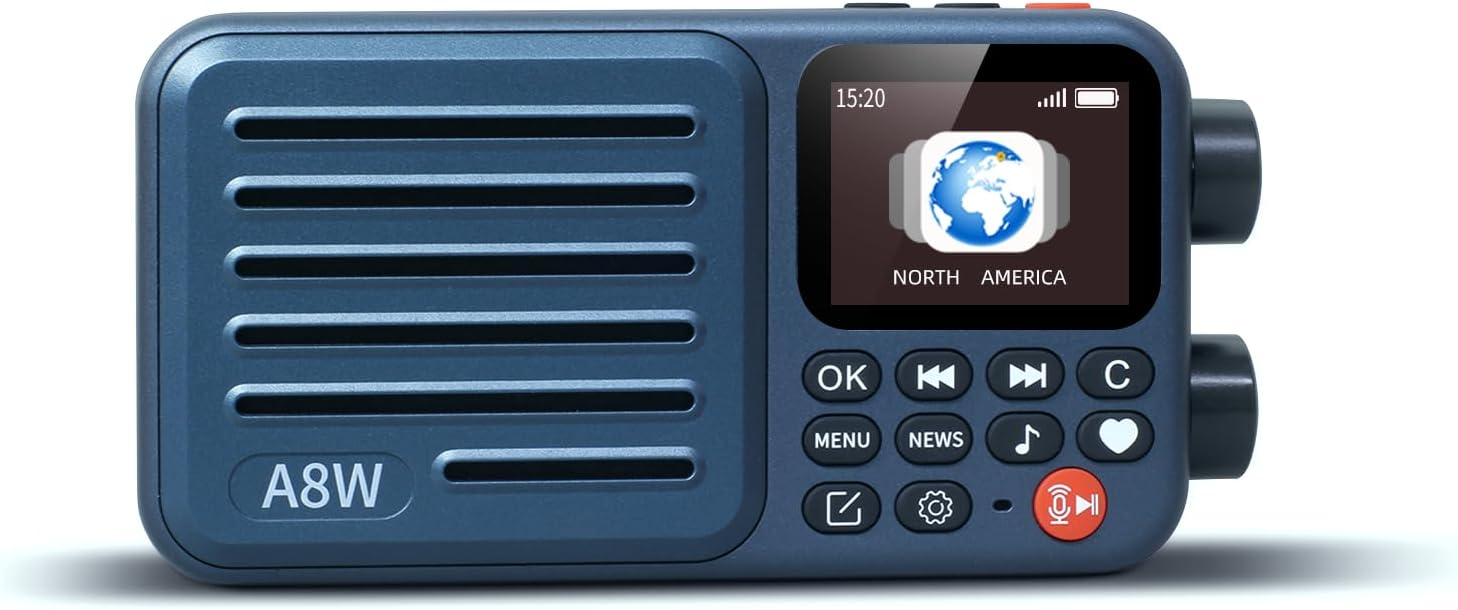
Image: The CHOYONG A8W Portable Smart Internet Radio Receiver, showcasing id-disinn kompatt u l-wiri tiegħu.
2. Informazzjoni dwar is-Sigurtà
- Tesponix l-apparat għall-ilma, umdità, jew temperaturi estremi.
- Evita li twaqqa’ jew tissuġġetta l-apparat għal impatti qawwija.
- Tippruvax tiżżarma jew issewwi l-apparat int stess. Irreferi għal kull manutenzjoni f'idejn persunal kwalifikat.
- Uża biss il-kejbil tal-iċċarġjar u l-adapter tal-enerġija speċifikati.
- Żomm fejn ma jintlaħaqx mit-tfal.
3. Kontenut tal-Pakkett
Jekk jogħġbok iċċekkja l-pakkett għall-oġġetti li ġejjin:
- CHOYONG A8W Portable Smart Internet Radio Receiver
- Type-C to 3.5mm audio cable (for earphones)
- Manwal tas-Sid
- Kejbil tal-Iċċarġjar USB (Tip Ċ)
4. Prodott Aktarview
Familiarize yourself with the various parts and controls of your A8W radio.

Immaġni: Dettaljata view of the A8W showing dual knobs, Micro SD card slot, and Type-C audio jack.
Kontrolli u Portijiet:
- Skrin tad-displej: Shows time, station information, battery status, and menu options.
- Dual Knobs: One for console navigation/selection, one for tuning/volume.
- Buttuna OK: Jikkonferma l-għażla.
- Buttuni tan-Navigazzjoni: For moving through menus and stations.
- Buttuna tal-menu: Accesses main menu.
- News Button: Quick access to news stations.
- Buttuna tal-Mużika: Quick access to music functions.
- Favorites Button (Heart Icon): Adds or accesses favorite stations.
- Voice Search Button (Microphone Icon): Jattiva t-tfittxija bil-vuċi.
- Power Button (Red Icon): Ixgħel/itfi l-apparat.
- Slott tal-Karta Mikro SD: For inserting a Micro SD card for local music playback.
- Type-C Audio Jack: For connecting earphones using the provided Type-C to 3.5mm cable.
- Port tal-Iċċarġjar tat-Tip C: Għall-iċċarġjar tal-apparat.
- Slot tal-Kard SIM: For inserting a 4G SIM card (if 4G model).
5. Setup
5.1 Iċċarġjar tal-batterija
Before first use, fully charge the device. Connect the provided USB Type-C cable to the radio's Type-C charging port and the other end to a USB power adapter (not included) or a computer's USB port. The battery indicator on the screen will show charging status. A full charge provides approximately 2000mAh of power.
Image: The A8W radio with an overlay indicating its 2000mAh rechargeable battery.
5.2 Konnessjoni mal-Wi-Fi
- Ixgħel l-apparat.
- Navigate to the 'Settings' menu using the knobs and OK button.
- Select 'Wi-Fi Network'.
- Agħżel in-netwerk Wi-Fi mixtieq tiegħek mil-lista.
- Daħħal il-password tal-Wi-Fi billi tuża t-tastiera fuq l-iskrin u kkonferma.
- Ladarba tkun konness, l-ikona tal-Wi-Fi tidher fuq id-displej.
5.3 Inserting a SIM Card (Optional, for 4G models)
If your model supports 4G, you can insert a SIM card for internet connectivity without Wi-Fi.
- Sib l-islott tal-karta SIM fuq l-apparat.
- Carefully insert a compatible 4G SIM card into the slot until it clicks into place.
- The device will automatically detect the SIM card and attempt to connect to the mobile network.
5.4 Daħħal Micro SD Card
To play local audio files, insert a Micro SD card into the designated slot.
- Sib l-islott tal-karta Micro SD.
- Daħħal il-kard tal-Micro SD bil-kuntatti tad-deheb iħarsu 'l isfel sakemm tikklikkja f'postha.
- The device will recognize the card, and you can access its content via the 'Music' or 'File Browser' option.
5.5 Konnessjoni tal-Earphones
For private listening, use the provided Type-C to 3.5mm cable to connect your 3.5mm earphones to the device's Type-C audio jack.

Image: The A8W radio held in hands, illustrating its portability and the use of Type-C earphones.
6. Istruzzjonijiet Operattivi
6.1 Tixgħel/Jitfi
Press and hold the red Power button (with the play/pause icon) for a few seconds to turn the device on or off.
6.2 Navigazzjoni tal-Interfaċċja
Use the dual knobs and navigation buttons to move through menus and select options. The OK button confirms your selection.
6.3 Radju bl-Internet
The A8W provides access to over 40,000 internet radio stations globally.

Image: The A8W radio with popular international radio station logos, demonstrating its global reach.
- Stazzjonijiet tal-Browsing: Stations are categorized by continent, country, province, city, type, and popularity. Navigate through these categories to find stations.
- Adding Stations: You can manually add stations by entering a valid URL (supporting MP3, AAC, M3U8, etc.) directly on the radio.
- Favoriting Stations: While listening to a station, press the Heart icon button to add it to your favorites for quick access.
6.4 Radju FM
The device also supports traditional FM radio (87.5-108MHz).
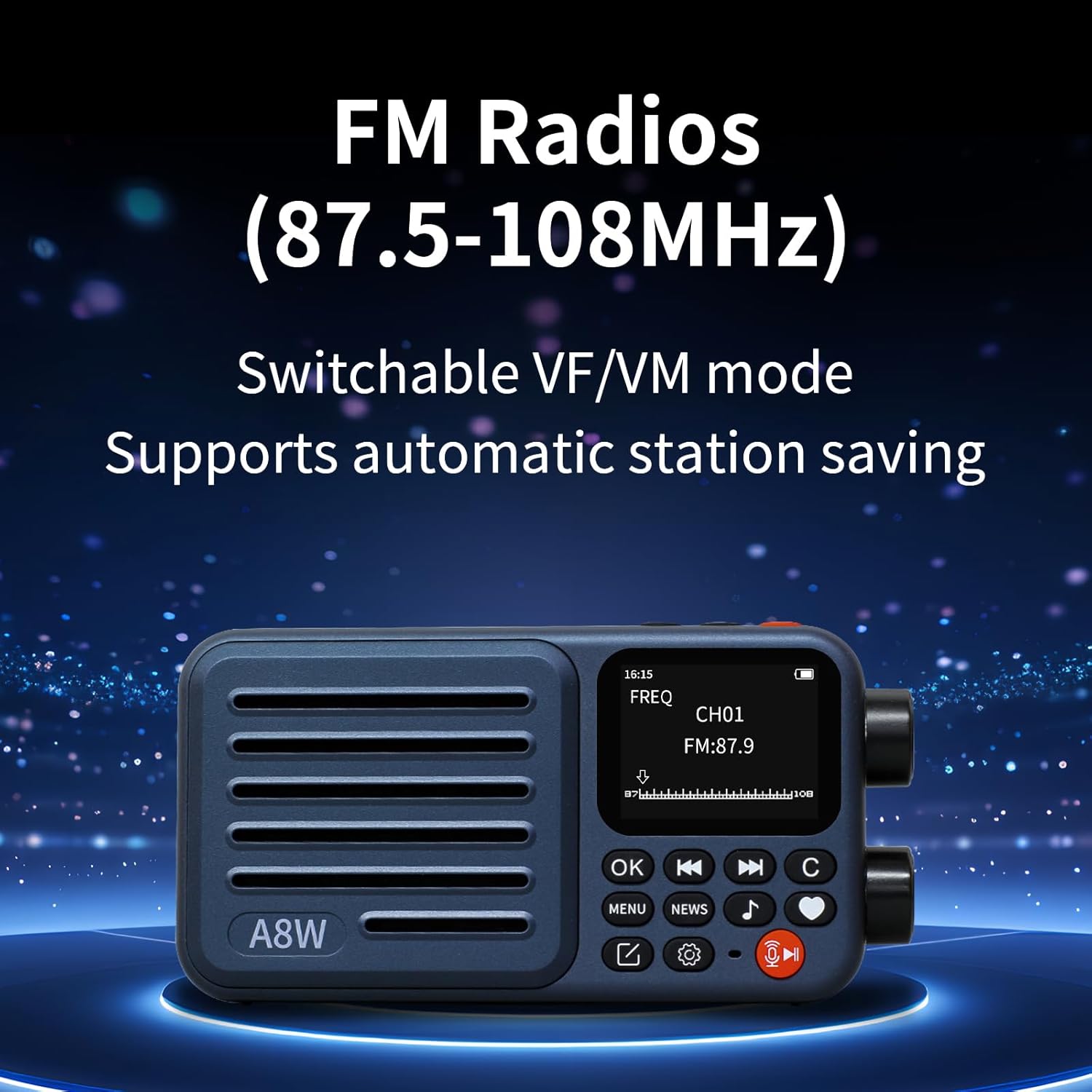
Image: The A8W radio screen showing FM frequency (87.5-108MHz) and signal strength.
- Irfinar: Switch to FM mode and use the tuning knob to manually adjust the frequency.
- Tiftix Awtomatiku: The device supports automatic FM station search and saving.
6.5 Tiftix bil-Vuċi
Use the voice search feature to quickly find radio stations.

Image: A graphic illustrating the voice search function with a microphone icon and
Ask a question about this manual
Ask about setup, troubleshooting, compatibility, parts, safety, or missing instructions. Manuals+ will review the question and use this page’s manual context to help answer it.