Introduzzjoni
The HY300 Plus HD Projector is a portable, versatile home theater device designed for an immersive viewing experience. Featuring Android 11, Wifi6 connectivity, and a 180-degree rotatable design, it offers flexibility in projection. This manual provides essential information for setting up, operating, and maintaining your projector.
Key features include native 1280x720P resolution with support for 4K video decoding, 300 ANSI lumens brightness, electric focusing, and automatic keystone correction. Its compact size and long LED light source life make it suitable for various indoor and outdoor uses.
X'hemm fil-Kaxxa
Please check the contents of your product packaging to ensure all items are present:
- HY300 Plus HD Projector
- Kontroll mill-bogħod
- Korda tal-Enerġija
- Qoxra tal-Apparat
- Manwal għall-Utent (dan id-dokument)

Figure 1: Product Packaging and Accessories. This image displays the HY300 Plus projector alongside its box, power charger, remote control, and user manual, indicating all included components.
Prodott Overview
Familiarize yourself with the main components and features of your HY300 Plus HD Projector.

Figura 2: Quddiem view of the HY300 Plus HD Projector. This image shows the projector's cylindrical body, front lens, and integrated stand.

Figura 3: Wara view of the HY300 Plus HD Projector. This image highlights the projector's ventilation grilles and input/output ports, including HDMI and USB.
Setup
1. Placement and Orientation
The HY300 Plus projector features a 180-degree rotatable design, allowing you to project onto walls, ceilings, or any desired surface. Position the projector on a stable, flat surface within the recommended projection distance of 1.2 to 4 meters for a screen size of 40 to 130 inches.
Video 1: HY300 Plus 180-degree rotation and mounting options. This video demonstrates the projector's flexible 180-degree rotation feature and shows how to attach it to a tripod or ceiling mount using the 1/4 inch screw hole.
2. Konnessjoni tal-Enerġija
Connect the provided power cord to the projector's power input port and then plug it into a standard electrical outlet (AC90-260V/50-60MHZ, 110-220V).
3. L-Ewwel Tixgħil
Agħfas il-buttuna tal-qawwa fuq il-proġettazzjoni jew il-kontroll remot biex tixgħel l-apparat. Il-proġettazzjoni tibda, u turi l-interfaċċja tal-Android 11.
4. Aġġustament tal-Focus
The projector features electric focusing. Use the remote control to adjust the focus until the projected image is clear and sharp.
Video 2: Electric focus demonstration. This video illustrates how the electric focus feature works, showing the image sharpening on the screen as the focus is adjusted.
5. Korrezzjoni Keystone
The projector supports auto horizontal keystone correction and manual trapezoidal correction. This feature automatically or manually adjusts the image to ensure a perfectly rectangular projection, even if the projector is placed at an angle.
Figure 4: Automatic Keystone Correction. This image demonstrates how the projector automatically corrects a distorted image to achieve a perfectly square projection.
6. Għażliet ta 'Immuntar
The HY300 Plus includes a built-in 1/4 inch screw hole at the bottom, allowing for versatile mounting options such as projector brackets, digital camera brackets, or ceiling mounts. This provides flexibility beyond tabletop placement.

Figure 5: Versatile Mounting Options. This image illustrates different ways to position the projector, including on a table, on a stand, and mounted to a wall or ceiling using the integrated screw hole.
Istruzzjonijiet Operattivi
1. Android 11 Interface
Your projector runs on Android 11, providing access to over 4,000 applications, including popular streaming services like Netflix, YouTube, and Amazon Prime. Navigate the interface using the remote control.
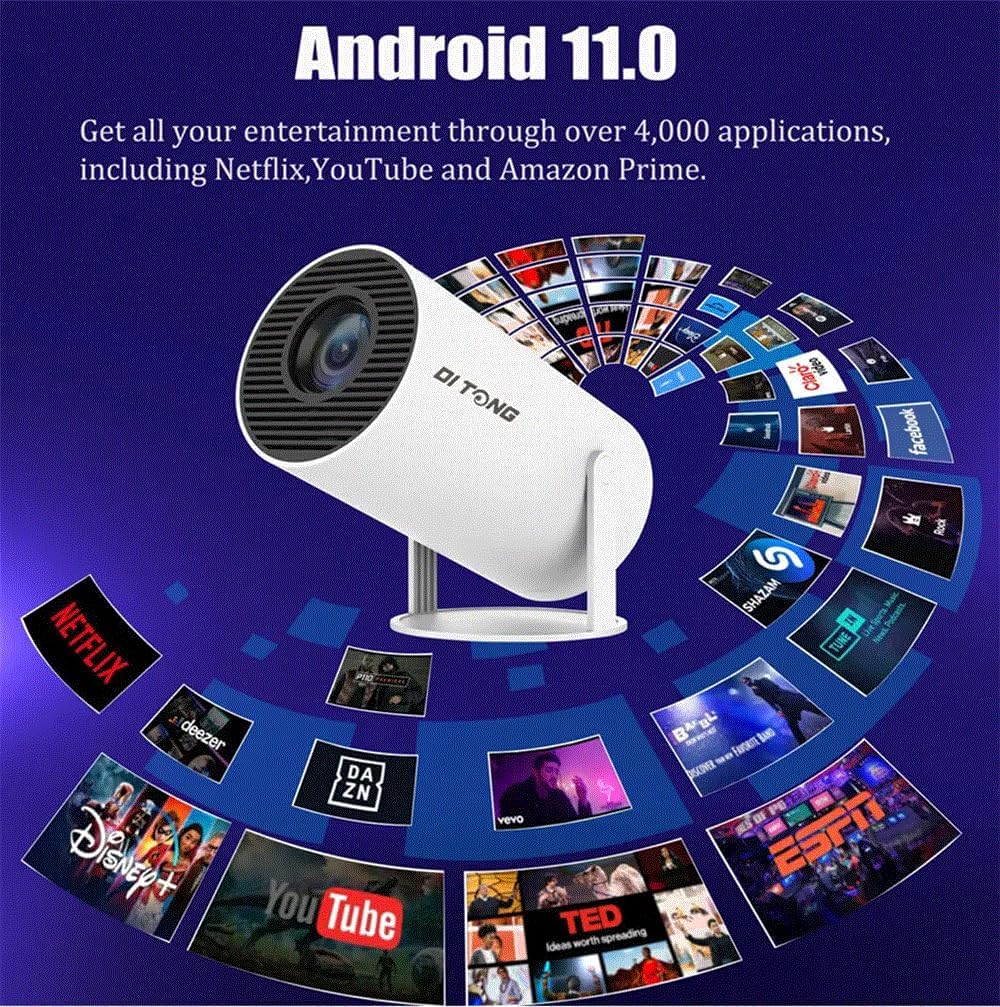
Figure 6: Android 11 Operating System. This image shows the projector with a graphic overlay of numerous application icons, highlighting its built-in Android 11 system for accessing various entertainment apps.
2. Konnettività
- Wi-Fi: The projector supports dual 2.4G/5G Wifi6, offering a smooth and reliable streaming experience. Connect to your home network via the settings menu.
- Bluetooth: Utilize Bluetooth 5.0 to connect external audio devices such as headphones or speakers for enhanced sound.
- HDMI/USB: Connect external devices like laptops, gaming consoles, or USB drives using the available HDMI and USB ports on the rear of the projector.
3. Screen Mirroring
Easily mirror content from your iPhone, Android smartphone, tablet, or laptop via Wi-Fi. This feature allows you to project your device's screen directly onto a larger display.

Figure 7: Convenient Screen Mirroring. This image depicts the projector displaying content on a large screen while a smartphone shows the same content, demonstrating the wireless screen mirroring capability for mobile devices.
4. Daqq tal-Midja
Il-proġettur jappoġġja firxa wiesgħa ta' formati tal-midja:
- Immaġni Files: JPG, BMP, PNG (supports image scaling).
- Video Files: Full-format decoding including HEVC/VP9/AVS2/AVC 4K@60fps and MPEG1/MPEG2/AV1 1080p/60fps decoding. While it supports 4K video decoding, the highest output resolution is 1280x720P.
Video 3: High definition video demonstration. This video showcases the projector's ability to display high-definition video content clearly, with a person walking in front of the projection to demonstrate its brightness and clarity.
5. Output tal-Awdjo
The projector has a built-in 5W stereo speaker with a HiFi system for clear sound. For a more immersive audio experience, you can connect external headphones or speakers via Bluetooth or the audio output port (if available).
Manutenzjoni
1. Tindif
- Lenti: Use a soft, lint-free cloth specifically designed for optical lenses to gently wipe the projector lens. Avoid using abrasive cleaners or excessive pressure.
- Barra: Imsaħ il-barra tal-proġettazzjoni b'ċarruta ratba u niexfa. Tużax prodotti tat-tindif likwidi direttament fuq l-apparat.
- Ventilazzjoni: Ensure the ventilation grilles are free from dust and obstructions to prevent overheating. Use a soft brush or compressed air to clear any debris.
2. Ħajja tas-Sors tad-Dawl
The LED light source in your HY300 Plus projector has a long life of up to 50,000 hours, providing years of reliable use under normal conditions.
3. Ħażna
When not in use for extended periods, store the projector in a cool, dry place, away from direct sunlight and extreme temperatures. Use the provided device cover to protect it from dust.
Issolvi l-problemi
If you encounter issues with your HY300 Plus projector, please refer to the following common solutions:
| Problema | Kawża Possibbli | Soluzzjoni |
|---|---|---|
| L-ebda immaġni pproġettata | Power not connected, projector off, input source incorrect. | Ensure power cord is securely connected and projector is turned on. Verify the correct input source (HDMI, USB, Wi-Fi) is selected. |
| L-immaġni hija mċajpra | Focus not adjusted, projection distance incorrect. | Use the remote control to adjust the electric focus. Ensure the projector is within the recommended projection distance (1.2-4M). |
| L-immaġni hija distorta (forma ta' trapeżojde) | Il-proġettur mhux perpendikolari mal-iskrin. | Utilize the auto horizontal keystone correction or manually adjust trapezoidal correction settings. |
| L-ebda ħoss | Volum baxx wisq, apparat awdjo estern mhux imqabbad, output awdjo mhux korrett magħżul. | Increase volume. Check Bluetooth connection for external speakers/headphones. Ensure internal speaker is selected if no external device is used. |
| Kwistjonijiet ta 'konnessjoni Wi-Fi | Password mhux korretta, sinjal dgħajjef, problemi bir-router. | Iċċekkja l-password tal-Wi-Fi darbtejn. Mexxi l-proġettazzjoni eqreb lejn ir-router. Erġa' ixgħel ir-router u l-proġettazzjoni. |
Speċifikazzjonijiet
| Karatteristika | Dettall |
|---|---|
| Sistema | Android 11 |
| Wi-Fi | 2.4G/5G Wifi6 |
| Teknoloġija tal-Wiri | LCD |
| Sors tad-Dawl | LED (50,000 hours long life) |
| Luminożità | 300 lumi ANSI |
| Mod ta 'Aġġustament | Electric focusing |
| Ceiling Installation Support | Yes (built-in 1/4 screw hole) |
| Proporzjon ta' Kuntrast | 1500:1 |
| Riżoluzzjoni Nattiva | 1280x720P |
| Riżoluzzjoni Max Appoġġjata | 1080P & 4K (decoding) |
| Proporzjon ta' l-aspett | 16:9 |
| Proporzjon ta' Projezzjoni | 1.2:1 |
| Projection Dimension | 40-130 pulzier |
| Distanza ta' Projezzjoni | 1.2-4 metri |
| Provvista tal-Enerġija | AC90-260V/50-60MHZ, 110-220V |
| Speaker | 3W |
| Bluetooth | BT5 |
| Daqs tal-Prodott | 134 * 119 * 218.5mm |
| CPU | Allwinner H713 ARM Cortex-A53 b'erba' qalba |
| GPU | Mali-G31 (jappoġġja OpenGL ES3.2, Vulkan 1.1, OpenCL2.0) |
| Immaġni File Appoġġ | JPG, BMP, PNG (jappoġġja l-iskalar tal-immaġni) |
| Video File Appoġġ | HEVC/VP9/AVS2/AVC 4K@60fps, MPEG1/MPEG2/AV1 1080p/60fps |
Garanzija u Appoġġ
For warranty information and technical support, please refer to the contact details provided by the seller or manufacturer at the point of purchase. Keep your proof of purchase for any warranty claims.
Informazzjoni dwar ir-Riċiklaġġ
Please dispose of this product responsibly. For information on recycling lamps and proper disposal of broken or damaged lamps, consult local regulations or visit relevant recycling guidelines provided by your region.


