
Introduzzjoni
This manual provides detailed instructions for the proper use and maintenance of your Casio G-Shock GA010-1A analog-digital watch. Please read this manual thoroughly to ensure correct operation and to maximize the lifespan of your timepiece. The GA010-1A is designed for durability and functionality, featuring a 10-year battery and robust construction.
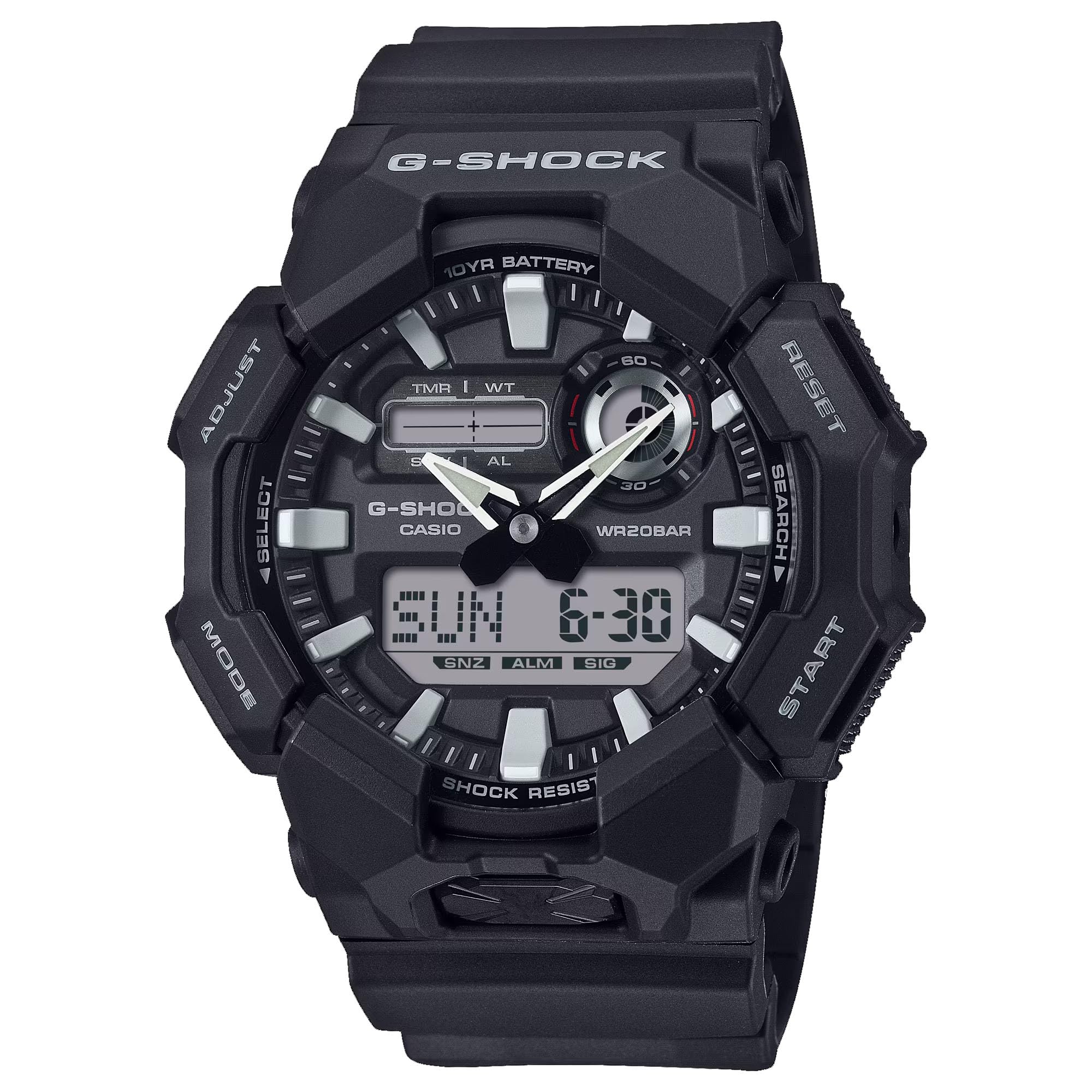
Immaġni: Quddiem view of the Casio G-Shock GA010-1A watch, showcasinil-wiri analogu u diġitali tiegħu.
Karatteristiċi
- Reżistenti għax-xokk: Iddisinjat biex jiflaħ impatti u vibrazzjonijiet.
- LED Light (Super Illuminator): Provides illumination for the display in low-light conditions. Selectable illumination duration (1.5 seconds or 3 seconds).
- Ħin Dinji: Displays the current time in 31 time zones (48 cities + Coordinated Universal Time). Includes daylight saving on/off and home city/world time city swapping.
- 1/100-Sekondi Stopwatch: Ikejjel il-ħin li għadda, il-ħin maqsum, u l-ħinijiet tal-ewwel u t-tieni post.
- 5 Allarmi ta' Kuljum: Independent daily alarms.
- Hand Shift Feature: Hands move out of the way to provide an unobstructed view of digital display contents.
- Ton tal-Operazzjoni tal-Buttuni Mixgħul/Mitfi: Allows muting of button operation tones.
- Ħajja tal-Batterija ta' 10 Snin: Powered by a CR2025 lithium metal battery.
- Reżistenza għall-Ilma: 200 meters (20 bar). Suitable for recreational scuba diving.
- Wiri Analogu-Diġitali: Jgħaqqad idejn analogi tradizzjonali ma' display diġitali għal żamma tal-ħin versatili.

Immaġni: Ġenb view of the Casio G-Shock GA010-1A watch, highlighting its robust case design.
Setup
Issettjar Inizjali tal-Ħin u d-Data
- Daħħal il-Modalità taż-Żamma tal-Ħin: Ensure the watch is in the Timekeeping Mode. Press the MODALITÀ button (usually bottom left) to cycle through modes until the current time and date are displayed.
- Idħol fil-Modalità ta' Setting: Agħfas u żomm il- aġġusta button (usually top left) until the city code starts flashing on the digital display. This indicates the setting mode.
- Agħżel il-Kodiċi tal-Belt: Uża l- QUDDIEM (fuq il-lemin) u REVERS (bottom right) buttons to select your home city code.
- Configure Daylight Saving Time (DST): Agħfas il- MODALITÀ biex tmur għas-setting tad-DST. Uża l-buttuna QUDDIEM buttuna biex tixgħel jew titfi d-DST.
- Issettja l-Ħin u d-Data: Agħfas il- MODALITÀ button to cycle through settings: 12/24-hour format, seconds, hour, minute, year, month, day. Use the QUDDIEM u REVERS buttuni biex jaġġustaw kull valur.
- Ħruġ mill-Modalità tas-Settings: Agħfas il- aġġusta button to exit the setting mode. The digital display will stop flashing, and the analog hands will automatically adjust to the set digital time.
Informazzjoni dwar il-batterija
The GA010-1A is equipped with a CR2025 lithium metal battery, providing an approximate 10-year battery life under normal usage conditions. When the battery power is low, the display may become dim or functions may become unstable. Battery replacement should be performed by a qualified technician to ensure water resistance and proper function are maintained.
Istruzzjonijiet Operattivi
Navigazzjoni tal-Modalità
Agħfas il- MODALITÀ button (bottom left) to cycle through the different modes: Timekeeping Mode, World Time Mode, Stopwatch Mode, Timer Mode, and Alarm Mode.
Modalità Ħin Dinji
Fil-Modalità Ħin Dinji, tista' view the current time in 48 cities (31 time zones) around the globe. Use the QUDDIEM (fuq il-lemin) u REVERS (bottom right) buttons to scroll through city codes. To swap your Home City time with the World Time City time, press and hold the aġġusta button (top left) for approximately three seconds.
Mod tal-Istopwatch
L-istopwatch ikejjel il-ħin li jkun għadda sa 23 siegħa, 59 minuta, u 59.99 sekonda.
- Agħfas il- QUDDIEM button to start and stop the stopwatch.
- Waqt li l-istopwatch ikun wieqaf, agħfas il-buttuna aġġusta button to reset it to zero.
- Biex tirrekordja ħinijiet maqsuma, agħfas il-buttuna aġġusta button while the stopwatch is running. Press aġġusta għal darb'oħra biex tirrilaxxa l-qasma u tkompli żżomm il-ħin.
Modalità ta' Allarm
The watch features 5 independent daily alarms. In Alarm Mode:
- Uża l- QUDDIEM button to scroll through the alarms (AL1 to AL5) and the hourlsinjal tal-ħin y (SIG).
- To set an alarm, select the desired alarm (e.g., AL1), then press and hold the aġġusta sakemm il-ħin tal-allarm jibda jteptep.
- Uża l- MODALITÀ button to move between hour and minute settings, and the QUDDIEM u REVERS buttuni biex jaġġustaw il-valuri.
- Agħfas il- aġġusta buttuna biex tikkonferma l-issettjar tal-allarm.
- To turn an alarm on/off, select the alarm and press the QUDDIEM button. An indicator will show if the alarm is active.
LED Light (Super Illuminator)
Press the large button located at the 6 o'clock position on the front of the case to activate the LED light. The illumination duration can be set to 1.5 seconds or 3 seconds in the Timekeeping Mode settings.
Karatteristika tal-Bidla tal-Idejn
If the analog hands obstruct the digital display, press the MODALITÀ u QUDDIEM buttons simultaneously. The hands will temporarily move to a position that allows clear viewing of the digital display. Press any button to return the hands to their normal timekeeping position.
Button Operation Tone On/Off
To toggle the button operation tone on or off, navigate to the Timekeeping Mode. Press and hold the MODALITÀ button for approximately three seconds. The "MUTE" indicator will appear or disappear on the digital display, indicating the tone status.
Manutenzjoni
Tindif tal-Arloġġ Tiegħek
Regularly wipe the watch case and band with a soft, dry cloth to remove dirt and moisture. For resin bands, you can use a mild soap solution and rinse thoroughly with water, then dry completely. Avoid using harsh chemicals or abrasive cleaners, as these can damage the watch's materials.
Reżistenza għall-Ilma
The GA010-1A is water resistant to 200 meters (20 bar). This means it is suitable for everyday use, showering, swimming, and recreational scuba diving. Tħaddimx il-buttuni waqt li l-arloġġ ikun imxarrab jew mgħaddas. Wara l-espożizzjoni għall-ilma mielaħ, laħlaħ l-arloġġ sewwa b'ilma frisk u nixxef b'ċarruta ratba.
Sostituzzjoni tal-batterija
The watch uses a CR2025 battery. While it has a 10-year life, eventual replacement will be necessary. It is highly recommended to have the battery replaced by an authorized Casio service center or a qualified watch technician. This ensures that the watch's water resistance and shock resistance are maintained after the case back is opened.

Immaġni: Wara view of the Casio G-Shock GA010-1A watch, showing the stainless steel case back and resin band attachment.
Issolvi l-problemi
- Il-Wiri Diġitali huwa Vojt jew Mudlama: The battery may be low. Consider professional battery replacement.
- L-Idejn Analogi Ma Jaqblux mal-Ħin Diġitali: Perform a hand alignment correction. Refer to the full Casio module manual for detailed steps, or try re-setting the time as described in the "Initial Time and Date Setting" section. The hands should automatically synchronize.
- Buttons Are Unresponsive: Ensure the watch is not in a locked mode (if applicable, though GA010-1A typically does not have a button lock). If submerged, ensure it is dry before operating buttons. If the issue persists, a reset or professional inspection may be required.
- Watch Stops Functioning: This could indicate a battery issue or internal malfunction. Seek professional service.
Speċifikazzjonijiet
| Numru tal-Mudell | GA010-1A |
| Tip ta 'Wiri | Analog-Diġitali |
| Moviment | Kwarz Ġappuniż |
| Materjal tal-Każ | Reżina |
| Materjal tal-Banda | Reżina |
| Reżistenza għall-Ilma | 200 Metru (20 Bar) |
| Tip ta 'batterija | CR2025 (Lithium Metal) |
| Ħajja tal-batterija | Appross. 10 snin |
| Dimensjonijiet tal-Każ (H x W x D) | 55.1 × 51.9 × 17.5 mm |
| Piż | 4 Uqija (madwar 113g) |
| Kristall | Ħġieġ minerali |
Garanzija u Appoġġ
Your Casio G-Shock GA010-1A watch is covered by a manufacturer's warranty. Please refer to the warranty card included with your purchase for specific terms, conditions, and duration. For technical support, service, or warranty claims, please contact Casio customer service or visit their official websit. Żomm il-prova tax-xiri tiegħek għall-validazzjoni tal-garanzija.
For further assistance, you may visit the official Casio websit: www.casio.com