
1. Gwida ta' Setup
This section provides instructions for setting up your ASUS TUF Gaming monitor.
1.1 Tneħħija tal-kaxxa u l-kontenut tal-pakkett
Neħħi l-komponenti kollha mill-imballaġġ bir-reqqa. Kun żgur li l-oġġetti kollha elenkati hawn taħt huma preżenti.

Figure 1: Package Contents. The box includes the VG27UQ1A monitor, a DisplayPort cable, an L-shaped screwdriver, a power cord, a quick start guide, and a warranty card.
- VG27UQ1A Gaming Monitor
- DisplayPort Cable
- Tornavit b'forma ta' L
- Korda tal-Enerġija
- Gwida Quick Start
- Karta ta' Garanzija
1.2 Physical Assembly and Ergonomics
Assemble the monitor stand and attach it to the display panel. The monitor is designed for ergonomic adjustments to enhance your viewing esperjenza.

Figure 2: Ergonomic Tilt Adjustment. The monitor allows for tilt adjustments from +20° to -5° for optimal viewangoli.
The monitor also supports VESA wall-mount compatibility for alternative mounting solutions (mounting hardware sold separately).
1.3 Il-Konnessjoni tal-Apparati Tiegħek
Connect your PC or console to the monitor using the appropriate cables. Ensure secure connections for optimal performance.

Figure 3: Robust Connectivity. The monitor features an Earphone Jack, DisplayPort, and two HDMI 2.1 ports for versatile connections.
- DisplayPort: For PC connections, supporting up to 4K@160Hz.
- HDMI (verżjoni 2.1): Two ports available for PC or console connections, supporting up to 4K@120Hz on latest consoles.
- Jack tal-widna: Għall-ħruġ tal-awdjo għal headphones jew kelliema esterni.
2. Istruzzjonijiet Operattivi
Learn how to operate your ASUS TUF Gaming monitor and utilize its advanced features.
2.1 Power On/Off and OSD Navigation
Locate the power button and OSD (On-Screen Display) joystick/buttons, typically found on the rear or bottom-right of the monitor. Use these controls to power the monitor on/off and navigate through the settings menu.
2.2 Gaming Performance Features
The VG27UQ1A is engineered for superior gaming performance.

Figure 4: High Refresh Rate and Fast Response Time. Experience incredibly smooth visuals with a 160Hz refresh rate and a rapid 1ms Gray-to-Gray (GTG) response time.
- Rata ta' Aġġornar ta' 160Hz: Provides fluid motion and reduced input lag for competitive gaming.
- Ħin ta' Rispons GTG ta' 1ms: Minimizes ghosting and motion blur, ensuring sharp images during fast-paced action.
- NVIDIA G-SYNC Compatible & AMD FreeSync Premium: These adaptive sync technologies synchronize the monitor's refresh rate with your GPU's frame rate, eliminating screen tearing and stuttering for a seamless gaming experience.
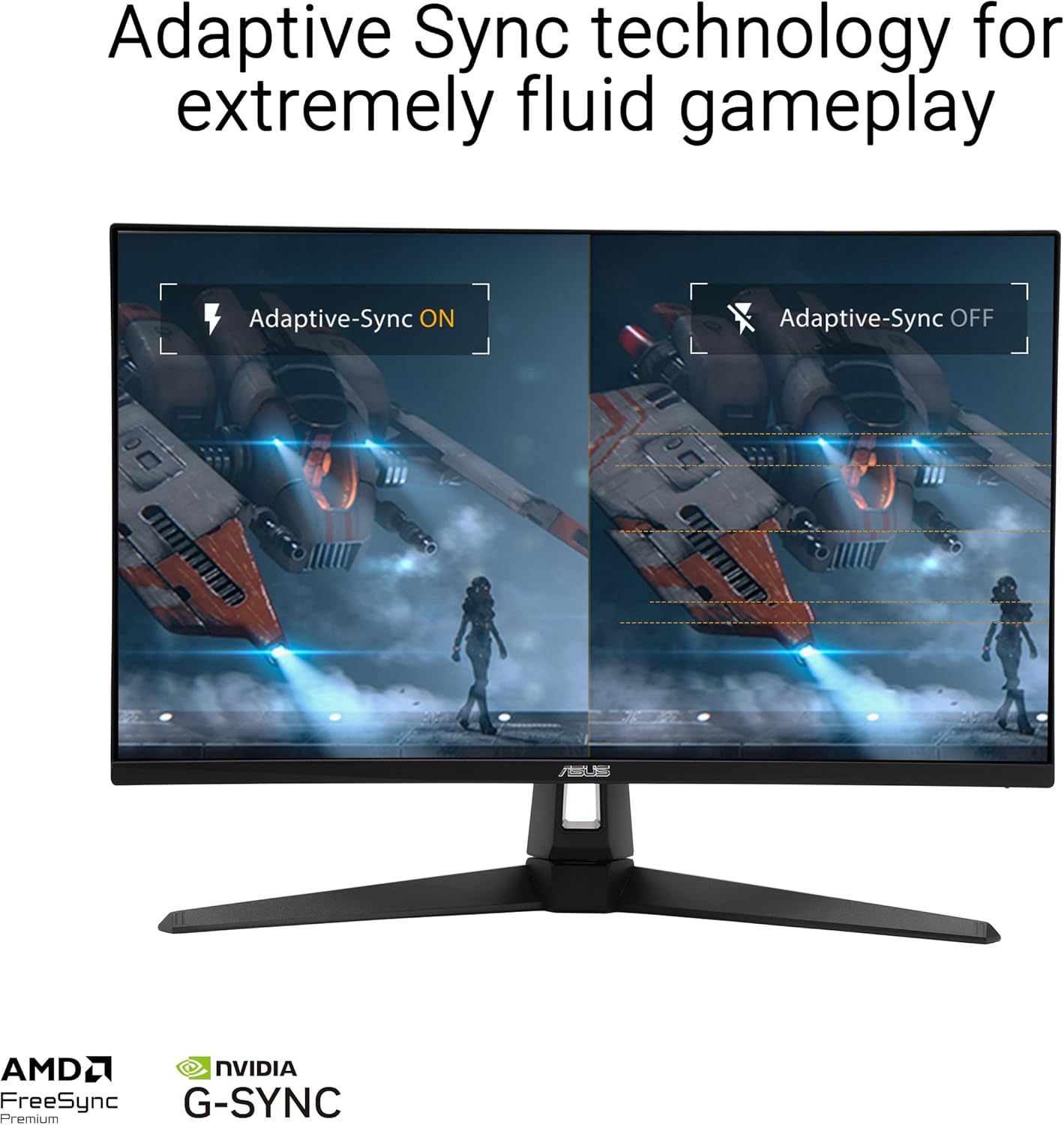
Figure 5: Adaptive Sync Technology. This image illustrates the benefit of Adaptive-Sync, showing smooth, tear-free visuals when enabled compared to the tearing visible when disabled.
- Sinkronizzazzjoni tal-ASUS Extreme Low Motion Blur (ELMB Sync): Enables ELMB and variable-refresh-rate technologies to work simultaneously, further reducing ghosting and tearing for sharp gaming visuals.
- Medda Dinamika Għolja (HDR): Supports HDR content, providing enhanced contrast and a wider color gamut for more vibrant and realistic visuals.
2.3 Console Gaming Optimization
The VG27UQ1A is optimized for next-generation console gaming.

Figure 6: Next-gen PC & Console Gaming. The monitor supports 4K@160Hz refresh rate on PCs and 4K@120Hz refresh rate on the latest consoles via HDMI 2.1.
2.4 ASUS DisplayWidget
Utilize the ASUS DisplayWidget software for intuitive adjustments to monitor settings, including GameVisual, Shadow Boost, and more, directly from your desktop.
3. Manutenzjoni
Manutenzjoni xierqa tiżgura l-lonġevità u l-prestazzjoni ottimali tal-monitor tiegħek.
- Tindif tal-Iskrin: Uża ċarruta ratba u mingħajr ħelu dampened with water or a non-abrasive screen cleaner. Avoid harsh chemicals or abrasive materials.
- Kura Ġenerali: Keep the monitor in a cool, dry environment. Avoid exposing it to direct sunlight or extreme temperatures. Do not block ventilation openings.
3.1 Karatteristiċi tal-Kura tal-Għajnejn
The ASUS TUF Gaming monitor incorporates Eye Care features to reduce eye strain during prolonged use.
Video 1: ASUS Eyecare with Disclaimer. This official video from ASUS Computer International Direct highlights the monitor's eye care technologies, including Blue Light Filter and Flicker-Free technology, designed to reduce eye strain during extended viewing.
- Filtru tad-Dawl Blu: Inaqqas l-emissjonijiet ta' dawl blu ta' ħsara biex jipprevjeni l-għeja tal-għajnejn.
- Teknoloġija Ħieles Flikkjaturi: Jelimina t-teptep tal-iskrin, u jipprovdi aktar komdu viewing esperjenza.
4 Issolvi l-problemi
Din it-taqsima tindirizza kwistjonijiet komuni li tista’ tiltaqa’ magħhom mal-monitor tiegħek.
4.1 Kwistjonijiet Komuni u Soluzzjonijiet
| Problema | Kawża Possibbli | Soluzzjoni |
|---|---|---|
| L-ebda immaġni fuq l-iskrin | Power cable disconnected, input source incorrect, or video cable loose. | Ensure power cable is securely connected. Check input source selection (DisplayPort/HDMI). Reconnect video cable firmly. |
| Image flickering | Incorrect refresh rate setting or interference. | Adjust refresh rate in your device's display settings. Ensure no strong electromagnetic interference sources are nearby. |
| L-ebda awdjo | Audio cable disconnected or volume too low. | Check earphone jack connection. Increase monitor volume via OSD. Ensure audio output is set to the monitor on your device. |
For more complex issues, please refer to the comprehensive troubleshooting guide in the full user manual or contact ASUS customer support.
5. Speċifikazzjonijiet
Detailed technical specifications for the ASUS TUF Gaming VG27UQ1A monitor.

Figure 7: Product Dimensions. Detailed measurements of the monitor for placement and compatibility.
| Karatteristika | Dettall |
|---|---|
| Daqs tal-Iskrin | 27 Pulzier |
| Riżoluzzjoni | 3840x2160 (4K UHD) |
| Max Rata ta' Aġġornar | 160Hz |
| Ħin ta' Rispons | 1ms (GTG) |
| Tip ta' Panel | IPS veloċi |
| Appoġġ HDR | Yes (95% DCI-P3) |
| Sinkronizzazzjoni Adattiva | Kompatibbli ma' NVIDIA G-SYNC, AMD FreeSync Premium |
| Konnettività | DisplayPort, 2x HDMI 2.1, Earphone Jack |
| Dimensjonijiet (LxWxH) | 8.4 x 24.2 x 17.9 pulzieri (21.38 x 61.48 x 45.49 ċm) |
| Piż tal-oġġett | 10.6 liri (4.81 kg) |
6. Garanzija u Appoġġ
Information regarding your product's warranty and how to obtain support.
6.1 Garanzija tal-Prodott
The ASUS TUF Gaming VG27UQ1A monitor comes with a garanzija ta 'sena. Please refer to the Warranty Card included in your package for detailed terms and conditions.
6.2 Appoġġ għall-Klijent
Għal assistenza teknika, soluzzjoni ta' sitwazzjonijiet, jew mistoqsijiet dwar is-servizz, jekk jogħġbok żur is-sit uffiċjali tal-appoġġ tal-ASUS website or contact their customer service hotline. Keep your product's serial number and proof of purchase readily available.
6.3 Adobe Creative Cloud Offer
This product includes a complimentary 3-month access to Adobe Creative Cloud. This offer is valid from 9/1/2023 to 8/31/2025. Please follow the instructions provided with your monitor to redeem this offer.


