
ASUS BT10 1PK
ASUS ZenWiFi BT10 Tri-Band WiFi 7 Mesh User Manual
Model: BT10 1PK | Brand: ASUS
Introduzzjoni
The ASUS ZenWiFi BT10 is a cutting-edge Tri-Band WiFi 7 Mesh system designed to provide seamless, high-speed wireless connectivity throughout your home or office. Equipped with advanced features like AI-powered AiMesh, dual 10G ports, and comprehensive security controls, this system ensures a reliable and secure network experience. This manual provides detailed instructions for setting up, operating, and maintaining your ZenWiFi BT10 system.
Karatteristiċi Ewlenin
- Tri-band WiFi 7 speeds up to 18 Gbps with 6GHz WiFi, MLO, and 4K-QAM for ultra-fast performance.
- AI-powered Smart AiMesh extends coverage up to 3000 sq. ft. (1-pack) for whole-home seamless connectivity.
- Eight internal antennas and ten high-power front-end modules eliminate WiFi dead zones.
- 24/7 end-to-end protection with commercial-grade AiProtection Pro and advanced VPNs.
- Establish up to three SSIDs for IoT devices and parental controls with Smart Home Master Network.
- Dual 10G Ports for high-speed wired connections and multiple WAN capability.
Gwida ta' Setup
Setting up your ASUS ZenWiFi BT10 is a straightforward process, largely guided by the ASUS Router App. Follow these steps for a quick and easy installation.
1. Tneħħija tal-kaxxa u Tqegħid
Carefully unbox your ZenWiFi BT10 unit. Place the unit in a central location within your home, ideally elevated and away from obstructions that might interfere with Wi-Fi signals. For optimal mesh performance, ensure the units are within reasonable range of each other.

The ASUS ZenWiFi BT10 unit, showcasing its sleek design and ventilation on the side.

Quddiem view of the ASUS ZenWiFi BT10, highlighting its minimalist aesthetic.
2. Konnessjoni Inizjali
Connect your modem to the WAN port of the primary ZenWiFi BT10 unit using an Ethernet cable. Plug in the power adapter and turn on the unit. Wait for the indicator lights to stabilize, indicating the unit is ready for setup.
3. Using the ASUS Router App
Download the ASUS Router App from your mobile device's app store (Google Play or Apple App Store). Open the app and follow the on-screen instructions to detect and configure your ZenWiFi BT10 system. The app will guide you through creating your Wi-Fi network name (SSID) and password, and setting up any additional mesh units.

The ASUS Router App simplifies the setup process with a clear 3-step guide, making network configuration accessible for all users.
Setup Matulview Video
Dan il-filmat jipprovdi viżwali fuqview of the ASUS ZenWiFi BT10 setup process, demonstrating the ease of installation and initial configuration.
Understanding Your ZenWiFi BT10
Konnettività u Portijiet
The ZenWiFi BT10 is equipped with versatile ports to support various network configurations and high-speed wired connections. It includes a USB WAN port, Gigabit WAN/LAN ports, and dual 10G WAN/LAN ports for future-ready networking.

Wara view of the ASUS ZenWiFi BT10, detailing its USB WAN, Gigabit WAN/LAN, and dual 10G WAN/LAN ports for flexible connectivity options.
Wi-Fi Performance & Coverage (AiMesh)
Leveraging Tri-band WiFi 7 technology, the ZenWiFi BT10 delivers exceptional speeds and extensive coverage. The AI-powered AiMesh system intelligently extends your network, eliminating dead zones and ensuring strong, stable Wi-Fi signals across up to 3000 sq. ft. (with a single pack). This is achieved through eight internal antennas and ten high-power front-end modules.

A visual representation of the AiMesh system blanketing an entire home with superior Wi-Fi coverage, highlighting the effective range and signal distribution.

An sploda view of the ZenWiFi BT10's internal components, illustrating the eight internal antennas and ten high-power front-end modules designed for unrivaled coverage and reliability.
Security Features (AiProtection Pro)
Your network is protected 24/7 with commercial-grade AiProtection Pro, powered by Trend Micro. This feature provides robust security against online threats, including malicious site blocking and infected device prevention. Advanced VPN features are also included for secure remote access.

Screenshots from the ASUS Router App demonstrating the AiProtection Pro interface, including filtering levels, security scans, and malicious website blocking options.
Parental Controls & Smart Home Master
The ZenWiFi BT10 offers advanced parental controls, allowing you to manage internet activity, set time schedules, and filter content for family members. The Smart Home Master Network feature enables you to create up to three separate SSIDs (Service Set Identifiers) for different purposes, such as an IoT Network, Kid's Network, and VPN Network, enhancing both security and network organization.

An illustration of the advanced parental controls available through the ASUS Router App, showing options for managing family devices and internet usage.
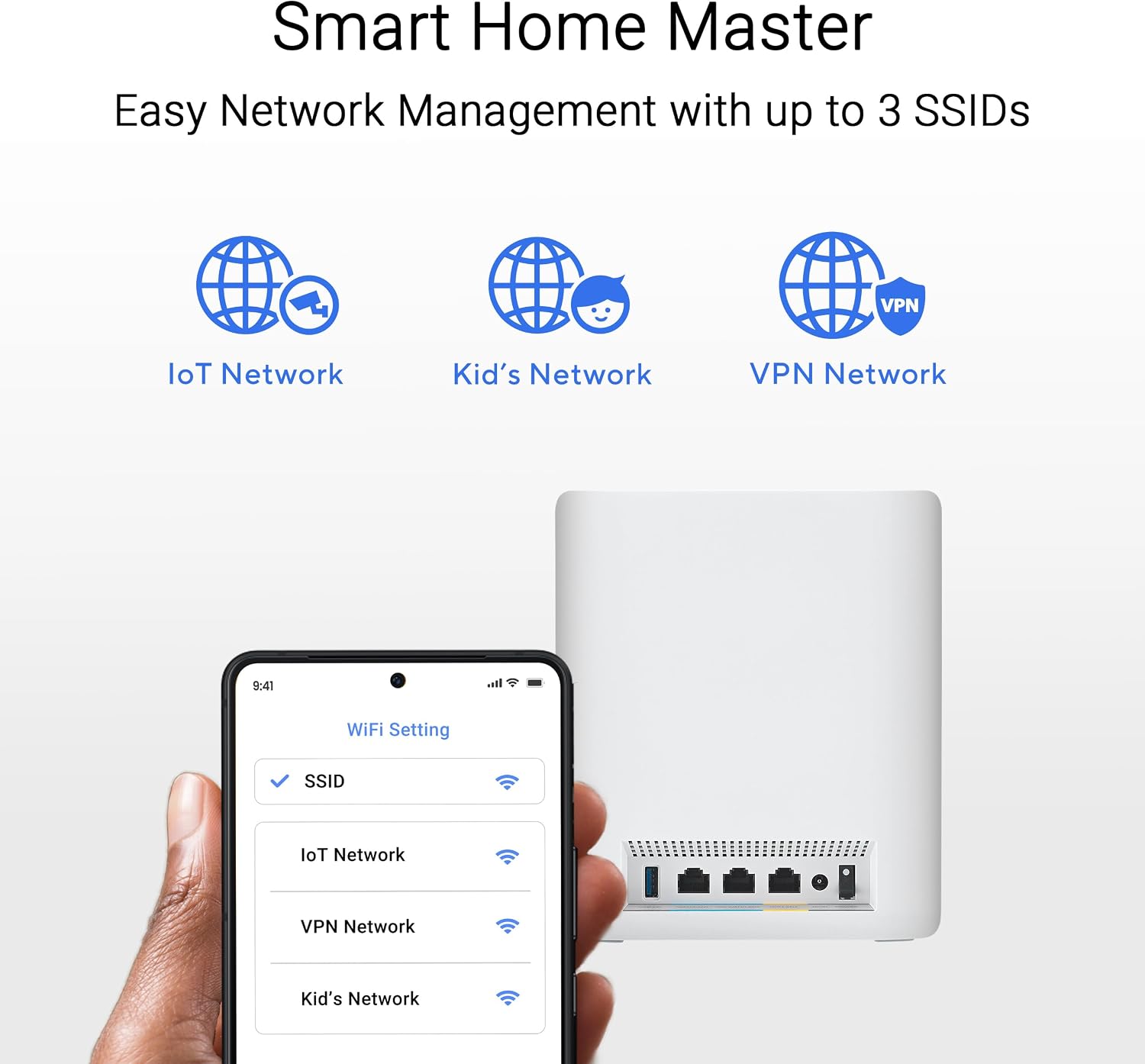
The Smart Home Master feature displayed on a phone screen, allowing users to easily manage and create separate SSIDs for IoT, Kids, and VPN networks.
Operating Your ZenWiFi BT10
Once set up, your ZenWiFi BT10 operates automatically to provide optimal Wi-Fi performance. You can monitor and manage your network using the ASUS Router App or the web interface. Key operational aspects include:
- Intelligent Band Steering: The system automatically directs your devices to the optimal Wi-Fi band (2.4 GHz, 5 GHz, or 6 GHz) for the best performance.
- AiMesh Node Management: Easily add or remove AiMesh nodes to expand your network coverage as needed.
- Traffic Prioritization (QoS): Prioritize specific devices or applications (e.g., gaming, streaming) to ensure smooth performance.
- Netwerk tal-Mistiedna: Create separate guest networks for visitors, keeping your main network secure.
Manutenzjoni
Regular maintenance helps ensure the longevity and optimal performance of your ZenWiFi BT10 system.
- Aġġornamenti tal-Firmware: Regularly check for and install firmware updates via the ASUS Router App or web interface. Updates often include performance improvements, new features, and security patches.
- Tindif: Keep the units clean and free from dust. Use a soft, dry cloth to wipe the exterior. Ensure ventilation areas are not blocked.
- Jibda mill-ġdid: Periodically restart your ZenWiFi BT10 units (e.g., once a month) to refresh network connections and clear any temporary issues.
Issolvi l-problemi
If you encounter issues with your ZenWiFi BT10, try these common troubleshooting steps:
- Ebda Konnessjoni tal-Internet: Check if your modem is working correctly. Ensure all cables are securely connected to the ZenWiFi unit and modem. Restart both devices.
- Sinjal dgħajjef tal-Wi-Fi: Relocate your ZenWiFi units to more central positions, away from large metal objects or thick walls. Consider adding another AiMesh node if coverage is still insufficient.
- Veloċitajiet bil-mod: Check your internet service provider (ISP) speed. Ensure no background downloads or high-bandwidth activities are consuming bandwidth. Update firmware.
- Skonnettjar tal-Apparat: Ensure your devices are within range. Check for interference from other electronic devices. Try forgetting and rejoining the Wi-Fi network on the affected device.
- Kwistjonijiet tal-App: Ensure your ASUS Router App is updated to the latest version. Try clearing the app's cache or reinstalling it.
Speċifikazzjonijiet
| Karatteristika | Dettall |
|---|---|
| Dimensjonijiet tal-Prodott | 2.83 x 7.32 x 6.26 pulzieri |
| Piż tal-oġġett | 1.88 liri |
| Numru tal-Mudell tal-Oġġett | BT10 1PK |
| Brand | ASUS |
| Isem tal-Mudell | BT10 1PK |
| Karatteristika Speċjali | VPN included |
| Klassi ta' Banda ta' Frekwenza | Tri-Band |
| Komunikazzjoni mingħajr fili Standard | 802.11n, 802.11ax, 802.11ac, 802.11.be (WiFi 7) |
| Apparati Kompatibbli | Kompjuter Personali |
| Frekwenza | 6 GHz |
| Użi Rakkomandati | Dar, Logħob, Negozju |
| Komponenti Inklużi | ZenWiFi BT10 1PK Mesh Router, USER MANUAL |
| Teknoloġija tal-Konnettività | Wi-Fi |
Garanzija u Appoġġ
The ASUS ZenWiFi BT10 comes with a 2-year warranty, as noted in customer reviews. For technical support, warranty claims, or additional assistance, please visit the official ASUS support webis-sit jew ikkuntattja s-servizz tal-konsumatur tagħhom. Żomm l-irċevuta tax-xiri tiegħek u n-numru tas-serje tal-prodott fil-qrib għal servizz aktar mgħaġġel.
For further information and resources, you may visit the Ħanut tal-ASUS fuq Amazon.
Ask a question about this manual
Ask about setup, troubleshooting, compatibility, parts, safety, or missing instructions. Manuals+ will review the question and use this page’s manual context to help answer it.