
Introduzzjoni
This manual provides comprehensive instructions for the proper use, setup, and maintenance of your DIGITEK DWM-115 2-in-1 Wireless Microphone system. Please read this manual thoroughly before operating the device to ensure optimal performance and longevity.
Kontenut tal-Pakkett
Iċċekkja li l-oġġetti kollha elenkati hawn taħt huma inklużi fil-pakkett tiegħek:
- 2 x Microphone Transmitters
- 1 x Riċevitur
- 1 x Kawża tal-Iċċarġjar
- 1 x Type-C to Lightning Connector
- 1 x USB għal Kejbil tal-Iċċarġjar tat-Tip C
- 2 x Wind Wool (Wind Muffs)
- 1 x Manwal tal-Utent (dan id-dokument)

Image: The package contents of the DIGITEK DWM-115 wireless microphone system, showing two microphone transmitters, one receiver, a charging case, a Type-C to Lightning connector, a USB to Type-C charging cable, and two wind wool covers.
Prodott Overview
The DIGITEK DWM-115 system consists of two wireless microphone transmitters, a receiver, and a portable charging case. Key features include 2.4GHz transmission, noise reduction, 360-degree sound capture, and broad compatibility with iOS and Android devices.
Komponenti
- Microphone Transmitter (TX): Captures audio. Features a magnetic clip for attachment and indicator lights for status.
- Riċevitur (RX): Connects to your recording device (smartphone, camera, etc.) and receives audio from the transmitters.
- Każ tal-Iċċarġjar: Stores and charges the transmitters and receiver.
- Type-C to Lightning Connector: Enables connection to Apple iOS devices.

Immaġni: Aktar minnview of the DIGITEK DWM-115 wireless microphone system, displaying the two compact microphone transmitters, the receiver unit, and the charging case.
Setup Istruzzjonijiet
1. Iċċarġjar tal-Apparati
- Place both microphone transmitters and the receiver into the charging case.
- Connect the USB to Type-C charging cable to the charging case and a power source (e.g., USB wall adapter, computer USB port).
- The charging case display will indicate charging status. Ensure all devices are fully charged before first use.
Ħin tal-Iċċarġjar: Approximately 2.5 hours for microphones and 2.5 hours for the charging case.

Image: A visual representation of the DIGITEK DWM-115 charging process, highlighting the charging case, microphones, and receiver, along with their respective charging times and battery capacities.
2. Konnessjoni mal-Apparat Tiegħek
- For Android Devices (USB Type-C): Plug the receiver directly into your Android smartphone's USB Type-C port.
- For iOS Devices (Lightning): Attach the Type-C to Lightning connector to the receiver, then plug the combined unit into your iPhone's Lightning port.
- The receiver's indicator light will show a stable connection once paired.
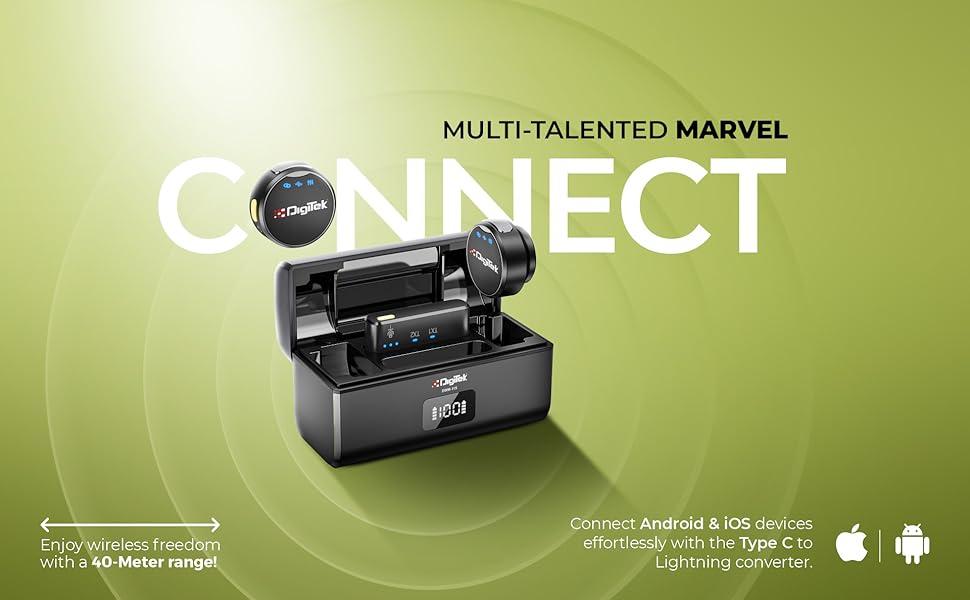
Image: This image demonstrates the connectivity options for the DIGITEK DWM-115 receiver, showing how it connects to both Android (Type-C) and iOS (Lightning) devices, emphasizing its broad compatibility.
3. Tqabbil Awtomatiku
The microphone transmitters and receiver are designed for automatic pairing. Once the receiver is connected to your recording device and the transmitters are powered on (taken out of the charging case), they should automatically establish a connection. Indicator lights will confirm successful pairing.

Image: A user demonstrating the DIGITEK DWM-115 microphone system, illustrating its plug-and-play setup and low-latency signal transmission for seamless audio recording.
Istruzzjonijiet Operattivi
1. Tixgħil / Mitfi
- Trasmettituri: Remove from the charging case to power on. Place back into the charging case to power off and begin charging.
- Riċevitur: Powers on automatically when plugged into a device. Unplug to power off.
2. Wearing the Microphone
Attach the microphone transmitter to your clothing using the magnetic collar clip. Position it approximately 6-8 inches from your mouth for optimal sound capture. The magnetic design ensures a secure and discreet fit.
3. Tnaqqis tal-Ħsejjes
The DWM-115 features advanced noise reduction technology. This function automatically filters out ambient background noise, ensuring your voice remains clear and prominent. This is particularly useful in environments with moderate background sound.
4. 360° Sound Capture
The omnidirectional microphone design allows for 360-degree sound capture. This feature is ideal for interviews, group discussions, or capturing immersive audio where sound sources may come from various directions.

Image: This graphic highlights key operational features of the DIGITEK DWM-115, including its 360-degree sound capture capability, the intelligent built-in chip for noise filtering, and its seamless compatibility with both Android and iOS devices via the Type-C to Lightning converter.
5. Dwal Indikaturi
The microphone transmitters and receiver are equipped with indicator lights to communicate their status:
- Blue Light (Transmitter): Indicates power on and successful connection.
- Red Light (Transmitter): Indicates low battery or charging.
- Blue Light (Receiver): Indicates successful connection to a transmitter.

Immaġni: Dettaljata view of the DIGITEK DWM-115 microphone, showcasing its indicator lights which provide visual feedback on the device's operational status.
Manutenzjoni
1. Tindif
- Imsaħ l-apparati b'ċarruta ratba u niexfa.
- Do not use liquid cleaners or solvents, as they may damage the product.
- Kun żgur li l-kuntatti tal-iċċarġjar huma nodfa u ħielsa minn debris.
2. Ħażna
- Aħżen is-sistema tal-mikrofonu fil-kaxxa tal-iċċarġjar tagħha meta ma tkunx qed tintuża biex tipproteġiha u żżommha ċċarġjata.
- Żomm l-apparat f'post frisk u niexef, 'il bogħod mix-xemx diretta u minn temperaturi estremi.
3. Kura tal-batterija
- Charge the devices regularly, even if not in frequent use, to maintain battery health.
- Evita li tiċċarġja l-batteriji kompletament għal perjodi twal.
Issolvi l-problemi
| Problema | Kawża Possibbli | Soluzzjoni |
|---|---|---|
| Ebda ħoss jew kwalità fqira tal-awdjo | Low battery; improper connection; out of range; microphone obstructed. | Charge devices fully. Ensure receiver is securely plugged in. Check recording app settings. Move closer to the receiver. Ensure microphone is not covered. |
| Apparati mhux qed jingħaqdu | Low battery; interference; devices not powered on. | Ensure all devices are charged and powered on. Restart both transmitters and receiver. Move away from other 2.4GHz devices. |
| Ħajja qasira tal-batterija | Incomplete charging; aging battery. | Ensure devices are charged for the recommended time. If battery life significantly degrades, contact support. |
| Receiver not recognized by phone | Phone settings; dirty port; incorrect connector. | Check phone's audio input settings. Clean phone's charging port. Ensure correct Type-C or Lightning connector is used. |
Speċifikazzjonijiet
| Karatteristika | Dettall |
|---|---|
| Numru tal-Mudell | DWM-115 |
| Teknoloġija tal-Konnettività | Wireless (2.4GHz) |
| Firxa Wireless | Sa 40 metri |
| Microphone Battery Life (TX) | Appross. 6 sigħat |
| Microphone Battery Capacity (TX) | 80mAh |
| Kawża tal-Iċċarġjar Kapaċità tal-Batterija | 400mAh 3.7V |
| Charging Time (Microphone) | Appross. 2.5 sigħat |
| Ħin tal-Iċċarġjar (Każ tal-Iċċarġjar) | Appross. 2.5 sigħat |
| Sound Capture | 360° Omnidirectional |
| Tnaqqis tal-Ħoss | Iva |
| Kompatibilità | iOS (Lightning), Android (USB Type-C) |
| Piż tal-oġġett | 400 g |
| Dimensjonijiet tal-Prodott | 12 x 12 x 6 ċm |
| Input Voltage | DC 4.5-5.2V |
| Proporzjon tas-sinjal għall-istorbju | 65dB |
| Firxa ta' Rispons ta' Frekwenza | 20Hz-20KHz |
| Sensittività | 35dB |

Image: This image provides key technical specifications for the DIGITEK DWM-115, including its 40-meter wireless transmission range, 6-hour run time for the receiver/transmitter, and 2.4 GHz radio frequency.

Image: A visual breakdown of the DIGITEK DWM-115's audio performance specifications, including sensitivity (35dB), input voltage (DC 4.5-5.2V), frequency response range (20Hz-20KHz), and signal-to-noise ratio (65dB).
Garanzija u Appoġġ
For warranty information and customer support, please refer to the details below:
- Manifattur: IMS Merchantiles Pvt. Ltd
- Toll Numru liberu: 1800-123-544-444
- Email tal-Klijent tal-Kura: support@digitek.net.in
Jekk jogħġbok żomm il-prova tax-xiri tiegħek għal kwalunkwe talba ta' garanzija.