
XTUGA A140
XTUGA A140 4-Channel Wireless Microphone System & B-BURNER Recording Microphone Isolation Shield User Manual
Mudell: A140
1. Introduzzjoni
This manual provides detailed instructions for the setup, operation, and maintenance of your XTUGA A140 4-Channel Wireless Microphone System and B-BURNER Recording Microphone Isolation Shield. Please read this manual thoroughly before use to ensure proper functionality and to prevent damage.
2. Kontenut tal-Pakkett
Iċċekkja li l-oġġetti kollha elenkati hawn taħt huma preżenti fil-pakkett tiegħek. Jekk xi oġġetti huma neqsin jew bil-ħsara, jekk jogħġbok ikkuntattja l-appoġġ għall-klijenti.
- 1 x XTUGA A140 4-Channel Wireless Receiver
- 4 x Mikrofoni li jinżammu fl-idejn mingħajr fili
- 1 x B-BURNER Recording Microphone Isolation Shield
- 1 x Adapter tal-Enerġija għar-Riċevitur
- 1 x Audio Cable (e.g., 1/4" to 1/4" or XLR to 1/4")
- Microphone Clips/Holders (quantity 4)
- Manwal għall-Utent (dan id-dokument)

Image: The complete XTUGA A140 4-Channel Wireless Microphone System and B-BURNER Recording Microphone Isolation Shield, showing the receiver, four microphones, and the isolation shield.
3. Karatteristiċi tal-prodott
3.1 XTUGA A140 4-Channel Wireless Microphone System
- Erba 'Kanali Indipendenti: Allows simultaneous use of four microphones without interference.
- Banda ta' Frekwenza UHF: Provides stable signal transmission and reduces interference.
- Firxa Operattiva Twila: Supports effective operation up to 80 meters (262 feet) in open areas.
- Wirja Diġitali ċara: Receiver and microphones feature LCD screens for frequency and battery status.
- Kostruzzjoni robusta: Microphones are designed with durable metal housing.
- Cardioid Dynamic Microphones: Optimized for vocal clarity and feedback suppression.

Image: The XTUGA A140 wireless receiver unit with four handheld wireless microphones, each displaying its frequency on an LCD screen.

Image: Diagram illustrating the 80-meter (approximately 262 feet) effective operating range of the XTUGA A140 wireless microphone system, with the receiver and a microphone shown at a distance.

Immaġni: Close-up view of the XTUGA wireless microphone, highlighting features such as sturdy metal construction, cardioid dynamic pickup pattern, clear and robust sound, and UHF anti-howling capabilities.
3.2 B-BURNER Recording Microphone Isolation Shield
- Acoustic Foam Panels: Designed to absorb unwanted reflections and echoes.
- Disinn li jintrewa: Allows for adjustable angles and portability.
- Multi-Layer Construction: Features reflective, filter, and absorbing layers for effective noise reduction.
- Reduces Ambient Noise: Creates a more controlled recording environment by minimizing room reflections and external noise.

Image: The B-BURNER Recording Microphone Isolation Shield in its folded, compact state, showcasing its acoustic foam interior.
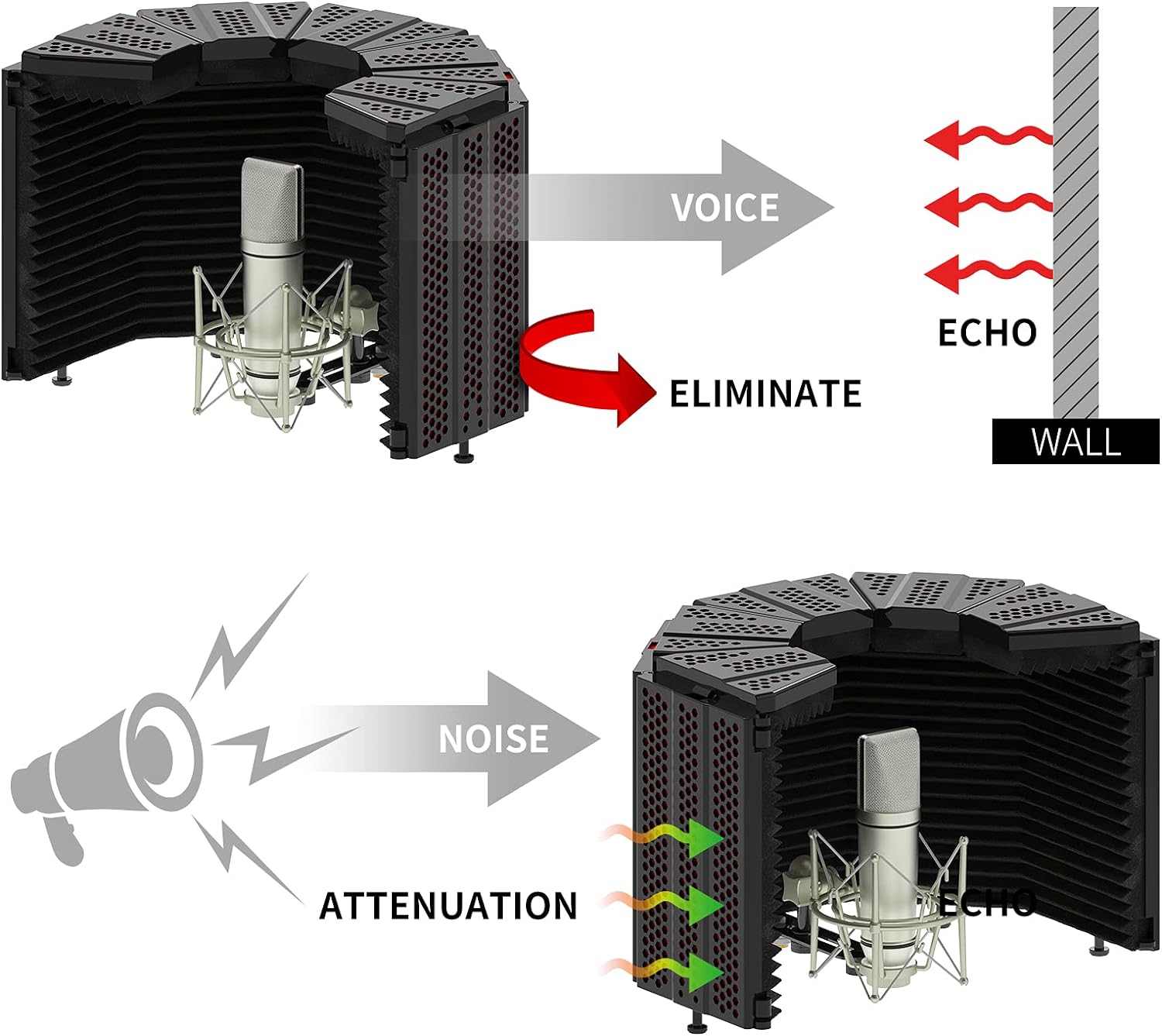
Image: Diagrams illustrating the adjustable closure angles (120° and 90°) and corresponding sound collection ranges (60° and 180°) of the B-BURNER Isolation Shield, along with how to bend the top panels to 45° and 90°.

Image: Visual representation of how the B-BURNER Isolation Shield eliminates voice echoes from walls and attenuates external noise, creating a cleaner sound input for the microphone.

Image: Cross-sectional diagram of the B-BURNER Isolation Shield, detailing its three layers: a reflective layer, a filter layer, and an absorbing layer, which work together to filter out noise and create a quiet recording environment.
4. Istruzzjonijiet ta' Setup
4.1 Wireless Microphone System Setup
- Ħoll il-Komponenti: Carefully remove the receiver, microphones, power adapter, and audio cable from the packaging.
- Qabbad l-Enerġija: Connect the provided power adapter to the DC IN port on the rear of the XTUGA A140 receiver. Plug the adapter into a standard electrical outlet.
- Qabbad Output tal-Awdjo: Connect one end of the audio cable (e.g., 1/4" or XLR) to the appropriate output port on the receiver (e.g., MIX OUT or individual channel outputs). Connect the other end to the input of your mixer, amplifier, jew interface awdjo.
- Install Microphone Batteries: Open the battery compartment of each handheld microphone and insert two AA batteries (not included), ensuring correct polarity.
- Qawwa Mixgħul:
- Turn on the receiver by pressing the power button. The display should illuminate.
- Turn on each microphone by pressing its power button. The microphone display should show its frequency.
- Sinkronizzazzjoni tal-Frekwenza: The microphones and receiver should automatically synchronize. If not, refer to the troubleshooting section or the specific pairing instructions in the full manual (if applicable, not detailed here). Ensure each microphone is assigned to a unique channel on the receiver.
- Aġġustament tal-Volum: Adjust the individual channel volume knobs on the receiver and the master volume on your connected audio device to an appropriate level.
4.2 Isolation Shield Setup
- Unfold the Shield: Gently unfold the B-BURNER Isolation Shield. The panels are hinged and can be adjusted to various angles.
- Immuntar: The shield typically mounts to a microphone stand. Attach the shield's mounting bracket to your microphone stand. Ensure it is securely tightened.
- Tqegħid tal-mikrofonu: Attach your microphone (e.g., one of the XTUGA handheld microphones or a condenser microphone) to the internal mounting screw or clip within the isolation shield. Position the microphone centrally within the shield for optimal acoustic performance.
- Aġġusta Angolu: Adjust the side panels of the isolation shield to create the desired acoustic environment. A wider angle (e.g., 180° collection range) might be suitable for capturing more room ambiance, while a narrower angle (e.g., 60° collection range) will provide more isolation. Refer to the diagrams in Section 3.2 for visual guidance.
5. Istruzzjonijiet Operattivi
5.1 Using the Wireless Microphone System
- Użu tal-mikrofonu: Hold the microphone approximately 2-6 inches from your mouth for optimal sound capture. Avoid covering the microphone grille with your hand, as this can affect sound quality and signal.
- Monitoraġġ Awdjo: Listen to the audio output through your connected speakers or headphones to ensure proper levels and clarity.
- Adjusting Frequencies (if necessary): If you experience interference, you may need to change the operating frequency of a microphone and its corresponding receiver channel. Consult the receiver's manual or display for instructions on frequency scanning and selection.
- Ġestjoni tal-batterija: Monitor the battery indicator on the microphone's display. Replace batteries promptly when they are low to avoid unexpected signal loss.
5.2 Using the Isolation Shield
- Pożizzjonament: Place the microphone with the isolation shield in a quiet room. The shield is designed to reduce reflections from the immediate surroundings of the microphone, not to completely soundproof a noisy environment.
- Optimizing Isolation: Experiment with the angle of the shield's panels to find the best acoustic isolation for your specific recording space and microphone. A more enclosed angle will provide greater isolation.
- Reġistrazzjoni: Speak or sing directly into the microphone, ensuring your voice is directed towards the center of the shield for maximum benefit from its acoustic properties.
6. Manutenzjoni
- Tindif:
- Wipe the receiver and microphones with a soft, dry cloth. Do not use liquid cleaners or abrasive materials.
- For the isolation shield, gently dust the foam panels with a soft brush or vacuum with a low setting. Avoid getting the foam wet.
- Ħażna: When not in use for extended periods, store the system and shield in a cool, dry place, away from direct sunlight and extreme temperatures. Remove batteries from microphones before long-term storage to prevent leakage.
- Sostituzzjoni tal-batterija: Always replace all batteries in a microphone at the same time with new ones of the same type. Dispose of used batteries responsibly.
7 Issolvi l-problemi
| Problema | Kawża Possibbli | Soluzzjoni |
|---|---|---|
| L-ebda ħoss mill-mikrofonu |
|
|
| Interference/Static/Dropouts |
|
|
| Poor sound quality (muffled, tinny) |
|
|
8. Speċifikazzjonijiet
8.1 XTUGA A140 Wireless Microphone System
- Mudell: A140
- Kanali: 4
- Faxxa ta' Frekwenza: UHF
- Medda operattiva: Up to 80 meters (262 feet) in optimal conditions
- Tip ta' Mikrofonu: Dinamika, Kardjojde
- Qawwa tal-Mikrofonu: 2 x Batteriji AA (għal kull mikrofonu)
- Output tar-riċevitur: Mixed 1/4" Jack, Individual XLR Outputs (check specific model for exact outputs)
8.2 B-BURNER Recording Microphone Isolation Shield
- Tip: Foldable Acoustic Isolation Shield
- Materjal: High-density acoustic foam, metal panels
- Saffi: Reflective, Filter, Absorbing
- Immuntar: Microphone stand mountable
- Aġġustabilità: Adjustable panel angles for varying acoustic isolation
9. Informazzjoni dwar is-Sigurtà
- Tesponix il-prodott għax-xita jew għall-umdità.
- Do not disassemble or modify the product. Refer all servicing to qualified personnel.
- Use only the provided power adapter for the receiver.
- Żomm fejn ma jintlaħaqx mit-tfal.
- Avoid placing the receiver near strong electromagnetic fields or other wireless devices that may cause interference.
10. Garanzija u Appoġġ
XTUGA products are designed for reliability and performance. For warranty information, technical support, or service inquiries, please contact your retailer or visit the official XTUGA websit. Jekk jogħġbok żomm il-prova tax-xiri tiegħek għal talbiet ta' garanzija.
Appoġġ onlajn: Visit the XTUGA Store on Amazon
Ask a question about this manual
Ask about setup, troubleshooting, compatibility, parts, safety, or missing instructions. Manuals+ will review the question and use this page’s manual context to help answer it.