
HUTT A1
HUTT A1 Auto Window Cleaning Robot
Manwal ta' Istruzzjoni għall-Utent
Introduzzjoni
This manual provides comprehensive instructions for the safe and efficient operation and maintenance of your HUTT A1 Auto Window Cleaning Robot. Please read this manual thoroughly before using the device to ensure proper function and to prevent damage or injury. Keep this manual for future reference.
Informazzjoni dwar is-Sigurtà
- Always connect the safety rope to a secure anchor point before operating the robot, especially for high-rise windows. The safety rope is designed to withstand a load of up to 145kg.
- Ensure the robot is used only on vertical, smooth surfaces. Avoid surfaces with beveled or rounded edges, or silicone protecting strips thicker than 6mm, as this may affect adhesion and cleaning performance.
- The internal 650mAh battery provides approximately 30 minutes of backup power in case of a sudden power outage, preventing the robot from falling. However, do not rely solely on the battery for operation.
- For severely dirty windows, perform an initial dry-wiping pass with clean, dry pads before wet-wiping to prevent smearing and optimize cleaning results.
- Keep hands, hair, and loose clothing away from the moving parts of the robot during operation.
- Tużax ir-robot f'kundizzjonijiet tax-xita jew estremament umdi.
Kontenut tal-Pakkett
Jekk jogħġbok iċċekkja l-kontenut tal-pakkett meta tiftaħ il-pakkett:
- HUTT A1 Window Cleaning Robot
- Kontroll mill-bogħod
- Adapter tal-Enerġija u Korda tal-Enerġija
- Ħabel tas-Sigurtà
- Microfiber Cleaning Pads (multiple pairs)
- Flixkun tal-Mili tal-Ilma
- Manwal għall-Utent

Image: The HUTT A1 Window Cleaning Robot and its packaging, showing the compact box design.
Prodott Overview
Familiarize yourself with the main components of your HUTT A1 robot:

Immaġni: Quddiem view of the HUTT A1 robot, showing the power button, indicator light, water tank, and spray nozzles, alongside its remote control.
- Unità Prinċipali: Houses the motor, water tank, and control systems.
- Buttuna tal-Qawwa: Located on the top surface for turning the robot on/off.
- Dawl Indikatur: Provides status feedback (e.g., charging, operating, error).
- Tank tal-Ilma: Integrated 150ml tank for holding cleaning solution.
- Żennuni tal-isprej: Four nozzles for wide-angle water spray coverage.
- Pads tat-tindif: Removable microfiber pads attached to the bottom for cleaning.
- Suction Area: The underside of the robot that creates vacuum for adhesion.
- Kontroll mill-bogħod: Għal tħaddim manwali u għażla tal-modalità.
Setup
Follow these steps to prepare your robot for cleaning:
- Iċċarġja r-Robot: Before first use, fully charge the robot using the provided power adapter. The indicator light will show charging status.
- Waħħal il-Pads tat-Tindif: Securely attach clean microfiber cleaning pads to the bottom of the robot. Ensure they are properly aligned.
- Imla t-Tank tal-Ilma: Open the water tank cap and fill the 150ml tank with clean water or a recommended window cleaning solution using the provided filling bottle. Close the cap tightly.
- Qabbad il-Ħabel tas-Sigurtà: Attach one end of the safety rope to the robot and the other end to a sturdy, secure anchor point indoors. This is crucial for safety.
- Qabbad l-Enerġija: Plug the power adapter into a wall outlet and connect it to the robot. The robot requires continuous power during operation.
- Pjazzament: Place the robot firmly on the window surface. Ensure good contact for suction to engage.
Vidjo ta' Dimostrazzjoni tas-Setup
Video: An official demonstration of the HUTT A1 Window Cleaning Robot, showcasing its features and setup process.
Istruzzjonijiet Operattivi
Once set up, operating the robot is straightforward:
- Qawwa Mixgħul: Press the power button on the robot or the remote control to turn it on. The robot will engage suction and adhere to the window.
- Ibda t-Tindif: Press the 'Start/Pause/Continue' button on the remote control or the main unit. The robot will automatically detect the window size and shape, then begin cleaning.
- Modi ta 'Tindif: The robot utilizes AI navigation to choose optimal cleaning paths (N-shaped for narrow windows, Z-shaped for wide windows). You can also manually select modes via the remote.
- Sprej tal-Ilma: The robot will automatically spray water during the cleaning cycle. You can also manually control the spray via the remote control.
- Tlestija: Once cleaning is complete, the robot will return to its starting position and emit an audible alert. Carefully remove the robot from the window.
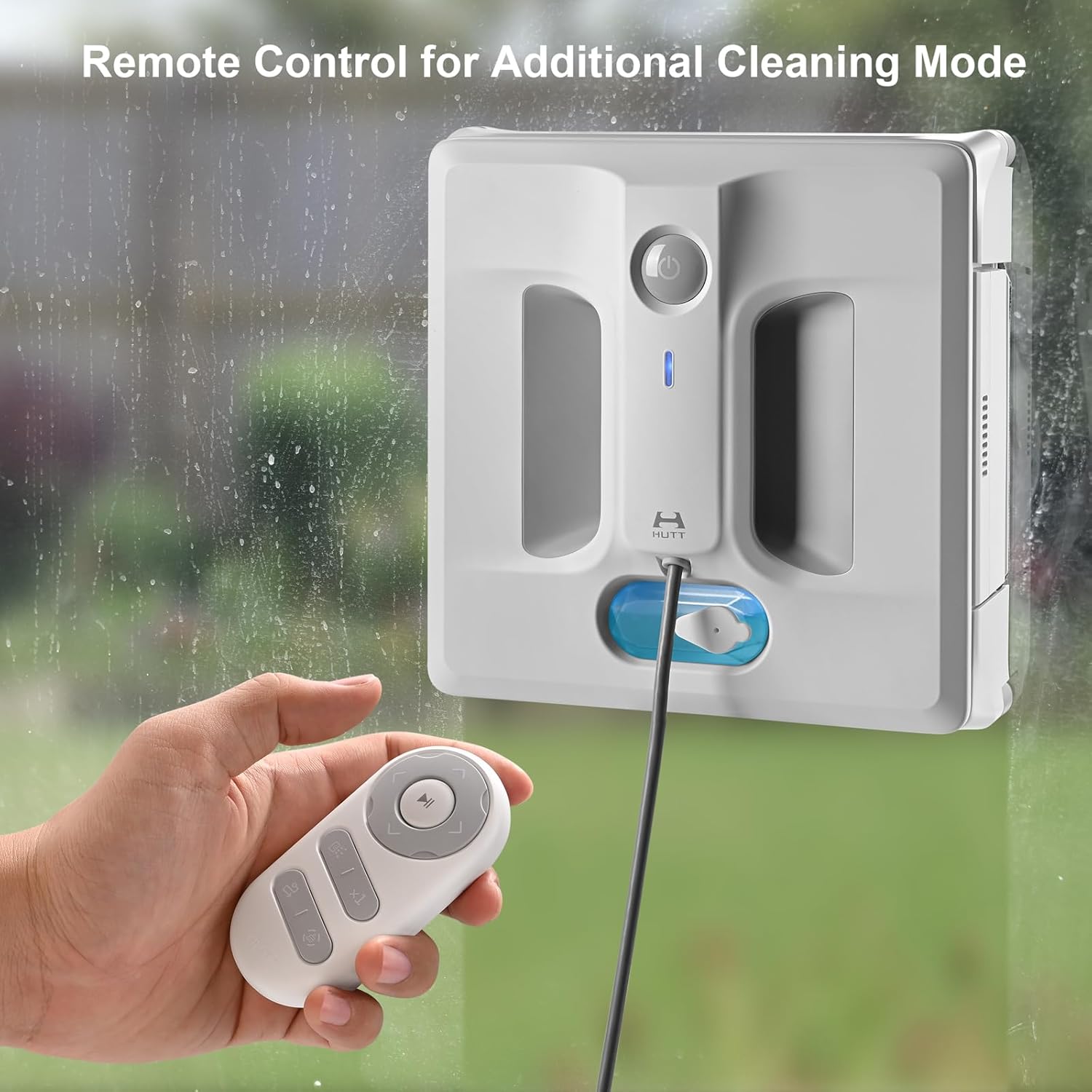
Image: A hand holding the remote control, demonstrating its use to operate the HUTT A1 robot on a window.
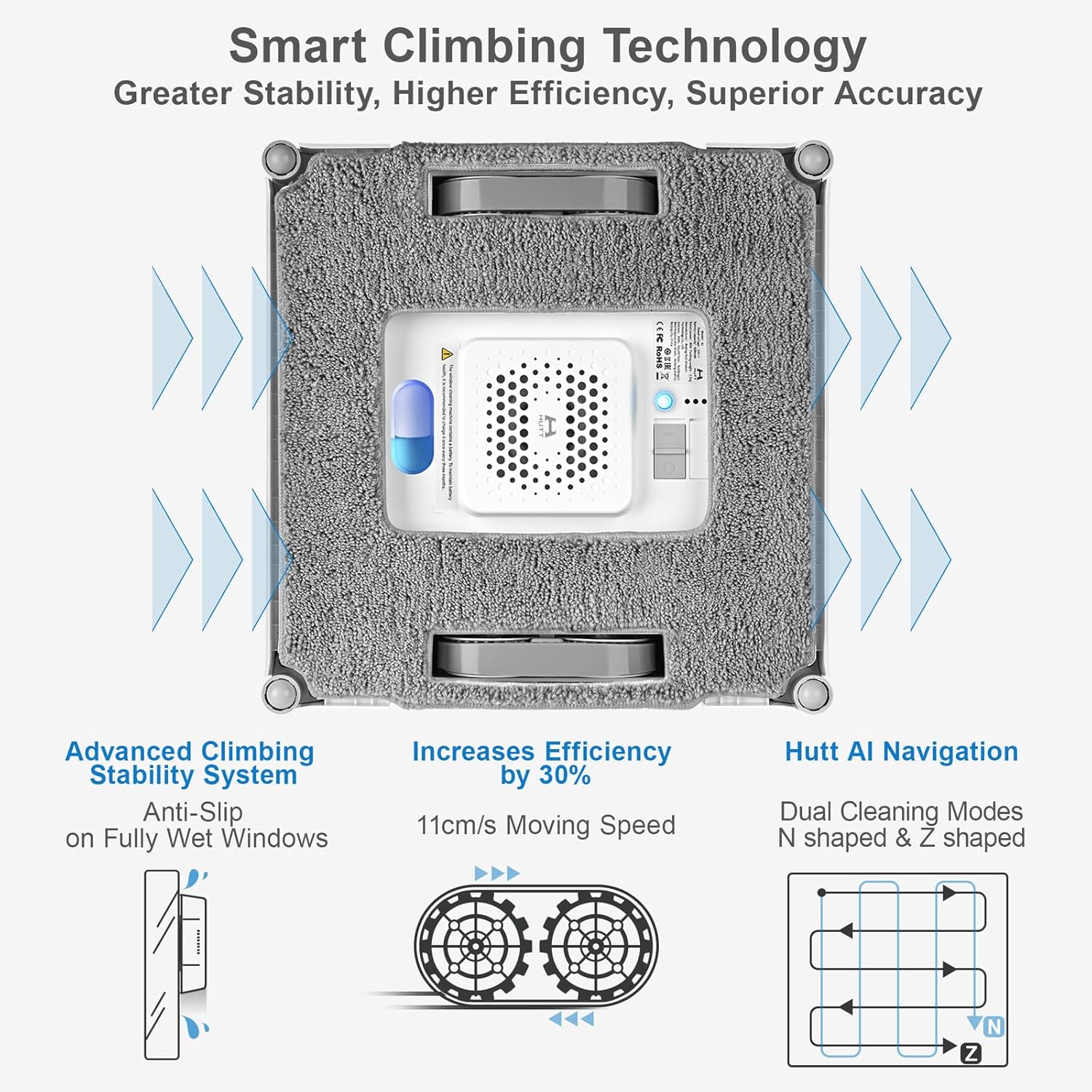
Image: An illustration detailing the robot's smart climbing technology, showing its movement speed and the N-shaped and Z-shaped cleaning patterns.
Modi tat-Tindif
The HUTT A1 utilizes advanced AI navigation to optimize cleaning efficiency:
- N-shaped Path: Ideal for narrow or tall windows, the robot moves in a vertical N-pattern to cover the surface.
- Z-shaped Path: Best for wide windows, the robot moves in a horizontal Z-pattern to ensure thorough coverage.
- Spot Wiping Mode: Available for targeting and removing stubborn stains or heavily soiled areas.
The robot automatically adjusts suction power and cleaning path based on surface conditions and edge detection for optimal results.
Manutenzjoni
Regular maintenance ensures the longevity and performance of your robot:
- Pads tat-tindif: After each use, remove the microfiber cleaning pads. They are washable and reusable. Hand wash or machine wash with mild detergent and air dry.
- Tank tal-Ilma: Empty any remaining water or cleaning solution from the tank after each use. Periodically clean the tank to prevent residue buildup.
- Żennuni tal-isprej: Periodically check the four spray nozzles for any blockages. If clogged, gently clear them using a small brush or pin.
- Robot Surface: Wipe the exterior of the robot with a soft, dry cloth to remove dust and debris. Do not use abrasive cleaners or immerse the robot in water.
- Ħażna: Aħżen ir-robot f'post frisk u niexef 'il bogħod mix-xemx diretta meta ma jkunx qed jintuża.
Issolvi l-problemi
If you encounter issues with your HUTT A1 robot, refer to the following common solutions:
| Problema | Kawża Possibbli | Soluzzjoni |
|---|---|---|
| Robot not adhering or falling | Surface too dirty/wet, power issue, uneven surface, worn pads. | Ensure surface is clean and dry. Check power connection. Verify surface is smooth and flat. Replace pads if worn. |
| Prestazzjoni fqira tat-tindif | Pads are dirty/dry, insufficient water, nozzles blocked, initial dry-wiping skipped. | Clean or replace pads. Refill water tank. Clear nozzle blockages. Perform dry-wiping first for heavily soiled windows. |
| L-ebda sprej tal-ilma | Water tank empty, nozzles blocked, spray mechanism malfunction. | Refill water tank. Clean nozzles. If issue persists, contact support. |
| Robot stops unexpectedly | Power disconnected, low internal battery, error detected. | Check power connection. Ensure internal battery is charged. Refer to indicator light for error codes and consult manual. |
| Nozzles leaking (as per some reviews) | Possible manufacturing defect or improper sealing. | Ensure water tank cap is tightly closed. If persistent, contact customer support for assistance. |
Speċifikazzjonijiet
| Karatteristika | Dettall |
|---|---|
| Brand | HUTT |
| Isem tal-Mudell | A1 Window Cleaning Robot |
| Qawwa tal-ġbid | Sa 6000Pa |
| Kapaċità tat-Tank tal-Ilma | 150ML |
| Żennuni tal-isprej | 4 (Upgraded) |
| Battery Life (Backup) | 30 minutes (internal battery) |
| Dimensjonijiet tal-Prodott | 10.3"T x 10.3"W x 1.22"Għ |
| Piż tal-oġġett | 2.8 liri |
| Karatteristika Speċjali | Wet/Dry Cleaning, Laser Sensor Detection, AI Algorithm |

Image: A comparison table highlighting key specifications of the HUTT A1 model against another model.
Garanzija u Appoġġ
For information regarding product warranty, technical support, or service inquiries, please contact HUTT customer service directly. You may find contact details on the official HUTT webis-sit jew permezz tal-pjattaforma tax-xiri tiegħek.
Ask a question about this manual
Ask about setup, troubleshooting, compatibility, parts, safety, or missing instructions. Manuals+ will review the question and use this page’s manual context to help answer it.