
1. Introduzzjoni
Welcome to the user manual for your DOOGEE V Max Pro 5G Rugged Smartphone. This guide provides essential information to help you set up, operate, and maintain your device. Designed for durability and high performance, the V Max Pro is built to withstand challenging environments while offering advanced features for everyday use.

Figura 1: Quddiem u wara view of the DOOGEE V Max Pro 5G Rugged Smartphone, highlighting its robust design and key features like the 22000mAh battery and 108MP camera.
2. Kontenut tal-Pakkett
Jekk jogħġbok ivverifika li l-oġġetti kollha huma preżenti fil-pakkett tal-prodott tiegħek:
- 1 x V MAX Pro 5G Rugged Phone
- 1 x Cable USB tat-Tip-C
- 1 x Charger
- 1 x Film kontra l-isplużjonijiet (applikat minn qabel)
- 1 x Additional Anti-explosion film
- 1 x Kaxxa tal-Ippakkjar
- 1 x Manwal
3. Setup
3.1 Installazzjoni tas-SIM Card u l-Ħażna
The DOOGEE V Max Pro supports dual SIM cards and expandable storage. Locate the SIM card tray on the side of the device. Use the provided SIM ejector tool to open the tray. Insert your Nano-SIM cards and/or a microSD card (up to 2TB, sold separately) into the designated slots. Ensure the tray is securely reinserted to maintain water and dust resistance.
3.2 Iċċarġjar inizjali
Before first use, fully charge your DOOGEE V Max Pro. Connect the provided Type-C USB cable to the phone's charging port and the other end to the 33W fast charger. Plug the charger into a power outlet. The device features a massive 22000mAh battery, designed for extended usage. The OTG (On-The-Go) function allows your phone to act as a power bank to charge other compatible devices.
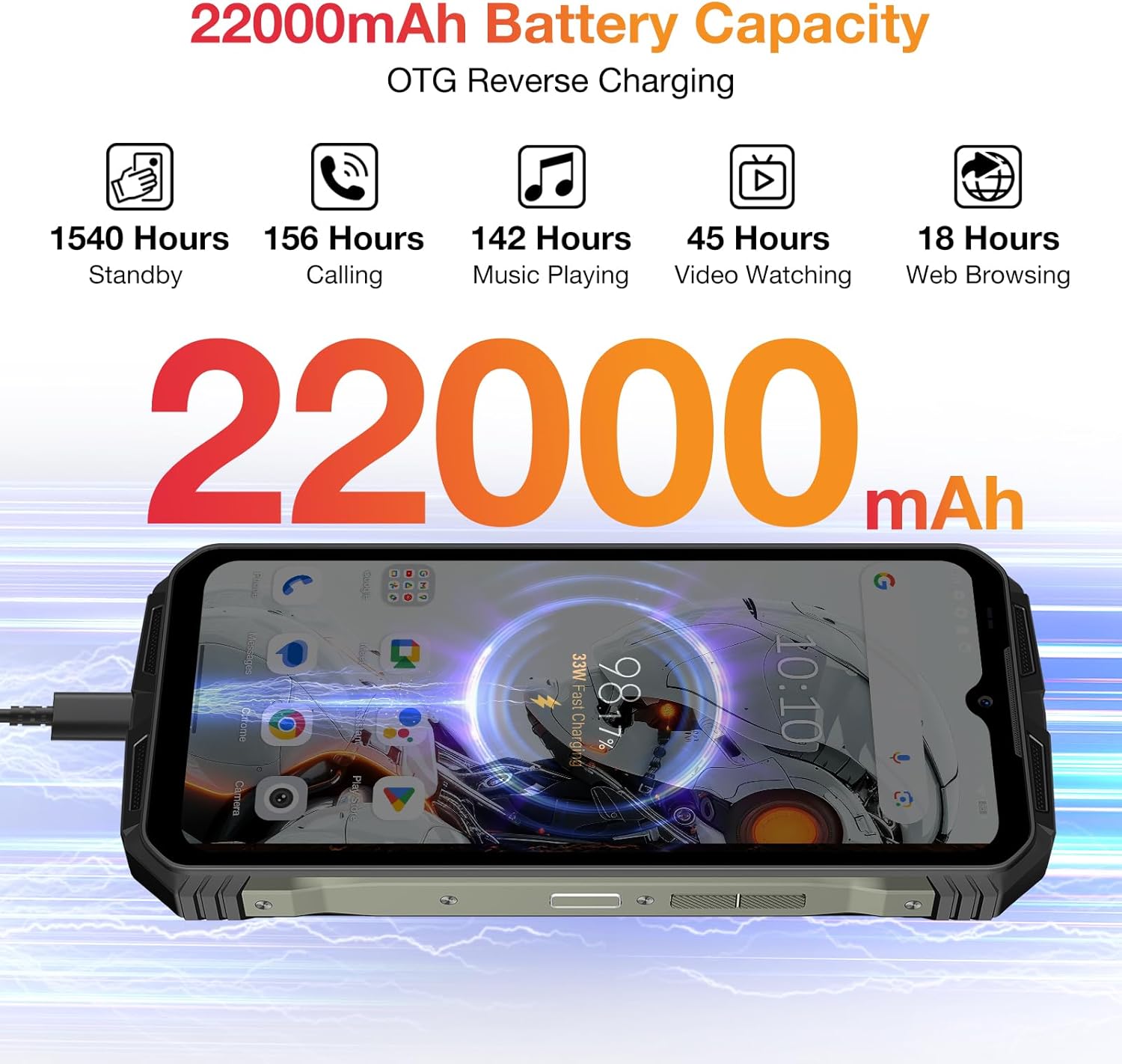
Figure 2: Visual representation of the DOOGEE V Max Pro's 22000mAh battery capacity and its OTG reverse charging capability.
4. Istruzzjonijiet Operattivi
4.1 Power On/Off
To power on your device, press and hold the Power button located on the side until the DOOGEE logo appears. To power off, press and hold the Power button, then select 'Power off' from the options displayed on the screen.
4.2 Wirja u Esperjenza Viżwali
The DOOGEE V Max Pro features a 6.58-inch FHD+ IPS Waterdrop Display with a 120Hz refresh rate. This provides a smooth and immersive visual experience for all your content, from browsing to gaming and video playback.

Figure 3: The 6.58-inch FHD+ 120Hz IPS Waterdrop Display offers vibrant colors and smooth visuals.
4.3 Prestazzjoni u Ħażna
Powered by the Dimensity 7050 5G Octa-core processor and equipped with 32GB RAM (12GB + up to 20GB Extended RAM) and 512GB ROM, expandable up to 2TB via TF card, the V Max Pro ensures smooth multitasking and ample storage for all your applications, photos, and videos. It runs on the latest Android 14 system for enhanced user experience and security.

Figure 4: The Dimensity 7050 5G Octa-core Processor provides robust performance for demanding tasks.

Figure 5: The phone offers 32GB RAM and 512GB ROM for smooth operation and extensive storage.

Figure 6: The DOOGEE V Max Pro runs on the latest Android 14 system, offering enhanced features and security.
4.4 Sistema tal-Kamera
Capture stunning photos and videos with the V Max Pro's versatile camera setup:
- Kamera Prinċipali tal-AI ta' 108MP: For high-resolution, detailed shots.
- Kamera tal-Viżjoni bil-Lejl ta' 20MP: Allows for clear photography in low-light or dark conditions.
- 8MP Wide-angle & Macro Camera: Capture expansive landscapes or intricate close-ups.
- Kamera ta' Quddiem ta' 16MP: Għal selfies u sejħiet bil-vidjo ta’ kwalità għolja.

Figura 7: Aktarview of the DOOGEE V Max Pro's triple camera system, including the 108MP main camera, 20MP night vision, and 8MP wide-angle/macro lenses.
4.5 Smart Interaction Lights
The V Max Pro features intelligent interaction lights on the back, which can be customized to provide visual notifications for incoming calls, SMS messages, music playback, and charging status. These lights enhance user interaction and provide quick visual cues.

Figure 8: The smart interaction lights on the back of the DOOGEE V Max Pro provide visual feedback for various notifications.
4.6 Karatteristiċi tas-Sigurtà
For enhanced security and convenience, the DOOGEE V Max Pro supports multiple unlock methods, including facial recognition and fingerprint unlock. The fingerprint sensor is conveniently located for quick and secure access to your device.
4.7 Konnettività
The device supports 5G cellular technology for fast network speeds, Wi-Fi 6 for reliable wireless connectivity, and NFC for convenient mobile payments and data exchange.
5. Integrazzjoni tal-Midja
5.1 Prodott Fuqview Video
Vidjo 1: Wirja uffiċjali tal-vidjo tal-prodottasing the DOOGEE V Max Pro's overall features, including its ruggedness, large battery, and performance.
5.2 Battery and Charging Demonstration
Video 2: A short video demonstrating the DOOGEE V Max Pro's 22000mAh battery and its OTG reverse charging capability, allowing it to charge other devices.
5.3 Karatteristiċi ta' Sigurtà 'l fuq minnview
Video 3: This video highlights the various security features of the DOOGEE V Max Pro, including NFC, Face ID, and fingerprint unlock for convenient and secure access.
5.4 Ruggedness Demonstration
Video 4: A brief demonstration of the DOOGEE V Max Pro's IP68/IP69K waterproof and dustproof capabilities, showcasing its resilience in challenging environments.
6. Speċifikazzjonijiet Tekniċi
| Karatteristika | Speċifikazzjoni |
|---|---|
| Dimensjonijiet tal-Prodott | 7.02 x 3.27 x 1.03 pulzieri |
| Piż tal-oġġett | 1.56 liri |
| Numru tal-Mudell tal-Oġġett | VMAXPRO |
| Batteriji | 1 batteriji tal-jone tal-litju meħtieġa (inklużi) |
| Sistema Operattiva | Android 14 |
| Teknoloġiji tal-Konnettività | WIFi 6, Fingerprint, OTG, Face ID, NFC |
| Karatteristiċi Speċjali | NFC/Face ID/Fingerprint/OTG/WIFi 6 |
| Riżoluzzjoni tal-Iskaner | 1080 x 2408 |
| Karatteristiċi Oħra tal-Kamera | Wara, Quddiem |
| Awdjo Jack | 3.5 mm |
| Kulur | Griż |
| Klassifikazzjoni tal-Qawwa tal-Batterija | 22000 Milliamp Sigħat |
| Ħin tat-Taħdit bit-Telefon | 156 Sigħat |
| Manifattur | DOOGEE |
| Kapaċità tal-Ħżin tal-Memorja | 512 GB |
| Daqs tal-Wiri tal-Iskrin Permanenti | 6.58 Pulzier |
| Riffriskar Rata | 120 Hz |
| Trasportatur Wireless | Jinfetaħ għat-Trasportaturi Kollha |
7. Manutenzjoni u Kura
To ensure the longevity and optimal performance of your DOOGEE V Max Pro, follow these maintenance guidelines:
- Tindif: Imsaħ l-apparat regolarment b'ċarruta ratba uamp drapp. Evita li tuża kimiċi ħarxa jew materjali li joborxu.
- Temperatura: Do not expose the phone to extreme temperatures (hot or cold) for prolonged periods.
- Reżistenza għall-Ilma u t-Trab: While the phone is IP68/IP69K rated, ensure all ports and covers are securely closed before exposing it to water or dust. Avoid intentional submersion in corrosive liquids.
- Protezzjoni tal-Impatt: Despite its rugged design, avoid unnecessary drops or impacts to prevent potential damage to internal components.
- Aġġornamenti tas-Software: Iċċekkja u installa aġġornamenti tas-softwer regolarment biex tiżgura li t-tagħmir tiegħek ikollu l-aħħar karatteristiċi u irqajja tas-sigurtà.

Figure 9: The DOOGEE V Max Pro is built to IP68/IP69K and MIL-STD-810H standards for superior ruggedness.
8. Issolvi l-problemi ta' Kwistjonijiet Komuni
Jekk tiltaqa' ma' xi problemi bid-DOOGEE V Max Pro tiegħek, jekk jogħġbok irreferi għall-passi komuni li ġejjin għas-soluzzjoni tal-problemi:
- L-Apparat Mhux Jixgħel: Kun żgur li l-batterija hija ċċarġjata. Qabbad il-ċarġer u stenna ftit minuti qabel ma tipprova terġa' tixgħelha. Jekk ma tirrispondix, ipprova terġa' tibda billi żżomm il-buttuna tal-Enerġija għal 10-15-il sekonda.
- Kwistjonijiet ta' Iċċarġjar: Check if the charging cable and adapter are securely connected and undamaged. Try using a different power outlet. Ensure the charging port is clean and free of debris.
- App Crashes/Freezing: Close the problematic app and reopen it. Clear the app's cache and data in Settings > Apps. If the issue persists, uninstall and reinstall the app.
- Sinjal tan-Netwerk Dgħajjef: Check your SIM card installation. Restart the device. Ensure you are within network coverage. If issues persist, contact your service provider.
- Il-Ftuħ tal-Marka tas-Swaba'/Wiċċ Mhux Jaħdem: Ensure your fingers are clean and dry for fingerprint recognition. For face unlock, ensure adequate lighting and that your face is clearly visible to the front camera. Re-register your fingerprint or face ID if necessary.
- Is-sħana żejda: Avoid using the phone while charging for extended periods or running multiple demanding applications simultaneously. Close background apps and reduce screen brightness if the device feels excessively warm.
- Irrisettjar tal-Fabbrika: Bħala l-aħħar soluzzjoni għal problemi persistenti tas-softwer, tista' tagħmel reset tal-fabbrika. Twissija: Dan se jħassar id-dejta kollha fuq it-telefon tiegħek. Agħmel backup tad-dejta importanti qabel ma tipproċedi. Mur f'Settings > Sistema > Għażliet ta' reset > Ħassar id-dejta kollha (reset tal-fabbrika).
9. Garanzija u Appoġġ għall-Klijent
Grazzi tax-xiriasing your DOOGEE V Max Pro 5G Rugged Phone. We value your experience and are committed to providing excellent customer service.
- Garanzija: Your device comes with a 2-Year Limited Warranty. Please refer to the warranty card included in your package for detailed terms and conditions.
- Garanzija ta' Money Back: We offer a 30-Days Money Back Guarantee and Free Return policy.
- Servizz tal-Klijent: If you encounter any issues or have questions regarding your product, please do not hesitate to contact us. You can reach our official customer support through Amazon's messaging system. We promise to respond within 24 hours and assist in resolving any issues you may have.
- Appoġġ onlajn: 24/7 One-on-One Online Support is available for your convenience.