
1. Prodott Aktarview
The Machenike Machcreator Mini Desktop, Model 4762H, is a compact and powerful computing solution designed for various applications, from business to everyday use. It features a 13th Gen Intel Core i7-13620H processor, 16GB DDR5 RAM, and a 512GB PCIe M.2 SSD, providing high-speed performance and efficient multitasking capabilities. This mini PC supports 4K dual monitor output and comes pre-installed with Windows 11 Pro.
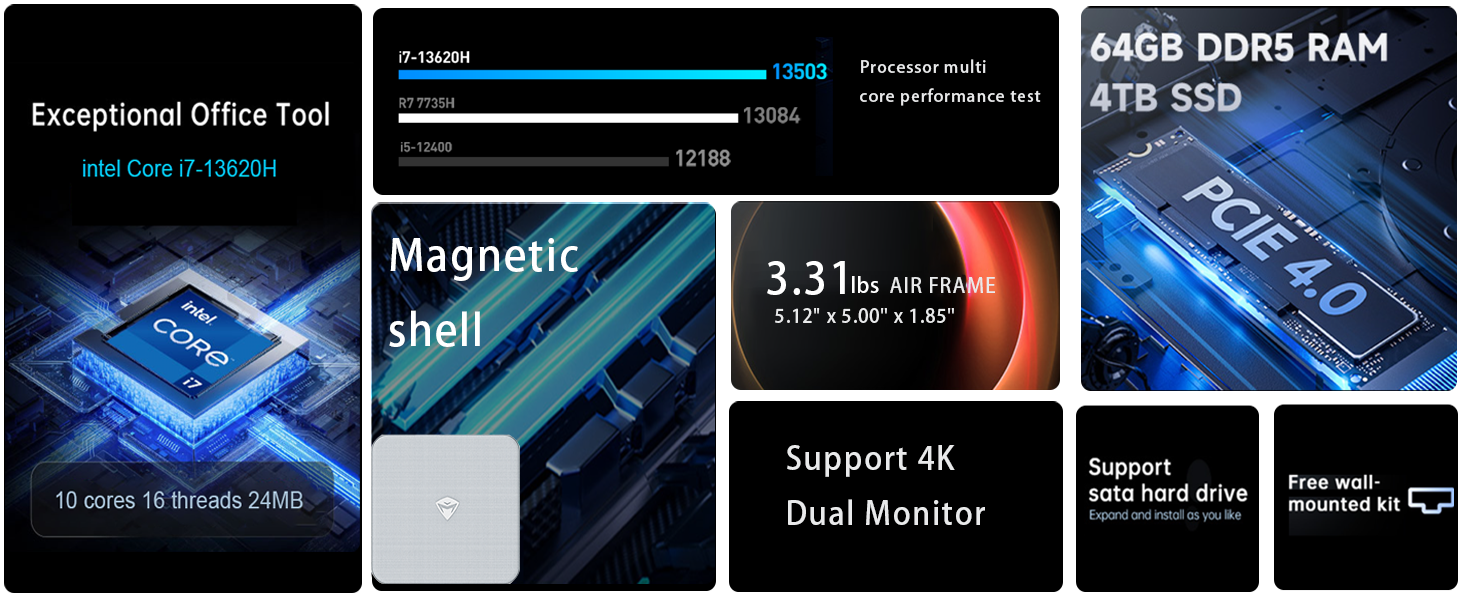
Immaġni: Fuqview of the Intel Core i7 processor, highlighting 10 Cores, 16 Threads, 4.90 GHz Max Turbo Frequency, and 24 MB L3 Cache.
Karatteristiċi ewlenin:
- Proċessur: Intel Core i7-13620H (10 Qlub, 16-il Ħjut, sa 4.9 GHz)
- Memorja: 16GB DDR5 SODIMM RAM (expandable up to 64GB)
- Ħażna: 512GB PCIe M.2 Solid State Drive (supports dual M.2 expansion)
- Sistema Operattiva: Windows 11 Pro
- Grafika: Integrated Intel UHD Graphics, supporting 4K dual monitor output via HDMI 2.0 and DisplayPort 1.4
- Konnettività: Wi-Fi 6, Bluetooth, 2 x RJ45 Ethernet, USB 3.2 Gen2 Type-A, USB Type-C
- Sistema tat-tkessiħ: Twin turbine cooling fan with deluxe all-copper radiator
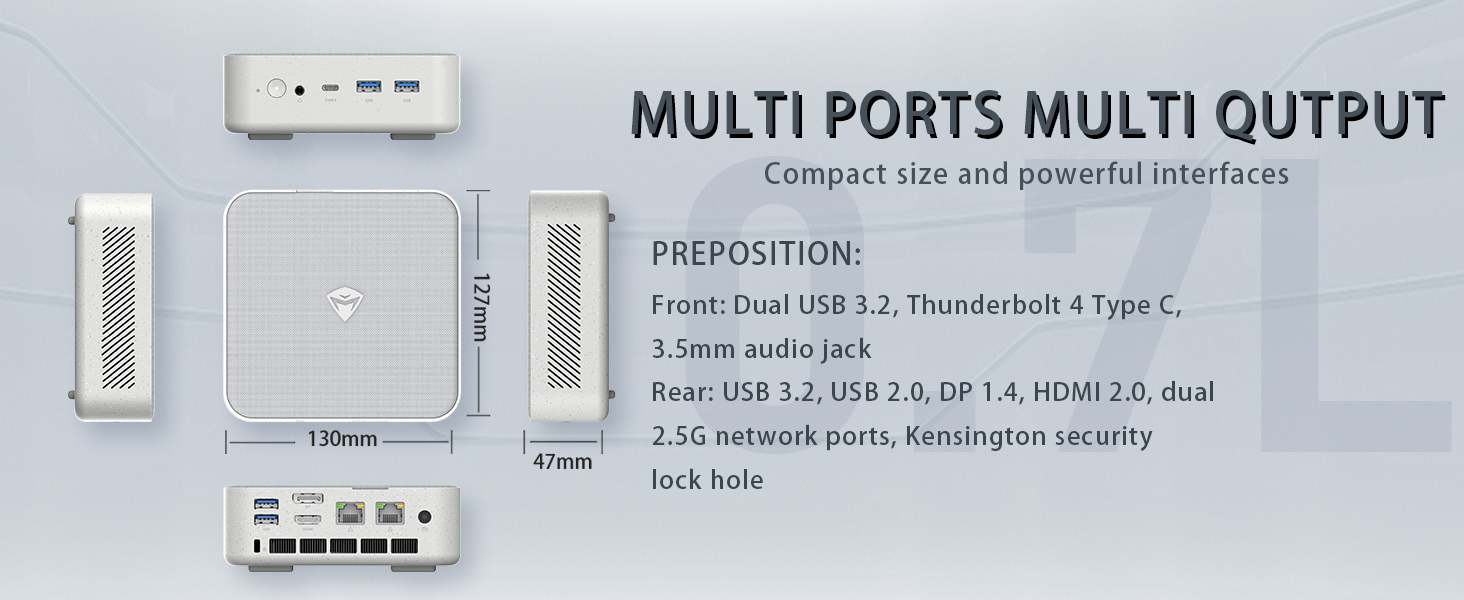
Image: Illustration of PCIe 4.0 SSD and memory slots, indicating support for up to 64GB DDR5 RAM and up to 4TB PCIe SSD expansion.
2. Gwida ta' Setup
2.1 Kif Tneħħi l-Apparat mill-Ippakkjar
Neħħi l-komponenti kollha mill-imballaġġ bir-reqqa. Kun żgur li l-oġġetti li ġejjin huma preżenti:
- Machenike Machcreator Mini Desktop (Model 4762H)
- Adapter tal-Enerġija
- Manwal għall-Utent (dan id-dokument)
- (Optional) VESA Mount Kit
2.2 Konnessjoni tal-Periferali
Qabel ma tixgħelha, qabbad il-periferali essenzjali tiegħek:
- Wiri: Connect your monitor(s) to the HDMI 2.0 or DisplayPort 1.4 ports on the rear of the mini PC. The USB Type-C port also supports video output.
- Tastiera u maws: Connect your USB keyboard and mouse to any of the available USB 3.2 Gen2 Type-A ports.
- Netwerk: For a wired connection, connect an Ethernet cable to one of the RJ45 ports. For wireless, ensure your Wi-Fi network is available.
- Qawwa: Connect the power adapter to the DC-in port on the mini PC, then plug the adapter into a power outlet.
Immaġni: Dettaljata view of the mini PC's front and rear ports, including USB 3.2 Gen2 Type-A, USB Type-C, 3.5mm Audio Jack, HDMI 2.0, DisplayPort 1.4, and RJ45 Ethernet ports. Dimensions are also shown.
2.3 Initial Boot-up and Windows 11 Pro Setup
- Agħfas il-buttuna tal-qawwa li tinsab fuq quddiem tal-mini PC.
- The system will boot into the Windows 11 Pro setup wizard. Follow the on-screen instructions to configure your language, region, network, and user account.
- Once setup is complete, your mini PC is ready for use.
3. Istruzzjonijiet Operattivi
3.1 Power On/Off
- Qawwa Mixgħul: Agħfas il-buttuna tal-qawwa darba.
- Itfi: Ikklikkja l-buttuna Start fil-Windows, imbagħad agħżel Power > Shut down.
- Ibda mill-ġdid: Ikklikkja l-buttuna Start fil-Windows, imbagħad agħżel Power > Restart.
- Irqad: Ikklikkja l-buttuna Start fil-Windows, imbagħad agħżel Power > Sleep.
3.2 Konfigurazzjoni tal-Wiri
The mini PC supports up to two 4K displays simultaneously. To configure display settings:
- Ikklikkja bil-lemin fuq id-desktop u agħżel "Settings tal-wiri".
- Here you can detect multiple displays, arrange them, change resolution, and adjust scaling.
3.3 Konnettività tan-Netwerk
- Wi-Fi: Click the network icon in the taskbar, select your Wi-Fi network, enter the password, and connect.
- Ethernet: If an Ethernet cable is connected, the system should automatically establish a wired network connection.
3.4 Cooling System Modes
The mini PC features an advanced cooling system with adjustable modes via the BIOS to optimize performance and noise levels. These modes include:
- Mod ta 'Silenzju: Prioritizes quiet operation, suitable for light tasks.
- Modalità Bilanċ: Offers a good balance between performance and noise.
- Modalità ta' Prestazzjoni: Maximizes performance (up to 65W power release), ideal for demanding applications.
To change these settings, access the BIOS during startup (typically by pressing Del or F2 repeatedly after powering on) and navigate to the relevant power or performance settings.
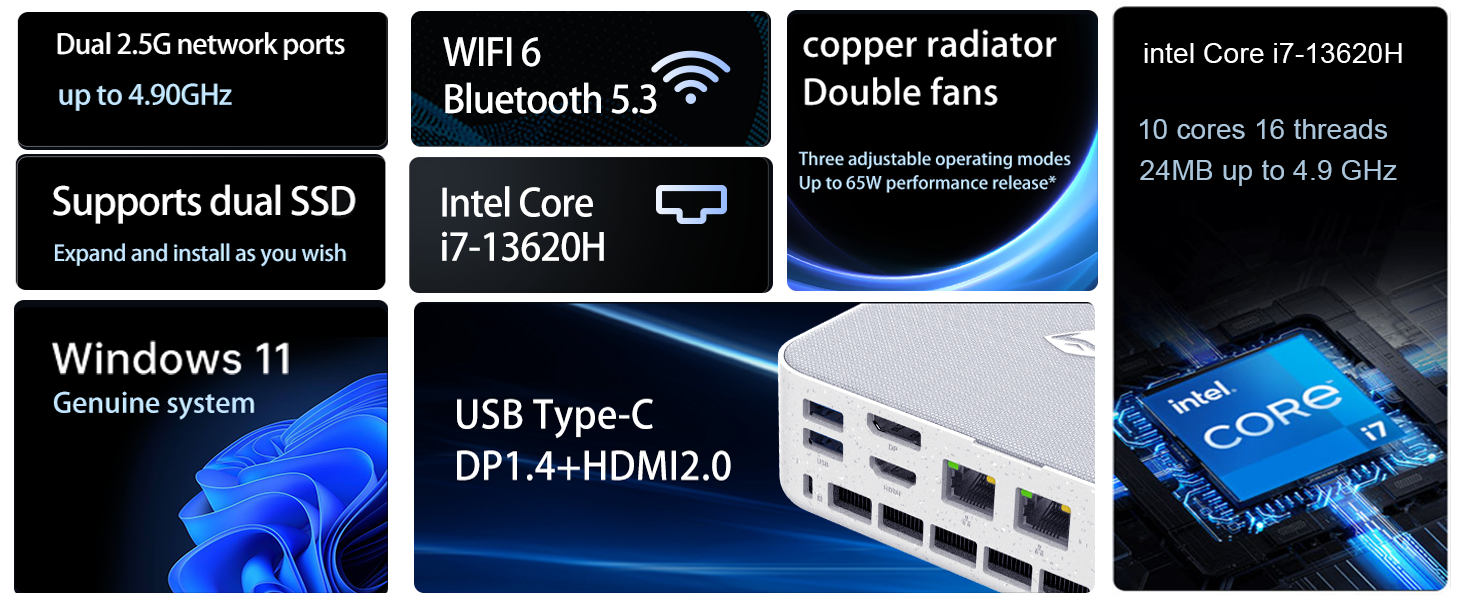
Image: Illustration of the twin turbine cooling fan and deluxe all-copper radiator, explaining how it prevents slowdowns due to overheating and offers silence, balance, and performance modes.
4. Manutenzjoni
4.1 Tindif tal-Apparat
To ensure optimal performance and longevity, regularly clean your mini PC:
- Power off the device and disconnect it from the power outlet.
- Uża drapp artab u niexef biex timsaħ il-parti ta' barra.
- Use compressed air to gently clear dust from ventilation openings. Do not insert any objects into the vents.
4.2 Aġġornamenti tas-Software
Keep your Windows 11 Pro operating system and drivers updated to ensure security and performance:
- Aġġornamenti tal-Windows: Go to Start > Settings > Windows Update and check for updates.
- Aġġornamenti tas-sewwieq: Visit the Machenike official websit għall-aħħar sewwieqa għall-mudell speċifiku tiegħek.
4.3 Espansjoni tal-Ħażna u l-Memorja
The Machenike Machcreator Mini Desktop supports upgrades for both RAM and storage:
- RAM: The device has 2 SODIMM slots and supports up to 64GB DDR5 RAM.
- Ħażna: It supports dual PCIe M.2 SSDs, allowing for significant storage expansion up to 4TB.
Nota: Opening the device for upgrades may void your warranty. Consult a qualified technician or refer to specific upgrade guides from Machenike if available.
5 Issolvi l-problemi
Din it-taqsima tindirizza kwistjonijiet komuni li tista' tiltaqa' magħhom. Għal problemi aktar kumplessi, jekk jogħġbok ikkuntattja l-appoġġ għall-klijenti.
5.1 Ebda Qawwa
- Kun żgur li l-adapter tal-enerġija huwa konness sew kemm mal-mini PC kif ukoll ma' sokit tal-enerġija li jaħdem.
- Ivverifika li s-sokit tal-enerġija jaħdem billi tqabbad apparat ieħor.
- Iċċekkja l-adapter tal-enerġija għal xi ħsara viżibbli.
5.2 L-ebda Output tal-Wiri
- Ikkonferma li l-monitor huwa mixgħul u li s-sors tad-dħul korrett huwa magħżul.
- Ensure the HDMI or DisplayPort cable is securely connected to both the mini PC and the monitor.
- Ipprova kejbil tad-displej jew monitor differenti jekk disponibbli.
- Jekk qed tuża diversi displays, ipprova qabbad display wieħed biss kull darba.
5.3 Kwistjonijiet ta' Konnettività tan-Netwerk
- Bil-fili (Ethernet): Check if the Ethernet cable is properly connected to both the mini PC and the router/modem. Verify router/modem status.
- Wireless (Wi-Fi): Ensure Wi-Fi is enabled in Windows settings. Restart your router/modem. Check if other devices can connect to the Wi-Fi network.
- Run Windows Network Troubleshooter (Start > Settings > Network & internet > Advanced network settings > Network troubleshooter).
6. Speċifikazzjonijiet
Detailed technical specifications for the Machenike Machcreator Mini Desktop, Model 4762H:
| Karatteristika | Speċifikazzjoni |
|---|---|
| Brand | Machenike |
| Numru tal-Mudell | 4762H |
| Sistema Operattiva | Windows 11 Pro |
| Mudell tas-CPU | Intel Core i7-13620H |
| Veloċità tas-CPU | Up to 4.9 GHz (Max Turbo Frequency) |
| Daqs tal-Memorja RAM Installata | 16 GB DDR5 (Expandable to 64 GB) |
| Veloċità tal-Arloġġ tal-Memorja | 4800 MHz |
| Slots tal-Memorja Disponibbli | 2 |
| Kapaċità tal-Ħżin tal-Memorja | 512 GB PCIe M.2 SSD (Supports dual M.2, up to 4TB) |
| Koproċessur tal-Grafika | Grafika Intel UHD (Integrata) |
| Interface tal-Output tal-Vidjo | HDMI 2.0, DisplayPort 1.4, USB Type-C |
| Riżoluzzjoni tal-Wiri Massimu | 3840x2160 (4K) |
| Interface tal-Ħardwer | 3.5mm Audio, Bluetooth, DisplayPort, Ethernet (2x RJ45), HDMI, USB, USB Type C |
| Konnettività bla fili | Wi-Fi 6 (802.11ax), Bluetooth |
| Dimensjonijiet tal-oġġett (LxWxH) | 5.12 x 5 x 1.85 pulzieri |
| Piż tal-oġġett | 49.8 Liri (Note: This weight may be a data entry error; actual weight for a mini PC is typically much less.) |
| UPC | 193200587317 |
7. Garanzija u Appoġġ
7.1 Informazzjoni dwar Garanzija
Machenike products typically come with a limited manufacturer's warranty. Please refer to the warranty card included with your purchase or visit the official Machenike website for detailed warranty terms and conditions specific to your region and product model. Keep your proof of purchase for warranty claims.
7.2 Appoġġ għall-Klijent
For technical assistance, troubleshooting beyond this manual, or warranty inquiries, please contact Machenike customer support:
- Appoġġ onlajn: Żur il-Machenike uffiċjali websit (www.machenike.com - example link, actual link may vary) and navigate to the support section.
- Appoġġ bl-Email: Irreferi għad-dokumentazzjoni tal-prodott tiegħek għall-indirizz elettroniku speċifiku tal-appoġġ.
- Appoġġ tat-Telefon: Check the Machenike websit għal numri ta' appoġġ bit-telefon reġjonali.
When contacting support, please have your product model number (4762H) and serial number ready.