
CHOYONG 097049251
CHOYONG A8W Internet Radio User Manual
Portable Smart WIFI/4G Radio FM Receiver
Introduzzjoni
The CHOYONG A8W Internet Radio is a versatile and portable device designed to provide a rich listening experience. It offers seamless Wi-Fi and 4G connectivity, granting access to over 40,000 internet radio stations globally, alongside traditional FM stations. Its advanced voice search function allows for effortless navigation, while features like a rechargeable battery, alarm clock, and Micro SD card support enhance user convenience. This manual provides comprehensive instructions for setting up, operating, and maintaining your A8W radio.
Kontenut tal-Pakkett
- CHOYONG A8W Internet Radio Unit
- Cable tal-Iċċarġjar tal-USB
- Manwal għall-Utent (dan id-dokument)
- (Note: Specific accessories may vary. Please check your product packaging.)
Prodott Overview

Figura 1: Quddiem view of the CHOYONG A8W Internet Radio, showing the speaker grille, display screen, and control buttons.

Figura 2: Ġenb view illustrating the Micro SD card slot and the Type-C headphone port.
Kontrolli u Portijiet:
- Skrin tad-displej: Shows station information, time, battery status, and menu options.
- Grille tal-Ispeaker: Integrated multimedia speaker for audio output.
- Buttuni tal-Kontroll: Includes OK, Play/Pause, Skip, Menu, News, Music, Favorite, Settings, and Voice Search.
- Volume/Navigation Knobs: Located on the side for adjusting volume and navigating menus.
- Slott tal-Karta Mikro SD: Għad-daqq tal-awdjo files minn kard Micro SD.
- Port tat-Tip-C: Used for charging the device and connecting Type-C headphones.
Setup
1. Iċċarġjar tal-Apparat
Before first use, fully charge the A8W radio. Connect the supplied USB charging cable to the Type-C port on the device and the other end to a standard USB power adapter (not included) or a computer's USB port. The charging indicator on the display will show the charging status.
2. Tixgħil / Mitfi
- Biex Tixgħel: Press and hold the Power button (usually integrated with one of the side knobs) until the display lights up.
- Biex Tifi: Press and hold the Power button again until the device shuts down.
3. Network Connection (Wi-Fi/4G)
To access internet radio stations, the A8W requires a network connection.
- Mill-menù prinċipali, mur fuq Settings.
- Agħżel Netwerk or Setup tal-Wi-Fi.
- The radio will scan for available Wi-Fi networks. Select your desired network from the list.
- Enter the Wi-Fi password using the on-screen keyboard and navigation buttons.
- Confirm the password and connect.
Important Note on Wi-Fi Security: For optimal compatibility, particularly with older firmware versions, this device may perform best with Wi-Fi networks configured to WPA2 security protocols. While WPA3 offers enhanced security, some devices may require a WPA2 setting for a stable connection. Consult your router's documentation for changing Wi-Fi security settings if needed.

Figura 3: Fuqview of key features including network connectivity options.
Istruzzjonijiet Operattivi
1. Radju fuq l-Internet
Access thousands of stations worldwide once connected to Wi-Fi or 4G.
- Innaviga lejn Radju fuq l-Internet mill-menu prinċipali.
- Browse stations by continent, country, genre, or popularity.
- Agħżel stazzjon biex tibda d-daqq.
- Uża l- Favorit button to save frequently listened stations.
2. Tiftix bil-Vuċi
The A8W features voice search for convenient station discovery.
- Agħfas il- Tiftix bil-Vuċi button (microphone icon).
- Speak clearly into the device's microphone, stating the name of the station or a keyword (e.g., "Play VOA").
- The radio will search and display relevant results.

Figura 4: Demonstrating the voice search functionality for easy station access.
3. Radju FM
To listen to local FM broadcasts:
- Innaviga lejn Radju FM mill-menu prinċipali.
- Use the navigation knobs or buttons to tune to your desired frequency (87.5-108MHz).
- The radio may automatically scan and save available stations upon first use.
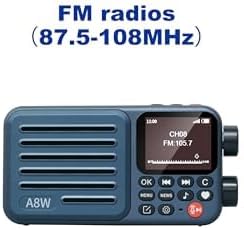
Figura 5: Display showing FM radio mode with a tuned frequency.
4. Daqq tal-Karta Mikro SD
The A8W supports playing audio files minn kard Micro SD.
- Insert a Micro SD card into the designated slot (refer to Figure 2).
- Innaviga lejn Plejer tal-Mużika or Karta SD mill-menu.
- Browse and select audio files (MP3, AAC, etc.) to play.
5. Alarm Clock and Timer
Set alarms and timers for personalized use.
- Aċċess Allarm or Timer settings from the main menu.
- Follow the on-screen prompts to set time, alarm sound (radio station or tone), and recurrence.
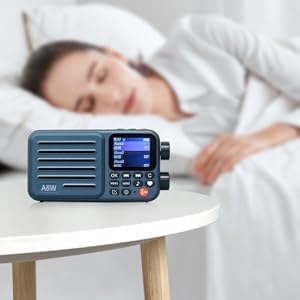
Figura 6: The A8W functioning as an alarm clock on a bedside table.
6. Audio Output (Headphones)
For private listening, connect Type-C headphones to the dedicated port.
- Insert Type-C headphones into the Type-C port on the side of the device.
- The audio will automatically switch from the internal speaker to the headphones.
- Note: This device uses a Type-C port for audio output. Standard 3.5mm headphones are not directly compatible without an adapter.

Figura 7: The compact size of the A8W and its compatibility with Type-C earphones.
Manutenzjoni
- Tindif: Uża drapp artab u niexef biex tnaddaf il-barra tar-radju. Tużax prodotti tat-tindif likwidi jew materjali li joborxu.
- Kura tal-batterija: Biex ittawwal il-ħajja tal-batterija, evita li tiċċarġja kompletament il-batterija ta' spiss. Iċċarġja l-apparat regolarment, anke jekk ma jkunx qed jintuża għal perjodi twal.
- Ħażna: Aħżen ir-radju f'post frisk u niexef 'il bogħod mix-xemx diretta u minn temperaturi estremi.
Issolvi l-problemi
| Problema | Kawża Possibbli | Soluzzjoni |
|---|---|---|
| L-apparat ma jixgħelx. | Batterija baxxa; Il-buttuna tal-qawwa mhux ippressata sew. | Charge the device fully. Press and hold the Power button for a few seconds. |
| Ma tistax tikkonnettja mal-Wi-Fi. | Incorrect password; Router too far; Wi-Fi security protocol incompatibility. | Double-check password. Move closer to router. Ensure your router is set to WPA2 security for best compatibility. Restart router and radio. |
| L-ebda ħoss mill-headphones. | Incorrect headphone type; Headphones not fully inserted. | Ensure you are using Type-C headphones. Insert the headphone plug firmly into the Type-C port. Check headphone functionality with another device. |
| Voice search not responding. | No internet connection; Microphone obstructed. | Verify Wi-Fi/4G connection. Ensure nothing is blocking the microphone opening. Speak clearly and close to the device. |
| Riċeviment fqir tal-FM. | Sinjal dgħajjef; Interferenza ambjentali. | Relocate the radio to an area with better signal. Extend any built-in antenna if available. |
Speċifikazzjonijiet
| Karatteristika | Dettall |
|---|---|
| Brand | CHOYONG |
| Mudell | A8W (097049251) |
| Konnettività | Wi-Fi, 4G network |
| Teknoloġija Tuner | Internet Radio, FM Radio (87.5-108MHz) |
| Sors tal-Enerġija | Battery Powered (Rechargeable 2000mAh battery) |
| Tip ta 'Wiri | LCD |
| Output Awdjo | Built-in multimedia speaker, Type-C headphone port |
| Appoġġ għall-Ħażna | Mikro SD Card |
| Dimensjonijiet (L x W x H) | 7.62 x 3.3 x 13.97 ċm (madwar 3 x 1.3 x 5.5 pulzieri) |
| Piż | 249.48 g (madwar 8.8 uqija) |
| Karatteristiċi Speċjali | Portable, Rechargeable, Voice Search, Alarm Clock, Timer Playback |
Garanzija u Appoġġ
For warranty information and technical support, please refer to the documentation provided with your purchase or contact CHOYONG customer service through their official webis-sit jew il-bejjiegħ bl-imnut li mingħandu xtrajt il-prodott. Żomm il-prova tax-xiri tiegħek għal talbiet ta' garanzija.
Ask a question about this manual
Ask about setup, troubleshooting, compatibility, parts, safety, or missing instructions. Manuals+ will review the question and use this page’s manual context to help answer it.