
MageGee LIGHT87
MageGee LIGHT87 Wireless Mechanical Keyboard User Manual
Model: LIGHT87
Gwida komprensiva għas-setup, it-tħaddim u l-manutenzjoni.
1. Prodott Aktarview
The MageGee LIGHT87 is a versatile 87-key wireless mechanical keyboard designed for gaming and productivity. It features a gasket-mounted structure for a creamy typing sound, hot-swappable switches, vibrant RGB backlighting, and multiple connectivity options including 2.4GHz wireless, Bluetooth 5.0, and USB-C wired mode. It is equipped with an 8000mAh battery and durable side-printed PBT keycaps.

Figura 1: Minn fuq għal isfel view of the MageGee LIGHT87 Wireless Mechanical Keyboard, showcasing id-disinn ta' 87 ċavetta tiegħu u d-dawl ta' wara RGB.

Figura 2: Aktarview of the MageGee LIGHT87's key features, including 8000mAh battery, PBT keycaps, Win/Mac dual system support, gasket mount, 5 layers of silencing foams, 16.8 million RGB backlight, triple mode connection, custom hot-swappable switches, and 87-key anti-ghosting.
2. Kontenut tal-Pakkett
Qabel ma tibda, jekk jogħġbok kun żgur li l-oġġetti kollha huma preżenti fil-pakkett:
- MageGee LIGHT87 Wireless Mechanical Keyboard
- USB-C għal USB-A Cable
- Riċevitur USB 2.4GHz
- Keycap Puller
- Iswiċċ Puller
- Manwal għall-Utent (dan id-dokument)

Figure 3: Contents of the MageGee LIGHT87 keyboard package, including the keyboard, USB cable, keycap puller, switch puller, and user manual.
3. Setup u Konnettività
The MageGee LIGHT87 keyboard offers three connection modes: USB-C wired, 2.4GHz wireless, and Bluetooth 5.0.
3.1 Iċċarġjar tat-Tastiera
Before first use, it is recommended to fully charge the keyboard. Connect the provided USB-C cable to the keyboard's USB-C port and the other end to a USB power source (e.g., computer USB port, wall adapter). The keyboard features an 8000mAh large-capacity battery.

Figure 4: Illustration of the 8000mAh battery capacity, providing approximately 53 hours with RGB backlight on and 400 hours with RGB backlight off.

Figure 5: Detailed battery life estimates: 53 hours with backlight on, 400 hours with backlight off, and 450 hours of sleep standby time.
3.2 Modi ta' Konnessjoni
The keyboard supports seamless switching between wired, 2.4GHz, and Bluetooth modes.
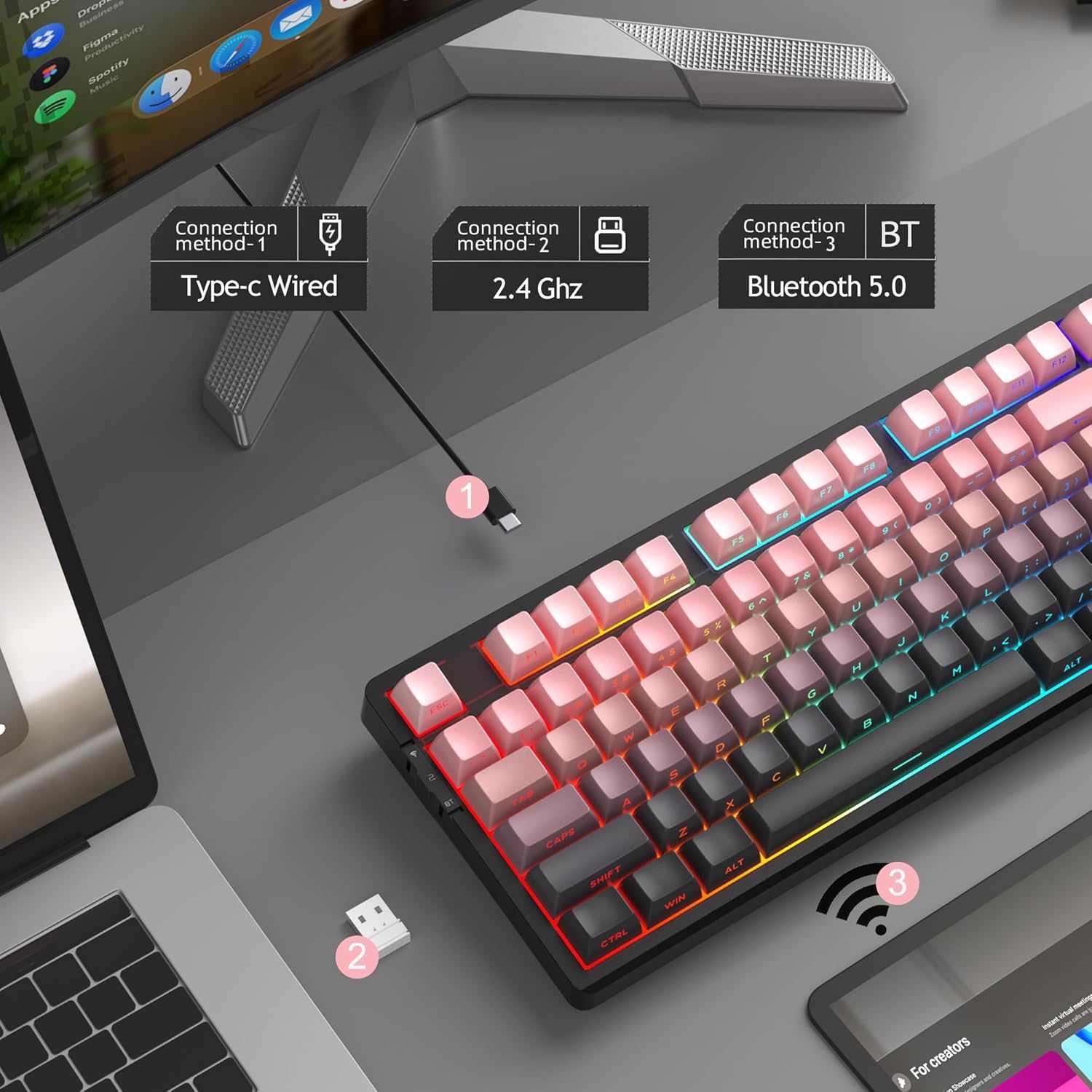
Figure 6: Visual representation of the three connection methods: Type-C Wired, 2.4 GHz Wireless, and Bluetooth 5.0.

Figure 7: Detailed instructions for switching between 2.4GHz, Bluetooth 5.0, and Type-C wired modes using the toggle switch and Fn key combinations.
3.2.1 USB-C Wired Mode
- Connect the USB-C cable to the keyboard and your computer's USB port.
- Toggle the switch on the keyboard to the "2" position (wired mode).
- It-tastiera tiġi rikonoxxuta awtomatikament mis-sistema tiegħek.
3.2.2 Modalità bla fili ta' 2.4GHz
- Sib ir-riċevitur USB ta' 2.4GHz (ġeneralment maħżun f'kompartiment fuq it-tastiera).
- Ipplaggja r-riċevitur USB f'port USB disponibbli fuq il-kompjuter tiegħek.
- Toggle the switch on the keyboard to the "wifi" icon position (2.4G wireless mode).
- Agħfas fn+4 to activate 2.4GHz mode. The keyboard should connect automatically.
3.2.3 Modalità Bluetooth 5.0
The keyboard can connect to up to three Bluetooth devices.
- Toggle the switch on the keyboard to the "BT" position (Bluetooth mode).
- Agħfas u żomm fn+1, fn+2, jew fn+3 for 3-5 seconds to enter pairing mode for the desired channel. The indicator light will flash rapidly.
- On your device (PC, laptop, tablet, smartphone), enable Bluetooth and search for "MageGee LIGHT87".
- Agħżel it-tastiera li trid tqabbad. Ladarba tkun konnessa, id-dawl indikatur jieqaf iteptep.
- Biex taqleb bejn apparati Bluetooth imqabbdin, sempliċement agħfas fn+1, fn+2, jew fn+3.
4. Istruzzjonijiet Operattivi
4.1 Kontroll tad-Dawl ta' Wara RGB
The MageGee LIGHT87 features 16.8 million cool RGB backlight options with various effects.
- Fn + Ikteb: Toggle between approximately 20 different backlight modes/effects.
- Fn + ←: Adjust light direction (for certain effects).
- Fn + →: Adjust light color (for static modes or color cycling).
- Fn + ↑Żid il-luminożità tad-dawl ta' wara.
- Fn + ↓: Naqqas il-luminożità tad-dawl ta' wara.
- Fn + =+: Increase backlight speed (for dynamic effects).
- Fn + -_: Decrease backlight speed (for dynamic effects).
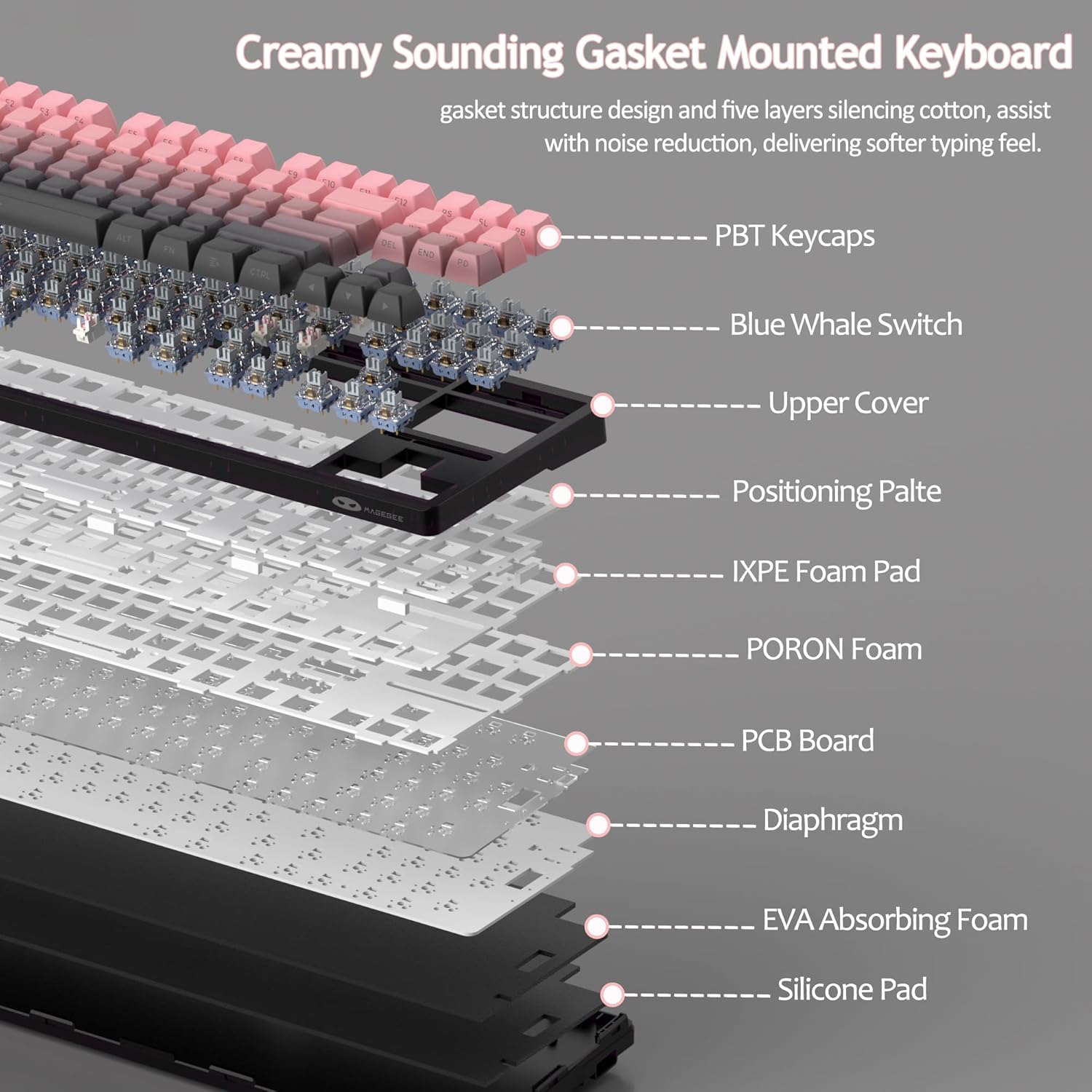
Figure 8: Visual guide to RGB backlight control key combinations.

Figure 9: Table summarizing RGB backlight functions and their corresponding Fn key combinations.
4.2 Swiċċijiet li jistgħu jinbidlu bis-sħana
The LIGHT87 keyboard features hot-swappable sockets, allowing you to change switches without soldering. It supports both 3-pin and 5-pin mechanical switches. The keyboard comes pre-installed with quiet linear Blue Whale switches.

Figure 10: Diagram illustrating the hot-swappable switch mechanism, showing compatibility with 3-pin and 5-pin switches and the pre-lubed Blue Whale switch.

Figure 11: Specifications of the Blue Whale Switch, including linear type, conduction stroke, total travel, operating force, material, and lifespan.
To Replace Switches:
- Neħħi l-għatu taċ-ċwievet bir-reqqa billi tuża l-puller tal-għatu taċ-ċwievet provdut.
- Uża l-puller tas-swiċċ biex taqbad bil-mod il-klipps ta’ fuq u ta’ isfel tas-swiċċ.
- Iġbed is-swiċċ dritt 'il fuq biex tneħħih mill-PCB.
- Allinja l-pinnijiet tas-swiċċ il-ġdid mat-toqob fuq il-PCB.
- Press the new switch firmly into place until it clicks. Ensure it is seated properly and not bent.
- Ibdel il-għatu taċ-ċwievet.
4.3 Gasket Structure and Sound Dampening
The LIGHT87 utilizes a gasket-mounted design, which provides a softer, more flexible typing feel and contributes to a "creamy thock" sound profile. Additionally, it incorporates five layers of sound-absorbing foams to effectively reduce noise and improve typing comfort.

Figura 12: Sploda view of the keyboard's internal components, highlighting the gasket structure and various foam layers (IXPE Foam Pad, PORON Foam, EVA Absorbing Foam, Silicone Pad) for sound dampening.
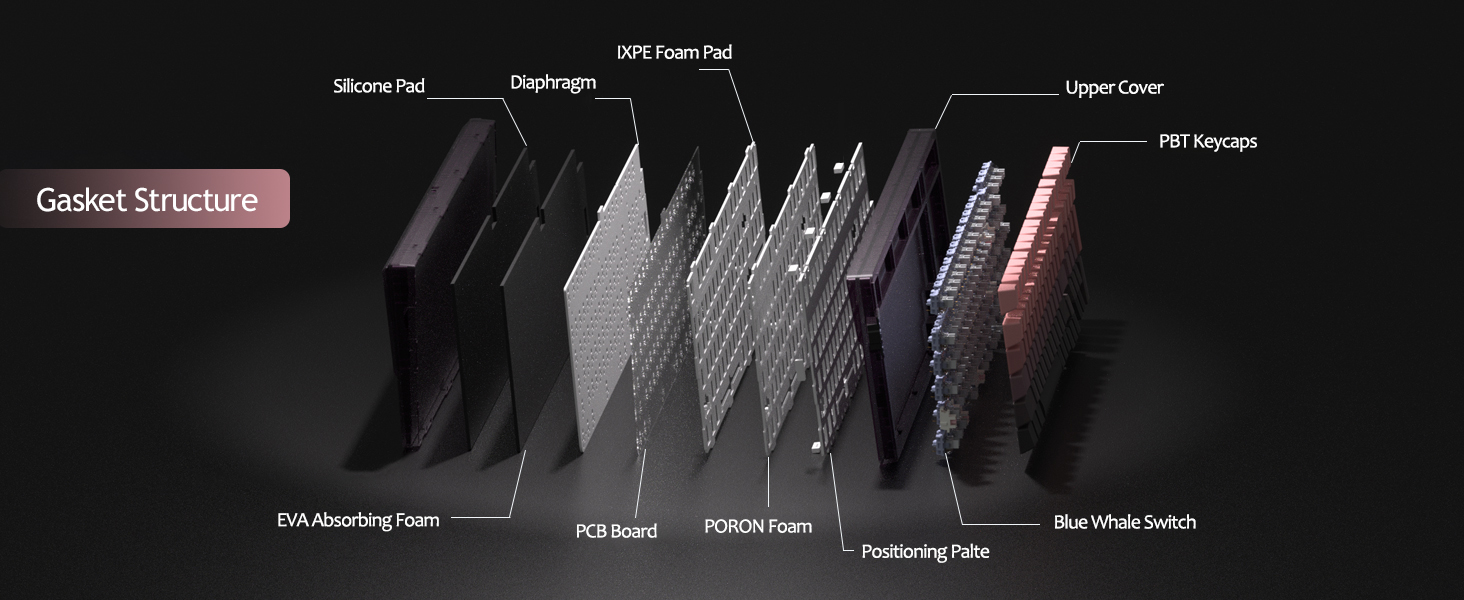
Figure 13: Detailed diagram of the gasket structure, showing how the plate is isolated from the case by gaskets, along with the various foam layers.
4.4 Tastiera tal-PBT
The keyboard is equipped with durable PBT keycaps, known for their resistance to shine and wear over time. The legends are side-printed for a clean top surface aesthetic.
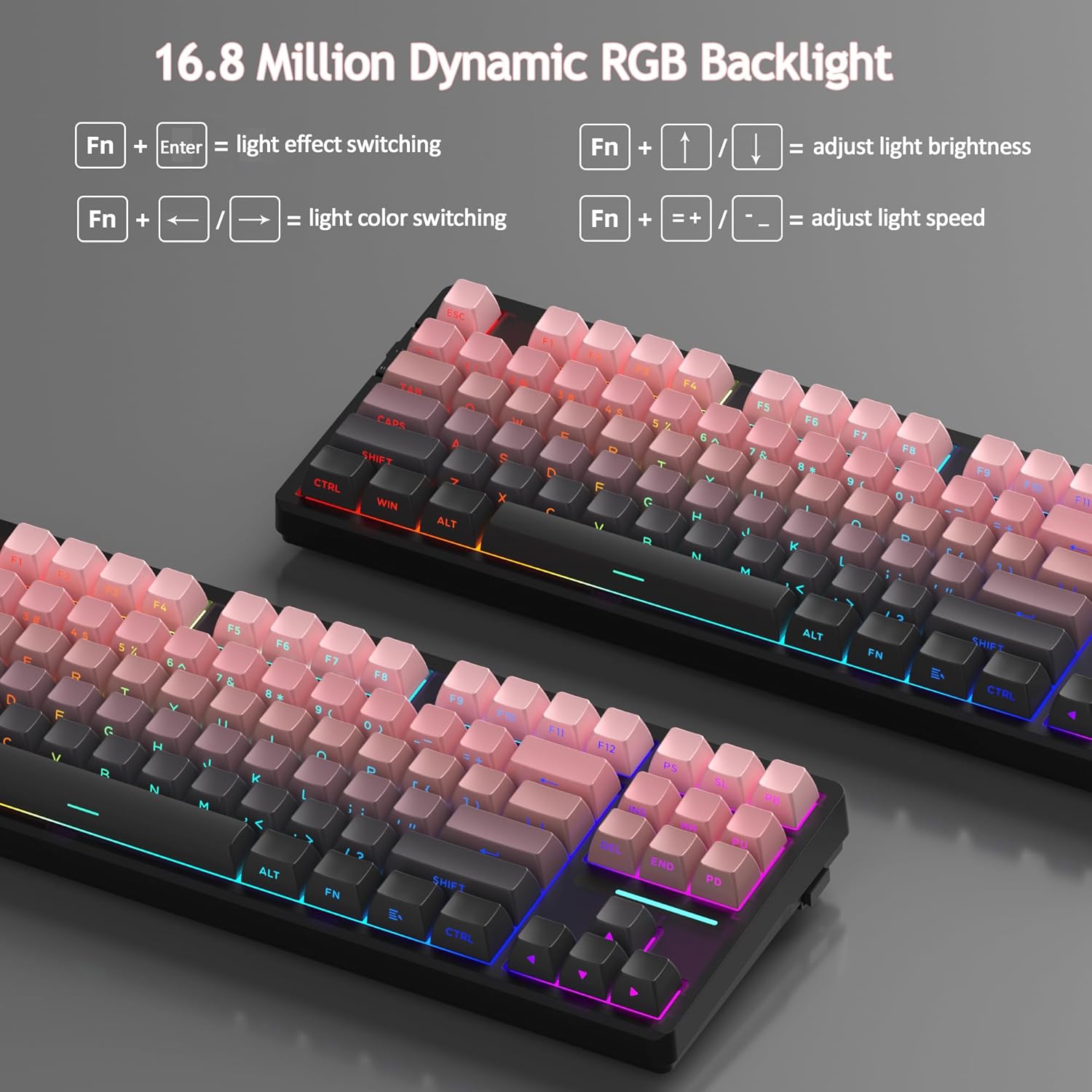
Figura 14: Close-up view of the keyboard's side-printed PBT keycaps.
4.5 Layout and Compatibility
The LIGHT87 features a compact 80% (TKL) layout with 87 keys, saving desktop space while retaining essential function and arrow keys. It supports both Windows and Mac operating systems, and all 87 keys feature 100% anti-ghosting for accurate input during intense gaming or typing sessions.
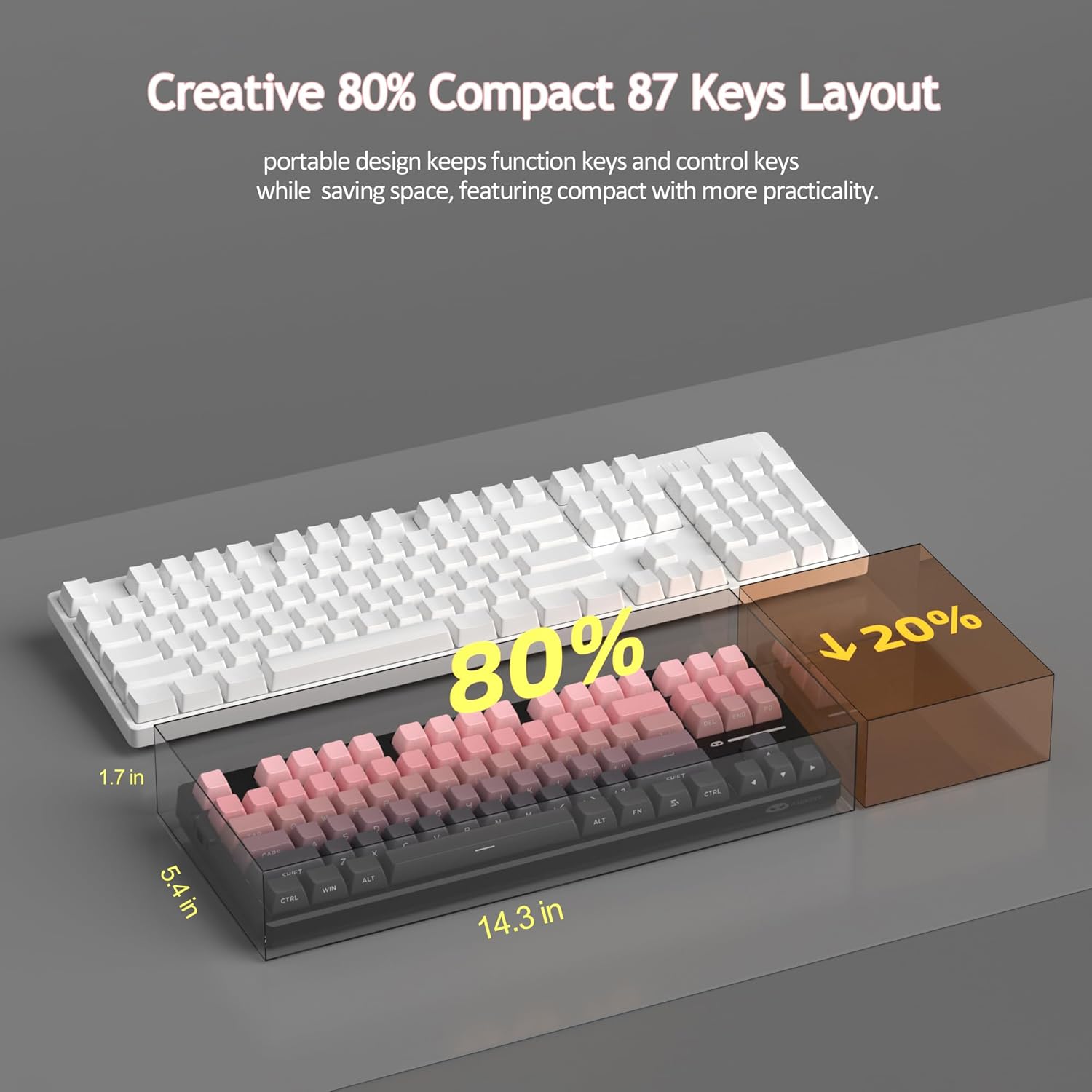
Figure 15: Comparison illustrating the compact 80% layout of the LIGHT87 keyboard compared to a full-size keyboard, highlighting space savings.

Figure 16: The MageGee LIGHT87 keyboard integrated into a desktop setup, demonstrating its use with a computer and monitor.
5. Manutenzjoni
5.1 Tindif tat-Tastiera
To maintain the performance and appearance of your keyboard, regular cleaning is recommended.
- Skonnettja t-tastiera mill-kompjuter tiegħek qabel ma tnaddafha.
- Uża pinzell artab jew arja kkompressata biex tneħħi t-trab u l-fdalijiet minn bejn il-keycaps.
- For stubborn dirt, you can carefully remove keycaps using the provided keycap puller and clean the surface underneath with a slightly damp, lint-free cloth. Ensure the cloth is not dripping wet.
- Wipe the keycaps and keyboard surface with a dry, soft cloth.
- Tużax kimiċi ħarxa, prodotti tat-tindif li joborxu, u lanqas tgħaddasx it-tastiera f'likwidu.

Figure 17: Image showing keycaps being removed from the keyboard, useful for cleaning or switch replacement.
5.2 Aġġustament tal-Angolu tat-Tastiera
The keyboard features adjustable feet to customize your typing angle for ergonomic comfort.

Figure 18: Image demonstrating the adjustable feet on the underside of the keyboard for tilt customization.

Figura 19: Proġett tal-ġenbfile tat-tastiera li turi l-keycap ergonomiku tagħha profile għal ittajpjar komdu.
6 Issolvi l-problemi
| Problema | Kawża Possibbli | Soluzzjoni |
|---|---|---|
| It-tastiera ma tirrispondix fil-modalità bil-fili. | Loose cable connection, incorrect mode selected, faulty USB port. | Ensure USB-C cable is securely connected. Check if the keyboard switch is set to "2" (wired mode). Try a different USB port on your computer. |
| 2.4GHz wireless not connecting. | USB receiver not plugged in, incorrect mode, low battery. | Ensure the 2.4GHz USB receiver is plugged in. Set the keyboard switch to "wifi" icon and press fn+4Iċċarġja t-tastiera. |
| Bluetooth pairing failed or connection unstable. | Incorrect pairing procedure, interference, device Bluetooth issues, low battery. | Ensure keyboard switch is set to "BT". Press and hold Fn + 1/2/3 to re-enter pairing mode. Forget the device on your computer/device and re-pair. Move closer to the device. Charge the keyboard. Restart your device's Bluetooth. |
| Backlight not working or stuck. | Backlight turned off, low battery, software glitch. | Agħfas Fn + ↑ to increase brightness. Charge the keyboard. Try cycling through backlight modes with Fn + Ikteb. |
| Certain keys not responding. | Swiċċ maħlul jew difettuż, debris taħt l-għatu taċ-ċwievet. | Remove the keycap and check for debris. If hot-swappable, try reseating the switch or replacing it with a known working switch. |
7. Speċifikazzjonijiet
| Karatteristika | Dettall |
|---|---|
| Mudell | DAWL87 |
| Brand | MageGee |
| Konnettività | 2.4GHz bla fili, Bluetooth 5.0, USB-C bil-fili |
| Tqassim | 87-key (80% TKL) |
| Swiċċijiet | Hot-swappable (3-pin/5-pin compatible), Blue Whale Linear Switches |
| Tappijiet ewlenin | Side-printed PBT |
| Dawl ta' wara | 16.8 Miljun RGB |
| Kapaċità tal-batterija | 8000mAh |
| Ħajja tal-Batterija (RGB ON) | Appross. 53 sigħat |
| Ħajja tal-Batterija (RGB MITFI) | Appross. 400 sigħat |
| Apparati Kompatibbli | PC, Laptop, Tablet, Smartphone, Gaming Console |
| Appoġġ tas-Sistema Operattiva | Windows, macOS |
| Kontra l-Ghosting | Il-87 ċwievet kollha |
| Dimensjonijiet (Pakkett) | 15.91 x 7.17 x 2.6 pulzieri |
| Piż tal-oġġett | 2.72 liri |
8. Garanzija u Appoġġ
MageGee products are designed for reliability and performance. For warranty information and customer support, please refer to the official MageGee websit jew ikkuntattja lill-bejjiegħ direttament permezz tal-pjattaforma tax-xiri tiegħek.
You can visit the official MageGee store on Amazon for more information and product updates: MageGee Amazon Store
Ask a question about this manual
Ask about setup, troubleshooting, compatibility, parts, safety, or missing instructions. Manuals+ will review the question and use this page’s manual context to help answer it.