
Aonerex B0DFP9LNR8
Aonerex 7-inch Portable Car Stereo with Backup Camera
Manwal għall-Utent
Model: B0DFP9LNR8
Prodott Overview
The Aonerex 7-inch Portable Car Stereo is a versatile in-car entertainment and navigation system designed to enhance your driving experience. It features wireless Apple CarPlay and Android Auto compatibility, a high-definition touch screen, and includes a backup camera for improved safety. This device allows for seamless integration with your smartphone, providing access to navigation, music, calls, and more directly on its display.

The Aonerex 7-inch Portable Car Stereo display, showing the Apple CarPlay interface, along with icons for Android Auto and a separate image of the included backup camera.
X'hemm fil-Kaxxa
Jekk jogħġbok ivverifika li l-komponenti kollha huma preżenti qabel ma tipproċedi bl-installazzjoni.
- 7-inch Portable Car Stereo Screen
- Immuntar Stand
- Cable AUX
- Ċarġer tal-Karozza
- Manwal għall-Utent (dan id-dokument)
- Backup Camera
Gwida ta' Setup
1. Immuntar tal-Apparat
Attach the portable car stereo to your dashboard or windshield using the provided mounting stand. Ensure the surface is clean and dry for optimal adhesion. Press firmly to secure the suction cup. For dashboard mounting, consider using the included adhesive disc if the dashboard surface is not smooth enough for direct suction.
2. Konnessjoni tal-Enerġija
Connect the car charger to the device's power input port and then plug the other end into your vehicle's 12V cigarette lighter socket. The device will power on automatically when the vehicle's ignition is turned on.
3. Installazzjoni ta' Kamera ta' Backup
Install the backup camera at the rear of your vehicle, ensuring it has a clear view. Connect the camera cable to the designated input port on the main unit. Professional installation is recommended for wiring the backup camera to your vehicle's reverse light circuit for automatic activation.

The Aonerex unit is designed for easy installation compared to traditional car stereos, as shown in this comparison image.
Istruzzjonijiet Operattivi
Wireless CarPlay & Android Auto
This device supports wireless Apple CarPlay for iPhones and Android Auto for Android smartphones. To connect:
- Kun żgur li l-Bluetooth u l-Wi-Fi huma attivati fuq l-ismartphone tiegħek.
- On the Aonerex screen, navigate to the CarPlay or Android Auto icon.
- Follow the on-screen prompts to pair your phone via Bluetooth. Once paired, the system will automatically establish a Wi-Fi connection for CarPlay or Android Auto functionality.
- For iPhone users, ensure Siri is enabled on your device for full voice command functionality.

The device supports wireless Android Auto and Apple CarPlay, allowing seamless integration of your smartphone's features onto the 7-inch display.
Real-time Car Navigation
Utilize your smartphone's navigation applications (e.g., Google Maps, Apple Maps, Waze) through CarPlay or Android Auto. The 7-inch screen will display real-time traffic information and provide voice-guided directions. You can search for destinations, points of interest, and receive updated route information.

The screen displays live map navigation, integrating with your phone's GPS, and supports voice commands for hands-free operation. Brightness is adjustable for optimal viewing.
Daqq ta' Awdjo u Vidjo
The unit features a built-in stereo speaker. For enhanced audio quality, connect the device to your car's audio system using one of the following methods:
- Bluetooth: Pair the Aonerex unit with your car's Bluetooth system.
- Transmiter FM: Select an unused FM frequency on the Aonerex unit and tune your car's radio to the same frequency.
- Cable AUX: Connect the provided AUX cable from the Aonerex unit's AUX output to your car's AUX input port.
The 7-inch 1024*600 HD touch display supports 1080P video playback, allowing you to enjoy various media content.
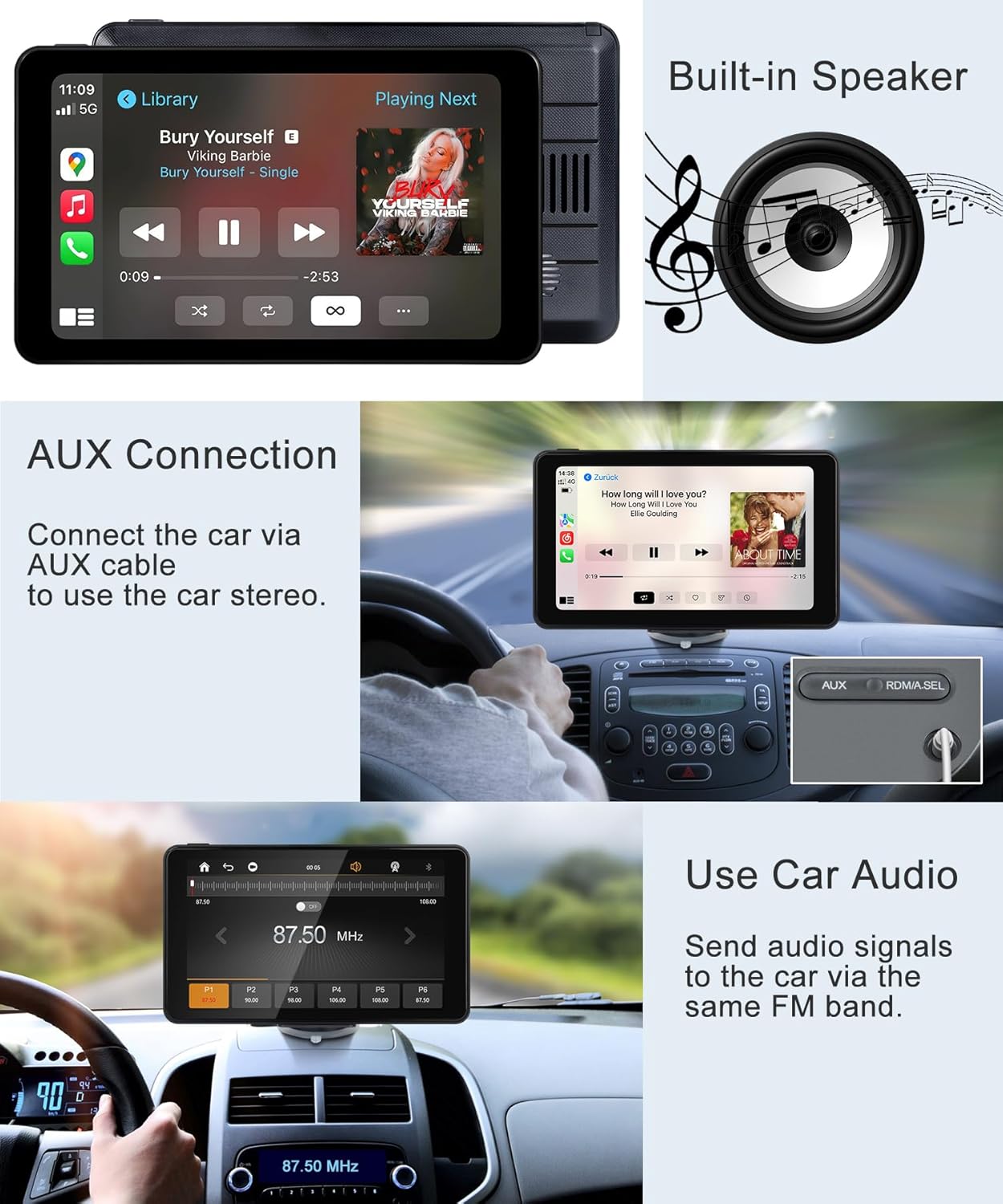
Audio can be played through the built-in speaker or routed to your car's audio system via AUX cable or FM transmission for a better sound experience.
Funzjoni ta' Link tal-Mera
The Mirror Link function allows you to display your smartphone's screen directly onto the Aonerex unit. This is compatible with both iOS and Android devices. Follow the on-screen instructions to establish the mirror link connection, typically involving a Wi-Fi direct connection.

The Mirror Link feature enables you to cast your phone's screen, including video content from apps like Netflix or YouTube, directly onto the Aonerex display.
HD Reversing Camera
When properly installed and connected to your vehicle's reverse light circuit, the screen will automatically switch to the backup camera view when you engage reverse gear. The 720P HD camera provides a 160-degree ultra-wide viewing angle and is equipped with 12 LEDs for clear visibility, even at night.

The included HD reversing camera offers a wide-angle view and clear imaging, automatically displaying on the screen when the vehicle is in reverse.
Manutenzjoni
To ensure the longevity and optimal performance of your Aonerex Portable Car Stereo, follow these maintenance guidelines:
- Tindif: Use a soft, lint-free cloth to clean the screen and exterior. Do not use abrasive cleaners or solvents.
- Temperatura: Avoid exposing the device to extreme temperatures (very hot or very cold) for extended periods.
- Ġestjoni tal-Kejbil: Ensure all cables are securely connected and not pinched or tangled, which could cause damage.
Issolvi l-problemi
If you encounter issues with your Aonerex Portable Car Stereo, please refer to the following common solutions:
| Problema | Kawża / Soluzzjoni Possibbli |
|---|---|
| L-apparat ma jixgħelx. |
|
| Ma nistax nikkonnettja ma' Wireless CarPlay/Android Auto. |
|
| Poor audio quality or no sound. |
|
| Mounting stand does not stick. |
|
| L-iskrin mirroring mhux qed jaħdem. |
|
Speċifikazzjonijiet
| Karatteristika | Dettall |
|---|---|
| Numru tal-Mudell | B0DFP9LNR8 |
| Daqs tal-Wiri | 7 pulzieri |
| Riżoluzzjoni tal-Wiri | 1024*600 HD (supports 1080P video playback) |
| Luminożità | Up to 400nit (adjustable) |
| Konnettività | Wireless Bluetooth, Wi-Fi, FM Transmitter, AUX |
| Apparati Kompatibbli | iPhone (Apple CarPlay), Android (Android Auto, Mirror Link) |
| Input tal-Interface tal-Bniedem | Touchscreen, Mikrofonu |
| Modalità tal-Ħruġ tal-Awdjo | Stereo (built-in speaker, car audio via Bluetooth/FM/AUX) |
| Backup Camera | 720P HD, 160-degree ultra-wide viewing angle, 12 LEDs |
| Piż tal-oġġett | 2.16 liri |
| Dimensjonijiet tal-Pakkett | 8.54 x 5.91 x 3.9 pulzieri |
| Manifattur | Aonerex |
| Pajjiż ta' Oriġini | Iċ-Ċina |
Garanzija u Appoġġ
Aonerex products are manufactured with high-quality standards. For warranty information and technical support, please refer to the contact details provided on the product packaging or visit the official Aonerex websit. Żomm l-irċevuta tax-xiri tiegħek bħala prova tax-xiri għal kwalunkwe talba ta' garanzija.
Manufacturer: Aonerex
Ask a question about this manual
Ask about setup, troubleshooting, compatibility, parts, safety, or missing instructions. Manuals+ will review the question and use this page’s manual context to help answer it.