
Keychron K2M-B4
Manwal tal-Utent tat-Tastiera Mekkanika Personalizzata mingħajr Fili Keychron K2 Max QMK/VIA
Model: K2M-B4
1. Introduzzjoni
The Keychron K2 Max is a versatile 75% layout mechanical keyboard designed for seamless integration across Mac, Windows, and Linux operating systems. It offers tri-mode connectivity, including 2.4 GHz wireless, Bluetooth 5.1, and Type-C wired options, ensuring high performance for both gaming and productivity. Featuring QMK/VIA open-source firmware for extensive customization and enhanced acoustic foams for a superior typing experience, the K2 Max is built for durability and user comfort.
2. Kontenut tal-Pakkett
Please verify that all items are present in your Keychron K2 Max package:
- 1x Fully Assembled Keychron K2 Max Keyboard
- 1x Kejbil tat-Tip A għal Tip Ċ
- 1x USB Type-A 2.4GHz Receiver
- 1x Adapter ta 'estensjoni għar-riċevitur
- 1x Keycap & Switch Puller
- 1x Tornavit
- Extra Keycaps for Windows OS
3. Prodott Aktarview
The Keychron K2 Max features a compact 75% layout, providing essential keys while saving desk space. It includes an RGB backlight for customizable illumination and is built with enhanced acoustic foams for a comfortable and quiet typing experience.
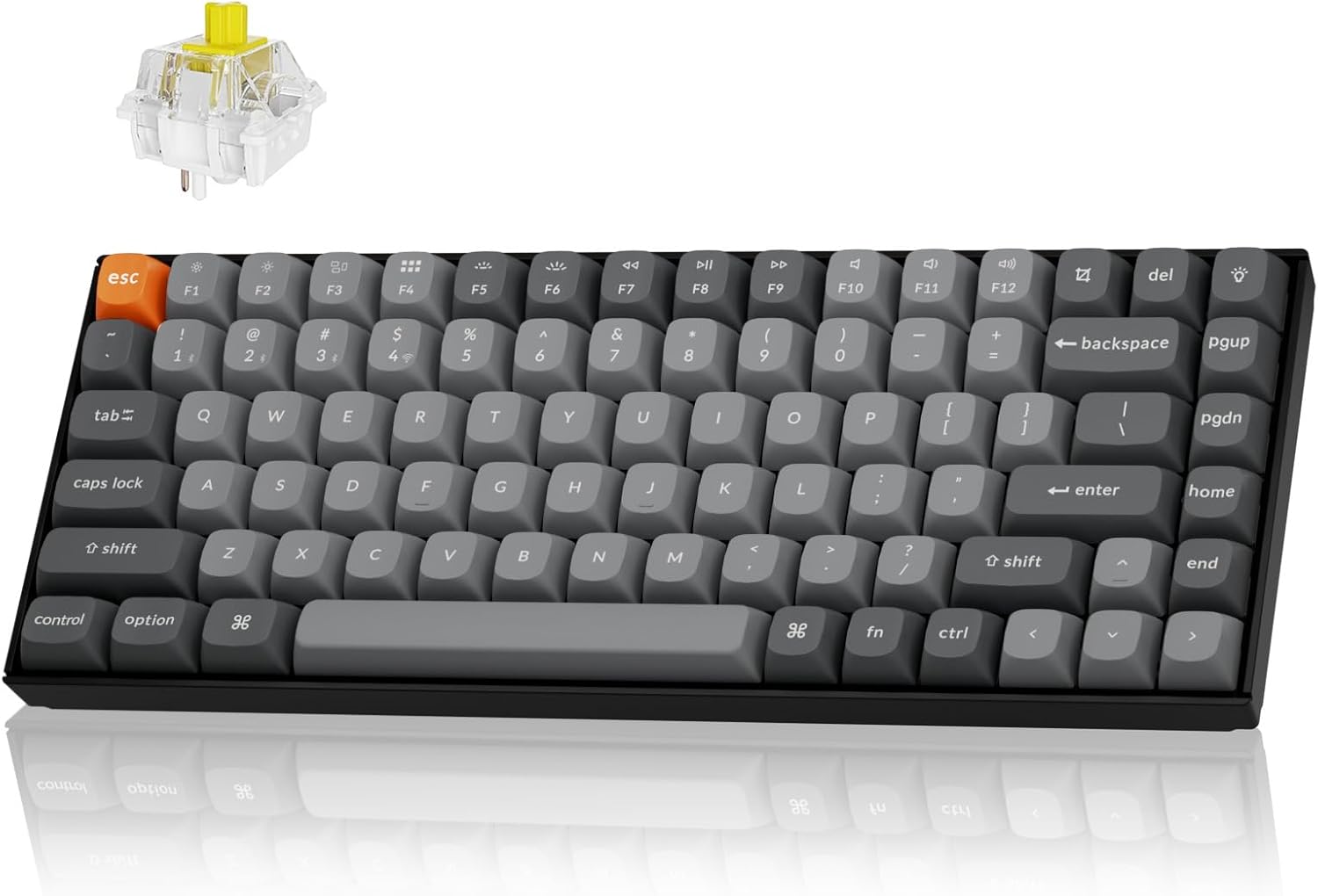
The Keychron K2 Max keyboard, showcasing its 75% layout and Banana switches.
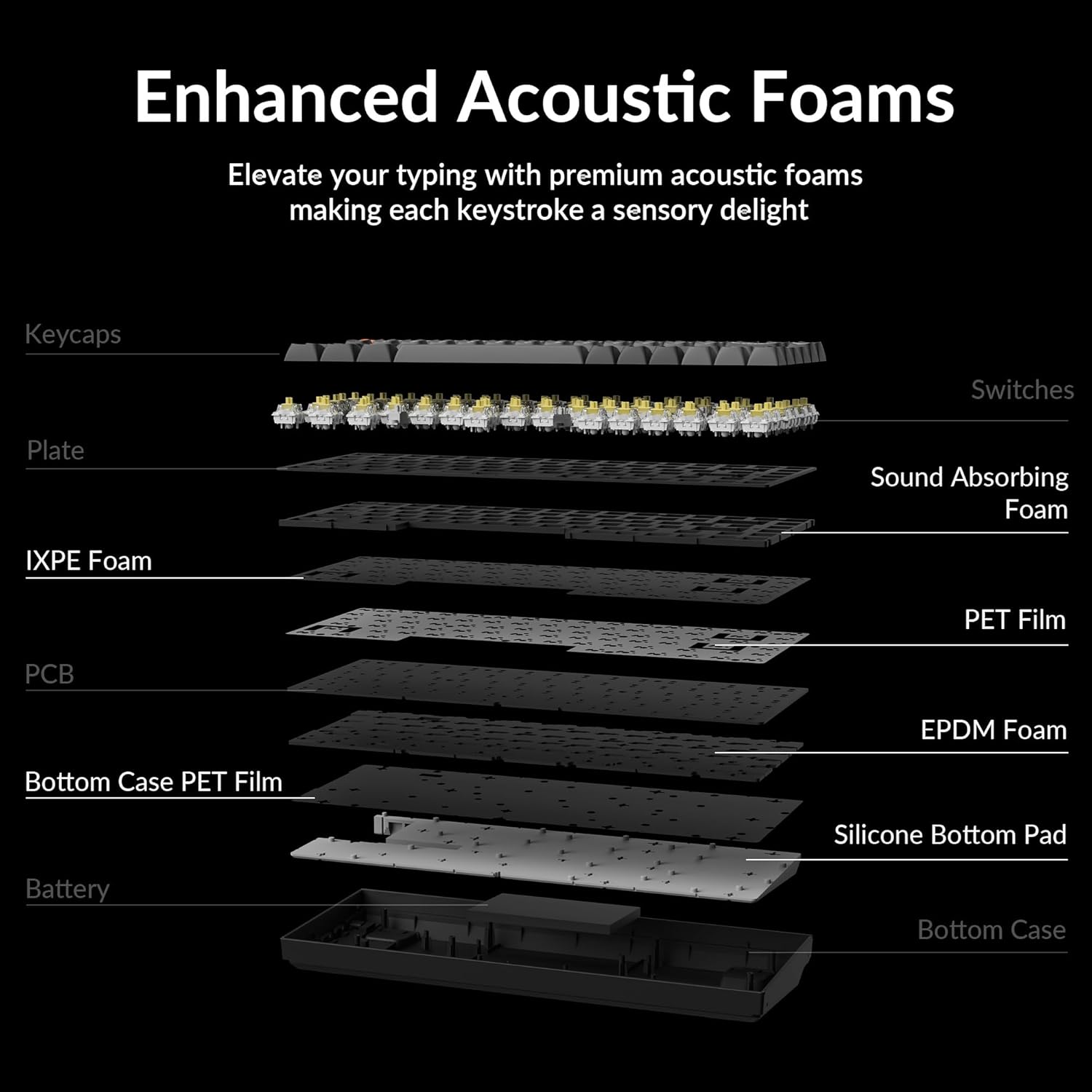
An sploda view illustrating the internal structure of the Keychron K2 Max, highlighting the enhanced acoustic foams (IXPE and EPDM) and other layers designed for a superior typing experience.
4. Setup
4.1 Iċċarġjar inizjali
Before first use, it is recommended to fully charge your Keychron K2 Max keyboard. Connect the provided Type-A to Type-C cable to the keyboard's USB-C port and a power source. The 4000mAh rechargeable battery provides extended usage time.
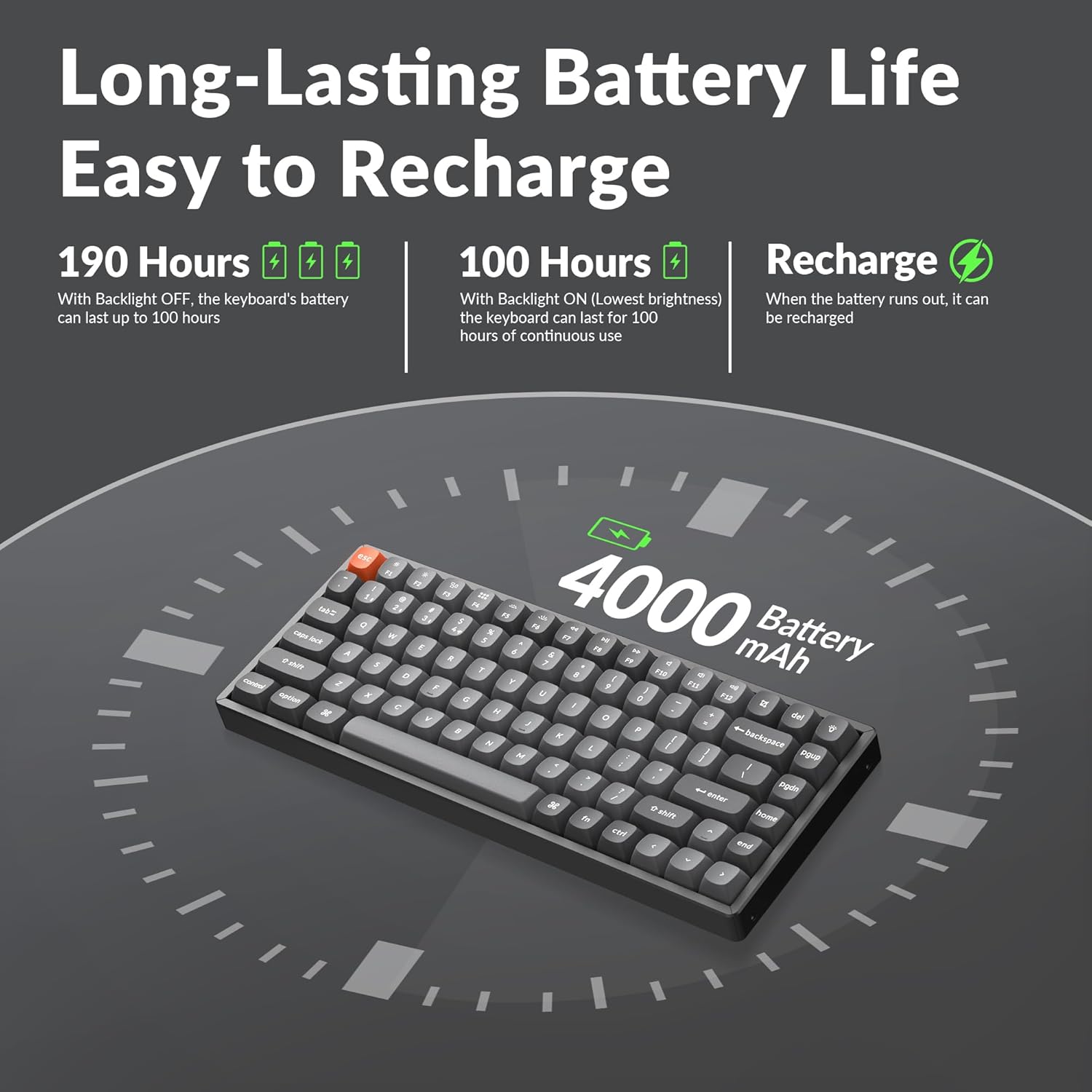
An illustration detailing the impressive battery life of the K2 Max, offering up to 190 hours of usage without backlight and 100 hours with backlight at lowest brightness.
4.2 Modi ta' Konnettività
The K2 Max supports three connection modes:
- 2.4 GHz bla fili: For optimal gaming and work performance with a 1000Hz polling rate. Insert the 2.4GHz USB receiver into your device's USB port. The keyboard should automatically connect.
- Bluetooth 5.1: Connect up to 3 devices and switch seamlessly.
- Toggle the keyboard switch to Bluetooth mode.
- Agħfas u żomm fn+1 (jew 2, 3) for 4 seconds until the indicator light flashes rapidly, indicating pairing mode.
- On your device, search for "Keychron K2 Max" in Bluetooth settings and connect.
- Tip-Ċ bil-wajer: Qabbad it-tastiera direttament mat-tagħmir tiegħek billi tuża l-kejbil USB Type-C provdut.

The Keychron K2 Max demonstrating its versatile tri-mode connectivity options: Bluetooth 5.1, 2.4 GHz wireless, and Type-C wired, allowing seamless connection to multiple devices.
4.3 OS Compatibility Switch
The K2 Max is fully optimized for both macOS and Windows. Use the OS toggle switch located on the side of the keyboard to select your operating system. Extra keycaps for Windows are included for a native experience.

The K2 Max keyboard highlighting its full compatibility with both macOS and Windows operating systems, including a set of additional keycaps for Windows users.
5. Istruzzjonijiet Operattivi
5.1 Funzjonijiet Ewlenin
The 75% layout includes all essential keys, including a dedicated function row (F1-F12) and navigation keys. Multimedia keys are optimized for macOS, providing native control over media playback and volume.
5.2 Kontroll tad-dawl ta' wara
The keyboard features an RGB backlight. Use the dedicated backlight keys (usually Fn + Lightbulb icon or similar) to cycle through various lighting effects, adjust brightness, and change colors.
5.3 QMK/VIA Customization
The Keychron K2 Max supports QMK open-source firmware and VIA software, allowing for extensive customization of key remapping, macros, and lighting effects. Access the Keychron Launcher web app for easy configuration without requiring any software installation.

A visual representation of the Keychron Launcher web app, which enables users to customize key remapping, macros, and lighting settings via QMK/VIA firmware without installation.
6. Manutenzjoni
6.1 Tindif tat-Tastiera
To clean your keyboard, power it off and disconnect any cables. Use a soft, lint-free cloth slightly dampened with water or a mild cleaning solution. For dust and debris between keycaps, use compressed air or a small brush. The included keycap puller can be used to carefully remove keycaps for deeper cleaning.
6.2 Kura tal-Batterija
To prolong battery life, avoid fully discharging the keyboard frequently. Store the keyboard in a cool, dry place when not in use for extended periods. If storing for a long time, ensure the battery is charged to about 50%.
7 Issolvi l-problemi
| Ħruġ | Kawża Possibbli | Soluzzjoni |
|---|---|---|
| Keyboard not connecting via 2.4 GHz/Bluetooth | Low battery, incorrect mode, pairing issue, receiver not detected. | Charge the keyboard. Ensure the mode switch is set correctly. Re-pair the Bluetooth connection (Fn + 1/2/3 for 4s). Try a different USB port for the receiver. |
| Iċ-ċwievet ma jirrispondux | Batterija baxxa, problema fis-softwer, ħsara fiżika. | Charge the keyboard. Try connecting via wired mode. Restart your computer. If specific keys, check for debris under keycap. |
| Backlight ma jaħdimx | Backlight turned off, low battery, software setting. | Press backlight control keys to turn on/adjust. Charge the keyboard. Check VIA software settings. |
| Dewmien jew dewmien fl-input | Interferenza, distanza mir-riċevitur/apparat, batterija baxxa. | Reduce distance to receiver/device. Remove sources of interference (other wireless devices). Charge the keyboard. Use wired mode for critical tasks. |
8. Speċifikazzjonijiet
| Karatteristika | Dettall |
|---|---|
| Isem tal-Mudell | K2M-B4 |
| Brand | Keychron |
| Teknoloġija tal-Konnettività | Bluetooth 5.1, 2.4 GHz Wi-Fi, USB Type-C |
| Deskrizzjoni tat-Tastiera | Mekkaniċi |
| Karatteristika Speċjali | RGB b'lura |
| Kulur | Keychron Super Banana Switch |
| Numru ta' Ċwievet | 84 |
| Apparati Kompatibbli | Laptop, Gaming Console, PC (Mac/Windows/Linux) |
| Batterija | 1 batterija tal-polimer tal-litju (inkluża) |
| Piż tal-oġġett | 3.08 liri |
| Dimensjonijiet tal-Pakkett | 15.27 x 6.42 x 2.24 pulzieri |
| Pajjiż ta' Oriġini | Iċ-Ċina |
9. Garanzija u Appoġġ
9.1 Informazzjoni dwar Garanzija
Il-prodotti Keychron tipikament jiġu b'garanzija limitata li tkopri difetti fil-manifattura. Jekk jogħġbok irreferi għall-Keychron uffiċjali website or your purchase documentation for specific warranty terms and conditions applicable to your region.
9.2 Appoġġ għall-Klijent
For technical assistance, troubleshooting, or warranty claims, please visit the official Keychron support page or contact their customer service team. Detailed contact information can usually be found on the Keychron websit.
Ask a question about this manual
Ask about setup, troubleshooting, compatibility, parts, safety, or missing instructions. Manuals+ will review the question and use this page’s manual context to help answer it.