
Denash Denashkfny6shdpu-12
Denash 12-Key Mechanical Gaming Macro Keypad User Manual
Model: Denashkfny6shdpu-12
Introduzzjoni
This manual provides instructions for the Denash 12-Key Mechanical Gaming Macro Keypad. Please read this manual thoroughly before using the product to ensure proper operation and to maximize its features.
The Denash 12-Key Mechanical Gaming Macro Keypad is a compact, wired mini keyboard designed for various applications including gaming, office work, and multimedia control. It features hot-swappable mechanical switches, customizable shortcuts, and RGB lighting.
Kontenut tal-Pakkett
- 1 x Denash 12-Key Mini Mechanical Keyboard
- 1 x Cable USB tat-Tip-C
- 1 x Keycap Puller
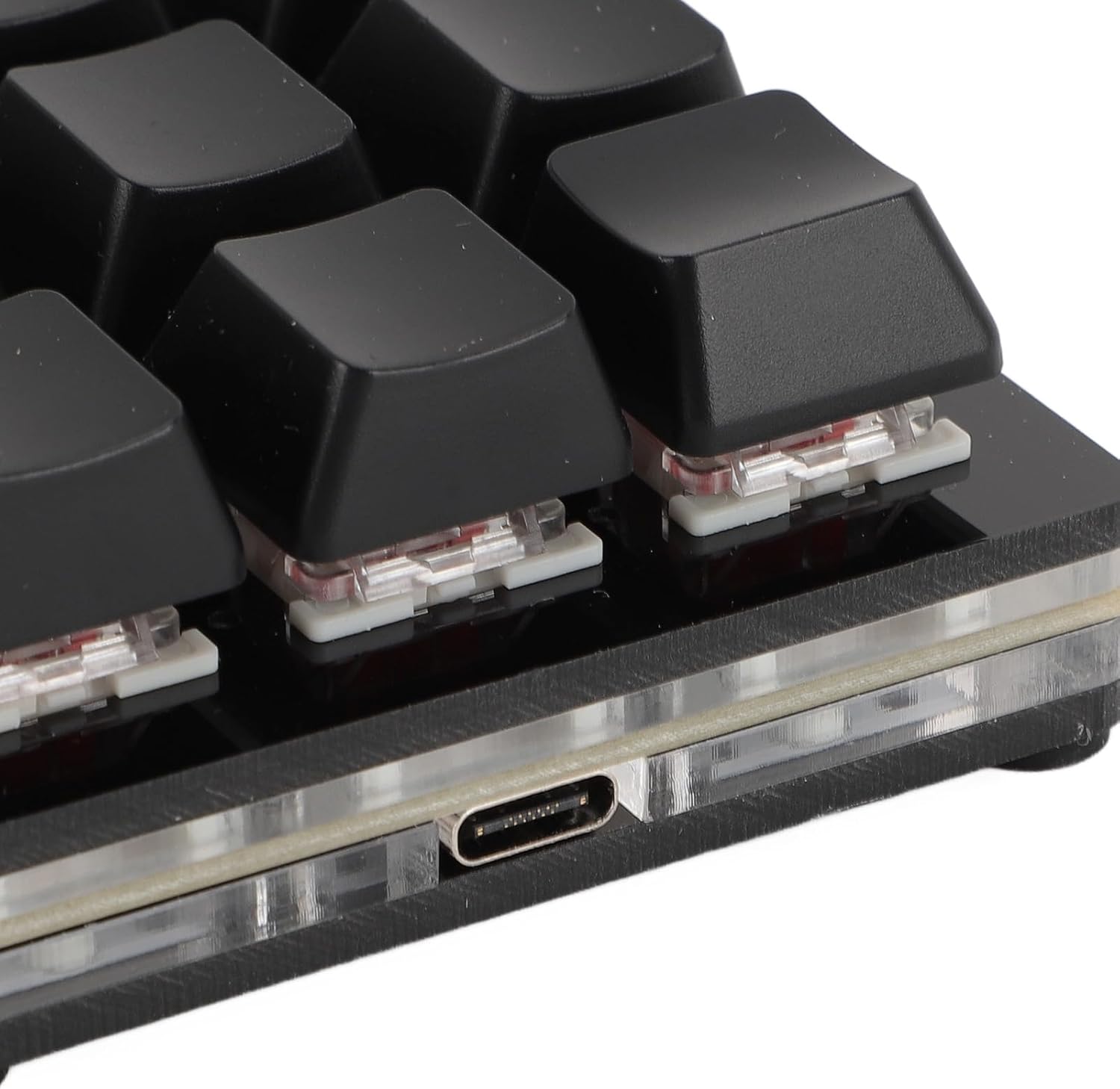
Image: The package includes the 12-key macro keypad, a Type-C USB cable, and a keycap puller tool.
Setup
- Qabbad it-Tastiera: Insert the Type-C end of the provided USB cable into the Type-C port on the back of the keypad.
- Qabbad mal-Kompjuter: Insert the standard USB-A end of the cable into an available USB port on your computer.
- Plug and Play: The keypad is plug-and-play. Your operating system (Windows, macOS, Linux, Raspberry Pi) should automatically detect and install the necessary drivers. No additional software installation is typically required for basic functionality.

Image: The Type-C USB interface on the keypad, ready for connection to a computer.
Istruzzjonijiet Operattivi
Funzjonalità Bażika
The keypad functions as a standard input device upon connection. Each of the 12 keys can be programmed for various functions.
Customizing Key Functions (Macro Programming)
The Denash 12-Key Macro Keypad supports customizable shortcuts and macro definitions. While specific software for programming is not detailed in the product description, macro keypads typically require dedicated software for advanced customization. Please refer to the manufacturer's website or included documentation for software download and programming instructions.
Common programmable functions include:
- Funzjonijiet tat-Tastiera: Agħti ċwievet singoli jew kombinazzjonijiet ta' ċwievet (eż., Ctrl+C, Alt+Tab).
- Funzjonijiet tal-maws: Assign mouse clicks (left, right, middle), scroll up/down, or specific mouse movements.
- Funzjonijiet Multimedjali: Control volume, play/pause, next/previous track.
- String Functions: Input predefined text strings.
- Game Functions: Assign complex in-game commands or sequences.
- Definizzjoni Makro: Record and assign a sequence of keystrokes and mouse actions.

Image: An illustration of the six main types of functions that can be assigned to the keypad's keys: Keyboard, Mouse, Multimedia, String, Game, and Macro Definition.
Dawl RGB
The keypad features RGB lighting with adjustable modes. Specific instructions for changing lighting modes are typically found within the customization software or via specific key combinations (if hardware-controlled). Refer to the manufacturer's documentation for detailed instructions on RGB lighting customization.
Manutenzjoni
Tindif
- Disconnect the keypad from your computer before cleaning.
- Use a soft, dry cloth to wipe the surface of the keypad.
- Għal ħmieġ iebsa, ħafif dampLaħlaħ id-drapp bl-ilma jew b'tindif ħafif u mhux abrażiv. Evita umdità eċċessiva.
- Uża arja kkompressata biex tneħħi t-trab u l-fdalijiet minn bejn il-keycaps.
Swiċċijiet Hot-Swappable
This keypad features hot-swappable mechanical switches, allowing you to change switches without soldering. This enables customization of typing feel and easy replacement of faulty switches.
- Neħħi l-Keycap: Uża l-puller tal-keycap provdut biex tneħħi bil-mod il-keycap mixtieq.
- Neħħi s-Swiċċ: Use a switch puller (not included, but often comes with replacement switches) to carefully pull the switch straight up from its socket.
- Installa Swiċċ Ġdid: Align the pins of the new switch with the holes in the PCB. Gently press the switch down until it clicks into place. Ensure the pins are not bent.
- Ibdel il-Keycap: Agħfas l-għatu taċ-ċavetta fuq iz-zokk tas-swiċċ il-ġdid.

Immaġni: Close-up view of a mechanical switch with its keycap removed, illustrating the hot-swappable nature of the keypad's switches.
Issolvi l-problemi
- Keypad not recognized by computer:
- Kun żgur li l-kejbil USB huwa konness sew kemm mat-tastiera kif ukoll mal-kompjuter.
- Ipprova qabbad it-tastiera ma' port USB differenti fuq il-kompjuter tiegħek.
- Test the keypad on another computer to rule out a computer-specific issue.
- Ibda mill-ġdid il-kompjuter tiegħek.
- Iċ-ċwievet ma jirrispondux:
- Iċċekkja għal ostakli fiżiċi taħt il-keycap.
- If the switch is hot-swappable, try reseating the switch or replacing it with a known working switch.
- Ensure no software conflicts are present if using custom macro software.
- Id-dawl RGB mhux qed jaħdem jew mhux korrett:
- Verify that the keypad is properly connected and receiving power.
- If using customization software, ensure lighting settings are correctly configured.
- Consult the manufacturer's documentation for specific RGB control instructions.
Speċifikazzjonijiet
| Tip ta' Oġġett | Tastiera Mekkanika Mini |
| Materjal | Akriliku + ABS |
| Numru taċ-Ċavetta | 12 ċwievet |
| Tip ta' Swiċċ | Red Mechanical Switch (Hot-Swappable) |
| Tip ta' Konnessjoni | Tip-Ċ Fili |
| Kompatibbli ma ' | Universal for computer (Windows, macOS, Linux, Raspberry Pi) |
| Numru tal-Mudell | Denashkfny6shdpu-12 |
| Dimensjonijiet | 7.09 x 5.12 x 1.57 pulzieri (Pakkett) |
| Piż tal-oġġett | 5.9 uqija |
Garanzija u Appoġġ
For warranty information and technical support, please refer to the documentation included with your product or visit the official Denash websit. Żomm l-irċevuta tax-xiri tiegħek għal pretensjonijiet ta' garanzija.
Manifattur: Denash
Ask a question about this manual
Ask about setup, troubleshooting, compatibility, parts, safety, or missing instructions. Manuals+ will review the question and use this page’s manual context to help answer it.