
1. Introduzzjoni
Thank you for choosing the KESIEME Intelligent Touch Screen Open Ear Earbuds. These wireless headphones are designed for comfort and awareness, featuring an open-ear design, Bluetooth 5.4 connectivity, and a touch-screen charging case for intuitive control. This manual provides detailed instructions to help you get the most out of your device.

Image 1.1: KESIEME Open Ear Earbuds and their intelligent touch screen charging case.
2. Kontenut tal-Pakkett
Jekk jogħġbok immarka l-kaxxa għall-oġġetti li ġejjin:
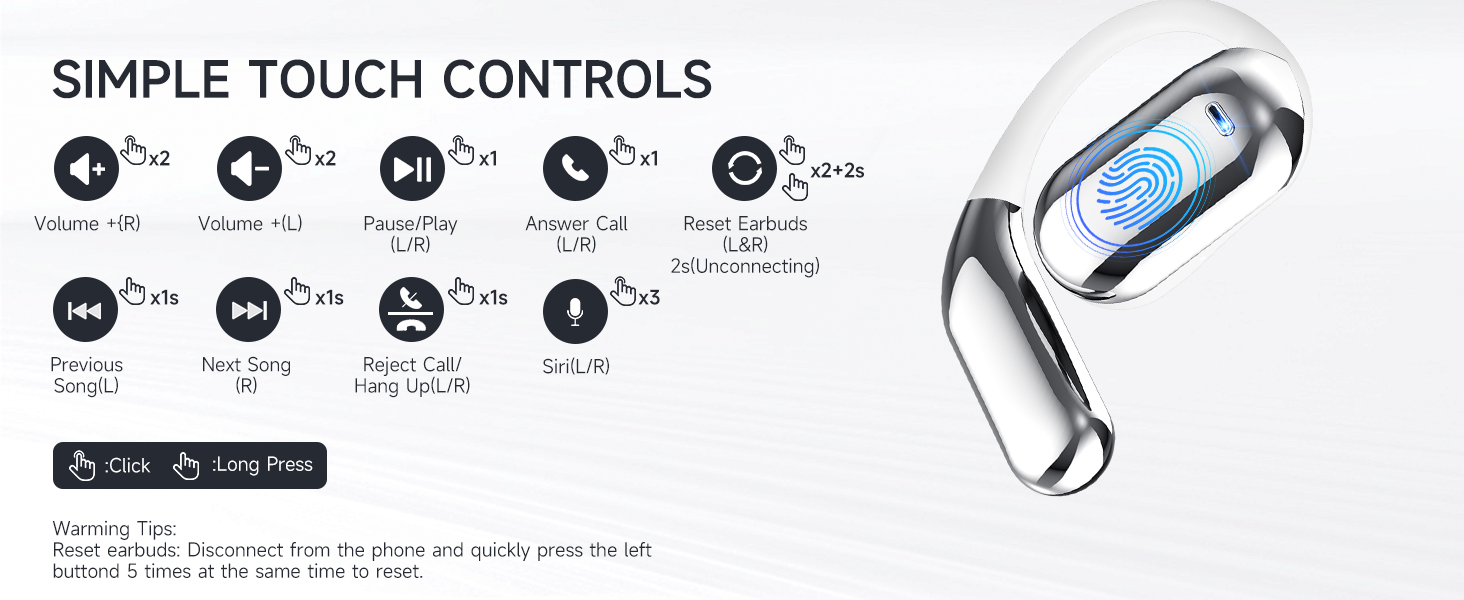
Image 2.1: Illustration of items included in the product package.
- Open Air Conduction Earphones (2 units)
- Kaxxa tal-Iċċarġjar (unità 1)
- Manwal għall-Utent (unità waħda)
- Kejbil tal-Iċċarġjar tat-Tip Ċ (unità 1)
3. Prodott Aktarview u Karatteristiċi
3.1 Open Ear Design
The KESIEME earbuds feature an open-ear design that rests gently on the ear, providing comfort for extended wear and allowing you to remain aware of your surroundings. This design minimizes pressure in the ear canal and reduces the risk of hearing damage compared to in-ear headphones.

Image 3.1: Comparison of open-ear design comfort versus traditional in-ear designs.
3.2 Premium Sound Quality
Equipped with dual 14.2mm air conduction dynamic drivers, these headphones deliver clear sound, powerful volume, and stereo audio. The design addresses sound leakage, ensuring a private listening experience.

Immaġni 3.2: Dettaljata view of the 14.2mm dynamic drivers for enhanced audio.
3.3 Bluetooth 5.4 Technology
The earbuds utilize Bluetooth 5.4 for a stable, fast, and low-latency wireless connection. This advanced technology ensures an uninterrupted audio experience with a connection range of up to 33 feet (10 meters).

Image 3.3: Benefits of upgraded Bluetooth 5.4 technology.
3.4 Kumdità u Tajbin
Designed with ergonomic ear hooks and skin-friendly materials, the earbuds are lightweight and provide a secure, comfortable fit for various activities.

Image 3.4: Features contributing to the ultimate comfort and fit of the earbuds.
4. Setup u Iċċarġjar
4.1 Iċċarġjar inizjali
Before first use, fully charge the earbuds and the charging case. Connect the provided Type-C charging cable to the charging case and a power source. The smart LED power display on the case will indicate the charging status and battery levels.
A single full charge provides up to 20 hours of earbud playtime. The charging case can recharge the earbuds multiple times, extending total playtime to approximately 48 hours.
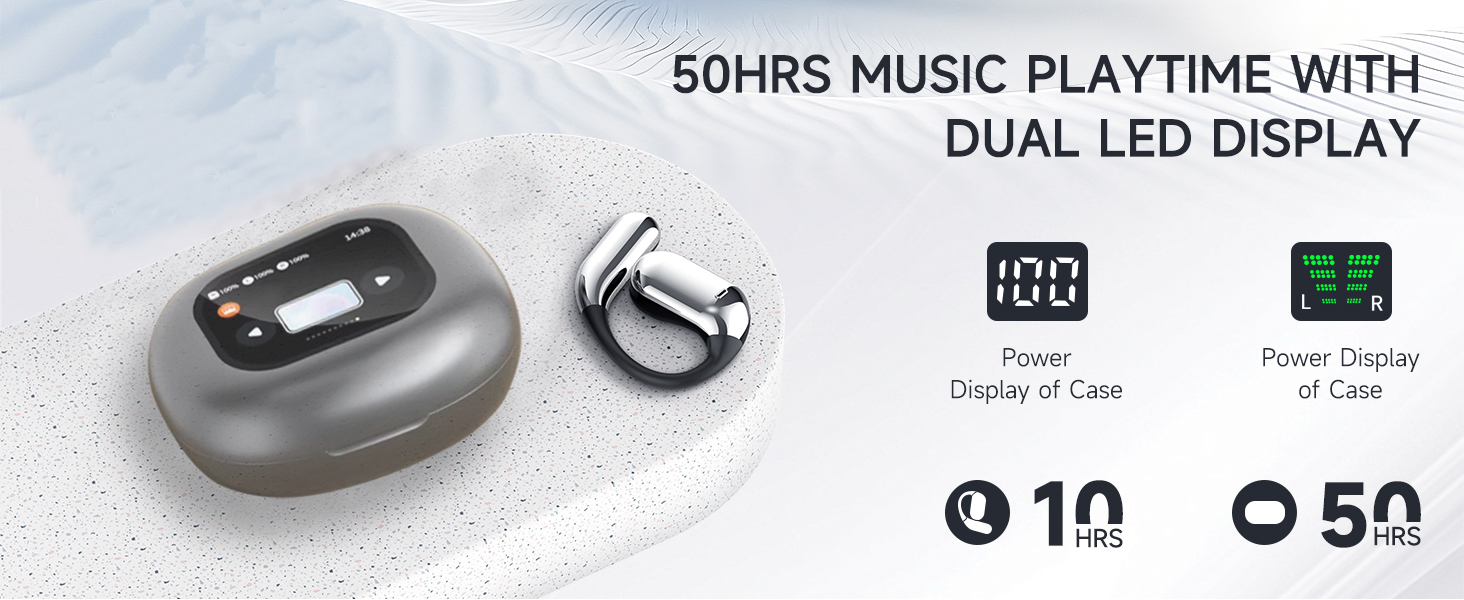
Image 4.1: Charging case with LED display showing battery status and total playtime.
4.2 Tqabbil ma' Apparat
- Kun żgur li l-earbuds huma ċċarġjati.
- Iftaħ il-kaxxa tal-iċċarġjar. Il-earbuds jinxtegħlu awtomatikament u jidħlu fil-modalità ta' tqabbil.
- Fuq l-apparat tiegħek (smartphone, tablet, kompjuter), attiva l-Bluetooth u fittex apparati disponibbli.
- Select "KESIEME YYK" (or similar model name) from the list to connect.
- Ladarba tkun konness, tisma' ton ta' konferma, u l-earbuds ikunu lesti għall-użu.
Nota: Il-earbuds jerġgħu jikkonnettjaw awtomatikament mal-aħħar apparat imqabbad meta joħorġu mill-kaxxa, jekk il-Bluetooth ikun attivat fuq l-apparat.
5. Istruzzjonijiet Operattivi
5.1 L-Ilbies tal-Earbuds
Follow these steps for a secure and comfortable fit:
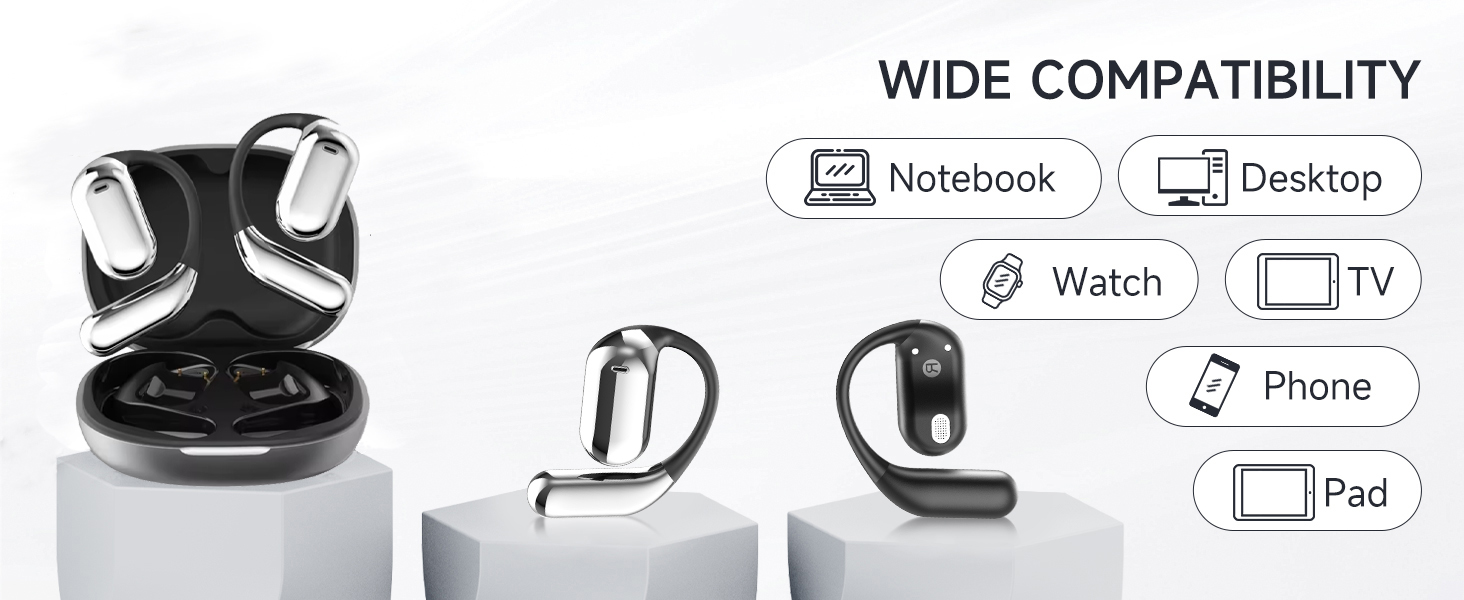
Image 5.1: Step-by-step instructions for correctly wearing the earbuds.
- Oħroġ il-widnejn mill-kaxxa tal-iċċarġjar.
- Hang the end of the earphones on the ear bone.
- Turn the earphones and slide them behind the ear.
- Adjust the ear hook, wear, and pull down the ear hook for a secure fit.
5.2 Kontrolli touch
The earbuds feature intuitive touch controls for managing audio playback, calls, and voice assistant functions. The charging case also has a touch screen for additional controls.
Immaġni 5.2: Fuqview tal-kontrolli tat-touch tal-earbuds.
| Azzjoni | Funzjoni |
|---|---|
| Double Click (L/R) | Volume + (Right Earbud), Volume - (Left Earbud) |
| Single Click (L/R) | Daqq/Pawża l-Mużika, Wieġeb is-Sejħa |
| Long Press 1s (L/R) | Previous Song (Left Earbud), Next Song (Right Earbud) |
| Long Press 2s (L/R) | Reject Call / Hang Up Call |
| Triple Click (L/R) | Attiva l-Assistent tal-Vuċi (Siri/Google Assistant) |
| Double Click + Long Press 2s (L/R) | Reset Earbuds (Disconnect from phone, then quickly press left button 5 times to reset) |
5.3 Charging Case Touch Screen Functions
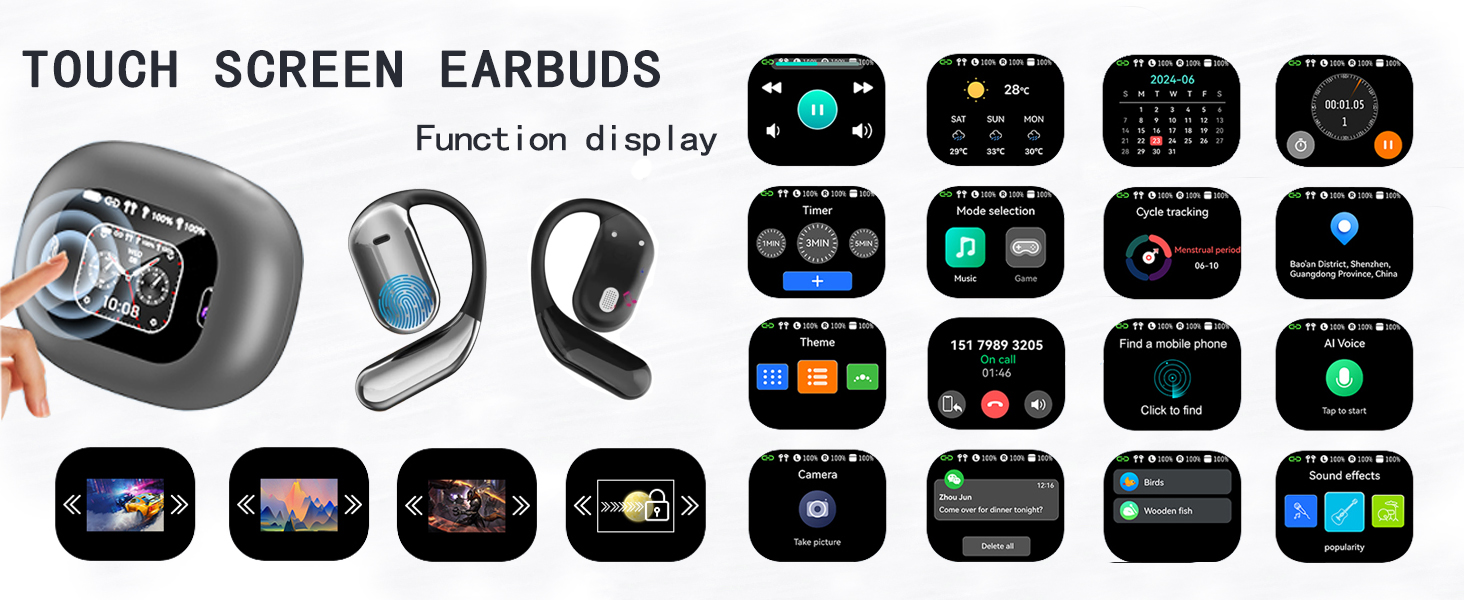
The charging case features an LCD full-color touch screen, providing access to various functions directly from the case.
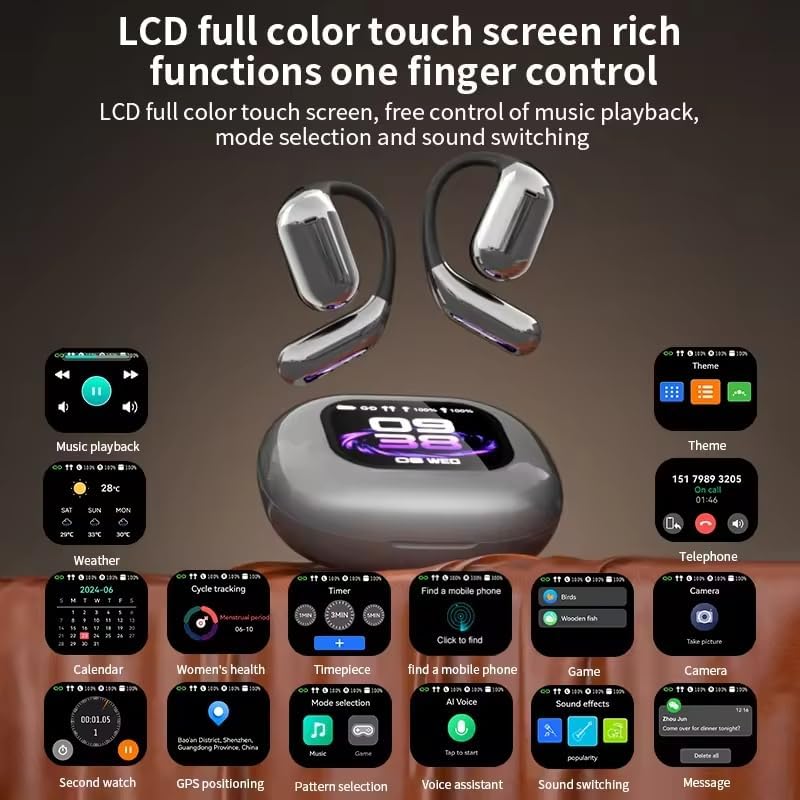
Immaġni 5.3: Fuqview of the charging case's touch screen interface and available functions.
- Daqq tal-mużika: Control tracks and volume.
- Temp: View informazzjoni dwar it-temp attwali.
- Kalendarju: Access date and time.
- Timer: Set countdowns.
- Għażla tal-Modalità: Switch between different audio modes (e.g., Music, Game).
- Traċċar taċ-ċiklu: (Potentially for fitness, details not specified).
- Find a Mobile Phone: Sib l-ismartphone imqabbad tiegħek.
- Temi: Customize the display theme.
- Telefon: View call history or dial.
- Kamera: Remote control for your phone's camera.
- Voice AI: Attiva l-assistent tal-vuċi.
- Effetti tal-Ħsejjes: Adjust audio equalization.
- Messaġġi: View notifiki.
6. Manutenzjoni
To ensure the longevity and optimal performance of your KESIEME earbuds, follow these maintenance guidelines:
- Tindif: Imsaħ il-earbuds u l-kaxxa tal-iċċarġjar regolarment b'ċarruta ratba, niexfa u mingħajr suf. Evita li tuża materjali li joborxu, alkoħol, jew prodotti tat-tindif kimiċi.
- Ħażna: When not in use, store the earbuds in their charging case to protect them from dust and damage. Keep the case closed.
- Iċċarġjar: Use only the provided Type-C cable for charging. Avoid exposing the charging port to moisture.
- Reżistenza għall-Ilma: Il-earbuds huma reżistenti għall-ilma, iżda mhumiex reżistenti għall-ilma. Evita li tgħaddashom fl-ilma jew tesponihom għal xita qawwija. Nixxefhom sewwa jekk jixxarbu.
- Temperatura: Do not expose the earbuds or charging case to extreme temperatures (hot or cold) or direct sunlight for prolonged periods.
7 Issolvi l-problemi
Jekk tiltaqa' ma' xi problemi bil-earbuds tiegħek, jekk jogħġbok irreferi għas-soluzzjonijiet komuni li ġejjin:
| Problema | Soluzzjoni |
|---|---|
| Il-earbuds mhux qed jitqabbdu/jikkonnettjaw |
|
| L-ebda ħoss jew volum baxx |
|
| Każ tal-iċċarġjar mhux iċċarġjar |
|
| Il-kontrolli tal-mess ma jirrispondux |
|
8. Speċifikazzjonijiet
| Karatteristika | Dettall |
|---|---|
| Brand | KESIEME |
| Isem tal-Mudell | Open Ear Earbuds (YYK) |
| Teknoloġija tal-Konnettività | Wireless (Bluetooth) |
| Teknoloġija tal-Komunikazzjoni mingħajr Fili | Bluetooth 5.4 |
| Medda Bluetooth | 33 pied (10 metru) |
| Tqegħid tal-widnejn | Widna Miftuħa |
| Fattur tal-Formola | Widnejn Miftuħa |
| Tip ta' Sewwieq Awdjo | Sewwieq Dinamika |
| Daqs tas-Sewwieq tal-Awdjo | 14.2 Millimetru |
| Medda ta' Frekwenzi | 20 Hz - 20,000 Hz |
| Impedenza | 32 Ohm |
| Ħajja tal-Batterija (Earbuds) | Sa 20 sigħat (ċarġ wieħed) |
| Ħin Totali tal-Logħob (bil-kaxxa) | Sa 48 sigħat |
| Tip ta' Kontroll | Mess |
| Livell ta 'Reżistenza għall-Ilma | Reżistenti għall-Ilma |
| Piż tal-oġġett | 6.7 uqija (0.19 Kilogrammi) |
| Dimensjonijiet tal-Prodott | 6 x 4.2 x 1.5 pulzieri |
| Apparati Kompatibbli | Desktops, Laptops, Tablets, Mobile Phones |
9. Garanzija u Appoġġ
KESIEME products are designed for reliability and performance. For warranty information, please refer to the documentation included with your purchase or contact KESIEME customer support.
If you require further assistance or have questions not covered in this manual, please contact KESIEME customer support through their official website or the retailer where you purchased the product. Please have your model number (YYK) and purchase details ready.