
COOLGEEK B0DD41WKCH
Manwal għall-Utent
COOLGEEK Portable Stereo CD Player Boombox
Model: B0DD41WKCH
1. Introduzzjoni
Grazzi tax-xiriasing the COOLGEEK Portable Stereo CD Player Boombox. This manual provides essential information for the safe and efficient operation of your device. Please read it thoroughly before use and retain it for future reference.
2. Prodott Aktarview
2.1 Karatteristiċi ewlenin
- Funzjonalità 3-in-1: Combines a vertical CD player, Bluetooth speaker, and FM radio.
- Vintage & Fashion Design: Blends leather hues with brushed aluminum for a unique aesthetic.
- Disinn portabbli: Features a leather handle for easy carrying.
- Ħajja Estiża tal-Batterija: Up to 18 hours of wireless playback on a single charge (approx. 2.5 hours charging time).
- Kelliema Stereo: Built-in stereo speakers with an aluminum grille for enhanced audio.
- Versatile CD Compatibility: Supports various types of CDs with simple operation and 360° surround sound.
- Bluetooth 5.0: Konnessjoni mingħajr fili veloċi u stabbli.
- Radju FM: Tunable from 87.5 to 108 MHz.
- Inverted Phase Hole: Designed for powerful and booming bass experience.

Figure 2.1: The COOLGEEK Portable Stereo CD Player Boombox in green, showcasing tiegħu vintage design and portable handle.

Figure 2.2: Visual representation of the boombox's key features, including its 3-in-1 functionality, Bluetooth 5.0, FM radio, vertical CD playback, and long battery life.
2.2 X'hemm fil-Kaxxa
- Vintage CD Player (1 unit)
- Adapter tal-Enerġija (unità 1)
- Manwal ta 'Istruzzjoni (Dan id-dokument)
3. Setup
- Spakkjar: Neħħi l-komponenti kollha mill-imballaġġ bir-reqqa. Żomm l-imballaġġ għal trasport jew ħażna fil-futur.
- Konnessjoni tal-Enerġija: Connect the provided power adapter to the DC IN port on the back of the boombox and plug it into a standard wall outlet.
- Ħlas Inizjali: For optimal battery performance, fully charge the device before first use. A full charge takes approximately 2.5 hours. The device can operate wirelessly for over 18 hours on a full charge.
- Pjazzament: Place the boombox on a stable, flat surface. Its portable leather handle allows for easy relocation.

Figure 3.1: The portable design of the boombox, highlighting its leather handle for easy transport and versatile placement.
4. Istruzzjonijiet Operattivi
4.1 Kontrolli Fuqview
Familiarize yourself with the control buttons and knob located on the top panel of the boombox. Refer to Figure 4.1 for a visual guide.
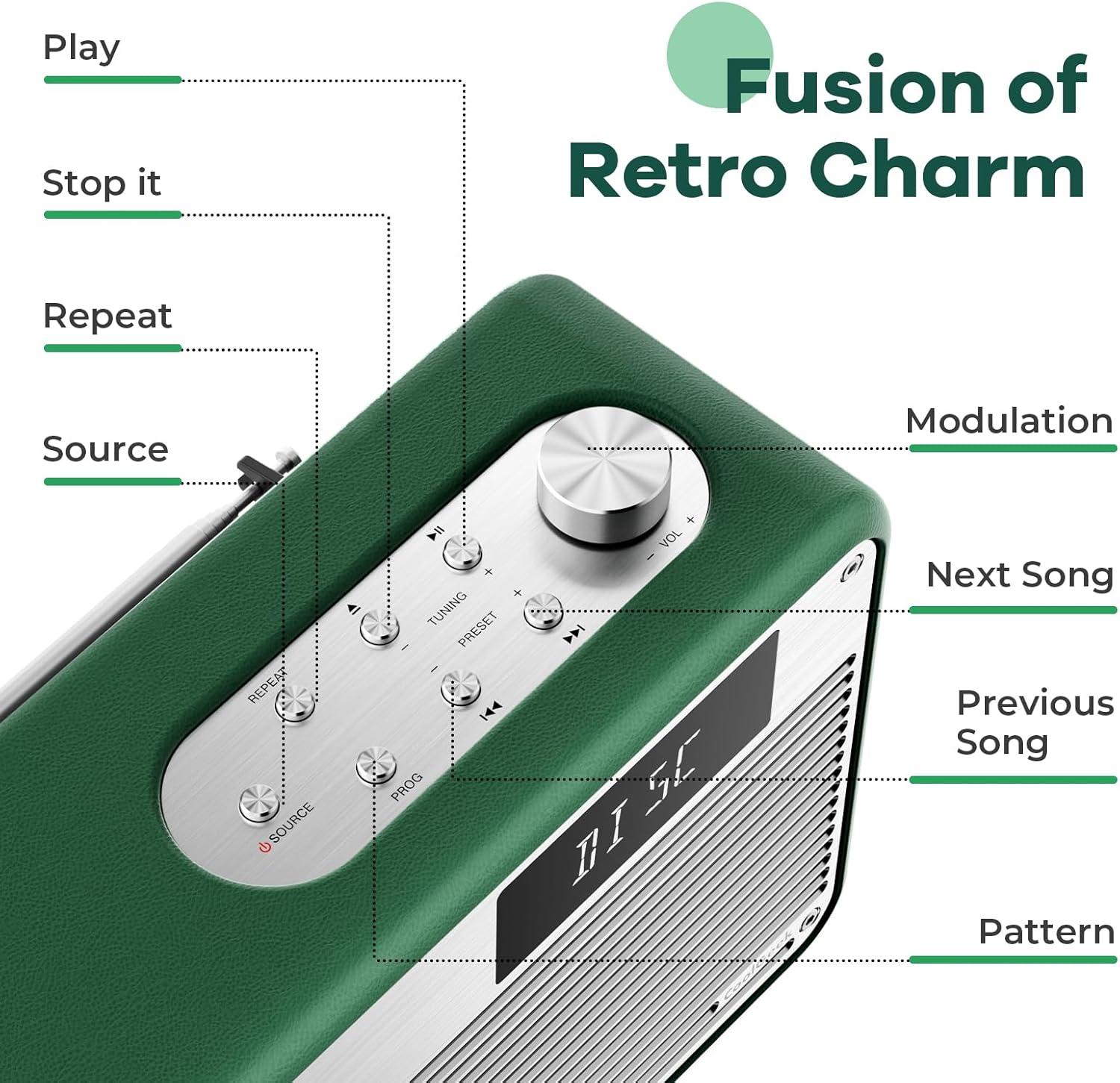
Figura 4.1: Dettaljat view of the control panel, indicating the function of each button and the modulation knob.
4.2 Daqq ta' CD
- Daħħal CD: Gently slide your CD into the vertical CD slot on the front of the boombox. The player is designed for simple disc insertion.
- Agħżel Sors: Press the 'SOURCE' button until 'CD' mode is displayed.
- Play/Pawsa: Press the 'PLAY/PAUSE' button to start or pause playback.
- Aqbeż il-binarji: Use the 'NEXT SONG' or 'PREVIOUS SONG' buttons to navigate between tracks.
- Kontroll tal-Volum: Rotate the 'MODULATION' knob to adjust the volume.
- Waqqaf il-Daqq: Press the 'STOP' button to end CD playback.
4.3 Modalità Bluetooth
- Agħżel Sors: Press the 'SOURCE' button until 'BT' (Bluetooth) mode is displayed. The device will enter pairing mode, indicated by a flashing Bluetooth icon or specific audio prompt.
- Tqabbil: On your mobile device (smartphone, tablet, etc.), enable Bluetooth and search for available devices. Select 'COOLGEEK Boombox' (or similar name) from the list.
- Konnessjoni: Once paired, the boombox will indicate a successful connection. You can now play audio from your mobile device through the boombox.
- Kontroll tad-daqq: Use the boombox's 'PLAY/PAUSE', 'NEXT SONG', and 'PREVIOUS SONG' buttons, or control playback directly from your paired device.
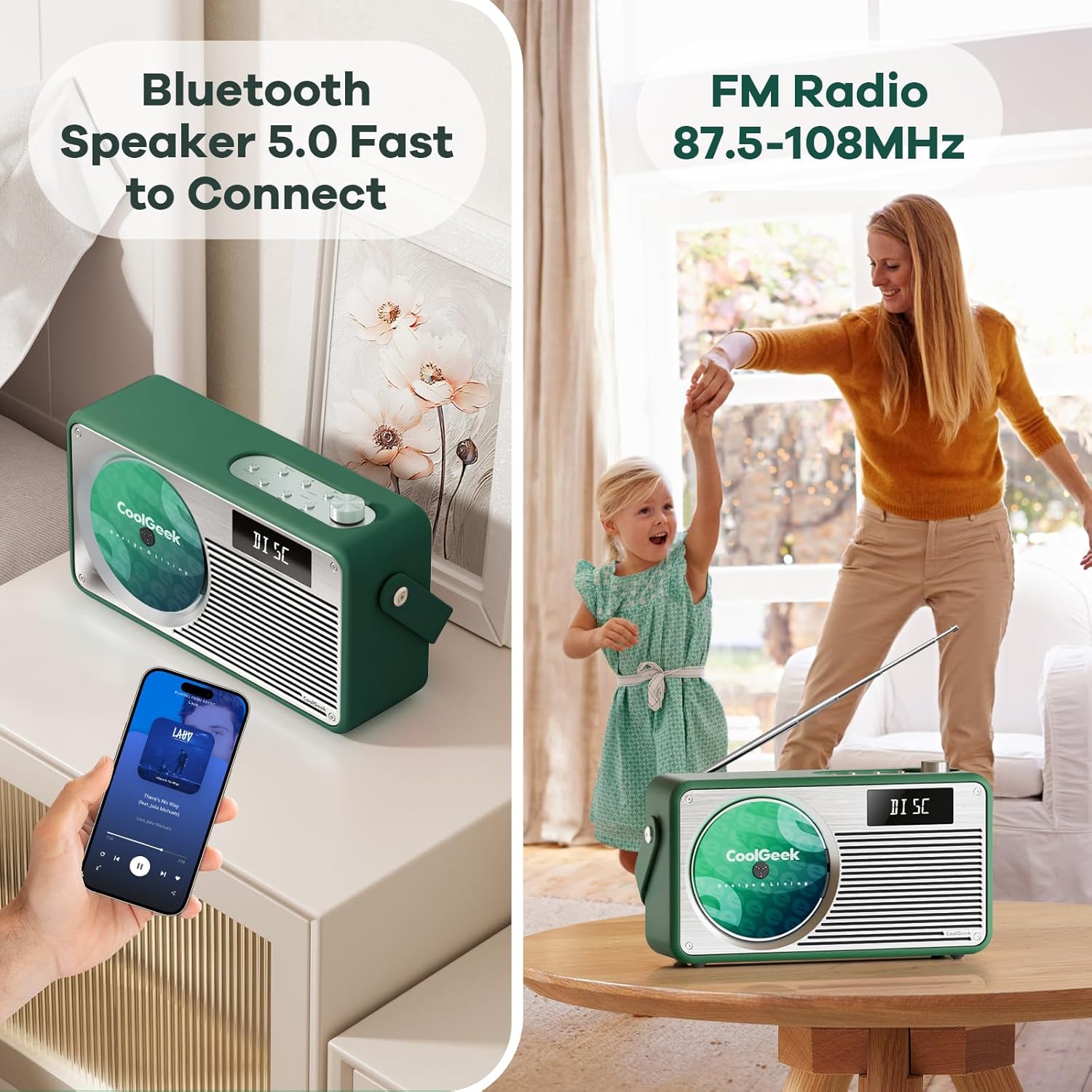
Figure 4.2: The boombox demonstrating its Bluetooth connectivity with a smartphone and its FM radio antenna extended.
4.4 Radju FM
- Agħżel Sors: Press the 'SOURCE' button until 'FM' mode is displayed.
- Stazzjonijiet tas-Sintonizzazzjoni: Use the 'TUNING' buttons (often combined with 'NEXT SONG'/'PREVIOUS SONG' or a dedicated tuning knob) to scan for radio stations. The frequency range is 87.5 to 108 MHz.
- Antenna: Extend the telescopic antenna on the back of the unit for better reception. Adjust its position for clearer sound.
- Stazzjonijiet issettjati minn qabel: Some models allow saving favorite stations. Refer to the specific button (e.g., 'PRESET' or 'PROG') for instructions.
5. Manutenzjoni
- Tindif: Use a soft, dry cloth to clean the exterior of the boombox. Do not use liquid cleaners or abrasive materials.
- CD Care: Immaniġġja s-CDs mit-truf tagħhom. Naddaf is-CDs maħmuġin b'ċarruta ratba u mingħajr suf, billi timsaħ miċ-ċentru 'l barra.
- Kura tal-batterija: Biex ittawwal il-ħajja tal-batterija, evita li tiċċarġja kompletament il-batterija ta' spiss. Jekk taħżen l-apparat għal perjodu estiż, iċċarġjah sa madwar 50% kull ftit xhur.
- Ħażna: Aħżen l-apparat f'post frisk u niexef 'il bogħod mix-xemx diretta u minn temperaturi estremi.
6 Issolvi l-problemi
| Problema | Kawża Possibbli | Soluzzjoni |
|---|---|---|
| Ebda qawwa | Battery drained; Power adapter not connected properly. | Charge the battery; Ensure power adapter is securely connected to both the boombox and the outlet. |
| L-ebda ħoss | Volume too low; Incorrect source selected; Device muted. | Increase volume; Press 'SOURCE' to select correct mode (CD, BT, FM); Check if device is muted. |
| Is-CD jaqbeż jew ma jdoqqx | Is-CD hija maħmuġa jew mibruxa; is-CD imdaħħla ħażin. | Clean the CD; Ensure CD is inserted correctly into the vertical slot. |
| Il-Bluetooth mhux qed jgħaqqad | Boombox not in pairing mode; Device too far; Bluetooth disabled on mobile device. | Ensure boombox is in BT mode and flashing; Move devices closer; Enable Bluetooth on your mobile device. |
| Akkoljenza fqira tal-FM | Antenna mhux estiża jew pożizzjonata b'mod korrett; Żona b'sinjal dgħajjef. | Fully extend and adjust the telescopic antenna; Try moving the boombox to a different location. |
7. Speċifikazzjonijiet
| Karatteristika | Dettall |
|---|---|
| Dimensjonijiet tal-Prodott (L x W x H) | 17 x 9.5 x 6.7 pulzieri |
| Piż tal-oġġett | 8.5 liri |
| Numru tal-Mudell (ASIN) | B0DD41WKCH |
| Batteriji | 1 batterija tal-jone tal-litju (inkluża) |
| Brand | COOLGEEK |
| Teknoloġija tal-Konnettività | Bluetooth |
| Kulur | Aħdar |
| Tip ta' Kelliem | Stereo |
| Manifattur | COOLGEEK |
| Data L-Ewwel Disponibbli | 14 ta’ Awwissu, 2024 |
8. Garanzija u Appoġġ
COOLGEEK is committed to providing excellent customer service. If you encounter any issues with your product or have questions, please contact us directly. We will do our best to resolve any problems you may experience.
For support, please refer to the contact information provided with your purchase or visit the official COOLGEEK websit.
Ask a question about this manual
Ask about setup, troubleshooting, compatibility, parts, safety, or missing instructions. Manuals+ will review the question and use this page’s manual context to help answer it.