
1. Prodott Aktarview
The OBDSTAR iScan BRP is a professional, portable diagnostic tablet specifically designed for BRP (Can-am) systems. It offers comprehensive diagnostic capabilities for motorcycles, snowmobiles, ATVs, and UTVs. Featuring a 5.0-inch capacitive touchscreen and running on Android 5.1.1, this tool provides an intuitive and efficient diagnostic experience.

Figure 1.1: The OBDSTAR iScan BRP Diagnostic Tool, showcasinl-interfaċċja tal-utent u d-disinn robust tagħha.
Karatteristiċi ewlenin:
- Professional Diagnostics: Tailored for BRP systems, offering superb performance.
- Funzjonijiet Avvanzati: Supports automatic scanning, VIN recognition, control module programming/coding, ECU setting, instrument coding, TPMS, maintenance light reset, CO/idle speed/A/F value adjustment, ABS control unit setting, EOL mode, transmission memory reset, and clear computer memory.
- Interface faċli għall-utent: Equipped with Android 5.1.1 operating system and a simple, intuitive menu guide for quick operation.
- Monitoraġġ tad-Data f'Ħin Reali: Records and plays back data streams to quickly and accurately locate sensor and component faults.
- Appoġġ Multi-Lingwi: Available in English, Spanish, Portuguese, French, German, Italian, Polish, Russian, Turkish, Indonesian, Farsi, Thai, Vietnamese.
- Konnettività: Wi-Fi for one-click software updates and remote assistance.
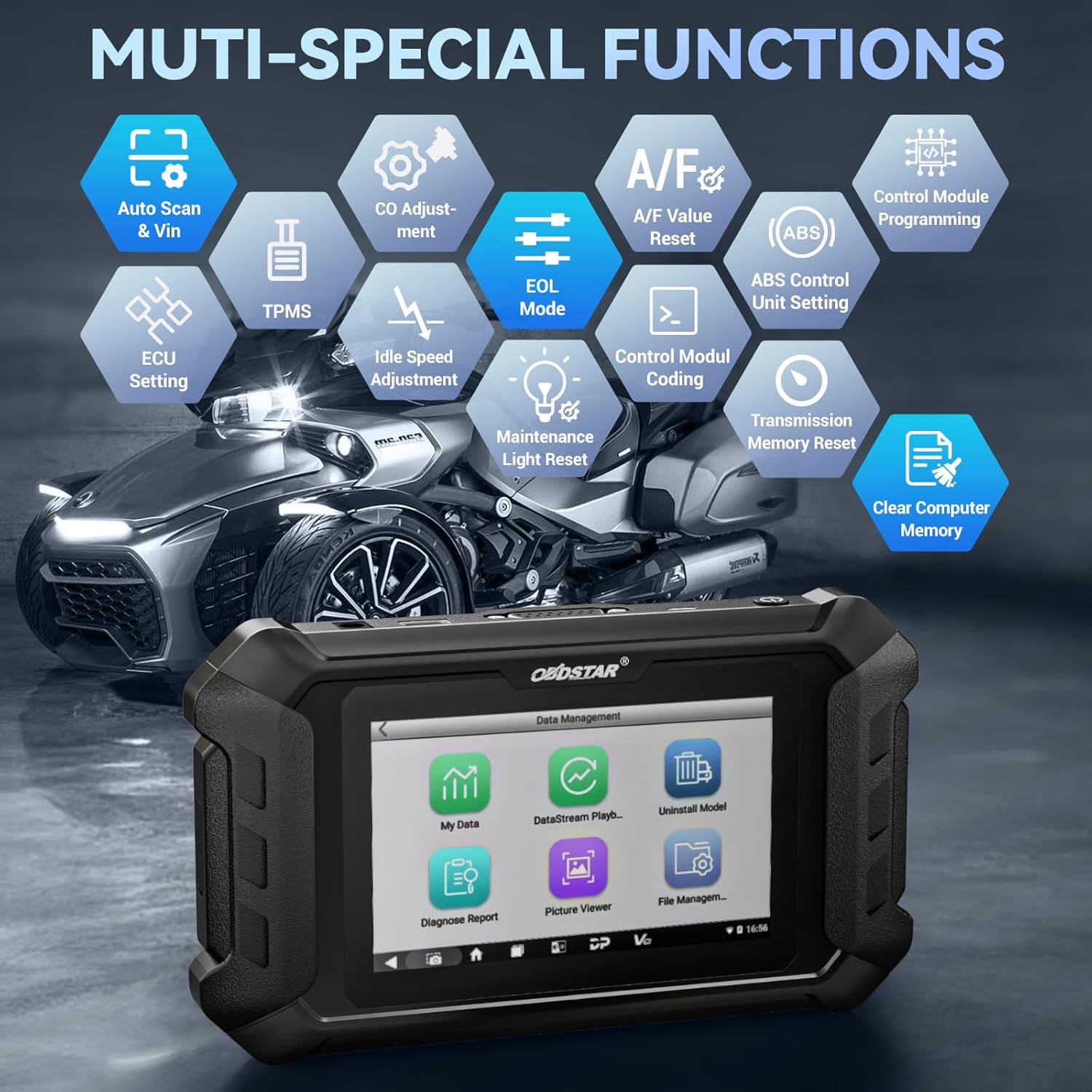
Figura 1.2: Aktarview of the multi-special functions supported by the OBDSTAR iScan BRP, including Auto Scan & VIN, ECU Setting, TPMS, A/F Value Reset, and more.
2. Kontenut tal-Pakkett
Malli tiftaħ il-pakkett, jekk jogħġbok ivverifika li l-oġġetti kollha li ġejjin huma inklużi u f'kundizzjoni tajba:
- Main Tablet (OBDSTAR iScan BRP Diagnostic Tool)
- Ċarġer 12V2A
- Kejbil Prinċipali
- BRP Cable
- Manwal għall-Utent

Figure 2.1: All components included in the OBDSTAR iScan BRP package: Main Tablet, 12V2A Charger, Main Cable, BRP Cable, and User Manual.
3. Gwida ta' Setup
3.1 L-Ewwel Tixgħel u l-Konfigurazzjoni
- Iċċarġja l-Apparat: Connect the 12V2A charger to the diagnostic tool and a power outlet. Ensure the device is fully charged before first use.
- Qawwa Mixgħul: Agħfas u żomm il-buttuna tal-qawwa li tinsab fuq il-ġenb tat-tablet sakemm l-iskrin jixgħel.
- Għażla tal-Lingwa: Upon first boot, you will be prompted to select your preferred language. Choose English or another supported language from the list.
- Konnessjoni Wi-Fi: Navigate to the system settings and connect to a stable Wi-Fi network. This is crucial for software updates and remote assistance.
- Aġġornament tas-Software: After connecting to Wi-Fi, it is recommended to perform a one-click software update to ensure you have the latest diagnostic software and vehicle coverage.
4. Istruzzjonijiet Operattivi
4.1 Konnessjoni ma' Vettura
- Locate Diagnostic Port: Identify the diagnostic port on your BRP vehicle (motorcycle, snowmobile, ATV, or UTV). Refer to your vehicle's service manual for the exact location.
- Qabbad Kejbils: Use the appropriate Main Cable and BRP Cable to connect the diagnostic tool to the vehicle's diagnostic port. Ensure connections are secure.
- Ixgħel l-Ignition: Turn the vehicle's ignition to the 'ON' position (do not start the engine unless instructed by the diagnostic procedure).
4.2 Twettiq ta' Dijanjostiċi
- Select 'MOTO Diag': From the main menu of the diagnostic tool, tap on the 'MOTO Diag' icon to enter the motorcycle diagnostic interface.
- Għażla tal-Vettura: Select the correct vehicle brand (BRP) and model from the list.
- Automatic VIN Recognition: The tool supports automatic VIN recognition. If prompted, allow the tool to read the VIN for faster vehicle identification.
- Skennjar tas-Sistema: Initiate an automatic system scan to identify all available control modules and detect any diagnostic trouble codes (DTCs).
- Funzjonijiet Dijanjostiċi:
- Aqra Kodiċijiet: View current, pending, and historic diagnostic trouble codes.
- Kodiċijiet Ċari: Erase diagnostic trouble codes from the vehicle's ECU.
- Fluss tad-Dejta: Monitor real-time data parameters from various sensors and components. Data can be displayed in text, waveform, or instrument diagram formats.
- Active Test (Motion Test): Perform specific tests on actuators and components to verify their functionality.
- Funzjonijiet Speċjali: Access advanced functions such as ECU setting, instrument coding, TPMS reset, maintenance light reset, CO adjustment, idle speed adjustment, A/F value reset, ABS control unit setting, EOL mode, transmission memory reset, and clear computer memory.
- Save and Print Reports: After diagnosis, you can save diagnostic reports and, if connected to a compatible printer, print them for record-keeping.

Figure 4.1: The diagnostic tool's interface highlighting features like Auto VIN & Scan, One Click Upgrade, Professional Tech Support, and Live Data monitoring.

Figure 4.2: The Auto VIN & Scan feature streamlines vehicle identification for efficient diagnostics.

Figure 4.3: The Data Play Back function allows for review of recorded real-time data, aiding in fault analysis.
5. Manutenzjoni
5.1 Aġġornamenti tas-Software
Regular software updates are essential to ensure your diagnostic tool has the latest vehicle coverage, bug fixes, and new features. Connect the device to a Wi-Fi network and use the 'Upgrade' function on the main menu for one-click updates.
5.2 Tindif u Ħażna
- Imsaħ l-apparat b'artab, damp drapp. Tużax tindif jew solventi li joborxu.
- Aħżen l-għodda f'post frisk u niexef, 'il bogħod mix-xemx diretta u minn temperaturi estremi.
- Keep cables neatly coiled to prevent damage.
6 Issolvi l-problemi
| Problema | Kawża Possibbli | Soluzzjoni |
|---|---|---|
| L-apparat ma jixgħelx. | Low battery; faulty charger/cable; device malfunction. | Charge the device for at least 30 minutes. Try a different charger/cable. If problem persists, contact support. |
| Ma tistax tikkonnettja mal-vettura. | Incorrect cable connection; vehicle ignition off; incompatible vehicle model; damaged diagnostic port. | Ensure cables are securely connected. Turn vehicle ignition ON. Verify vehicle compatibility. Check vehicle's diagnostic port for damage. |
| L-aġġornament tas-softwer ifalli. | Unstable Wi-Fi connection; insufficient storage; server issue. | Ensure strong Wi-Fi signal. Check available storage space. Try updating again later. |
| L-iskrin ma jirrispondix. | Problema fis-softwer; ħsara fiżika. | Erġa' ibda l-apparat. Jekk il-problema tippersisti, ikkuntattja l-appoġġ. |
7. Speċifikazzjonijiet
- Mudell: SP540
- Sistema Operattiva: Android 5.1.1
- Proċessur: RK3128 Quad-core
- Wiri: Touch Screen ta '5.0 pulzieri capacitive
- Konnettività: Wi-Fi
- Batterija: 1 batterija tal-polimer tal-litju (inkluża)
- Piż tal-oġġett: Madwar 2.55 liri
- Dimensjonijiet tal-pakkett: Madwar 12.91 x 9.29 x 2.76 pulzieri
- Pajjiż ta' Oriġini: Iċ-Ċina
- Lingwi Appoġġjati: EN, ES, PT, FR, DE, IT, PL, RU, TR, ID, FA, TH, VN

Figure 7.1: Hardware highlights of the OBDSTAR iScan BRP, including Wi-Fi, Android 5.1.1, 5.0 Inch Touch Screen, RK3128 Quad-core Processor, and Intuitive Menu Guidance.
8. Appoġġ u Garanzija
8.1 Appoġġ Tekniku
OBDSTAR provides technical support for the iScan BRP diagnostic tool. You can utilize the one-click remote help function on the device to receive assistance from OBDSTAR technical staff.
8.2 Politika ta' Ritorn
This product is eligible for a 30-day refund/replacement return policy from the date of purchase. Please refer to your retailer's specific return terms and conditions for detailed information.