
1. Introduzzjoni
Thank you for choosing the ECLIPSE AVN-LBS01 Car Navigation System. This manual provides essential information for the proper installation, operation, and maintenance of your device. Please read this manual thoroughly before using the product to ensure safe and optimal performance. Keep this manual in a safe place for future reference.
2. Informazzjoni dwar is-Sigurtà
Always observe the following safety precautions to prevent injury, damage to the device, or damage to your vehicle.
- Sigurtà tas-Sewqan: Do not operate the navigation system or view the screen while driving. Always pull over to a safe location before making adjustments or inputting destinations.
- Installazzjoni: Installation should be performed by a qualified professional to avoid electrical shorts, damage to vehicle wiring, or improper mounting. Ensure all connections are secure.
- Provvista tal-Enerġija: This unit is designed for a 12V DC negative ground electrical system. Do not connect it to any other voltage jew polarità.
- Ventilazzjoni: Aċċerta ruħek li jkun hemm ventilazzjoni adegwata madwar l-unità. Timblokkax il-fetħiet tal-ventilazzjoni.
- Tindif: Uża drapp artab u niexef għat-tindif. Tużax prodotti tat-tindif jew solventi li joborxu.
3. Kontenut tal-Pakkett
Ivverifika li l-oġġetti kollha huma preżenti fil-pakkett qabel ma tipproċedi bl-installazzjoni.
- ECLIPSE AVN-LBS01 Main Unit
- Antenna tal-GPS
- Mikrofonu
- Xedd tal-Wiring Prinċipali
- Various Connection Cables (e.g., RCA, USB, Steering Wheel Control)
- Viti u Aċċessorji tal-Immuntar

Stampa 3.1: Various wiring harnesses and connectors included with the ECLIPSE AVN-LBS01 car navigation system. This image shows a comprehensive set of cables for power, audio, video, and data connections, essential for integrating the unit into a vehicle's electrical system.

Stampa 3.2: GPS antenna and microphone for the ECLIPSE AVN-LBS01 car navigation system. The GPS antenna is crucial for accurate location tracking, while the microphone enables hands-free communication and voice commands.
4. Setup u Installazzjoni
Proper installation is crucial for the performance and safety of your car navigation system. It is highly recommended that installation be performed by a professional.
4.1. Main Unit Overview

Stampa 4.1: Quddiem view of the ECLIPSE AVN-LBS01 car navigation system. This image displays the 7V screen, control buttons (TILT, MENU, Current Location), and the overall aesthetic of the unit when installed in a dashboard.

Stampa 4.2: Fuq view of the ECLIPSE AVN-LBS01 car navigation system showing the product label. The label indicates the model number AVN-LBS01(R), manufacturing origin (Made in China), power requirement (12V), and serial number (FDI202203118595). It also includes information regarding Bluetooth trademark ownership.
4.2. Konnessjonijiet tal-Panew ta 'wara
The rear panel of the AVN-LBS01 unit provides various ports for connecting power, antennas, and external devices.

Stampa 4.3: Wara view of the ECLIPSE AVN-LBS01 car navigation system showing connection ports. Key ports include MIC (microphone input), GPS (GPS antenna input), TV (TV antenna input), and various multi-pin connectors for power, speakers, and other vehicle interfaces.
4.3. Konnessjonijiet tal-Wiring
Connect the main wiring harness and other cables as follows:
- Qawwa u Art: Connect the yellow wire (constant 12V), red wire (accessory 12V), and black wire (ground) to the corresponding vehicle wiring.
- Riżultati tal-Ispeaker: Qabbad il-wajers tal-ispiker mal-ispikers tal-vettura tiegħek, filwaqt li tiżgura l-polarità korretta.
- Antenna tal-GPS: Connect the GPS antenna to the dedicated GPS port on the rear of the unit. Position the antenna in a location with a clear view tas-sema.
- Mikrofonu: Connect the microphone to the MIC input port. Route the microphone cable to a suitable location for clear voice pickup.
- Vehicle Signals: Connect the SPEED (vehicle pulse), REVERSE, and PARKING wires to the corresponding vehicle signals. The parking brake connection is a safety feature that may restrict certain functions while the vehicle is in motion.
- Konnessjonijiet oħra: Connect any additional cables for steering wheel controls, external amplifiers, or video inputs/outputs as required.
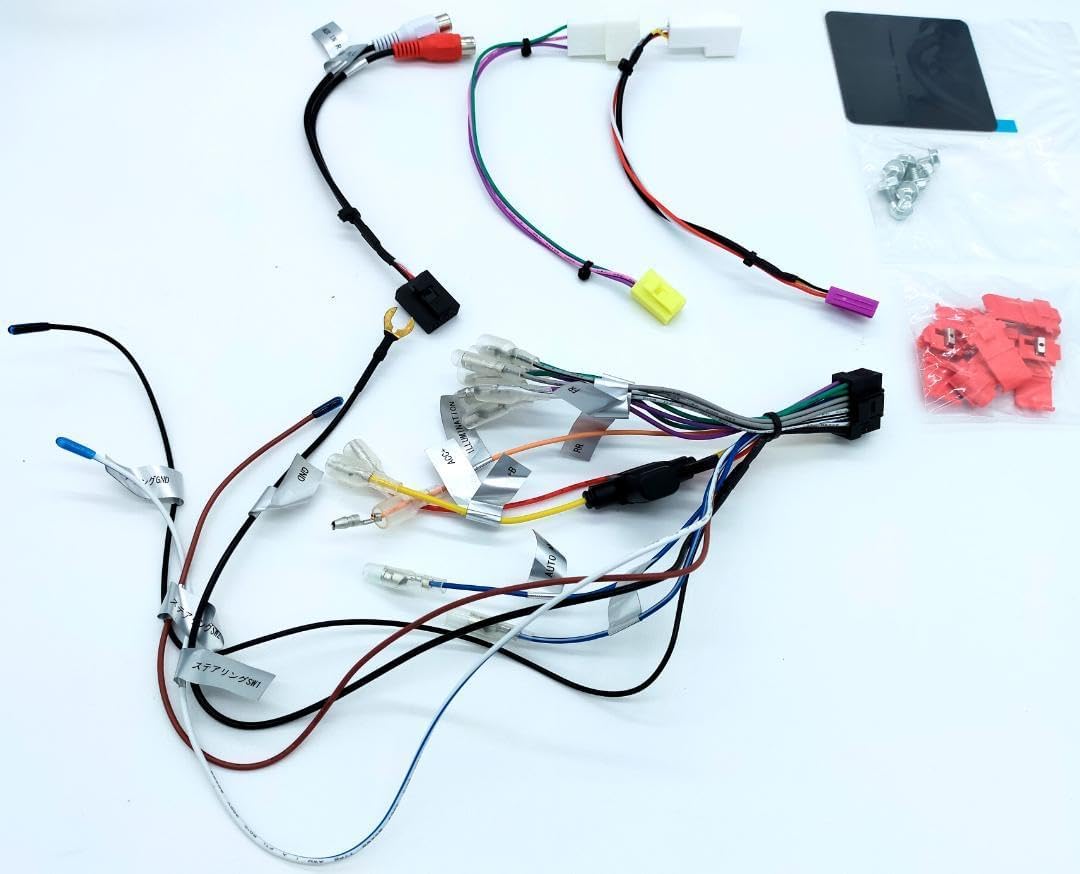
Stampa 4.4: Dettaljati view of the main wiring harness for the ECLIPSE AVN-LBS01 car navigation system. This image highlights various labeled wires such as SPEED (vehicle pulse), REVERSE, and PARKING, which are critical for proper navigation and safety feature operation.
4.4. Immuntar tal-Unità
Secure the main unit into the vehicle's dashboard opening using the provided mounting brackets and screws. Ensure the unit is firmly seated and does not obstruct any vehicle controls or airbags.

Stampa 4.5: Ġenb view of the ECLIPSE AVN-LBS01 car navigation system showing mounting points. This perspective illustrates the screw holes and chassis design for secure installation within a vehicle's dashboard.

Stampa 4.6: Naħa opposta view of the ECLIPSE AVN-LBS01 car navigation system showing mounting points. Similar to Image 4.5, this view provides additional detail on the chassis structure and mounting options.
5. Istruzzjonijiet Operattivi
This section covers the basic operation of your ECLIPSE AVN-LBS01 car navigation system.
5.1. Power On/Off
To power on the unit, turn your vehicle's ignition to the ACC or ON position. The unit will typically power on automatically. To power off, turn the ignition to the OFF position.
5.2. Display Controls
The unit features a 7V type touchscreen display. Use the physical buttons for quick access to common functions.
- TILT Button: Press this button to adjust the screen angle for optimal viewing and to reduce glare.
- Buttuna MENU: Press to access the main menu, where you can select various functions such as navigation, audio, video, and settings.
- Buttuni +/-: Typically used for volume control or zooming in/out on the map.
- Current Location Button: Press to quickly display your current position on the map.

Stampa 5.1: Quddiem angolat minn fuq view of the ECLIPSE AVN-LBS01 car navigation system showing the tilt mechanism. This image demonstrates how the screen can be adjusted for better visibility, highlighting the 'TILT' button on the front panel.
5.3. Navigation Functions
The AVN-LBS01 comes with 2022 Autumn Edition map data. Access navigation features through the main menu.
- Destination Input: Use the touchscreen keyboard to enter addresses, points of interest (POIs), or coordinates.
- Gwida tar-Rotta: Follow on-screen directions and voice prompts for turn-by-turn navigation.
- Mappa View: Switch between 2D and 3D map views, zoom levels, and display options.
- Informazzjoni dwar it-Traffiku: If supported, the system may display real-time traffic updates to help avoid congestion.
5.4. Daqq Awdjo/Vidjo
The unit supports various audio and video playback options. Refer to the on-screen menu for available sources (e.g., radio, USB, Bluetooth audio, external AV input).
6. Manutenzjoni
Regular maintenance ensures the longevity and optimal performance of your navigation system.
- Tindif tal-iskrin: Imsaħ l-iskrin bil-mod b'ċarruta ratba u mingħajr suf. Għal tbajja' persistenti, nixxef ftit.ampen the cloth with water or a screen-safe cleaner. Do not spray cleaner directly onto the screen.
- Tindif tal-Unità: Use a dry, soft cloth to wipe the exterior of the unit. Avoid using harsh chemicals or abrasive materials.
- Aġġornamenti tas-Software: Iċċekkja perjodikament il-manifattur website or contact support for available map data and software updates.
7 Issolvi l-problemi
If you encounter issues with your AVN-LBS01, refer to the following common problems and solutions.
| Problema | Kawża Possibbli | Soluzzjoni |
|---|---|---|
| Ebda qawwa | Konnessjoni tal-enerġija maħlula, fjus maħruq, l-ignition tal-vettura mitfija. | Check power wiring, inspect vehicle fuses, ensure ignition is on. |
| L-ebda sinjal GPS | GPS antenna not connected, antenna obstructed, driving in an area with poor satellite reception. | Kun żgur li l-antenna tal-GPS hija konnessa sew u għandha viżibilità ċara view tas-sema. Mexxi lejn żona miftuħa. |
| Touchscreen ma jirrispondix | System freeze, dirty screen, calibration issue. | Restart the unit (turn vehicle ignition off and on). Clean the screen. If issue persists, consult a professional. |
| L-ebda awdjo | Volume too low, mute activated, speaker wiring issue. | Increase volume, check mute settings, verify speaker connections. |
If the problem persists after trying these solutions, please contact customer support or a qualified service technician.
8. Speċifikazzjonijiet
| Karatteristika | Dettall |
|---|---|
| Numru tal-Mudell | AVN-LBS01 |
| Tip ta 'Wiri | 7V Type Touchscreen |
| Dejta tal-Mappa | 2022 Autumn Edition |
| Provvista tal-Enerġija | 12V DC (Art Negattiva) |
| Manifattura Oriġini | Magħmul fiċ-Ċina |
| ASIN | B0DCW68M8N |
| Numru tal-Oġġett | m49798662797 |
| Numru tas-serje | FDI202203118595 |
| Bluetooth | Bluetooth® word mark and logos are registered trademarks owned by Bluetooth SIG, Inc. |
9. Garanzija u Appoġġ
For warranty information, please refer to the warranty card included with your product or contact your retailer. For technical support, product inquiries, or service, please contact the authorized ECLIPSE service center or your point of purchase. Keep your purchase receipt and serial number handy when contacting support.