
Keychron KYCN-K13M-H3
Keychron K13 Max Wireless RGB Mechanical Keyboard User Manual
Model: KYCN-K13M-H3
1. Introduzzjoni
Thank you for choosing the Keychron K13 Max Wireless RGB Mechanical Keyboard. This manual provides detailed instructions on setting up, operating, maintaining, and troubleshooting your new keyboard. Please read this manual thoroughly to ensure optimal performance and longevity of your device.
The Keychron K13 Max is a high-performance 80% layout (TKL) mechanical keyboard designed for both productivity and gaming. It offers triple connectivity modes: ultra-low latency 2.4 GHz wireless, stable Bluetooth 5.1, and reliable wired USB Type-C. With QMK/VIA programmability, hot-swappable Gateron low-profile mechanical switches, and vibrant RGB backlighting, it provides a customizable and comfortable typing experience across macOS, Windows, and Linux systems.
2. Prodott Aktarview
The Keychron K13 Max features a compact 80% layout, retaining essential keys while saving desk space. It comes equipped with Gateron low-profile mechanical switches and durable double-shot PBT keycaps. The keyboard's internal structure includes advanced IXPE acoustic foam and latex foam for a quiet and comfortable typing sound profile.
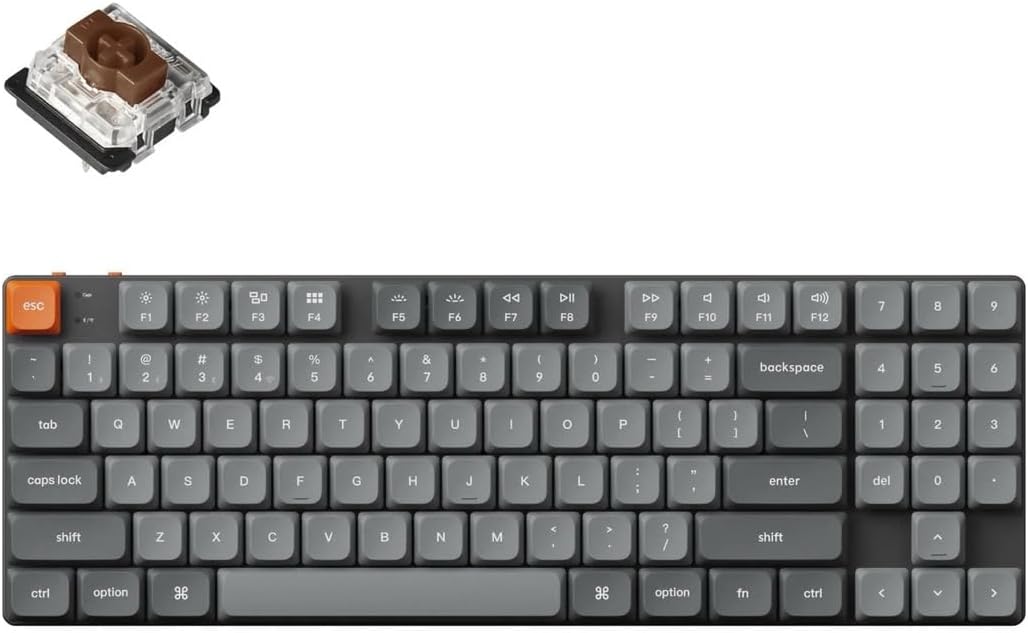
Image: Keychron K13 Max keyboard with a detached Gateron low-profile switch, illustrating the full keyboard layout and the hot-swappable switch mechanism.
Karatteristiċi ewlenin:
- Konnettività Tripla: 2.4 GHz Wireless, Bluetooth 5.1, and Wired USB Type-C.
- Programmabilità QMK/VIA: Full key remapping, macros, and shortcuts via open-source firmware.
- Swiċċijiet li jistgħu jinbidlu bis-sħana: Easily change Gateron low-profile mechanical switches without soldering.
- Dawl ta' wara RGB: 22 types of RGB backlight options for personalized aesthetics.
- Kompatibilità Multi-OS: Seamlessly switch between macOS, Windows, and Linux.
- Acoustic Foam: IXPE and latex foam for enhanced typing sound and feel.

Image: A studio shot of the Keychron K13 Max keyboard, highlighting its sleek design and compact form factor.
3. Setup
Iċċarġjar inizjali:
Before first use, it is recommended to fully charge the keyboard. Connect the provided USB Type-C cable to the keyboard's Type-C port and the other end to a USB power source (e.g., computer USB port, wall adapter). The charging indicator light will show the charging status.
Kif Tqabbad it-Tastiera Tiegħek:
The K13 Max supports three connection modes:
- Konnessjoni bla fili ta' 2.4 GHz:
- Locate the 2.4 GHz receiver (dongle) included with your keyboard.
- Plug the 2.4 GHz receiver into an available USB port on your computer.
- On the keyboard, slide the mode switch (usually on the top left side) to the '2.4G' position.
- The keyboard should automatically connect. If not, press Fn + 4 (for 2.4G pairing) for 4 seconds until the indicator light flashes rapidly, then release.
- Konnessjoni Bluetooth:
- Slide the mode switch on the keyboard to the 'BT' position.
- To enter pairing mode, press and hold Fn + 1 (for Bluetooth device 1), Fn + 2 (for Bluetooth device 2), or Fn + 3 (for Bluetooth device 3) for 4 seconds until the indicator light flashes rapidly.
- On your computer or device, enable Bluetooth and search for 'Keychron K13 Max'.
- Select the keyboard and complete the pairing process.
- You can switch between paired Bluetooth devices by pressing Fn + 1, Fn + 2, or Fn + 3 briefly.
- Konnessjoni USB tat-Tip Ċ bil-Fili:
- Connect the provided USB Type-C cable from the keyboard to your computer's USB port.
- Slide the mode switch on the keyboard to the 'Cable' position.
- It-tastiera se tiġi rikonoxxuta bħala tastiera USB standard.
Swiċċ tas-Sistema Operattiva:
The K13 Max has a switch to toggle between macOS and Windows/Android layouts. Ensure this switch is set to your operating system for correct key functionality (e.g., Alt/Option, Win/Command keys).

Immaġni: Ġenb view of the Keychron K13 Max keyboard, demonstrating the two adjustable typing angles for ergonomic comfort.
4. It-Tħaddim tat-Tastiera
Ċwievet Multimedia:
The K13 Max includes 12 dedicated multimedia keys (F1-F12) accessible via the Fn key. These keys control media playback, volume, and other system functions. Refer to the keycap legends for specific functions.
RGB Backlighting Control:
The keyboard offers 22 types of RGB backlight effects. Use the dedicated backlight key (usually Fn + Lightbulb icon) to cycle through effects. Use Fn + Arrow keys or other designated keys to adjust brightness, speed, and color of the backlighting.
QMK/VIA Programming:
The Keychron K13 Max is fully compatible with QMK firmware and VIA software, allowing for advanced customization of key assignments, macros, and lighting effects. To use VIA:
- Download the VIA software from the official Keychron website or use the web-based VIA application.
- Connect the keyboard to your computer via the wired USB Type-C connection.
- Open the VIA application. It should automatically detect your K13 Max keyboard.
- You can now remap keys, create macros, and customize lighting layers directly within the VIA interface. Changes are saved directly to the keyboard's firmware.

Image: The Keychron K13 Max keyboard in a typical desk setup, demonstrating its integration into a workspace.
5. Manutenzjoni
Tindif:
Biex tnaddaf it-tastiera tiegħek, l-ewwel skonnettjaha mis-sorsi kollha tal-enerġija. Uża drapp artab u mingħajr suf imxarrab ftit.ampened with water or a mild cleaning solution to wipe down the keycaps and frame. For dust and debris between keys, use compressed air or a small brush. Avoid using harsh chemicals or abrasive materials.
Swiċċijiet Hot-Swapping:
The K13 Max features hot-swappable sockets, allowing you to change switches without soldering. Use the provided switch puller tool to carefully remove existing switches. Align the pins of the new switch with the holes on the PCB and gently press down until it clicks into place. Ensure the switch is fully seated to avoid bent pins.
6 Issolvi l-problemi
It-Tastiera Mhux Tirrispondi:
- Kun żgur li t-tastiera hija ċċarġjata.
- Check the mode switch (2.4G/BT/Cable) is set correctly for your connection type.
- Għal 2.4G, kun żgur li d-dongle huwa mdaħħal sew.
- For Bluetooth, re-pair the device if necessary.
- Try connecting via wired USB Type-C to rule out wireless issues.
Ċwievet Mhux Reġistrazzjoni:
- If a specific key is not working, try hot-swapping the switch with a known working one to determine if the switch or the socket is faulty.
- Kun żgur li s-swiċċ ikun imwaħħal sew fis-sokit tiegħu.
- Iċċekkja għal xi debris taħt il-keycap jew madwar is-swiċċ.
Kwistjonijiet ta' Skonnessjoni tal-Bluetooth:
- Kun żgur li t-tastiera tinsab fil-firxa tat-tagħmir tiegħek.
- Iċċekkja għal interferenza minn apparat ieħor mingħajr fili.
- Aġġorna s-sewwieqa tal-Bluetooth tat-tagħmir tiegħek.
- Erġa' qabbad it-tastiera mat-tagħmir tiegħek.
7. Speċifikazzjonijiet

Image: Detailed diagram showing the physical dimensions of the Keychron K13 Max keyboard and its low-profile Gateron switch.
| Karatteristika | Deskrizzjoni |
|---|---|
| Isem tal-Mudell | Keychron K13 Max |
| Numru tal-Mudell | KYCN-K13M-H3 |
| Tqassim | 80% TKL, QWERTY ANSI US (90 keys) |
| Swiċċijiet | Gateron Low-Profile Mekkaniku (Jista' jinbidel bis-sħana) |
| Materjal Keycap | Baxx-Profile PBT b'Doppju Shot |
| Materjal tal-qafas | ABS + Qafas tal-Aluminju |
| Konnettività | 2.4 GHz Wireless, Bluetooth 5.1, Wired USB Type-C |
| Polling Rate (2.4Ghz & Wired) | 1000Hz |
| Rata ta' Votazzjoni (Bluetooth) | 90Hz |
| Qlib N-Key (NKRO) | Yes (Wireless & Wired Modes) |
| Dawl ta' wara | 22 Types of RGB Backlight |
| Batterija | 2000 mAh Rechargeable Li-Polymer |
| Wireless Working Time (Backlight Off) | Sa 154 sigħat |
| Sistema Kompatibbli | macOS / Windows / Linux |
| Dimensjonijiet | 346 x 118.5 mm (13.62 x 4.66 pulzieri) |
| Piż | 600 g / 1.32 lbs |
| Angolu tat-tajpjar | 3.37º, 4.2º, and 6.7º |
| MCU | ARM Cortex-M4 32-bit STM32F402 (256KB Flash) |
8. Garanzija u Appoġġ
Keychron products typically come with a limited warranty. For specific warranty terms and conditions, please refer to the warranty card included with your product or visit the official Keychron websit. Żomm il-prova tax-xiri tiegħek għal talbiet ta' garanzija.
For technical support, troubleshooting assistance, or to inquire about replacement parts, please visit the Keychron support page on their official website. You can usually find FAQs, driver downloads, and contact information for customer service there.
Ask a question about this manual
Ask about setup, troubleshooting, compatibility, parts, safety, or missing instructions. Manuals+ will review the question and use this page’s manual context to help answer it.