
1. Prodott Aktarview
The LiNKFOR 6-Channel Audio Mixer is an ultra-compact device designed to combine up to six line-level signal sources into a single output channel. It is suitable for connecting various electronic instruments and audio equipment such as microphones, guitars, basses, keyboards, and phones, making it ideal for small clubs, bars, or personal stage setups. This mixer features individual volume controls for each input and the main output, along with mono/stereo switching capabilities. Its robust all-metal shell ensures durability and reduces electromagnetic interference for a purer sound experience.

Figure 1: LiNKFOR 6-Channel Audio Mixer, showcasinid-disinn kompatt u t-tqassim tal-kontroll tiegħu.
2. Informazzjoni dwar is-Sigurtà
- Tiżgura l-provvista tal-enerġija voltage matches the device's requirements (5V DC).
- Tesponix l-apparat għall-ilma, umdità, jew temperaturi estremi.
- Avoid disassembling or modifying the device, as this may void the warranty and cause damage.
- Żomm l-apparat 'il bogħod minn kampi manjetiċi qawwija.
- Use only the provided or recommended power adapter and cables.
3. Kontenut tal-Pakkett

Figura 2: Kontenut inkluż fil-pakkett tal-prodott.
Ivverifika li l-oġġetti kollha huma preżenti fil-pakkett tiegħek:
- LiNKFOR 6-Channel Audio Mixer (Model 6-IN-1-OUT)
- Provvista ta 'Enerġija 5V
- USB Type-C Power Cable with Magnetic Ring
- Cable Awdjo 6.35mm
- Manwal għall-Utent
4. Karatteristiċi tal-prodott
- Disinn Ultra-Kompatt: Mixes up to 6 line signal sources into 1 channel for headphones or speakers.
- Kompatibilità versatili: Suitable for microphones, guitars, basses, keyboards, phones, and other stage tagħmir.
- Kontroll Indipendenti: Each input and the main output feature independent volume control.
- Swiċċjar Stereo/Mono: Supports switching between stereo and mono modes with a single key.
- Ultra-Low Noise Performance: Designed for impressive audio experience without interference.
- Provvista ta 'Enerġija Stabbli: Certified 5V power supply and power cable with magnetic ring ensure stable performance.
- Specific Power Switch: Easy to operate on/off switch, eliminating frequent unplugging.
- Kostruzzjoni Durabbli: All-metal shell reduces electromagnetic interference and provides a purer sound. Non-slip pads prevent movement during use.
Vidjo 1: Fuqview of a 6-channel stereo audio mixer, highlighting its inputs and controls. This video demonstrates the compact design, 6.35mm input interfaces, independent volume adjustments, and mono/stereo switching capabilities.
5. Setup
Follow these steps to set up your LiNKFOR 6-Channel Audio Mixer:
- Konnessjoni tal-Enerġija: Connect the provided USB Type-C power cable to the mixer's 5V DC input port. Plug the other end into a compatible 5V USB power source (e.g., wall adapter, computer USB port, power bank).
- Ixgħel: Press the power switch located on the mixer. The power indicator light will illuminate.
- Konnessjonijiet tad-dħul: Connect your audio sources (microphones, instruments, phones, etc.) to the INPUT 1-6 jacks using 6.35mm TRS/TS cables.
- Konnessjoni tal-Output: Connect your headphones or amplifier to the OUTPUT jack using a 6.35mm TRS/TS cable.
- Aġġustament tal-Volum Inizjali: Set all LEVEL knobs (1-6) and the main OUTPUT knob to their minimum position before playing any audio to avoid sudden loud sounds.

Figure 3: Connecting the Type-C power supply.
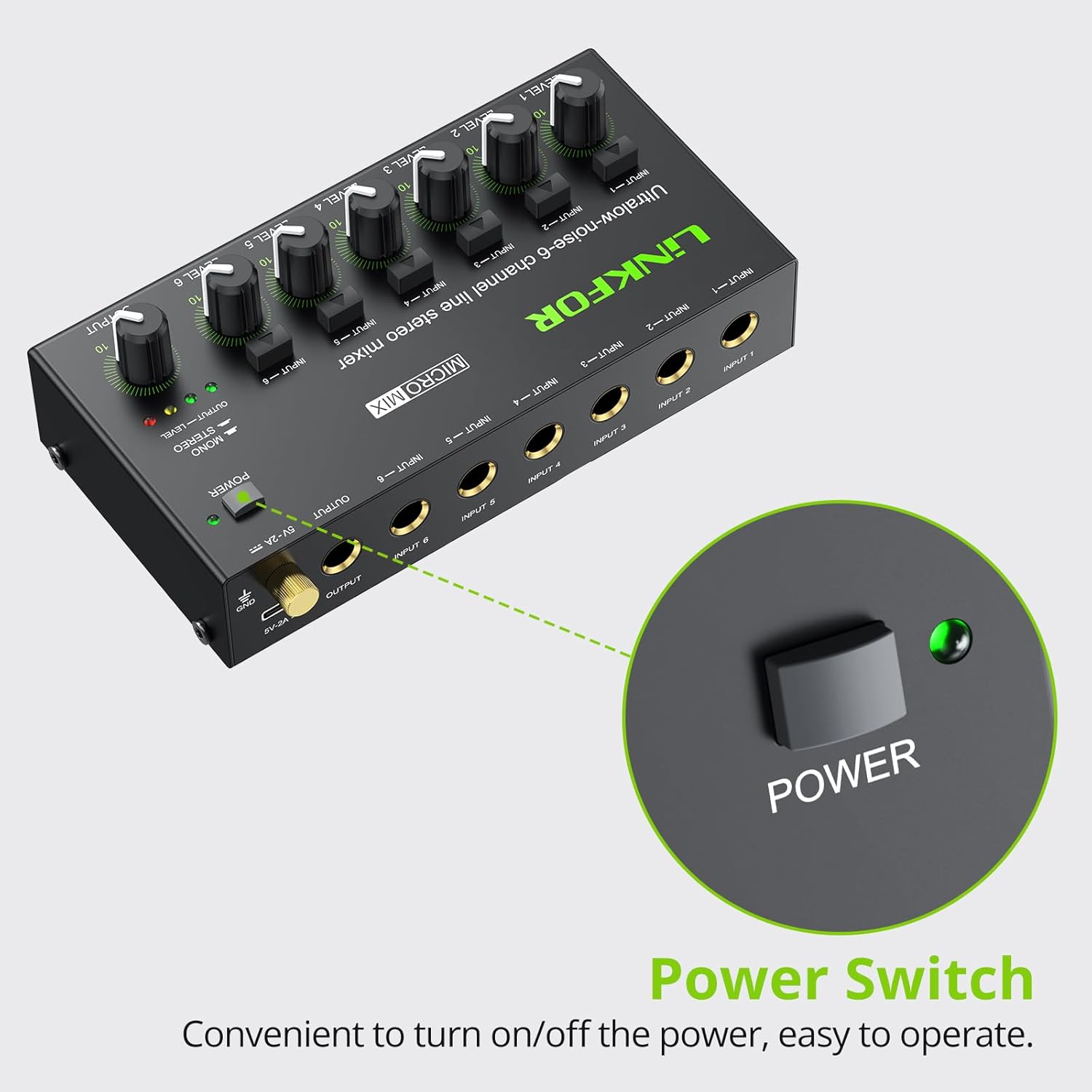
Figura 4: Il-post tas-swiċċ tal-enerġija.
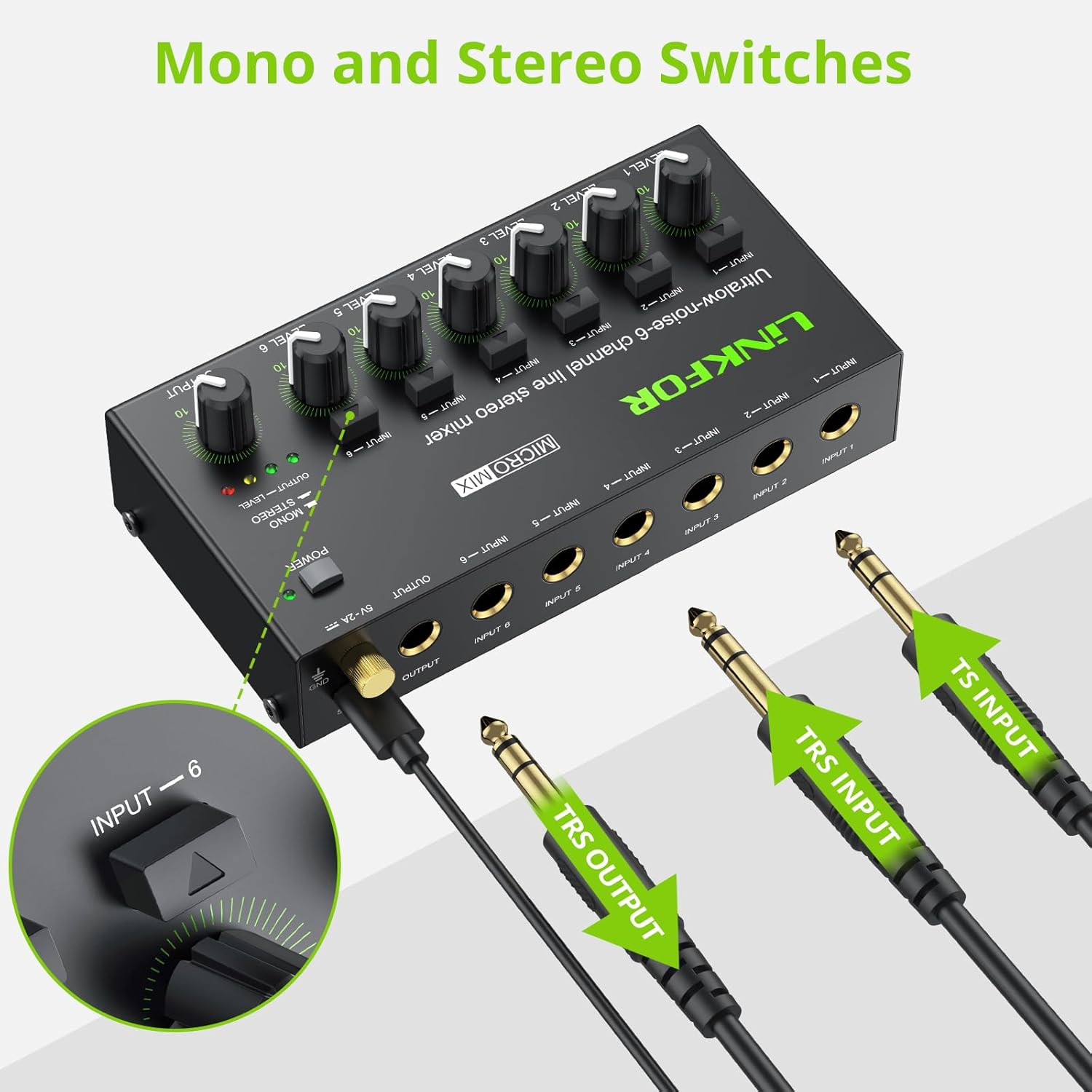
Figure 5: Input and output interfaces.

Figure 6: Connection diagram for inputs and outputs.
6. Istruzzjonijiet Operattivi
Once your mixer is set up, follow these instructions for operation:
- Aġġustament tal-Livelli tal-Input: Gradually turn up the LEVEL knob for each active input channel (LEVEL 1-6) until the desired volume is achieved for that specific source.
- Aġġustament tal-Livell tal-Output: Slowly increase the main OUTPUT knob to control the overall volume of the mixed audio sent to your headphones or amplifier. Monitor the OUTPUT LEVEL indicator lights (green, yellow, red) to prevent clipping (red light indicates signal is too high).
- Mono/Stereo Switching: Each input channel has a dedicated button to switch between mono and stereo modes. Press the button above the respective input to toggle between modes as needed for your audio source.
- Mixing Multiple Sources: Adjust the individual LEVEL knobs for each input to create a balanced mix of all connected audio sources.
Video 2: Official LiNKFOR video demonstrating the 6-Channel Audio Mixer's features. This video highlights the specific power switch, separate volume controls for each channel, stereo/mono switching, and ultra-low noise performance during operation.

Figura 7: Eżample of mixer in use with guitar and laptop.
7. Manutenzjoni
- Tindif: Uża drapp artab u niexef biex tnaddaf il-barra tal-mixer. Tużax prodotti tat-tindif likwidi jew solventi.
- Ħażna: Aħżen l-apparat f'post frisk u niexef 'il bogħod mix-xemx diretta u minn temperaturi estremi meta ma jkunx qed jintuża.
- Kura tal-Cable: Ensure all cables are connected securely and are not bent or kinked excessively to prevent damage.
8 Issolvi l-problemi
| Problema | Kawża Possibbli | Soluzzjoni |
|---|---|---|
| Ebda output tal-ħoss | Power not connected or turned on; Volume knobs too low; Incorrect cable connections. | Check power supply and switch; Increase LEVEL and OUTPUT knobs; Verify all audio cables are correctly and securely connected. |
| Ħoss distort | Volume levels too high (clipping); Faulty cables or audio sources. | Reduce LEVEL and/or OUTPUT knobs until red indicator light disappears; Test with different cables or audio sources. |
| Hissing/Buzzing noise | Ground loop interference; Poor quality cables; Nearby electronic interference. | Ensure proper grounding; Use high-quality shielded cables; Move the mixer away from other electronic devices. |
| Kanal wieħed mhux qed jaħdem | Faulty input cable or source; Input level too low. | Test the input with a different cable and source; Increase the specific channel's LEVEL knob. |
9. Speċifikazzjonijiet

Figura 8: Dimensjonijiet tal-prodott.
| Karatteristika | Dettall |
|---|---|
| Brand | LinkFOR |
| Numru tal-Mudell | 6-IN-1-OUT |
| Numru ta 'Kanali | 6 |
| Teknoloġija tal-Konnettività | 6.35mm |
| Sors tal-Enerġija | Corded Elettriku |
| Voltage | 5 Volts |
| Dimensjonijiet tal-Prodott | 1.26"D x 2.95"W x 1.26"Għ (32mm D x 75mm W x 32mmGħ) |
| Piż tal-oġġett | 8.5 uqija (240 Grammi) |
10. Garanzija u Appoġġ
For warranty information and technical support, please refer to the documentation included with your purchase or visit the official LiNKFOR websit. It-termini speċifiċi tal-garanzija jistgħu jvarjaw skont ir-reġjun u l-bejjiegħ bl-imnut.