
1. Introduzzjoni
Thank you for choosing the ABIR R30 Robot Vacuum Cleaner. This manual provides essential information for the safe operation, maintenance, and troubleshooting of your device. Please read it thoroughly before use to ensure optimal performance and longevity of your robot vacuum.

Image: The ABIR R30 Robot Vacuum Cleaner alongside its auto-empty station, with a smartphone displaying the control app interface.
2. Kontenut tal-Pakkett
Ivverifika li l-oġġetti kollha huma preżenti fil-pakkett:
- ABIR R30 Robot Vacuum Cleaner
- Stazzjon Auto-Empty
- Adapter tal-Enerġija
- 2-in-1 Water Tank and Dust Box
- Pinzell Prinċipali
- Xkupilji tal-ġenb (2 pari)
- Mopping Pad
- Manwal għall-Utent
3. Istruzzjonijiet tas-Sigurtà
Always adhere to basic safety precautions when using electrical appliances to reduce the risk of fire, electric shock, or injury.
- Read all instructions before operating the robot vacuum.
- Tħaddimx ir-robot f'ambjenti mxarrbin jew ħdejn l-ilma.
- Żomm ix-xagħar, il-ħwejjeġ laxki, is-swaba’, u l-partijiet kollha tal-ġisem 'il bogħod minn fetħiet u partijiet li jiċċaqilqu.
- Tiġborx xi ħaġa li tkun qed taħraq jew tpejjep, bħal sigaretti, lofarini, jew irmied jaħraq.
- Ensure the charging station is placed on a level surface against a wall, with adequate clear space around it.
- Issorvelja t-tfal u l-annimali domestiċi meta r-robot ikun qed jaħdem.
4. Setup
4.1 Pożizzjonament tal-Istazzjon tal-Iċċarġjar
Place the auto-empty station on a hard, level surface against a wall. Ensure there is at least 0.5 meters of clear space on both sides and 1.5 meters in front of the station for the robot to navigate effectively.
4.2 Iċċarġjar inizjali
Connect the power adapter to the auto-empty station and plug it into a wall outlet. Place the robot onto the charging contacts of the station. The robot will automatically begin charging. Allow for a full charge before first use (approximately 4-5 hours).
4.3 Konnessjoni tal-App u Konfigurazzjoni tal-Wi-Fi
Download the ABIR Home app from your smartphone's app store. Follow the in-app instructions to connect your robot to your home Wi-Fi network. This enables remote control, scheduling, and access to advanced features.

Image: The ABIR R30 robot vacuum cleaner utilizing 360-degree scanning to map a room, with the corresponding map displayed on a smartphone app.
4.4 Alexa Control Setup
Once connected to the app, enable the ABIR skill in your Alexa app. Link your ABIR account to Alexa to control your robot vacuum using voice commands.
5. Operazzjoni
5.1 Tibda u Twaqqaf it-Tindif
Press the power button on the robot or use the app to start a cleaning cycle. Press again to pause. The robot will return to the charging station when cleaning is complete or the battery is low.

Image: A diagram illustrating the ABIR R30 robot vacuum's auto-charge and breakpoint continue cleaning function, showing it returning to the base when the battery is low and resuming from where it left off after charging.
5.2 Modi tat-Tindif
The ABIR R30 offers 3-in-1 functionality: vacuuming, sweeping, and mopping. Select your desired mode via the app.
- Vacuuming: Utilizes 6500PA suction to remove dirt and debris.
- Knis: Side brushes and main brush sweep particles into the suction path.
- Mopping: Attach the mopping pad and fill the water tank for wet cleaning.

Image: The ABIR R30 robot vacuum demonstrating its combined vacuuming, sweeping, and mopping capabilities on different floor surfaces.
5.3 Navigazzjoni u Mappatura Intelliġenti
The robot uses advanced LIDAR navigation for precise mapping and obstacle avoidance. It can save multiple maps for different floors of your home, allowing for customized cleaning routes.
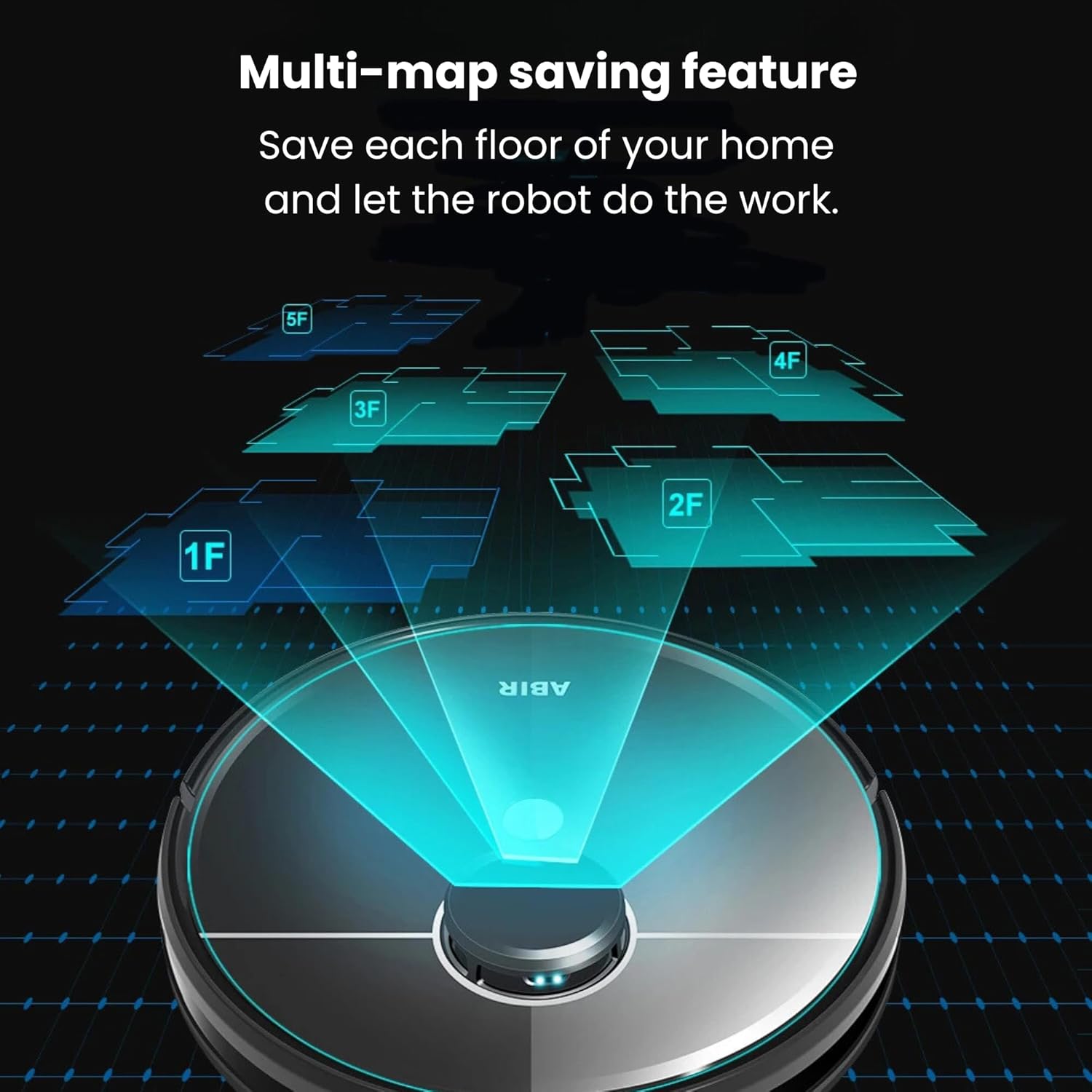
Image: The ABIR R30 robot vacuum illustrating its multi-map saving feature, capable of storing maps for various floors (1F, 2F, 3F, 4F, 5F) of a home.
5.4 Funzjoni ta' Tbattil Awtomatiku
After each cleaning cycle, the robot automatically returns to the auto-empty station to dispose of collected dust and debris into a sealed bag, minimizing manual intervention.
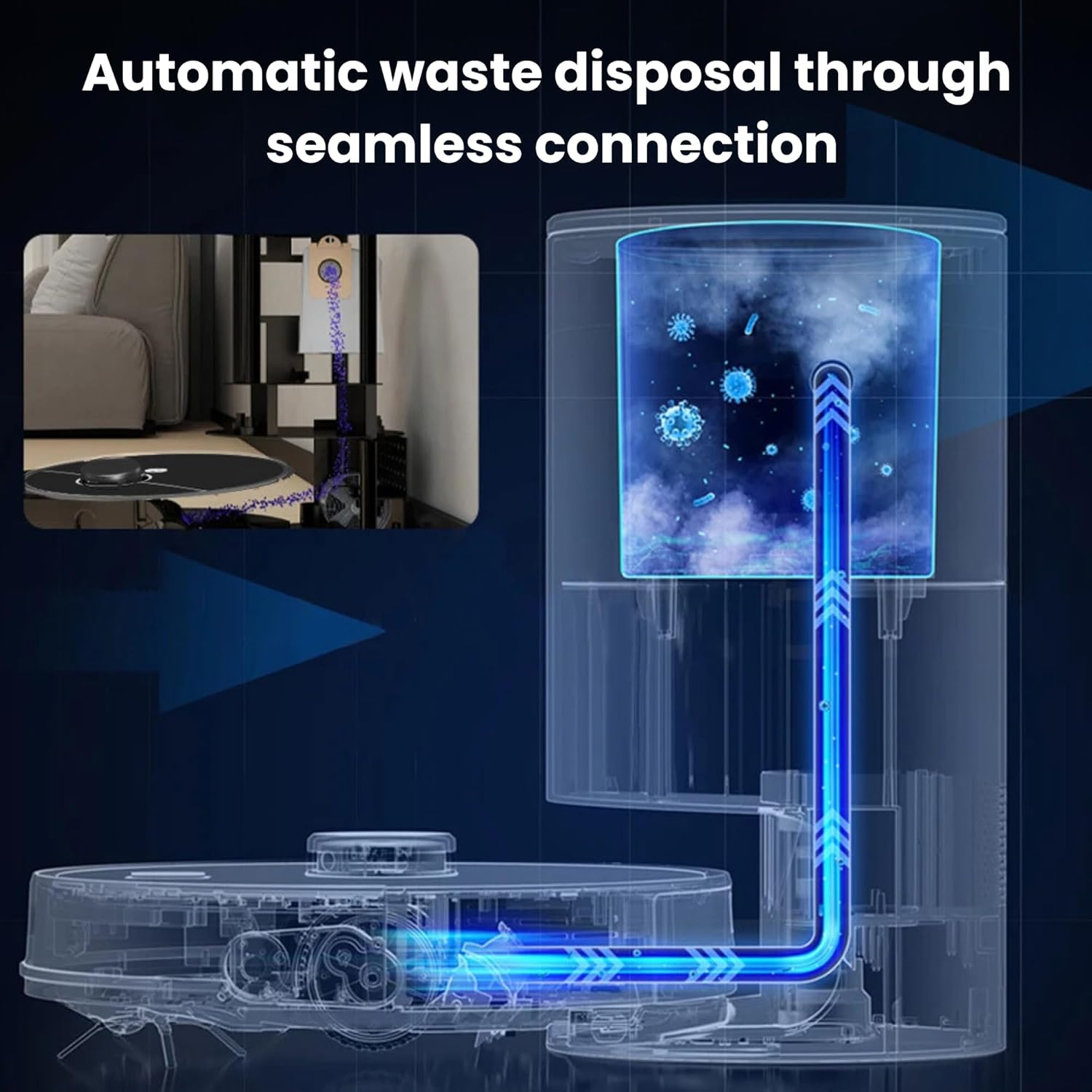
Image: A diagram showing the automatic waste disposal process of the ABIR R30, where debris is seamlessly transferred from the robot to the auto-empty station.
6. Manutenzjoni
Regular maintenance ensures the optimal performance and extends the lifespan of your ABIR R30.
6.1 Tindif tal-Landa taż-Żibel u l-Filtru
- Empty the robot's internal dustbin after each use, or as indicated by the app.
- Tap the HEPA filter to remove dust. Rinse the filter with water if necessary, ensuring it is completely dry before reinstallation.
- Ibdel il-filtru HEPA kull 3-6 xhur, skont l-użu.
6.2 Tindif tal-Pinzell Prinċipali u l-Pinzell tal-Ġenb
- Remove the main brush and use the cleaning tool to cut and remove any tangled hair or debris.
- Remove side brushes and clean off any accumulated hair or dirt. Replace if bristles are worn or damaged.
6.3 Kura tal-Mopping Pad
- Remove the mopping pad after each use and wash it thoroughly. Air dry completely before reattaching.
- Empty any remaining water from the 2-in-1 tank after mopping.
6.4 Tindif tas-Sensor
Wipe all sensors (cliff sensors, anti-collision sensors, charging contacts) with a clean, dry cloth regularly to ensure proper function.

Image: The ABIR R30 robot vacuum highlighting its advanced sensor capabilities, including obstacle detection, anti-falling mechanisms, and anti-twinning features to prevent entanglement with wires.
7 Issolvi l-problemi
If your ABIR R30 encounters an issue, refer to the following common solutions:
| Problema | Kawża Possibbli | Soluzzjoni |
|---|---|---|
| Robot mhux jiċċarġja | Charging contacts dirty; power adapter not connected; robot not properly docked. | Clean charging contacts; ensure power adapter is plugged in; re-dock the robot. |
| Prestazzjoni fqira tat-tindif | Il-kontenitur tat-trab huwa mimli; ix-xkupilji mħabbtin; il-filtru mblukkat. | Vojta l-kontenitur tat-trab; naddaf ix-xkupilji prinċipali u tal-ġenb; naddaf jew ibdel il-filtru. |
| Ir-robot jeħel spiss | Obstacles in path; cliff sensors dirty; robot tangled in wires. | Clear obstacles; clean sensors; remove loose cables or use virtual barriers. |
| Kwistjonijiet ta 'konnessjoni tal-app | Incorrect Wi-Fi password; robot too far from router; app outdated. | Verify Wi-Fi credentials; move robot closer to router; update app. |
8. Speċifikazzjonijiet
| Karatteristika | Dettall |
|---|---|
| Isem tal-Mudell | R30 |
| Brand | ABIR |
| Qawwa tal-ġbid | 6500PA |
| Livell ta' Storbju | 55 Deċibel |
| Runtime | Sa 120 minuta |
| Dimensjonijiet tal-Prodott | 33 x 33 x 9.6 ċm |
| Piż tal-oġġett | 4 Kilogrammi |
| Kapaċità tal-Kaxxa tat-Trab | 270ml (integrated with water tank) |
| Kapaċità tat-Tank tal-Ilma | 180ml (integrated with dust box) |
| Tip ta 'filtru | HEPA |
| Tip ta' Navigazzjoni | LIDAR |
| Metodi ta' Kontroll | App Control, Voice Control (Alexa, Google Home) |
| Karatteristiċi Speċjali | Auto Emptying, Multi-map Saving, 3-in-1 (Vacuum, Sweep, Mop), Pet Friendly |
9. Garanzija u Appoġġ
9.1 Informazzjoni dwar Garanzija
The ABIR R30 Robot Vacuum Cleaner comes with a comprehensive warranty:
- One-year coverage for the laser head, mainboard, and battery.
- Additional spare parts are protected for 3 years.
Jekk jogħġbok żomm il-prova tax-xiri tiegħek għal pretensjonijiet ta' garanzija.
9.2 Appoġġ għall-Klijent
For further assistance, technical support, or warranty inquiries, please contact ABIR customer service through the contact information provided in the product packaging or on the official ABIR websit.


