
1. Introduzzjoni
This manual provides essential instructions for the safe and efficient use of your Meizu Note 21 Pro smartphone. Please read this manual thoroughly before operating the device and retain it for future reference.
2. X'hemm fil-Kaxxa
- Meizu Note 21 Pro Smartphone
- Adapter tal-Enerġija
- (Other accessories such as USB cable, SIM ejector tool, and documentation may vary by region.)
3. Layout tal-Apparat
Familiarize yourself with the physical components of your Meizu Note 21 Pro.
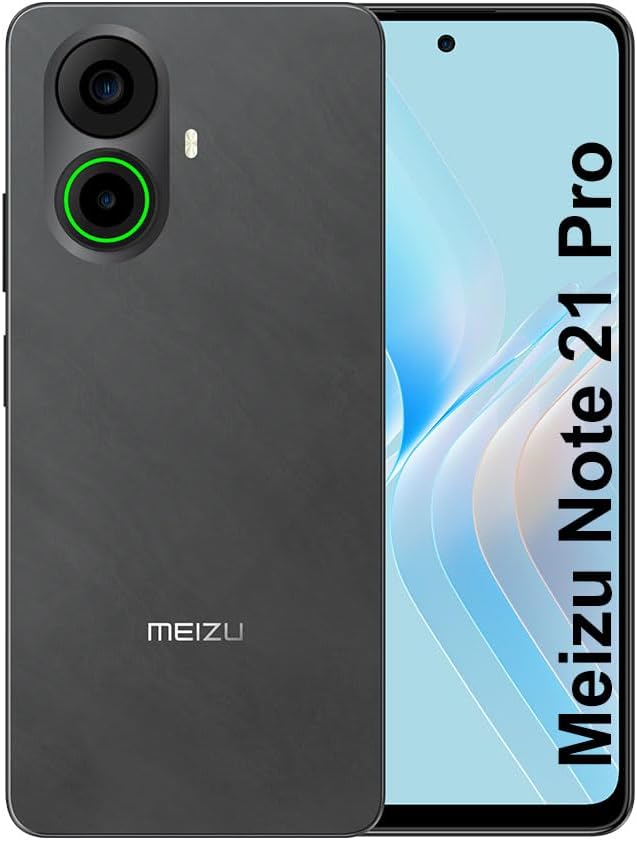
Stampa 3.1: Quddiem u wara view of the Meizu Note 21 Pro. The front displays the screen with a punch-hole camera. The rear shows the dual camera module with a green accent ring on one lens, a flash, and the "MEIZU" logo at the bottom.
- Wiri ta' Quddiem: 6.78-inch FHD+ screen with a 120Hz refresh rate.
- Kamera ta' quddiem: Jinsab fiċ-ċentru ta' fuq tal-wiri.
- Kameras ta' wara: Dual camera system, including a 64MP main camera.
- Sensor tal-Marki tas-Swaba' tal-Ġenb: Integrated for secure access.
- Port USB: Għall-iċċarġjar u t-trasferiment tad-dejta.
- Jack Awdjo 3.5mm: Għall-headphones.
- Trej tal-Kard SIM/MicroSD: Supports Dual Nano SIM and MicroSD cards.
4. Setup
4.1. Daħħal Karti SIM u MicroSD
- Sib it-trej tal-kard SIM fuq il-ġenb tat-tagħmir tiegħek.
- Daħħal l-għodda tal-ejecter tas-SIM fit-toqba ż-żgħira ħdejn it-trej u imbotta bil-mod sakemm it-trej joħroġ 'il barra.
- Poġġi l-kard(s) Nano SIM u/jew il-kard MicroSD tiegħek fl-islottijiet apposta fuq it-trej. Kun żgur li l-kuntatti tad-deheb iħarsu 'l isfel.
- Erġa’ daħħal it-trej fl-apparat bir-reqqa sakemm tikklikkja f’postu.
4.2. L-Ewwel Tixgħel u l-Konfigurazzjoni
- Press and hold the Power button until the Meizu logo appears.
- Segwi l-istruzzjonijiet fuq l-iskrin biex tagħżel il-lingwa tiegħek, tikkonnettja ma' netwerk Wi-Fi, u tissettja l-kont Google tiegħek.
- During setup, you will be guided to configure security features such as a PIN, pattern, or password.
4.3. Fingerprint Recognition Setup
- Innaviga lejn Settings > Sigurtà u privatezza > Marki tas-swaba 'Nisfruttaw.
- Follow the on-screen instructions to register your fingerprint by repeatedly touching the side-mounted sensor.
- Ensure your finger covers the entire sensor area during registration for optimal performance.
5. Tħaddim tat-Tagħmir Tiegħek
5.1. Wiri u Navigazzjoni
- The 6.78-inch FHD+ display operates at a 120Hz refresh rate for smooth visuals.
- Navigate the Android 14 operating system using touch gestures: tap, swipe, pinch-to-zoom.
- Access quick settings by swiping down from the top of the screen.
5.2. Funzjonijiet tal-Kamera
- Iftaħ l-applikazzjoni tal-Kamera mill-iskrin tad-dar jew mill-kexxun tal-app.
- The rear camera system features a 64MP main sensor for high-resolution photos and a 2MP depth-of-field camera for portrait effects.
- The 13MP front-facing camera is suitable for selfies and video calls.
- Tap on the screen to focus, and use the on-screen shutter button to capture images. Explore various modes like Portrait, Night, and Pro within the camera app.
5.3. Prestazzjoni u Ħażna
- The MediaTek G99 Octa Core processor ensures efficient performance for applications and multitasking.
- The device comes with 256GB of internal storage and 8GB of RAM.
- Storage can be expanded using a MicroSD card (sold separately).
5.4. Batterija u Iċċarġjar
- The Meizu Note 21 Pro is equipped with a 5000mAh battery.
- Use the provided Power Adapter for 30W fast charging.
- To charge, connect the USB cable to the phone's USB port and the power adapter, then plug the adapter into a wall outlet.
5.5. Konnettività
- 4G LTE: Supports various LTE FDD and TDD bands for cellular data. Note: This international version works on T-Mobile in the USA and globally with other carriers.
- Wi-Fi 5: Qabbad ma' netwerks mingħajr fili għal aċċess għall-internet.
- Bluetooth: Imqabbad ma' aċċessorji mingħajr fili bħal headphones u speakers.
- NFC: Għal ħlasijiet mingħajr kuntatt u tqabbil rapidu ma' apparati kompatibbli.
- GPS: Għas-servizzi ta' lokalizzazzjoni u navigazzjoni.
6. Manutenzjoni
- Tindif: Uża drapp artab u mingħajr suf biex tnaddaf l-iskrin u l-qafas tal-apparat. Evita kimiċi ħarxa jew materjali li joborxu.
- Kura tal-batterija: Avoid extreme temperatures. Do not fully discharge the battery frequently. For optimal battery longevity, keep the charge between 20% and 80%.
- Aġġornamenti tas-Software: Iċċekkja u installa regolarment aġġornamenti tas-sistema biex tiżgura prestazzjoni u sigurtà ottimali. Mur fuq Settings > Sistema > Aġġornament tas-sistema.
7 Issolvi l-problemi
| Ħruġ | Soluzzjoni Possibbli |
|---|---|
| L-apparat ma jixgħelx | Ensure the battery is charged. Connect the device to the power adapter and try again. If unresponsive, press and hold the Power button for 10-15 seconds to force a restart. |
| Sinjal tan-netwerk fqir | Check if the SIM card is correctly inserted. Move to an area with better network coverage. Restart the device. Verify with your carrier that your plan is active. |
| L-apps huma bil-mod jew qed jiġġarraf | Agħlaq l-applikazzjonijiet fl-isfond. Neħħi l-cache tal-app (Settings > Apps > agħżel l-app > Ħażna u cache > Ċar il-cache). Restart the device. Ensure sufficient storage space. |
| Is-senser tal-marki tas-swaba' mhux qed jaħdem | Ensure your finger and the sensor are clean and dry. Re-register your fingerprint in settings. |
8. Speċifikazzjonijiet
- Mudell: Meizu Note 21 Pro
- Sistema Operattiva: Android 14
- Proċessur: MediaTek G99 Octa Core (2.2GHz)
- Wiri: 6.78 inches FHD+ (1080 x 2160 resolution), 120Hz Refresh Rate
- RAM: 8 GB
- Ħażna Interna: 256 GB
- Kamera ta' wara: 64MP Prinċipali + 2MP Fond
- Kamera ta' quddiem: 13MP
- Batterija: 5000mAh, Iċċarġjar Mgħaġġel ta' 30W
- Konnettività: 4G LTE (FDD:1,2,3,4,5,7,8,12,17,18,19,20,26,28,66; TDD:38,40,41), 3G WCDMA, 2G Quad Band, Wi-Fi 5, Bluetooth, NFC, GPS
- Awdjo Jack: 3.5 mm
- Dimensjonijiet: 6.64 x 2.96 x 0.33 pulzieri
- Piż: 1.1 liri
9. Garanzija u Appoġġ
For warranty information and technical support, please refer to the warranty card included with your product or visit the official Meizu websit. Żomm il-prova tax-xiri tiegħek għal talbiet ta' garanzija.
For further assistance, you may contact Meizu customer service through their official channels.