
1. Introduzzjoni
This manual provides detailed instructions for the VIKYLIN 8MP Fixed Dome PoE IP Camera Outdoor, Model VK-YC2583I-28. This camera features 4K Ultra HD resolution, full-color night vision, human/vehicle detection, a built-in microphone, and Power over Ethernet (PoE) for simplified installation. Please read this manual thoroughly before installation and operation to ensure proper use and optimal performance.
2. Kontenut tal-Pakkett
Iċċekkja li l-oġġetti kollha elenkati hawn taħt huma inklużi fil-pakkett tiegħek. Jekk xi oġġetti huma neqsin jew bil-ħsara, jekk jogħġbok ikkuntattja l-appoġġ għall-klijenti.
- 1x 4K PoE IP Dome Camera
- 1x Base Sticker
- 1x Manwal ta 'Istruzzjoni
- 1x Screw Bag (containing screws for mounting)
- 1x Waterproof Kit

Image: Package contents of the VIKYLIN 8MP Fixed Dome PoE IP Camera.
3. Karatteristiċi tal-prodott
- Riżoluzzjoni 4K Ultra HD: Provides clear image quality with 8MP (3840 × 2160) resolution at 20 frames per second, featuring a 1/2.8” 8 Megapixel Scan CMOS sensor and a 2.8mm fixed lens for a 112° ultra-wide viewangolu tal-ing.
- Viżjoni bil-Lejl b'Kulur Sħiħ: Equipped with F1.6 aperture and soft supplemental lighting, this camera provides detailed full-color video even in extremely dark scenes.
- Dawl Doppju Intelliġenti: The camera intelligently switches between IR (infrared) and warm light illumination based on detection, ensuring optimal night vision while deterring intruders with a warm light flash.
- Sejbien tal-Bniedem/Vetturi: Advanced detection functions reduce false alarms by accurately identifying human and vehicle movement. Detection areas and sensitivity can be adjusted.
- Mikrofonu inkorporat: Capture clear audio from the camera's vicinity, allowing for one-way audio monitoring and recording.
- Qawwa fuq Ethernet (PoE): Simplifies installation by providing both power and data connection through a single Cat 5 or Cat 6 Ethernet cable.
- Disinn Durabbli: IP67 weatherproof and IK10 vandal-proof rating ensures reliable outdoor performance in various conditions.
- Kompressjoni Effiċjenti: Utilizes H.265+/H.264 encoding technology to save bandwidth and storage space without compromising video quality.
Feature Demonstrations
Video: Demonstration of the camera's UltraHD 4K picture display quality.

Image: Smart Dual Illuminators in action, providing full-color night vision when a target is detected.

Image: Human and Vehicle Detection capabilities, highlighting reduced false alarms.
Video: Full Color Camera Night Vision demonstration, showcasing clear imaging in low-light conditions.

Image: Built-in microphone feature allowing for one-way audio communication.
4. Setup u Installazzjoni
The VIKYLIN 8MP Fixed Dome PoE IP Camera is designed for easy installation using Power over Ethernet (PoE). A single Ethernet cable provides both power and data connectivity.
4.1 Installazzjoni Fiżika
- Agħżel Post: Select a suitable indoor or outdoor location for mounting. The camera is IP67 rated for weather resistance and IK10 for vandal resistance.
- Immuntar: Use the provided base sticker as a template to mark drill holes. Secure the camera using the included screws.
- Konnessjoni tal-Cable: Connect a Cat 5 or Cat 6 Ethernet cable from the camera to a PoE injector, PoE switch, or PoE NVR. Ensure the waterproof kit is properly installed for outdoor use.

Image: Camera's IP67 weatherproof and IK10 vandal-proof design.
4.2 Konfigurazzjoni Inizjali
After physical installation, configure the camera using the web interface jew applikazzjoni mobbli.
- Qabbad man-Netwerk: Ensure the camera is connected to your network via PoE.
- Skopri l-Kamera: Use a PC software like VMS or SADP Tool to search for the camera device on your network.
- Aċċess Web Interface: Iftaħ a web browser and enter the camera's IP address. Log in using the default credentials (usually admin/admin or admin/12345).
- Enable P2P: Navigate to Configuration > Network > P2P and enable the P2P function. Scan the QR code to add the device to your mobile app.
Video: Detailed guide on configuring the 4K Full Color PoE IP Dome Camera, including human/vehicle detection settings and night vision options.
5. Istruzzjonijiet Operattivi
Operate your VIKYLIN IP camera using the 'Remoteeyes' mobile app or compatible PC software.
5.1 Mobile App (Remoteeyes)
- Niżżel l-App: Download the 'Remoteeyes' app from the Apple App Store or Google Play Store.
- Żid Apparat: Use the P2P function (QR code scan) to add your camera to the app.
- Live View: Access live video feeds from your camera anytime, anywhere.
- Daqq: Review irreġistrat footage b'karatteristiċi ta' daqq intelliġenti.
- Awdjo f'direzzjoni waħda: Utilize the built-in microphone for one-way audio communication.
- Twissijiet: Receive real-time video/snapshot alerts on your mobile phone when human or vehicle detection is triggered.
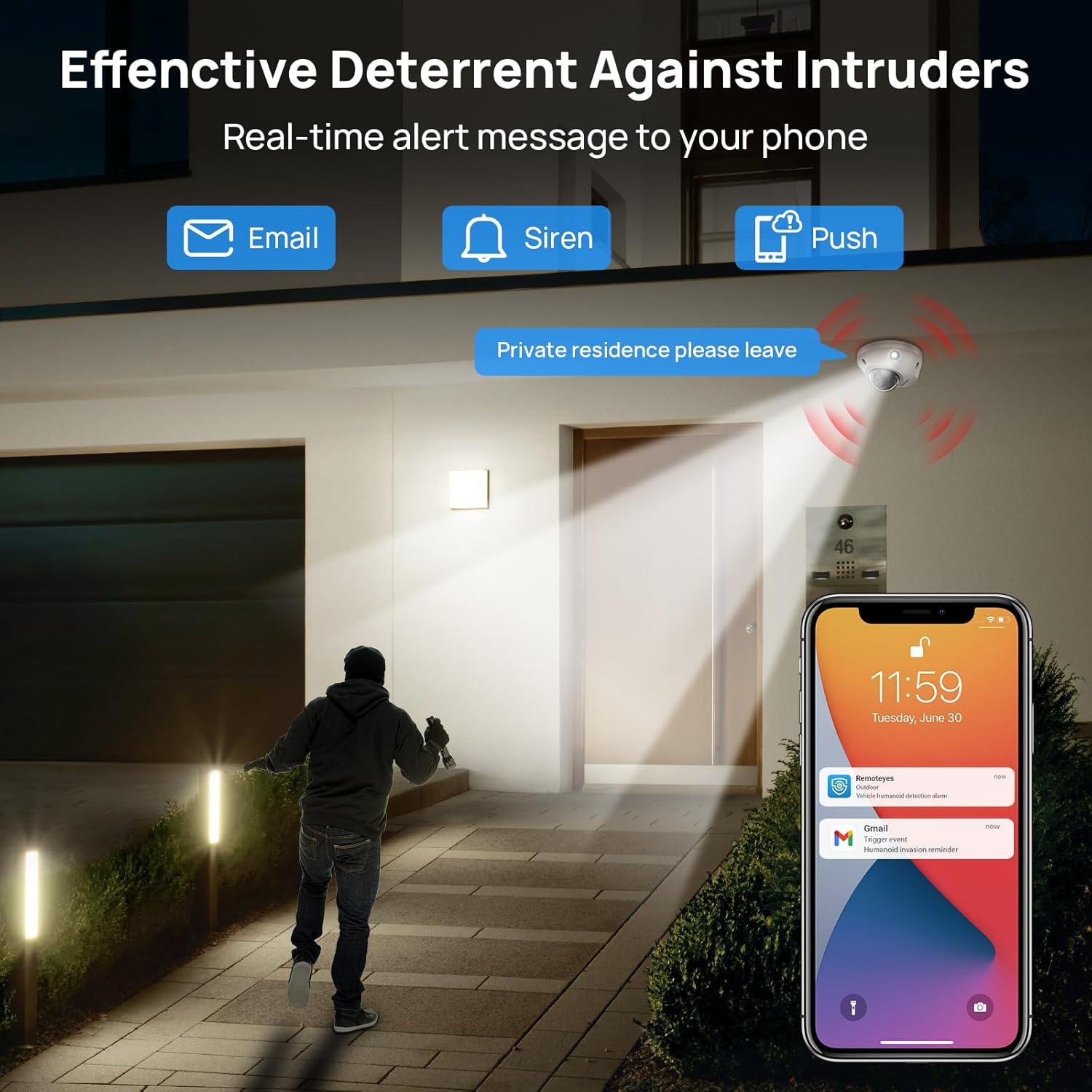
Image: Real-time alerts and deterrent features in action.
5.2 PC Software and Third-Party Compatibility
The camera is compatible with free PC software (VMS) and third-party monitoring software such as Blue Iris, iSpy, and VLC. It supports the Open Network Video Interface protocol (ONVIF) and RTSP for integration with various systems.
Local PC/NVR/NAS video storage is supported, with options for 24/7 recording or motion-triggered video to NVR or FTP.
6. Manutenzjoni
To ensure optimal performance and longevity of your VIKYLIN IP Camera, consider the following maintenance tips:
- Tindif regolari: Naddaf il-lenti u l-kaxxa tal-kamera perjodikament b'drapp artab u dryer.amp drapp biex tneħħi t-trab u l-fdalijiet. Evita prodotti tat-tindif li joborxu.
- Aġġornamenti tal-Firmware: Iċċekkja l-manifattur websit jew app għal aġġornamenti tal-firmware disponibbli biex tiżgura li l-kamera tiegħek għandha l-aħħar karatteristiċi u titjib fis-sigurtà.
- Spezzjoni tal-Cable: Regularly inspect the Ethernet cable and connections for any signs of wear or damage, especially for outdoor installations.
- Ġestjoni tal-Ħażna: If using local storage (Micro SD card, NVR, NAS), ensure sufficient storage space is available and manage recordings as needed.
7 Issolvi l-problemi
If you encounter issues with your VIKYLIN 8MP Fixed Dome PoE IP Camera, refer to the following common troubleshooting steps:
- Ebda Qawwa/Konnessjoni:
- Verify the Ethernet cable is securely connected to both the camera and the PoE source (NVR, switch, or injector).
- Ensure the PoE source is powered on and functioning correctly.
- Iċċekkja l-kejbil għal ħsara.
- Ma nistax naċċessa l-Kamera:
- Confirm the camera's IP address using the SADP Tool or VMS software.
- Ensure your computer or mobile device is on the same network as the camera.
- Check firewall settings on your computer or router that might be blocking access.
- Reset the camera to factory defaults if you have forgotten the password (a reset button is available on the camera).
- Kwalità Fqira tal-Immaġni:
- Naddaf il-lenti tal-kamera.
- Check network bandwidth; insufficient bandwidth can affect streaming quality.
- Adjust image settings (brightness, contrast, WDR) in the camera's web interfaċċja jew app.
- Allarmi Foloz:
- Adjust the sensitivity of human/vehicle detection.
- Define specific detection zones to exclude areas with irrelevant motion (e.g., trees swaying).
For further assistance, please contact VIKYLIN customer support.
8. Speċifikazzjonijiet
| Karatteristika | Dettall |
|---|---|
| Isem tal-Mudell | 4K Dual-light Built-in Microphone PoE IP Dome Camera (VK-YC2583I-28-N) |
| Numru tal-Mudell tal-Oġġett | VK-YC2583I-28 |
| Riżoluzzjoni Għadha Effettiva | 8 MP (3840 x 2160) |
| Frame Rata | 20 frejm kull sekonda |
| Lenti | 2.8mm fixed lens, F1.6 Super Aperture |
| ViewIng Angolu | 112° Ultra-wide |
| Medda tal-Viżjoni Lejl | 98 Feet (Full Color / IR View) |
| Teknoloġija tad-Dawl Baxx | Night Color / IR, Smart Dual Light |
| Awdjo | Built-in Mic (One-way Audio) |
| Sejbien | Sejbien tal-Bniedem/Vettura |
| Teknoloġija tal-Konnettività | Ethernet (PoE) |
| Sors tal-Enerġija | Elettriku bil-Fili (PoE) |
| Ħażna | Local PC/NVR/NAS Video Storage, supports up to 256GB Micro SD card (not included) |
| Kompatibilità | PoE NVR, ONVIF, Blue Iris, iSpy, VLC, Remoteeyes App (iOS/Android), VMS PC software |
| Klassifikazzjoni tal-Protezzjoni Internazzjonali | IP67 (Li ma jgħaddix ilma) |
| Protezzjoni tal-Impatt | IK10 (Vandal-proof) |
| Temperatura operattiva | -30°C sa 60°C (-22°F sa 140°F) |
| Umdità | < 90% |
| Materjal | Metall |
| Dimensjonijiet tal-Prodott | 5.51 x 5.51 x 3.94 pulzieri |
| Piż tal-oġġett | 1.17 liri |

Image: Technical specifications overview tal-kamera.
9. Garanzija u Appoġġ
VIKYLIN provides comprehensive support for its products.
- Garanzija: The product includes a 2-year warranty.
- Appoġġ Tekniku: Appoġġ tekniku tul il-ħajja huwa disponibbli.
- Informazzjoni ta' Kuntatt: For any questions or issues, please contact our support team via email at cairo@vikylin.com.
- Pjanijiet ta' Protezzjoni: Extended protection plans are available for purchase separately (e.g., 2-Year Protection Plan, 3-Year Protection Plan, Complete Protect).


