
1. Introduzzjoni
Thank you for choosing the Rraycom BW6 Wireless Security Camera. This 2K outdoor security camera is designed to provide reliable surveillance with features such as full-color night vision, AI motion detection, two-way audio, and weatherproof construction. This manual will guide you through the setup, operation, and maintenance of your camera to ensure optimal performance and security.
2. X'hemm fil-Kaxxa
Jekk jogħġbok iċċekkja l-kontenut tal-pakkett bir-reqqa. Jekk xi oġġetti huma nieqsa jew bil-ħsara, ikkuntattja l-appoġġ għall-klijenti.
- BW6 Rechargeable Battery Security Camera
- Muntatura tal-metall
- Sett Viti
- Cable USB
- Manwal għall-Utent (dan id-dokument)
3. Karatteristiċi tal-prodott
The Rraycom BW6 camera offers a range of advanced features for comprehensive home security.

Figura 3.1: Fuqview of Rraycom BW6 Camera Features.
3.1 High-Resolution Video
Aqbad ikel ċar u dettaljattage with 2K QHD resolution and a wide 130-degree viewing angle, minimizing blind spots.

Figura 3.2: 2K Resolution and 130-degree Wide Angle View.
3.2 Advanced Night Vision
The camera supports both full-color night vision and infrared mode, ensuring clear visibility even in low-light conditions.

Figura 3.3: Full Color Night Vision vs. Infrared Mode.
3.3 Intelligent Motion Detection
Equipped with AI motion detection, the camera can distinguish between humans and other moving objects, reducing false alarms. You can also customize specific motion detection zones to focus on critical areas.

Figura 3.4: AI Motion Detection Capabilities.

Figura 3.5: Customizable Motion Detection Zones.
3.4 Awdjo b'żewġ direzzjonijiet
Ikkomunika direttament mal-viżitaturi jew tiskoraġġixxi l-intrużi billi tuża l-mikrofonu u l-ispiker integrati.

Figura 3.6: Two-Way Audio Communication.
3.5 Disinn li ma jgħaddix ilma minnu
With an IP65 weatherproof rating, the camera is designed to withstand various outdoor conditions, including rain, sun, and snow.

Figura 3.7: IP65 Weatherproof Rating.
3.6 Għażliet ta' Ħażna Flessibbli
Rekord footage to a Micro SD card (up to 256GB, not included) or utilize cloud storage services for secure data backup and access.

Figura 3.8: Cloud and Micro SD Storage Options.
3.7 Integrazzjoni ta' Dar Intelliġenti
The camera is compatible with Amazon Alexa, allowing for convenient voice control and integration into your smart home ecosystem.
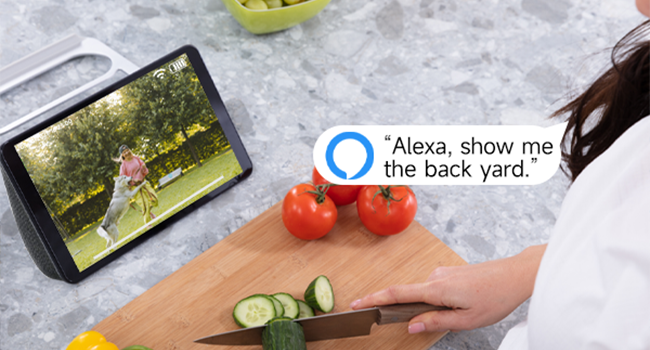
Figura 3.9: Amazon Alexa Integration.
4. Gwida ta' Setup
4.1 Iċċarġjar tal-Kamera
Before initial use, fully charge the camera using the provided USB cable. Connect the USB cable to the camera's charging port and a standard USB power adapter (not included). The charging indicator light will show the charging status.
4.2 Installazzjoni tal-App u Ħolqien ta' Kont
- Download the official Rraycom app from your smartphone's app store (available for Android and iOS).
- Iftaħ l-app u segwi l-istruzzjonijiet fuq l-iskrin biex toħloq kont ġdid jew idħol jekk diġà għandek wieħed.
4.3 Tqabbil tal-Kamera
- Ensure your camera is powered on and your smartphone is connected to a 2.4GHz Wi-Fi network.
- In the Rraycom app, tap the "Add Device" or "+" icon.
- Agħżel il-mudell tal-kamera tiegħek mil-lista.
- The app will prompt you to scan a QR code displayed on your camera or generate a QR code on your phone for the camera to scan. Follow the specific instructions in the app.
- Once the camera successfully connects, you will hear a confirmation sound, and the camera will appear in your app's device list.
4.4 Immuntar tal-Kamera
Agħżel post adattat għall-kamera tiegħek, u żgura li jkollha dawl ċar view of the area you wish to monitor and good Wi-Fi signal strength. Use the provided metal mount and screws to securely attach the camera to a wall or other stable surface. Adjust the camera's angle for optimal coverage.
5. Istruzzjonijiet Operattivi
5.1 Ħaj View Aċċess
Open the Rraycom app and select your camera from the device list to access the live video feed. You can view the 2K resolution footage fil-ħin reali.
5.2 Settings ta' Sejbien ta' Moviment
Navigate to the camera settings in the app to configure motion detection. You can:
- Enable/disable AI Human Detection.
- Set up custom motion detection zones to monitor specific areas.
- Adjust motion sensitivity levels.
- Configure alert notifications (push notifications, siren alarm).
5.3 Komunikazzjoni f'żewġ direzzjonijiet
Waqt li tkun ħaj view, tap the microphone icon in the app to speak through the camera's speaker. Tap the speaker icon to listen to audio from the camera's microphone.
5.4 Reġistrazzjoni u Daqq
The camera automatically records when motion is detected. You can access recorded footage through the app:
- Ħażna Cloud: View recordings stored in the cloud (subscription may be required).
- Ħażna tal-Kard SD: Access recordings saved on the Micro SD card inserted into the camera.
5.5 Modi ta' Viżjoni bil-Lejl
The camera automatically switches between day and night vision modes. In night vision settings, you can typically choose between:
- Viżjoni bil-Lejl bil-Kulur Sħiħ: Utilizes built-in spotlights to provide color images in low light.
- Viżjoni bil-lejl infrared: Provides black and white images using infrared LEDs.
5.6 Alexa Voice Commands
To integrate with Amazon Alexa, enable the Rraycom skill in the Alexa app. Once linked, you can use voice commands such as "Alexa, show me the [camera name]" to view the live feed on compatible Alexa devices.
6. Manutenzjoni
6.1 Ġestjoni tal-batterija
The BW6 camera is battery-powered. Monitor the battery level in the app and recharge the camera using the USB cable when the battery is low. Battery life varies based on usage, motion detection frequency, and environmental factors.
6.2 Tindif
Naddaf il-lenti u l-kaxxa tal-kamera perjodikament b'drapp artab u dryer.amp cloth to remove dust and dirt. Avoid using harsh chemicals that could damage the camera's finish or lens.
6.3 Aġġornamenti tal-Firmware
Ensure your camera's firmware is up to date. The Rraycom app will typically notify you of available updates. Follow the in-app instructions to perform firmware updates, which can improve performance and add new features.
7 Issolvi l-problemi
If you encounter issues with your Rraycom BW6 camera, refer to the following common problems and solutions:
| Problema | Soluzzjoni Possibbli |
|---|---|
| Il-kamera ma tikkonnettjax mal-Wi-Fi |
|
| Motion detection is delayed or misses events |
|
| Allarmi foloz frekwenti |
|
| Static noise in recordings |
|
| Ħajja fqira tal-batterija |
|
8. Speċifikazzjonijiet
Technical details of the Rraycom BW6 Wireless Security Camera:
| Karatteristika | Dettall |
|---|---|
| Brand | Rraycom |
| Isem tal-Mudell | BW6 |
| Teknoloġija tal-Konnettività | Wireless (Wi-Fi) |
| Karatteristika Speċjali | Motion Sensor, Full Color Night Vision, Two-Way Talk |
| Użu fuq ġewwa/barra | Ġewwa, Barra |
| Apparati Kompatibbli | Android & iOS, Amazon Alexa |
| Tip Muntaġġ | Mount Wall |
| Klassifikazzjoni li ma jgħaddix ilma minnha | IP65 |
| Sors tal-Enerġija | Mħaddma bil-batterija |
| Kapaċità tal-batterija | 5200 mAh |
| Qasam Ta ' View | 130 Grad |
| Riżoluzzjoni tal-Qbid tal-Vidjo | 2K |
| Format tal-Qbid tal-Vidjo | MP4 |
| Appoġġ għall-Ħażna | Karta Mikro SD (sa 256GB), Ħażna fis-Sħab |
| Dimensjonijiet tal-oġġett | 1 x 1 x 1 pulzieri (approssimattiv) |
9. Garanzija u Appoġġ
For warranty information, please refer to the product packaging or contact Rraycom customer service directly. If you have any questions, technical issues, or require assistance with your Rraycom BW6 camera, please contact our support team:
Email: aftersale@rraycom.com
Please provide your product model (BW6) and a detailed description of your issue when contacting support for faster assistance.