
HUAWEI LCA-B11
HUAWEI WATCH D2 User Manual
Mudell: LCA-B11
1. Introduzzjoni
The HUAWEI WATCH D2 is an advanced smartwatch engineered to provide comprehensive health monitoring capabilities directly from your wrist. This device supports ambulatory blood pressure monitoring, ECG analysis, sleep breathing awareness, and SpO2 tracking. Designed for both men and women, it offers seamless integration with iOS and Android smartphones, enabling Bluetooth calling and a battery life of up to 6 days.
Important Safety Notice: This product is not a medical device. The blood pressure monitoring and ECG features are intended for general wellness and fitness purposes only and are not intended for use in the diagnosis, cure, mitigation, treatment, or prevention of disease. Consult a medical professional for any health concerns. Users with pacemakers or other implanted electronic devices should consult their doctor before using this watch.

The HUAWEI WATCH D2, displaying its health monitoring interface with blood pressure and heart rate readings.
2. X'hemm fil-Kaxxa
- HUAWEI WATCH D2 (inkluż ċinga qasira, ċinga daqs L, airbag, u ħwejjeġ tal-airbag)
- M-sized strap (airbag included)
- Riga taċ-ċirkonferenza tal-polz
- Gwida għall-ilbies
- Wireless charger and cable
- Quick Start Guide (Safety Information included) and Warranty Card
3. Setup
To begin using your HUAWEI WATCH D2, follow these steps to download the HUAWEI Health App and pair your device.

Fuqview of connecting your HUAWEI WATCH D2 to your smartphone via the HUAWEI Health app.

Detailed steps for downloading the HUAWEI Health App, pairing your smartwatch, and checking for updates.
- Pass 1: Niżżel
Download the HUAWEI Health App from consumer.huawei.com or search for it in your device's app store. - Pass 2: Par
Open the HUAWEI Health App, navigate to 'Device' > 'ADD' > 'Smartwatches' to pair your watch. - Pass 3: Aġġorna
Once paired, go to 'Me' > 'Check for updates' within the HUAWEI Health App to ensure your watch has the latest firmware.
The HUAWEI WATCH D2 is compatible with both iOS and Android operating systems.
4. Istruzzjonijiet Operattivi
4.1. Wrist-based Ambulatory Blood Pressure Monitoring (ABPM)
The HUAWEI WATCH D2 allows for continuous 24-hour ambulatory blood pressure monitoring, even during sleep. This feature helps in identifying high-level SBP and DBP readings throughout the day and night, providing insights into your blood pressure patterns.

The watch screen showing continuous blood pressure measurements over 24 hours.
For accurate measurements, ensure proper posture:

Correct posture for Ambulatory Blood Pressure Monitoring (ABPM): Keep wrist and palm naturally extended, keep quiet and avoid speaking, keep device level with your heart, support your elbow, and avoid pressing down on the airbag.

Correct posture for single blood pressure measurement: Sit stably, relax your body, put feet flat on the ground without crossing them, keep wrist and palm naturally extended, keep quiet and avoid speaking, keep device level with your heart, support your elbow, and avoid pressing down on the airbag.
Watch the video below for a demonstration on how to use the HUAWEI WATCH D2 for blood pressure monitoring:
Video demonstrating the setup and use of the HUAWEI WATCH D2 for ambulatory blood pressure monitoring.
Compare the speed and convenience of the HUAWEI WATCH D2 with traditional blood pressure monitors:
Comparison video highlighting the efficiency of HUAWEI WATCH D2's blood pressure measurement versus a traditional monitor.
4.2. Beat-by-Beat ECG Analysis
The improved electrode technology in the HUAWEI WATCH D2 allows for more accurate and responsive ECG signal collection. By touching the electrode on the side for 30 seconds, you can obtain real-time data to help screen for common heart conditions.

The HUAWEI WATCH D2 performing a 30-second ECG analysis, showing heart rhythm on screen.

A close-up view of the HUAWEI WATCH D2 during an ECG measurement, highlighting the precision of the sensor.
4.3. Health Community & Home Care
Create a Health community within the HUAWEI Health app to monitor the health data of family and loved ones. You can view their blood pressure, heart rate, SpO2, daily step counts, and sleep quality from a single interface. Ensure the HUAWEI Health app is updated to its latest version for this feature. Each account can follow up to 20 people and have a maximum of 20 followers.
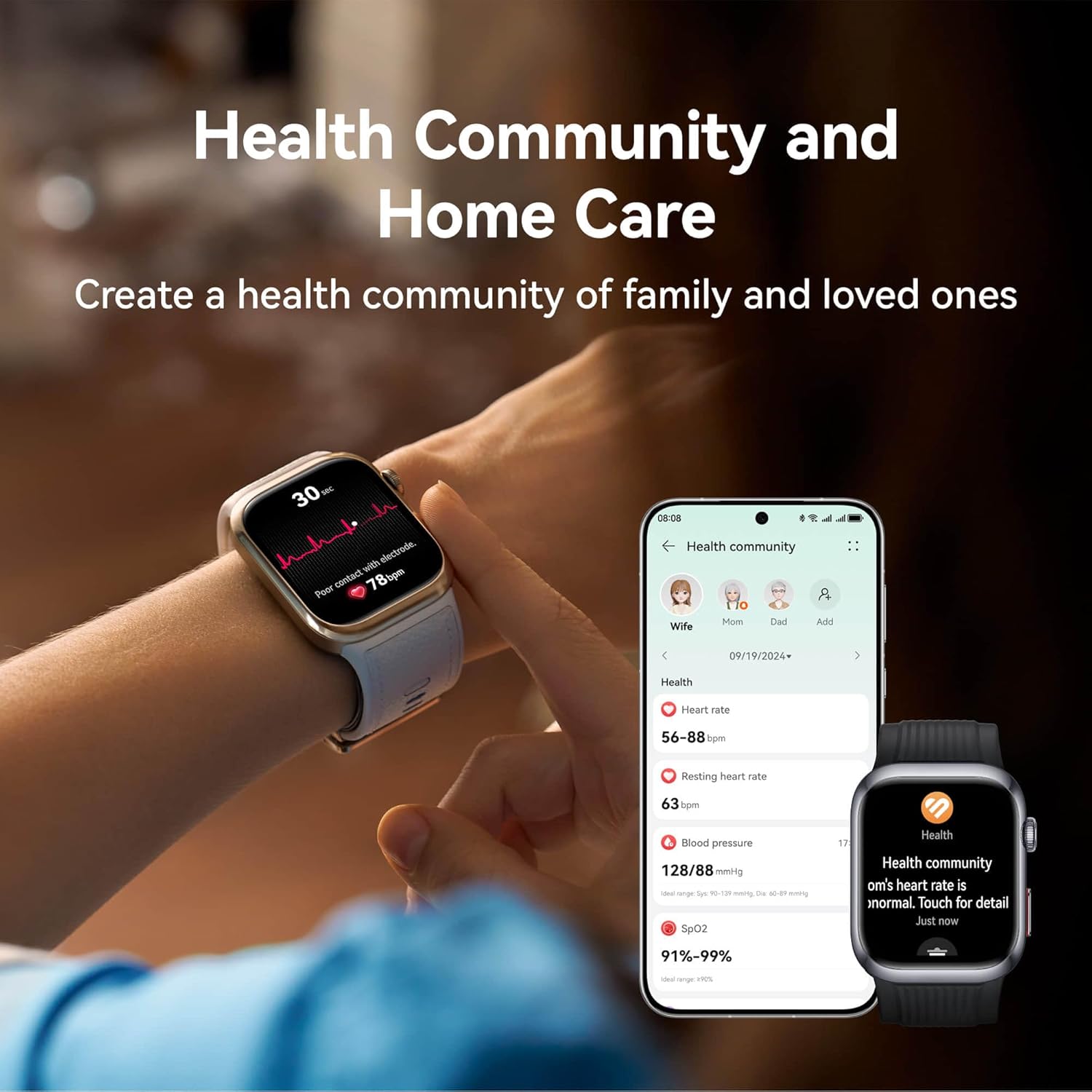
The HUAWEI WATCH D2 alongside a smartphone displaying the Health Community feature, allowing users to monitor family health data.

The HUAWEI Health app interface for the Health Community, showing various health metrics for connected family members.

A screen from the HUAWEI Health app detailing blood pressure measurement history over time.
4.4. Smart Lifestyle Features
The HUAWEI WATCH D2 enhances your daily life with over 80 exercise modes, automatic detection of six common activities, and precise GNSS positioning for outdoor workouts. You can also connect the watch to your phone via Bluetooth to answer or reject calls directly from your wrist.

Multiple HUAWEI WATCH D2 units showcasing features such as local music playback, Bluetooth calling, and over 80 exercise modes.
The watch also supports various health tracking features including heart rate, stress, and skin temperature monitoring:

A detailed heart rate graph displayed on the HUAWEI WATCH D2, showing fluctuations over a 24-hour period.

The HUAWEI WATCH D2 showing an average stress level reading with a corresponding graph.

The HUAWEI WATCH D2 displaying skin temperature readings, with a note about factors affecting accuracy.

The HUAWEI WATCH D2 and smartphone app showing detailed sleep monitoring data, including sleep duration and quality.
Explore the internal components and design of the HUAWEI WATCH D2:
Product video showcasing the design, internal components, and key features of the HUAWEI WATCH D2.
4.5. Disinn u Wirja
The HUAWEI WATCH D2 features a slim design with a 26.5 mm ultra-narrow mechanical airbag integrated into the strap. It boasts a 1.82-inch ultra-HD AMOLED display with 1500-nit peak brightness, ensuring clear visibility of your health data.

The HUAWEI WATCH D2 in two color variants, emphasizing its light and slim design.

A dettaljata view of the white HUAWEI WATCH D2, showing the strap and side buttons.

A dettaljata view of the black HUAWEI WATCH D2, highlighting its strap and side profile.
The watch also offers various customizable watch faces:

A selection of available watch faces for the HUAWEI WATCH D2, including Always-On Display (AOD) and regular dial options.
5. Manutenzjoni
To ensure the longevity and accuracy of your HUAWEI WATCH D2, regular maintenance is recommended:
- Tindif: Regularly clean the watch strap and body with a soft, damp drapp. Evita kimiċi ħarxa jew materjali li joborxu.
- Kura tas-Sensor: Keep the optical sensors on the back of the watch clean and free from debris to ensure accurate health monitoring.
- Iċċarġjar: Use only the provided wireless charger and cable. Avoid exposing the charging contacts to water or excessive moisture.
- Ħażna: Meta ma tkunx qed tużah għal perjodi twal, aħżen l-arloġġ f'post frisk u niexef 'il bogħod mix-xemx diretta.
6 Issolvi l-problemi
If you encounter issues with your HUAWEI WATCH D2, consider the following common troubleshooting steps:
- Kwistjonijiet ta' Konnettività: Ensure Bluetooth is enabled on your smartphone and the watch is within range. Restart both devices if connection problems persist.
- Qari mhux eżatt: Verify that the watch is worn correctly, snugly but comfortably, on your wrist. Ensure the sensors are clean. For blood pressure measurements, follow the recommended posture guidelines.
- Ixxotta tal-batterija: Reduce screen brightness, disable unnecessary notifications, and limit continuous health monitoring features if you experience rapid battery drain.
- Problemi ta' Sinkronizzazzjoni tal-App: Check your internet connection and ensure the HUAWEI Health app is updated to the latest version. Try force-closing and reopening the app.
- Ara Ma Jirrispondix: Attempt a force restart by pressing and holding the power button until the device reboots.
For more complex issues, refer to the official HUAWEI support websit jew ikkuntattja lis-servizz tal-konsumatur.
7. Speċifikazzjonijiet
| Karatteristika | Dettall |
|---|---|
| Numru tal-Mudell | LCA-B11 |
| Dimensjonijiet tal-Prodott | 4.8 x 3.8 x 1.33 ċm; 40 g |
| Sistema Operattiva | HarmonyOS |
| Kapaċità tal-Ħżin tal-Memorja | 4 GB |
| Karatteristiċi Speċjali | Breath Monitor, Blood Pressure Monitor, ECG, Custom Activity Tracking, Heart Rate Monitor |
| Kapaċità tal-batterija | 524 Milliamp Sigħat |
| Teknoloġija tal-Konnettività | Bluetooth |
| Komunikazzjoni mingħajr fili Standard | Bluetooth |
| GPS | GPS inkorporat |
| Forma | Round |
| Daqs tal-Iskrin | 1.82 Pulzier |
| Manifattur | HUAWEI |
| L-Ewwel Data Disponibbli | 19 ta’ Settembru 2024 |
8. Garanzija u Appoġġ
Your HUAWEI WATCH D2 comes with a standard manufacturer's warranty. Please refer to the Warranty Card included in your product packaging for specific terms and conditions, including warranty period and coverage details.
For technical support, product inquiries, or warranty claims, please visit the official HUAWEI support webis-sit jew ikkuntattja s-servizz tal-konsumatur tagħhom. Żomm l-irċevuta tax-xiri tiegħek u n-numru tas-serje tal-prodott fil-qrib għal servizz aktar mgħaġġel.
Appoġġ onlajn: consumer.huawei.com